Home
Certification Prep // 220-1202

4.0 Operational Procedures

4.2 ~ Given a scenario, apply change management procedures.

core2-lab.exe
> load objective 4.2
> map scenario clues
> verify and document

Learning Goals

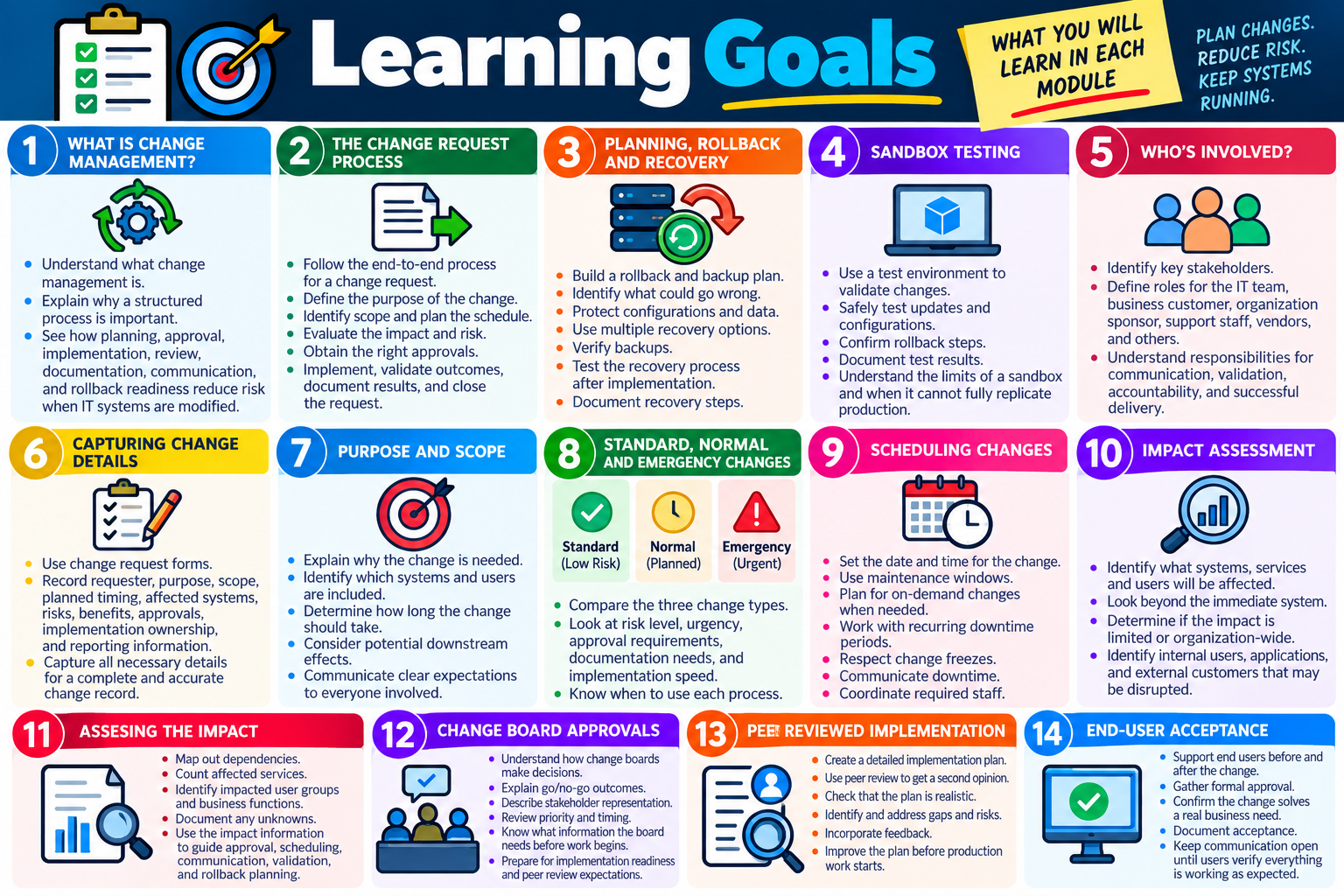
Learning Goals infographic for Objective 4.2 covering change management, change requests, rollback and recovery, sandbox testing, stakeholders, request forms, purpose and scope, change types, scheduling, impact assessment, change board approvals, peer review, and end-user acceptance.
Learning Goals for Objective 4.2 focus on planning changes, reducing risk, coordinating stakeholders, protecting systems, and confirming successful outcomes.
  • Module 1: Explain what change management is and why structured planning, approval, implementation, review, documentation, communication, and rollback readiness reduce risk when IT systems are modified.
  • Module 2: Follow the change management process by submitting a request, defining purpose, identifying scope, planning the schedule, assessing impact and risk, getting approval, implementing the change, validating success, documenting outcomes, and closing the request.
  • Module 3: Prepare rollback and backup plans by identifying what could go wrong, preserving configurations and data, using multiple recovery options, verifying backups, testing after implementation, and documenting recovery steps.
  • Module 4: Use sandbox testing to validate changes in an isolated environment, test updates or configurations safely, confirm rollback steps, document test results, and recognize limits that the sandbox cannot fully reproduce.
  • Module 5: Identify responsible staff members by defining the roles of the IT team, business customer, organization sponsor, support staff, vendors, and other stakeholders needed for communication, validation, accountability, and successful delivery.
  • Module 6: Use request forms to capture complete change details, including requester, purpose, scope, planned timing, affected systems, risks, benefits, approvals, implementation ownership, and reporting data.
  • Module 7: Define the purpose and scope of a change by explaining why the change is needed, what systems and users are included, how long it should take, what downstream effects may occur, and what expectations must be communicated.
  • Module 8: Distinguish standard, normal, and emergency change types by comparing risk, urgency, approval requirements, documentation expectations, implementation speed, and when each process should be used.
  • Module 9: Schedule the date and time of a change by choosing maintenance windows, handling on-demand changes, using recurring downtime periods, respecting change freezes, communicating downtime, and coordinating required staff.
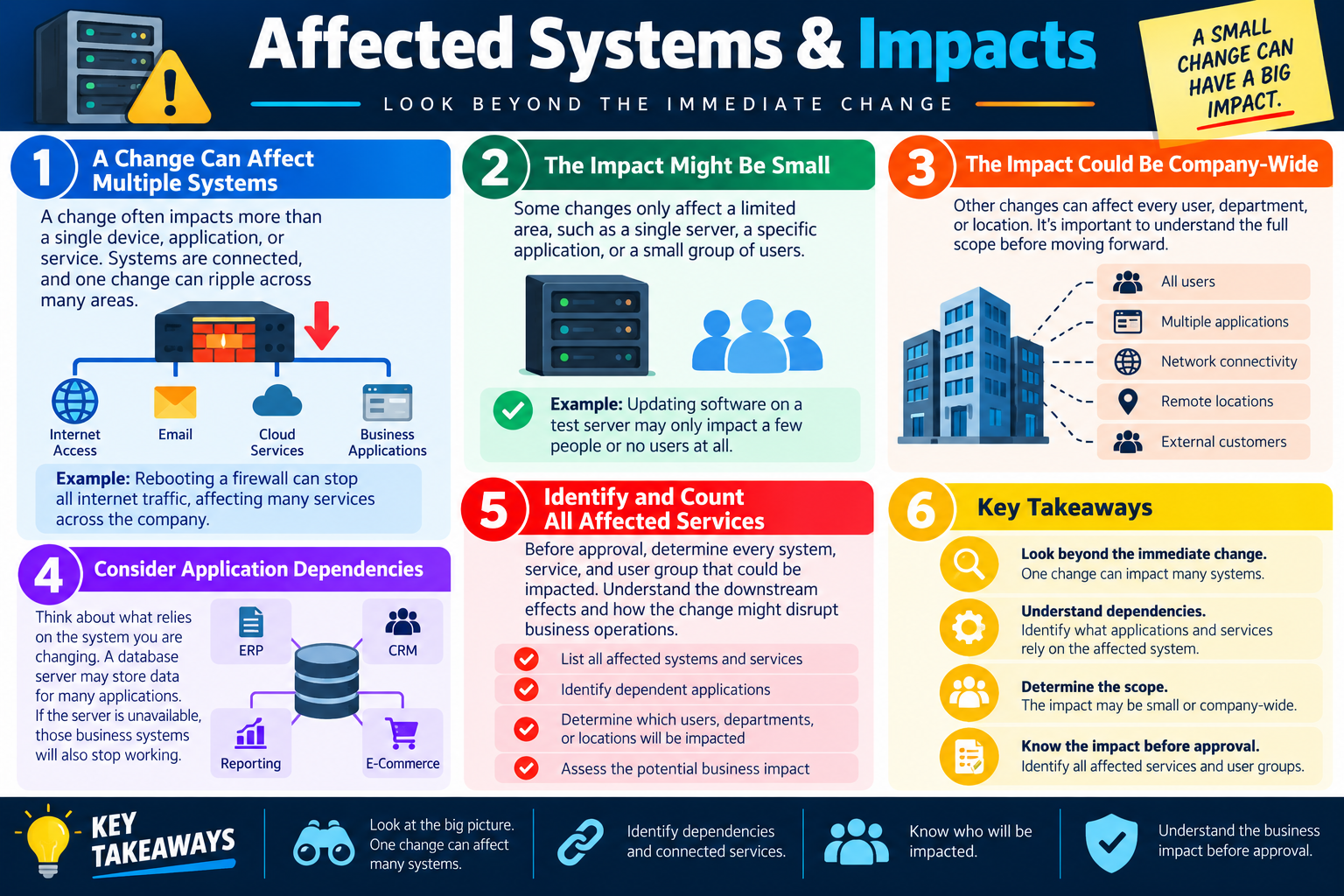
  • Module 10: Identify affected systems and impacts by looking beyond the immediate change, recognizing connected services, determining whether the effect is limited or company-wide, and identifying users, locations, applications, and external customers that may be disrupted.
  • Module 11: Perform impact assessment by mapping dependencies, counting affected services, identifying impacted user groups and business functions, documenting unknowns, and using impact information to guide approval, scheduling, communication, validation, and rollback planning.
  • Module 12: Explain change board approvals by describing go/no-go decisions, stakeholder representation, priority and timing review, final approval, implementation readiness, peer review expectations, and the information a board needs before work begins.
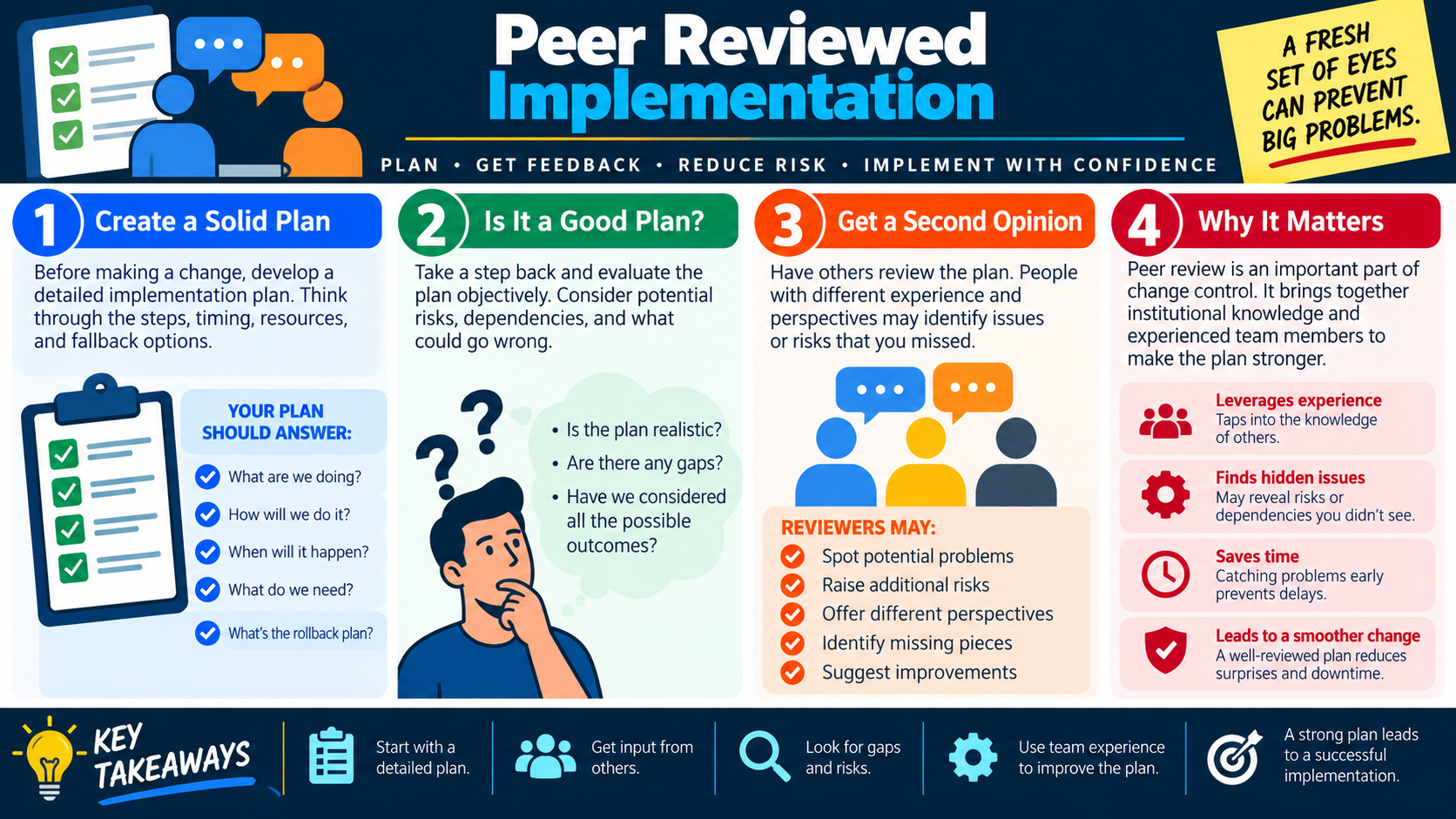
  • Module 13: Apply peer reviewed implementation by creating a solid plan, checking whether the plan is realistic, getting a second opinion, finding gaps and hidden risks, incorporating feedback, and improving the plan before production work starts.
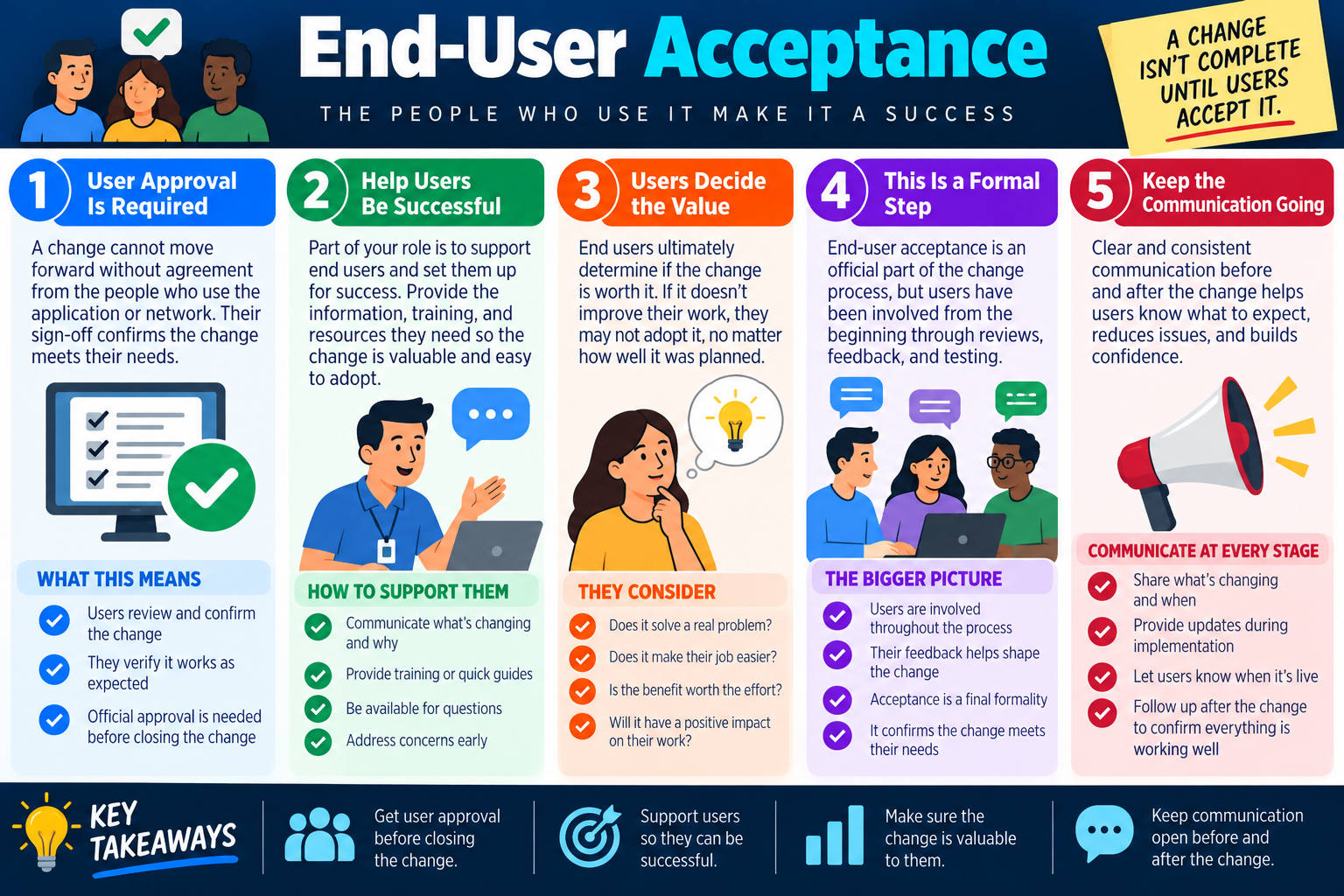
  • Module 14: Complete end-user acceptance by supporting users before and after the change, gathering formal approval, confirming the change solves a real business need, documenting acceptance, and keeping communication open until users verify success.
Lesson ModuleModule 1 / 17
chg
Module 01

Module 1 - What Is Change Management?

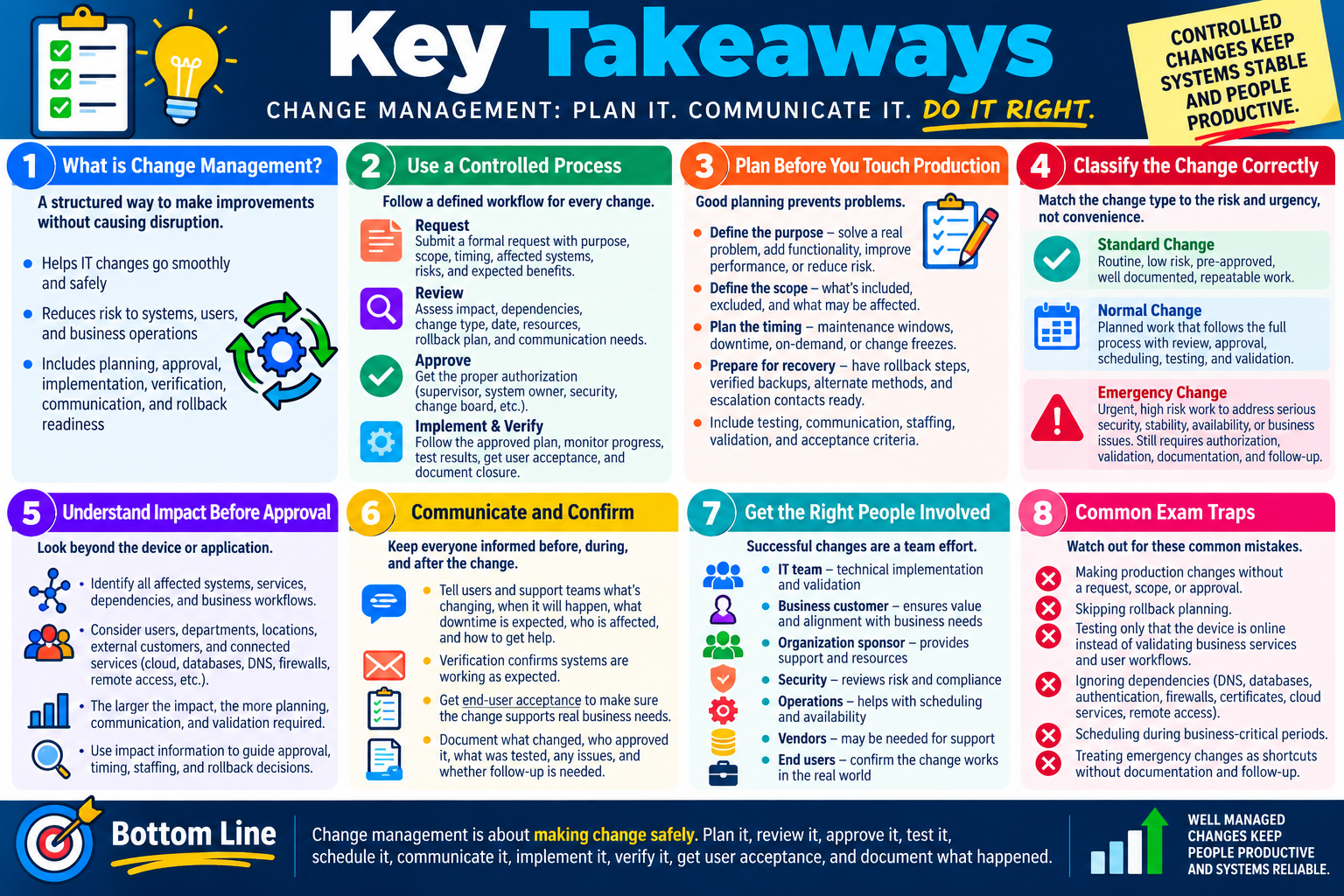
Change management is a controlled, repeatable process for planning, approving, implementing, documenting, and reviewing changes to IT systems so improvements do not create unnecessary disruption.

In IT, change is constant. Systems need patches, applications need upgrades, firewall rules need adjustments, network devices need configuration updates, and business teams need new tools or modified access. Without a change management process, even a small improvement can create downtime, weaken security, confuse users, or make troubleshooting harder because no one knows exactly what changed.

Change management does not mean preventing change. It means making change deliberate. The organization still improves systems, fixes problems, and adds capabilities, but it does so with planning, communication, testing, approval, implementation steps, rollback options, and documentation. A good change process helps the team move forward without turning normal maintenance into avoidable outages.

The Basics

A change management process gives the organization a structured way to handle modifications to IT systems. The process usually answers a few practical questions: What is changing? Why is it needed? Who approved it? What systems or users may be affected? When will it happen? How long should it take? What steps will be followed? How will the change be tested? What is the rollback plan if it fails?

This structure matters because support teams often inherit the consequences of undocumented changes. If a technician modifies a firewall rule, upgrades software, or changes a network device port without documenting it, the next technician may waste hours troubleshooting symptoms without knowing the environment changed. Change management keeps the record visible.

Plan Define the purpose, scope, affected systems, expected impact, timing, and implementation steps before work begins.
Approve Use the proper manager, owner, change board, or policy path so risky changes are reviewed before implementation.
Implement Perform the change during the approved window using documented steps and responsible staff.
Review Verify the result, document what happened, capture lessons learned, and confirm whether the change succeeded.

What Counts as a Change?

Many routine IT tasks are actually changes. A change is not limited to a massive system migration or a data center redesign. If the work modifies a system, application, device, security control, network path, configuration, or user-facing service, it may need to follow change management procedures. The level of control depends on risk and organizational policy.

Examples include installing or upgrading software, applying a patch to an application, changing firewall rules, modifying switch or router ports, changing access rules, updating a server configuration, replacing a business-critical device, adjusting authentication settings, or changing a scheduled backup job. Even if the task seems simple, the impact may be larger than expected.

  • Install or upgrade software: New versions can change features, compatibility, licensing, performance, and user workflows.
  • Apply a patch: Patches may fix vulnerabilities or bugs, but they can also introduce conflicts or require restarts.
  • Update firewall rules: Security rule changes may allow required traffic, block legitimate users, or expose services if done incorrectly.
  • Modify network device ports: Changing ports, VLANs, trunks, or access settings can affect users, phones, printers, cameras, and applications.

Why It Matters

Change is one of the most common sources of IT risk because systems are interconnected. A small change in one place can affect users, services, security, performance, compliance, and support documentation somewhere else. For example, a firewall rule meant to support a new application might block remote users. A patch meant to improve security might break a line-of-business application. A network port change might disconnect a printer, access point, or phone.

Change management helps prevent those surprises. It forces the team to think about affected users, dependent systems, timing, risk, communication, and rollback before the change happens. It also creates a record that support teams can review when troubleshooting after the change.

Exam tip: When a scenario involves modifying a working system, look for planning, approval, testing, maintenance windows, communication, rollback, verification, and documentation.

Have a Clear Process

A change management policy should define how changes are requested, reviewed, approved, scheduled, performed, validated, and documented. The exact process varies by organization. A small company may use a simple approval workflow in a ticketing system. A large enterprise may use a formal change advisory board, maintenance calendar, change freeze periods, and detailed implementation plans.

The important point is consistency. Technicians should know which changes need approval, who can approve them, when they can be made, and what information must be documented. The process should also define what counts as an emergency change and how emergency work is documented after the immediate issue is stabilized.

  1. Frequency: Define how often changes can be made and whether certain times are restricted by business needs.
  2. Time and duration: Identify the expected start time, end time, maintenance window, outage duration, and user impact.
  3. Implementation procedure: List step-by-step installation or configuration tasks so the work can be performed consistently.
  4. Rollback plan: Document how to return to the previous state if the change causes a problem.

Challenges

Change management can be difficult because it requires discipline. Technicians may be used to solving problems quickly, and users may pressure IT to \"just make the change.\" Teams may see approval steps as slow or unnecessary, especially when the work feels routine. Culture can be the hardest part: people must learn that the process protects them from avoidable outages, rework, confusion, and blame.

Skipping the process may feel faster in the moment, but it creates hidden cost. If a rushed change breaks a service, the organization may spend more time recovering than it would have spent planning. If no one documents the change, support teams may troubleshoot the wrong problem. If no rollback plan exists, a failed change can turn a short outage into a much longer disruption.

Better Outcomes

When changes are managed well, the organization reduces risk and downtime, keeps systems stable and secure, improves communication, and creates a record for future reference. Successful changes also become easier to repeat because the team knows which steps worked, what problems appeared, and how the result was verified.

Less downtime Planning and maintenance windows reduce surprise outages and user disruption.
Better security Approval and review help prevent unsafe firewall, access, patch, or configuration changes.
Clear communication Users, technicians, managers, and vendors know what is changing and when.
Reusable records Documented changes help future troubleshooting, audits, compliance reviews, and repeated deployments.

Bottom line: Change management is a formal process for making IT changes safely. Plan the change, get approval, communicate impact, follow documented steps, keep rollback ready, verify the result, and document what happened.
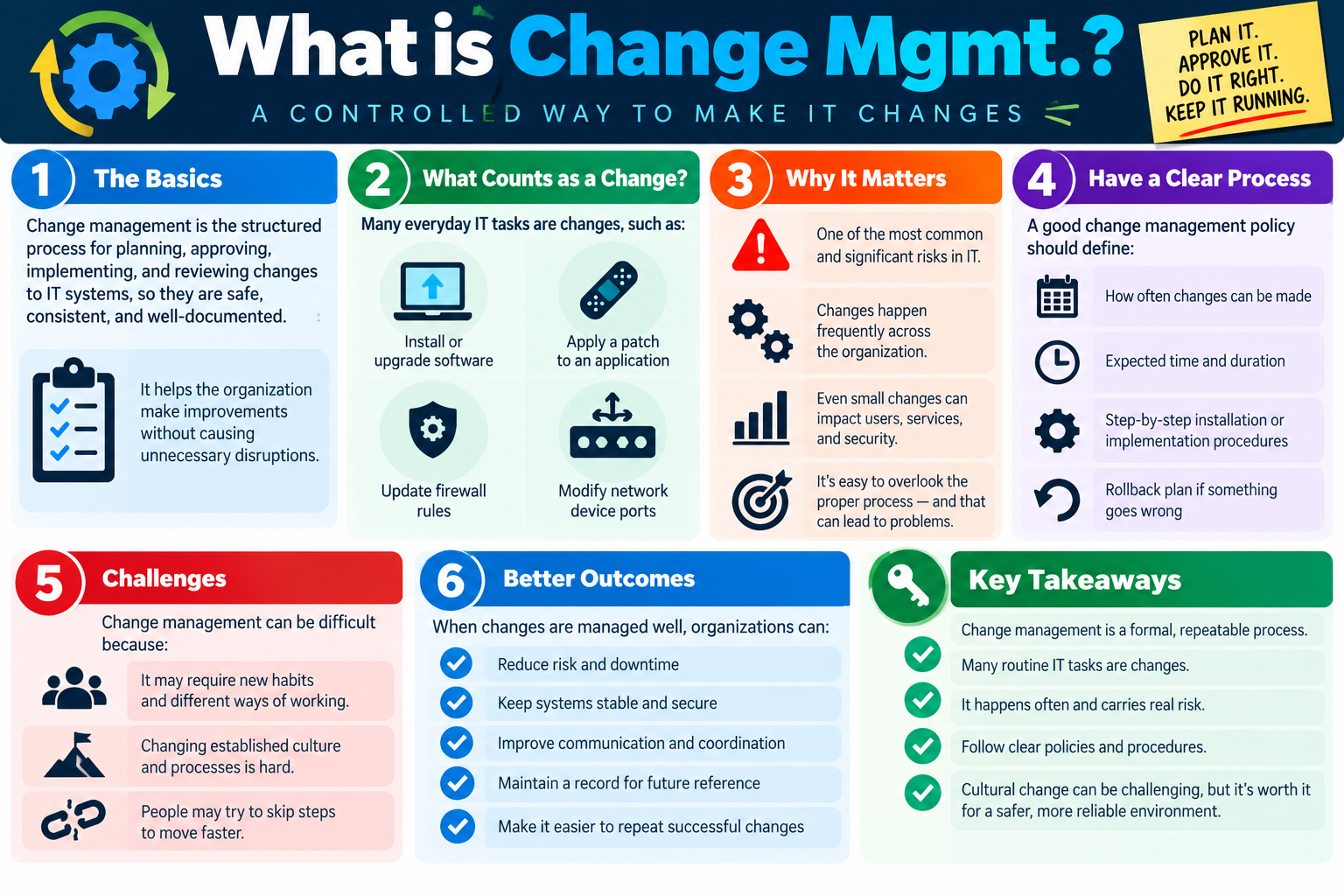
Change management infographic explaining the basics, examples of IT changes, why change management matters, clear process requirements, challenges, better outcomes, and key takeaways.
Change management helps organizations plan, approve, implement, review, and document IT changes so systems stay stable, secure, and reliable.
flow
Module 02

Module 2 - Change Management Process

A change management process is a structured, step-by-step method for planning, evaluating, approving, implementing, verifying, and closing changes to IT systems.

The process exists because changes affect more than the technician performing the work. A software upgrade can affect users, help desk call volume, application compatibility, licensing, training, and security. A firewall rule change can affect remote workers, cloud services, vendors, and monitoring tools. A patch can solve a vulnerability but introduce a new conflict. Change management helps the organization make the right change, in the right way, with the right people informed.

No changes should be made outside the change management process unless the organization has a documented emergency procedure. Even emergency changes should be recorded after the immediate problem is stabilized. The goal is not bureaucracy for its own sake; the goal is safe, authorized, communicated, auditable work.

What the Process Does

A good change process creates a clear path from idea to completion. It defines who requested the change, why the change is needed, what will be affected, when the work will happen, what risks exist, who must approve it, how the change will be implemented, how success will be verified, and how the request will be closed. This prevents confusion and gives support teams a reliable record if something goes wrong later.

Minimizes downtime Scheduling, testing, and communication reduce surprise outages and business disruption.
Prevents costly mistakes Review and approval help catch missing dependencies, weak rollback plans, and unsafe timing.
Gets the right people involved System owners, security, support, business stakeholders, and approvers can review impact before work begins.
Creates an audit trail The request, approval, implementation steps, validation, and final outcome are recorded for future reference.

Step 1: Submit a Request

The process begins with a change request. This request should include all required details, not just a vague statement such as "update the app" or "change the firewall." The person requesting the change should explain what needs to change, who is requesting it, why it is needed, and the initial justification. If the request is incomplete, the change may be delayed or rejected until the missing information is provided.

A well-written request helps the reviewers understand whether the change is routine, risky, urgent, business-critical, or unnecessary. It also creates the first record of the change, which matters for troubleshooting, reporting, compliance, and accountability.

Step 2: Define the Purpose

Every change should have a clear purpose. The purpose explains the business need or technical problem and what the change is expected to accomplish. A change might fix a security vulnerability, enable a new service, improve performance, replace unsupported software, add required functionality, or resolve a recurring support issue.

Purpose matters because a change should align with business goals. If the expected benefit is unclear, reviewers cannot accurately judge the risk. A patch that closes an actively exploited vulnerability has a different urgency than an optional feature update. A change that supports a business deadline may need a different schedule than routine maintenance.

Step 3: Identify the Scope

Scope defines exactly what will change and what will not change. This includes systems, devices, applications, users, services, locations, configurations, permissions, dependencies, and boundaries. Clear scope prevents uncontrolled expansion during implementation. If a technician starts changing related systems that were not included in the approved request, the organization loses control of risk.

Scope should also identify dependencies. A web application may depend on a database, certificate, firewall rule, DNS record, identity provider, load balancer, or storage system. A network change may affect phones, printers, wireless access points, cameras, or remote users. Good scope prevents teams from discovering dependencies only after the change causes disruption.

Step 4: Plan and Schedule

Planning and scheduling determine when the change should happen and how stakeholders will be informed. The best date and time depend on availability, user impact, business needs, maintenance windows, change freezes, staffing, vendor availability, and communication requirements. A low-risk change may happen during normal maintenance. A high-impact change may require after-hours work, broader communication, or a formal maintenance window.

A schedule should include the planned start time, expected end time, expected downtime, communication plan, and who will be available during the work. It should also consider whether the change conflicts with other scheduled changes. Multiple overlapping changes can make troubleshooting much harder if something fails.

Step 5: Assess Impact and Risk

Risk assessment asks what could go wrong and who or what could be affected. Reviewers should consider affected users, affected systems, service dependencies, downtime, performance impact, security risk, compliance concerns, customer impact, support impact, and the likelihood of failure. Risk assessment also includes mitigation: backups, snapshots, rollback steps, test plans, monitoring, and staffing.

Not every change requires the same level of review. A low-risk change with a clear rollback may move quickly. A high-risk change affecting critical systems may require formal approval, sandbox testing, peer review, communication to users, and a documented rollback plan. The process should match the risk.

Exam tip: Risk assessment is where you look for affected users, affected systems, potential downtime, performance impact, security impact, rollback planning, and mitigation.

Step 6: Get Approval

Approval confirms that the right people have reviewed the request, understood the risk, and authorized the change. Depending on the organization, approval may come from a supervisor, system owner, business owner, security team, change control board, or change advisory board. Some routine changes may be preapproved if they follow a standard procedure. Riskier changes usually need explicit approval.

Approval may also include conditions, such as requiring the work to occur in a specific maintenance window, notifying affected users, completing a backup first, having a vendor on standby, or documenting test results before proceeding.

Step 7: Implement the Change

Implementation is the point where the approved work is carried out. The technician should follow the documented procedure rather than improvising. During the change, progress should be monitored, unexpected behavior should be recorded, and the team should be ready to back out if the change fails or creates unacceptable impact.

Implementation should stay within the approved scope. If a new problem appears that requires additional changes, the technician should pause and follow the organization's process for expanding, escalating, or opening a separate request. Unapproved side changes can create hidden risk.

Step 8: Confirm and Close

The change is not complete just because the command ran or the installer finished. The team must verify that the change produced the intended result and did not create unacceptable side effects. Validation may include checking logs, testing applications, confirming connectivity, monitoring performance, reviewing alerts, and getting end-user acceptance when appropriate.

After validation, document the outcome and close the request. The closure notes should say what was changed, whether the change succeeded, what evidence confirmed success, whether users accepted the result, whether any issues occurred, and whether follow-up is needed. If the change failed, record the rollback and lessons learned.

Successful Change Management

Successful change management leads to stable systems, satisfied users, and a stronger IT environment. It reduces risk, reduces downtime, improves communication, and creates better outcomes because everyone understands what is changing and why. It also gives technicians a record they can use the next time a similar change is needed.

Bottom line: The change management process turns a requested change into controlled work: submit the request, define purpose, identify scope, schedule carefully, assess risk, get approval, implement according to plan, verify success, document the outcome, and close the request.

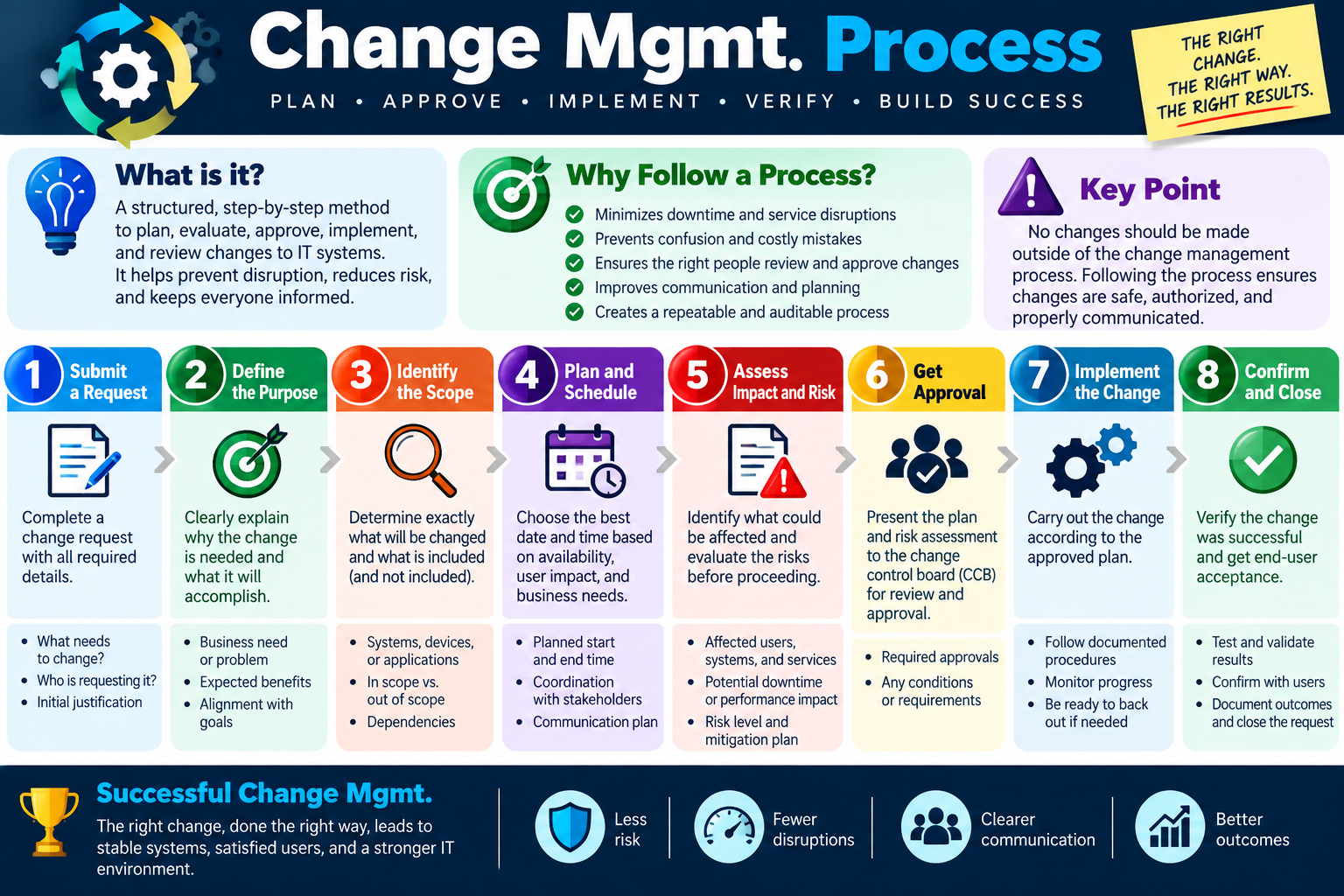
Change management process infographic showing request submission, purpose, scope, scheduling, risk assessment, approval, implementation, confirmation, closure, and successful change management outcomes.
The change management process helps ensure changes are planned, approved, implemented, verified, communicated, documented, and closed properly.
back
Module 03

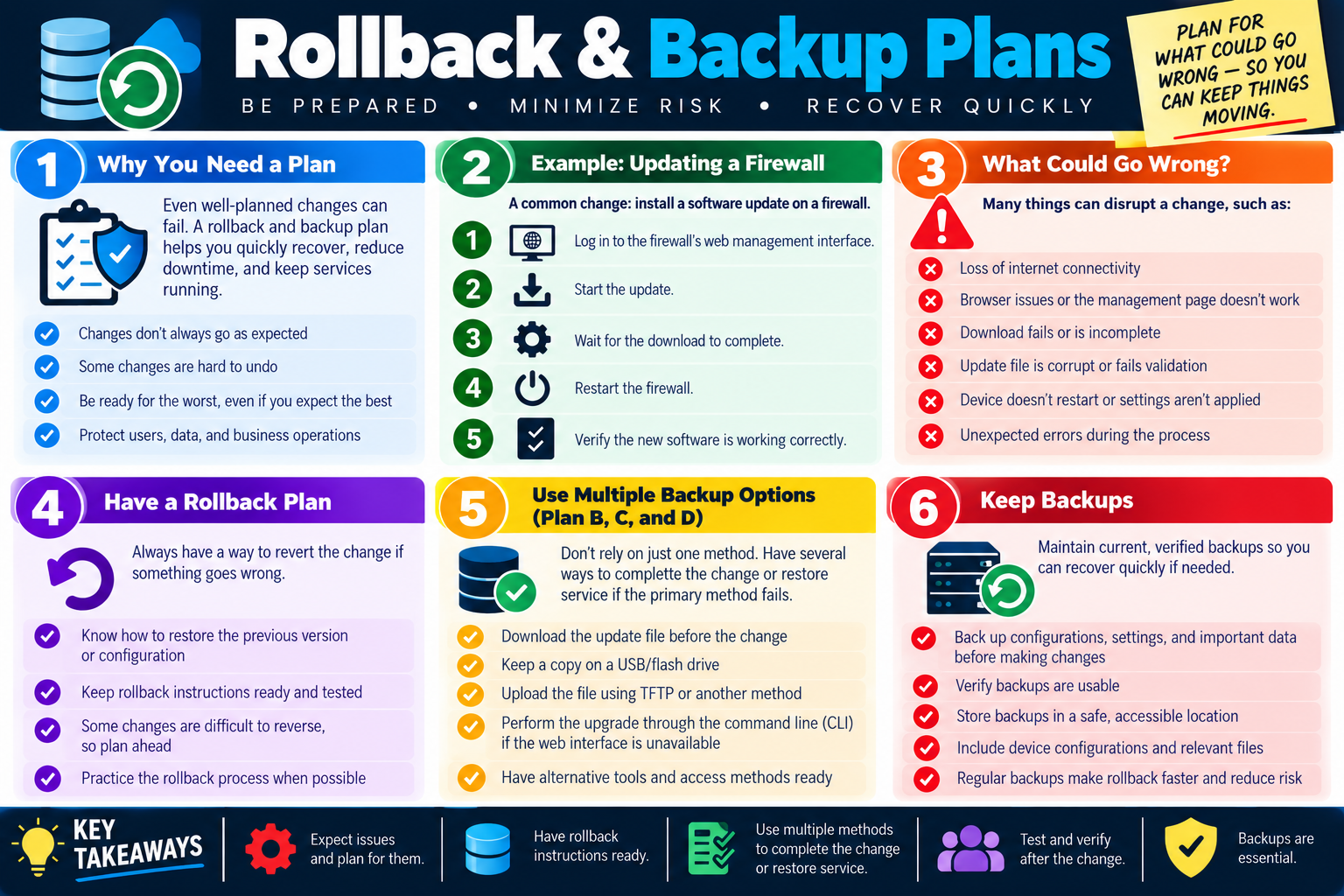
Module 3 - Rollback and Backup Plans

Every meaningful change should have a recovery plan before the work begins. Rollback instructions and verified backups reduce downtime, protect data, and give the team a safe path if the change fails.

Even well-planned changes can fail. A download may be incomplete, an update file may be corrupt, a device may not restart, a web management page may stop responding, a configuration may not apply correctly, or an unexpected error may appear during implementation. Change management assumes that something can go wrong, then prepares the team to recover quickly.

A rollback plan explains how to return the system to its previous working state. A backup plan protects the data, settings, configuration, or software state needed to restore service. Together, these plans keep a failed change from becoming a long outage. They also reduce stress during implementation because the technician knows what to do if the result is not acceptable.

Why You Need a Plan

A rollback and backup plan is not pessimism; it is professional preparation. The goal is to protect users, data, and business operations. A change may look simple, but systems often have dependencies that are not obvious until something breaks. The recovery plan gives the organization a way to continue operations even when the primary implementation path fails.

Some changes are hard to undo. Firmware updates, firewall upgrades, database schema changes, application upgrades, identity-provider changes, certificate changes, and network configuration changes may require special recovery steps. If those steps are not known before the change starts, the team may be forced to improvise under pressure.

  • Changes do not always go as expected.
  • Some changes are difficult, slow, or impossible to reverse without preparation.
  • Technicians should be ready for the worst even when they expect the best.
  • Recovery planning protects users, business operations, configurations, and data.

Example: Updating a Firewall

A firewall update is a strong example because the device may protect internet access, VPN connections, remote workers, site-to-site links, cloud applications, and security monitoring. The basic change might sound straightforward: log in to the firewall, start the update, wait for the download, restart the firewall, and verify the new software is working. But each step has possible failure points.

If the firewall web interface stops responding, the technician may need command-line access or console access. If the download fails, an offline update file may be needed. If the update corrupts the configuration, a configuration backup may be required. If VPN users cannot reconnect after the reboot, the team may need to restore the previous version or adjust settings according to the rollback procedure.

Before the update Download required files, review release notes, back up the configuration, and confirm maintenance-window approval.
During the update Follow the approved steps, monitor progress, avoid unapproved side changes, and record unexpected behavior.
After the update Verify internet access, VPN, firewall rules, logs, monitoring, and affected business services.
If it fails Use the rollback plan, restore known good configuration, and document what happened.
What Could Go Wrong?

Risk planning should identify realistic failure points. A technician should ask, “What could interrupt this change?” and “What would we do if that happens?” For a firewall update, problems might include loss of internet connectivity, browser or management-page issues, a failed or incomplete download, a corrupt update file, failed validation, restart problems, settings that do not apply, or unexpected errors during the process.

These risks do not mean the change should never happen. They mean the change needs preparation. If internet access might fail, have the update file downloaded beforehand. If the web interface might become unavailable, have a command-line method ready. If the configuration might be damaged, export and verify a configuration backup before starting.

Exam tip: If a change has risk, look for rollback instructions, verified backups, alternate access methods, maintenance windows, and validation after implementation.

Have a Rollback Plan

A rollback plan explains how to revert the change if it fails. It should be written clearly enough that another qualified technician could follow it. A rollback plan may include restoring a previous configuration, reinstalling a previous software version, reverting a snapshot, disabling a new rule, reversing a policy change, restoring a database backup, or moving traffic back to the previous device.

Rollback instructions should be ready before the change starts, not written during the outage. When possible, the rollback process should be tested or practiced. Some changes are easy to reverse; others require careful sequencing. Knowing the difference is part of risk management.

  1. Know the previous state. Save the current configuration, version, settings, and relevant files before changing them.
  2. Write the rollback steps. Include exact commands, screens, files, or procedures needed to return to the previous state.
  3. Define the rollback trigger. Decide what failure condition means the team should stop and revert instead of continuing.
  4. Confirm responsibility. Identify who can approve and perform the rollback during the change window.

Use Multiple Backup Options

Do not rely on only one method. A strong plan may include Plan B, Plan C, and Plan D. For example, a technician might download the update file before the change, keep a copy on a USB drive, prepare a TFTP upload option, know how to perform the upgrade through the command-line interface, and have alternate tools or access methods ready.

Multiple options matter because the primary path may fail. If the web management interface stops working, the CLI may still be available. If the online download fails, a local copy may work. If a configuration is corrupted, a verified backup can restore service. If the device cannot recover, a spare device or vendor support path may be needed.

Keep Backups

Backups are only useful if they are current, complete, verified, and accessible. Before making changes, back up configurations, settings, important data, application files, databases, virtual machines, or other affected resources as appropriate. Then verify that the backup is usable. A backup that cannot be restored is only a false sense of safety.

Store backups in a safe and accessible location. The location should be available during the change window, but protected from accidental deletion or corruption. For critical systems, backups may need to be stored in more than one place. Configuration backups should also be labeled clearly so the team knows which version was taken immediately before the change.

Configuration backups Preserve device settings, firewall rules, switch configurations, application settings, and policy states.
Data backups Protect files, databases, user data, and business records before risky changes.
Snapshots Capture virtual machine or system state when supported by the platform and approved by policy.
Verification Confirm that backups exist, are readable, and can be restored when needed.

Verify After the Change

After implementation, verify that the change worked and that affected services still function. Validation should include the main objective of the change and important dependent services. In the firewall example, do not verify only that the version number changed. Also test connectivity, VPN, firewall rules, logs, monitoring, and any user-facing services affected by the firewall.

If validation fails, follow the rollback decision criteria. Do not keep making random changes in hopes that the problem disappears. A controlled rollback is often safer than extending downtime with unapproved troubleshooting.

Bottom line: Plan for what could go wrong before the change starts. Keep rollback instructions ready, use multiple recovery methods, verify backups, test after implementation, and document the result.

Rollback and backup plans infographic explaining why recovery planning is needed, firewall update risks, rollback planning, multiple backup options, and verified backups.
Rollback and backup planning helps technicians recover quickly, reduce risk, and keep services running when a change does not go as expected.
box
Module 04

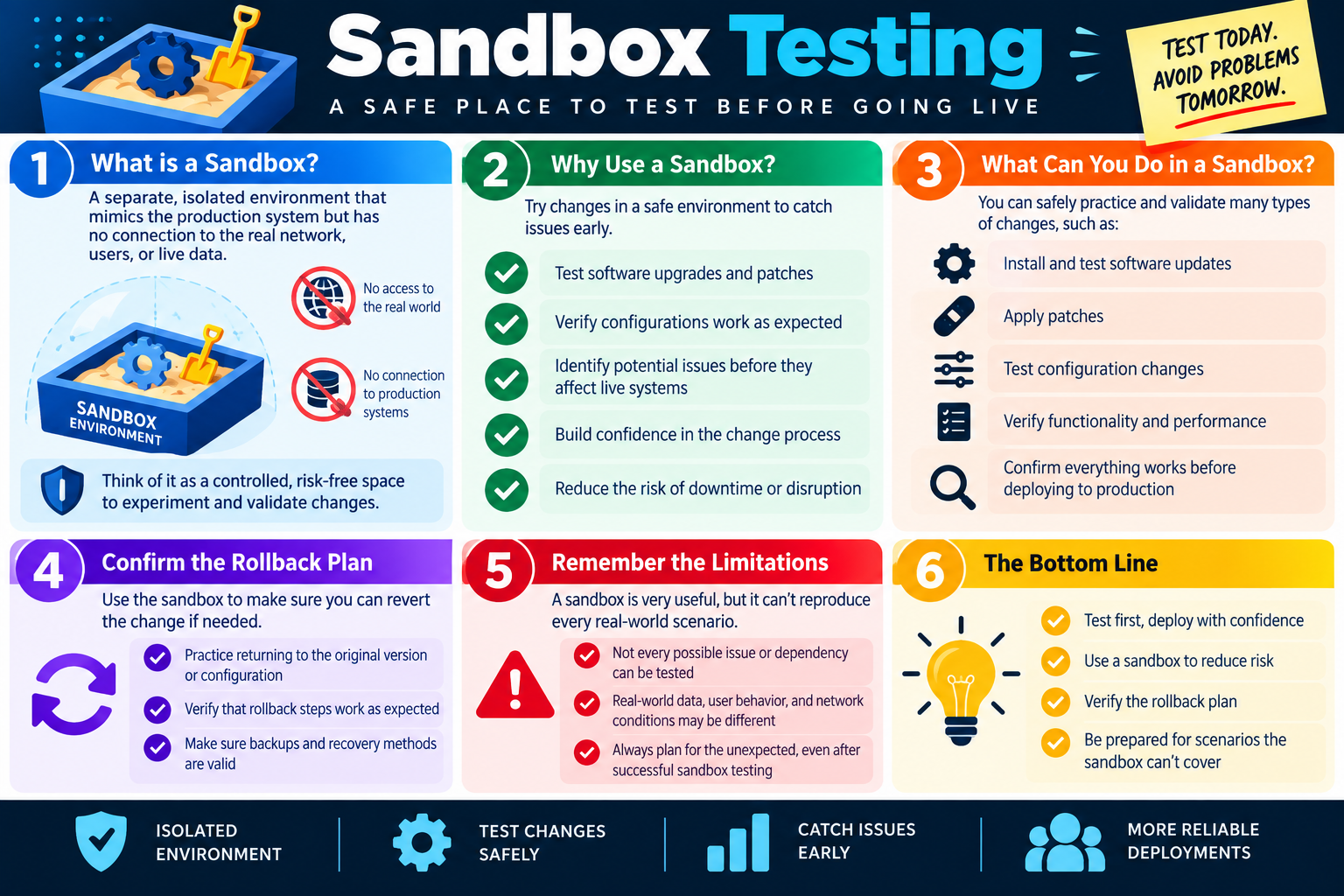
Module 4 - Sandbox Testing

Sandbox testing gives technicians a safe, isolated place to validate changes before deploying them to production.

A sandbox is a separate test environment that mimics the production system closely enough to evaluate a change, but it is isolated from the real network, real users, and live data. The purpose is to give the team room to experiment, verify, and make mistakes without interrupting business operations. In change management, that matters because a change that looks simple on paper can behave differently once it touches applications, configurations, dependencies, or security controls.

Using a sandbox does not remove every risk, but it lowers risk by catching obvious problems early. Before a software update, patch, configuration adjustment, or deployment reaches production, the team can test the steps, observe the results, verify expected behavior, and refine the implementation plan. This supports safer changes, better documentation, and more confident approvals.

What Is a Sandbox?

A sandbox is an isolated environment designed for testing. It may be a virtual machine, test server, lab network, staging application, cloud test tenant, spare device, duplicate firewall configuration, or other controlled space. The key idea is separation: the sandbox should not directly affect production users, production systems, business data, or critical services.

In a well-designed sandbox, technicians can simulate the system they plan to change. They may use similar software versions, comparable configuration settings, representative test accounts, sample data, and documented procedures. The environment does not need to be perfect, but it should be close enough to reveal likely issues before the change goes live.

Separate environment The sandbox is distinct from production so testing does not interrupt live services.
No live user impact Failed tests should not disconnect users, corrupt real data, or break business workflows.
Controlled conditions The team can repeat steps, test variations, and collect results in a predictable space.
Validation space Technicians can confirm whether the change behaves as expected before deployment.

Why Use a Sandbox?

Sandbox testing helps the organization catch issues early. If an update fails, a setting is incorrect, a patch conflicts with an application, or a configuration creates unexpected behavior, it is better to discover that in a test environment than during a production maintenance window. Testing gives the team time to adjust the plan before users are affected.

A sandbox also builds confidence in the change process. The technician can practice the steps, estimate timing, identify unclear instructions, test monitoring and verification steps, and confirm whether the change produces the intended result. When the production change begins, the team is not guessing; it is following a process that has already been rehearsed.

  • Test software upgrades and patches: Verify that the new version installs correctly and does not break required functions.
  • Verify configurations: Confirm that settings, policies, firewall rules, or application options work as expected.
  • Identify problems early: Find errors, dependencies, compatibility issues, or performance problems before production users are affected.
  • Reduce disruption: Use testing results to lower the chance of downtime, failed deployment, or emergency rollback.

What You Can Test

A sandbox is useful for many types of changes. Technicians can install updates, apply patches, test configuration changes, validate functionality, check performance, review logs, and confirm that the planned procedure is complete. The sandbox can also reveal missing steps. For example, an application update may require a service restart, a database migration, a permission change, or a browser cache refresh that was not listed in the original plan.

Testing should include more than installation success. A change may install cleanly but still fail the business purpose. The team should test the actual function users depend on. If the change updates a line-of-business application, verify login, common workflows, reports, integrations, printing, file access, and any other critical features. If the change updates a network device, test connectivity, routing, security rules, VPN, monitoring, and dependent services.

Confirm the Rollback Plan

Sandbox testing is also a good time to verify the rollback plan. A rollback plan that looks reasonable in a document may have missing steps, unclear commands, or assumptions that do not match the real system. Practicing the rollback in a sandbox helps confirm that the team can return to the previous version or configuration if the production change fails.

  1. Practice reverting the change. Return the sandbox to the original version, configuration, or state and confirm it works.
  2. Validate rollback instructions. Make sure the steps are clear, complete, and usable by the technician performing the work.
  3. Check backups and recovery methods. Confirm that backups, exports, snapshots, or saved configurations can actually be restored.
  4. Define rollback triggers. Decide what test failure or production symptom should cause the team to stop and revert.

Remember the Limitations

A sandbox is valuable, but it cannot reproduce every real-world condition. Production systems may have more users, more data, heavier traffic, different hardware, different permissions, integrations with other systems, real network latency, or business workflows that are difficult to simulate. A change can pass sandbox testing and still have an issue in production.

That limitation does not make sandbox testing useless. It means technicians should treat sandbox results as evidence, not a guarantee. The team still needs approval, communication, backups, maintenance windows, monitoring, rollback instructions, and post-change validation. Successful sandbox testing should improve confidence, but it should not replace risk planning.

Exam tip: Sandbox testing reduces risk before production deployment, but it does not eliminate the need for approval, backups, rollback planning, and verification after the change.

When Sandbox Testing Fits the Change Process

Sandbox testing usually belongs before production implementation and after the change has been scoped. Once the team knows what will change and what systems may be affected, it can build or select a test environment and validate the procedure. The testing results can then support the approval process by showing what was tested, what worked, what failed, and what adjustments were made.

For higher-risk changes, sandbox results should be documented in the change request. Include the test environment used, steps performed, outcome, known limitations, rollback results, and any remaining risk. This gives approvers better information and helps the implementation team follow a more reliable plan.

Before approval Use sandbox results to support risk assessment and show that the plan was tested.
Before deployment Use the sandbox to practice implementation, validation, and rollback steps.
During documentation Record test results, limitations, and lessons learned in the change request.
After deployment Compare production results against what happened in the sandbox and update procedures if needed.

Bottom line: Test first, deploy with confidence. A sandbox provides an isolated place to validate changes, catch issues early, confirm rollback steps, and prepare for scenarios the test environment cannot fully reproduce.

Sandbox testing infographic explaining isolated environments, testing changes safely, validating rollback plans, sandbox limitations, and more reliable deployments.
Sandbox testing gives teams a safer place to validate changes, catch issues early, and confirm rollback steps before production deployment.
team
Module 05

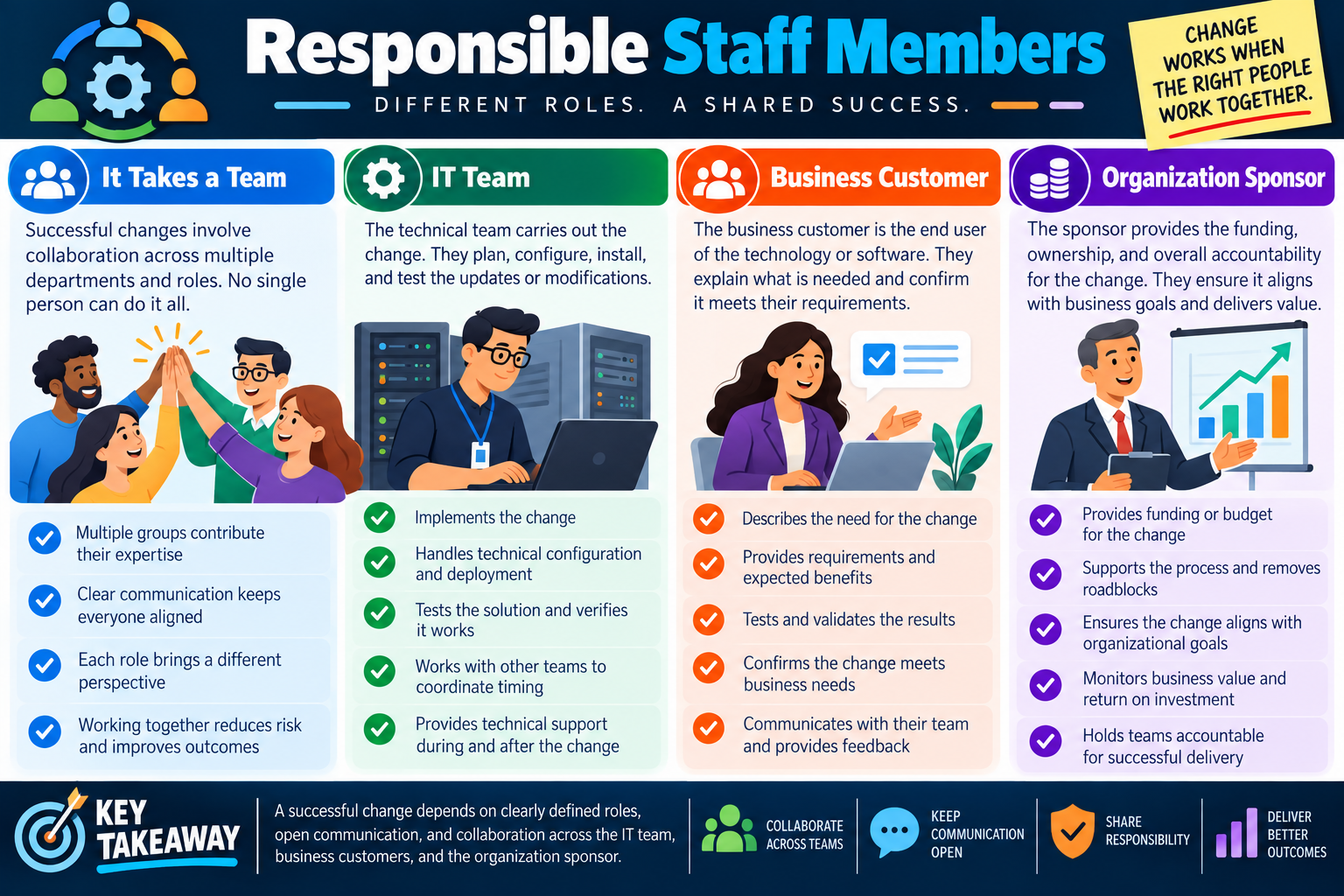
Module 5 - Responsible Staff Members

Successful change management depends on clearly defined roles, open communication, shared responsibility, and collaboration between technical teams, business customers, and organizational sponsors.

A change is rarely successful because one person completed a technical task in isolation. Most changes affect users, services, schedules, budgets, security, support teams, and business outcomes. Responsible staff members make sure the right people are involved before, during, and after the change so technical work supports real organizational needs.

Clearly identifying responsible staff members also prevents confusion. If no one knows who owns the request, who approves the work, who performs the implementation, who validates the outcome, or who communicates with users, the change can stall or fail. Change management works best when each role understands its responsibility and the team communicates throughout the process.

It Takes a Team

Change management is collaborative by design. Multiple groups contribute different expertise: technical staff understand systems and implementation steps, business users understand operational needs, sponsors understand funding and strategic priorities, and support teams understand user impact. No single person usually has the complete picture.

Team involvement reduces risk because different roles notice different problems. A technician may focus on configuration, compatibility, and rollback. A business customer may notice workflow timing, user training, or service impact. A sponsor may focus on value, cost, deadlines, and alignment with business goals. Bringing these viewpoints together leads to a better plan.

  • Multiple groups contribute expertise: Technical, business, security, support, management, and vendor roles may all be needed.
  • Clear communication keeps everyone aligned: Stakeholders need to know what is changing, why it matters, when it happens, and what to expect.
  • Each role brings a different perspective: Technical success and business success are related, but they are not always the same thing.
  • Working together reduces risk: Collaboration helps catch missing requirements, timing conflicts, support gaps, and unclear ownership.

The IT Team

The IT team carries out the technical side of the change. Depending on the organization, this may include system administrators, network technicians, application owners, desktop support, security analysts, database administrators, cloud engineers, vendors, or managed service providers. Their job is to plan the technical work, configure systems, install updates, test results, support users, and document what was done.

The IT team should not treat implementation as the only responsibility. Before the change, they help define scope, dependencies, maintenance windows, technical risks, rollback steps, and validation methods. During the change, they follow the approved procedure and communicate progress. After the change, they verify results, monitor for problems, update records, and provide support if users report issues.

Implements the change Performs the approved installation, configuration, update, migration, or technical modification.
Handles deployment details Manages settings, scripts, dependencies, access, scheduling, and coordination with other technical systems.
Tests and verifies Confirms the solution works technically and that affected services remain available.
Provides support Helps during and after the change if users experience problems or follow-up is needed.

The Business Customer

The business customer is the person, department, or group that uses the technology or benefits from the change. They may be the end user of an application, the owner of a workflow, the department requesting a new feature, or the team affected by a system update. Their role is essential because they explain what is needed and confirm whether the result actually meets business requirements.

Technical teams can verify that a system is online, a service starts, or a version number changed. The business customer helps verify whether the change supports the real work. For example, an accounting application update may install successfully, but the accounting team still needs to confirm that reports, exports, permissions, printers, integrations, and daily workflows behave correctly.

  1. Describe the need. Explain the business problem, requested outcome, expected benefit, and affected workflow.
  2. Provide requirements. Identify required features, deadlines, user groups, compliance needs, and acceptance criteria.
  3. Validate results. Test the change from the user or department perspective, not just the system perspective.
  4. Communicate feedback. Report issues, confirm success, and tell their team what changed when appropriate.

The Organization Sponsor

The organization sponsor provides ownership and accountability for the change. A sponsor may be a manager, department leader, executive, project owner, or budget holder. Their role is especially important when the change requires funding, affects multiple departments, changes business processes, or carries significant risk.

The sponsor helps ensure the change aligns with organizational goals. They may approve budget, remove roadblocks, support scheduling decisions, clarify priorities, and hold teams accountable for successful delivery. Without sponsorship, a change may lack authority, funding, or business direction. With strong sponsorship, teams are more likely to understand why the work matters and how success will be measured.

Provides funding Approves budget, licensing, hardware, vendor support, staffing, or other resources needed for the change.
Removes roadblocks Helps resolve priority conflicts, cross-team delays, policy questions, or decision gaps.
Aligns with goals Confirms the change supports business value, risk reduction, compliance, or operational improvement.
Holds accountability Ensures teams follow through, communicate clearly, and deliver the expected outcome.

Shared Communication

Communication connects the roles. A change may fail even when the technical work is correct if users are surprised, the business owner does not know when to test, the sponsor does not understand the risk, or the help desk is not prepared for calls. Good communication should begin early and continue through implementation, validation, and closure.

Communication should be specific. Tell stakeholders what is changing, why it is changing, when it will happen, who is affected, what downtime or behavior to expect, who owns each task, how to report problems, and when the change is complete. For larger changes, communication may include advance notices, maintenance-window reminders, status updates, post-change summaries, and support instructions.

Exam tip: When a change scenario mentions multiple departments, business impact, user acceptance, funding, or unclear ownership, look for the answer that gets the responsible staff members involved and keeps communication open.

Shared Responsibility

Responsible staff members do not all do the same work, but they share responsibility for the outcome. The IT team is responsible for safe technical implementation. The business customer is responsible for requirements and acceptance testing. The sponsor is responsible for alignment, funding, and accountability. Support teams may be responsible for communication, tickets, knowledge base updates, and user assistance.

Shared responsibility does not mean blurred ownership. Each role should have clear tasks and decision points. A change request should identify who requested the change, who approves it, who implements it, who validates it, who communicates it, who can authorize rollback, and who closes the record. This prevents last-minute confusion during the change window.

Deliver Better Outcomes

When the right people work together, changes are more likely to deliver the intended value. Technical teams can avoid guessing at business needs. Business customers can prepare their users and validate results. Sponsors can make decisions quickly when priorities, budgets, or timing conflicts appear. Support teams can respond faster because they know what changed and who owns it.

Good collaboration also improves future changes. Lessons learned can be documented, procedures can be updated, and teams can reuse successful patterns. Over time, the organization becomes better at planning, approving, implementing, and validating change because roles are understood and communication is expected.

Collaborate across teams Include the technical, business, sponsor, support, and vendor roles needed for the change.
Keep communication open Share expectations, timing, status, risks, results, and follow-up information clearly.
Share responsibility Assign ownership for implementation, testing, approval, user communication, and closure.
Deliver better outcomes Use each role's perspective to reduce risk and confirm the change meets real needs.

Bottom line: Change works when the right people work together. Define roles, involve the IT team, gather requirements from the business customer, secure sponsor support, communicate clearly, validate the result, and document who was responsible for each part of the change.

Responsible staff members infographic explaining team collaboration, IT team responsibilities, business customer responsibilities, organization sponsor responsibilities, and shared change management success.
Responsible staff members help make change successful by sharing technical expertise, business requirements, sponsorship, communication, and accountability.
form
Module 06

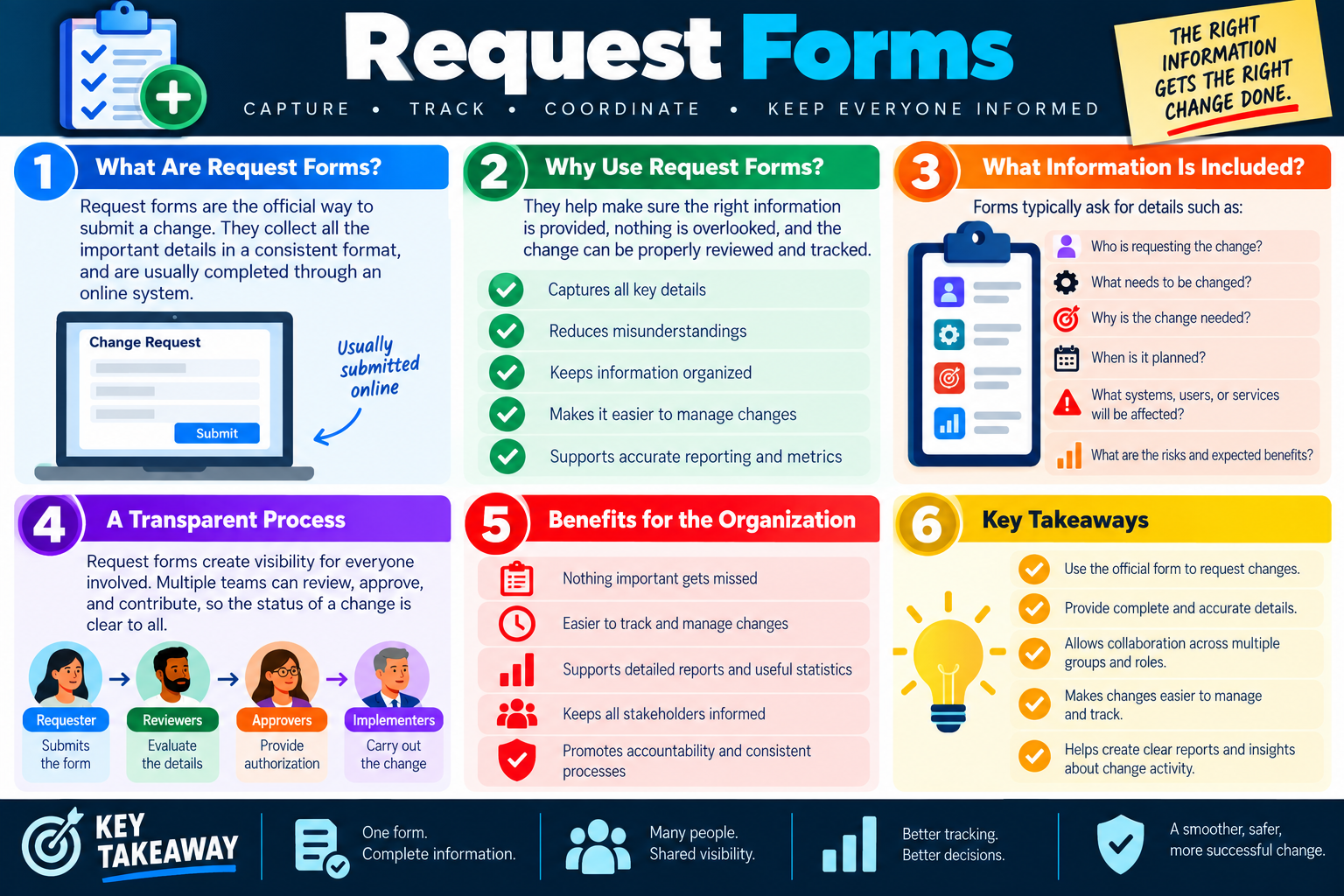
Module 6 - Request Forms

Request forms are the official starting point for many changes because they capture the right information in a consistent format and make the change easier to review, approve, track, and report.

A change request should not depend on hallway conversations, vague emails, or memory. Request forms give the organization a structured way to collect the facts before technical work begins. They help make sure everyone understands what is being requested, why it is needed, who is affected, when it should happen, what risks exist, and who needs to review or approve the change.

Most organizations submit change request forms through an online ticketing system, IT service management platform, service portal, or workflow tool. The exact system may vary, but the purpose is the same: capture complete information, route the request to the right people, and create a record that can be tracked from submission through approval, implementation, validation, and closure.

What Are Request Forms?

A request form is an official document or online form used to submit a proposed change. It collects key details in a standardized way so reviewers do not have to guess what the requester means. A good form turns an informal idea into something the change management process can evaluate.

Request forms are usually completed online because online forms can require mandatory fields, attach supporting files, route approvals, timestamp submissions, trigger notifications, and link the request to tickets, assets, users, projects, or configuration items. This makes the change easier to manage than a disconnected email thread.

Official request The form creates a formal record that a change was requested and who submitted it.
Consistent format Every requester provides similar information, which makes review and comparison easier.
Central tracking The request can be monitored, assigned, approved, updated, and closed in one place.
Audit trail The organization can show what was requested, reviewed, approved, implemented, and verified.

Why Use Request Forms?

Request forms reduce misunderstandings by forcing the important details to be written down before work starts. If a requester simply says, "Update the system," the technical team still needs to know which system, what kind of update, why it is needed, who uses it, when the change should happen, whether downtime is acceptable, and what success looks like. A request form prompts for those details.

Forms also keep information organized. A change may involve the requester, reviewers, approvers, implementers, support staff, vendors, managers, and affected users. When the request is captured in one record, everyone can see the same information and status. This visibility prevents duplicate work, missed approvals, and conflicting assumptions.

  • Captures key details: The form prompts the requester to provide the facts needed for review.
  • Reduces misunderstandings: Written requirements and scope are clearer than informal conversations.
  • Keeps information organized: Related notes, approvals, files, dates, and status updates stay with the request.
  • Makes changes easier to manage: Teams can route, prioritize, assign, schedule, approve, and close the change properly.
  • Supports reporting: Standard fields make it easier to create metrics about change volume, success, risk, and timing.

Information Commonly Included

A good request form asks enough questions to support planning and approval without burying the requester in unnecessary complexity. The form should identify who is requesting the change, what needs to be changed, why it is needed, when it is planned, what systems or services are affected, and what risks or benefits are expected. Higher-risk changes may require more detail, attachments, testing evidence, rollback plans, or sponsor approval.

The most useful forms focus on information that helps reviewers make a decision. A change request should explain the business need, technical scope, affected users, expected benefit, risk level, implementation timing, communication needs, and validation plan. If these items are missing, the request may need to be returned for more information before it can proceed.

  1. Who is requesting the change? Identify the requester, department, contact information, business owner, and sponsor if applicable.
  2. What needs to be changed? Describe the system, application, device, configuration, service, or process being modified.
  3. Why is the change needed? Explain the business reason, technical problem, security requirement, expected benefit, or compliance driver.
  4. When is it planned? Include requested timing, deadline, maintenance window, blackout dates, and expected duration.
  5. What will be affected? Identify systems, users, locations, services, integrations, vendors, and dependencies.
  6. What are the risks and benefits? Summarize possible downtime, security concerns, rollback needs, and expected improvements.

A Transparent Process

Request forms create visibility for everyone involved. Once the form is submitted, reviewers can evaluate the details, approvers can provide authorization, implementers can carry out the change, and stakeholders can monitor status. This transparency helps people understand where the request is in the process and what still needs to happen.

Transparency also improves accountability. If a change is delayed, the record can show whether the request is missing information, waiting for approval, scheduled for a maintenance window, assigned to an implementation team, or pending validation. Instead of guessing who has the next step, the workflow shows the current owner and status.

Requester Submits the form, explains the need, and provides requested details.
Reviewers Evaluate completeness, scope, impact, dependencies, timing, and risk.
Approvers Authorize the change based on policy, business need, and risk level.
Implementers Carry out the approved change, verify the result, and update the record.

Benefits for the Organization

Request forms help ensure nothing important gets missed. They make changes easier to track and manage, support detailed reporting, keep stakeholders informed, and promote accountability. Over time, the organization can use request data to identify trends: which systems change most often, how long approvals take, which changes create incidents, which teams need more resources, and where processes can improve.

Standard forms also support consistent decisions. If every change request includes similar fields, reviewers can compare requests more fairly and apply policy more reliably. This matters for risk management, compliance, audits, security reviews, and service-level expectations.

Nothing gets missed Required fields prompt requesters to provide details that are easy to forget.
Easier tracking Status, ownership, approvals, timing, and implementation notes remain connected to the request.
Better reporting Standardized data supports useful statistics, dashboards, audits, and process improvement.
Accountability The record shows who requested, reviewed, approved, implemented, validated, and closed the change.

Complete and Accurate Details

The quality of a request form depends on the quality of the information entered. A form filled with vague answers still creates risk. Requesters should be specific, and reviewers should return incomplete forms when important details are missing. A request that says "upgrade software soon" is much weaker than one that identifies the application, version, users affected, reason for upgrade, preferred window, validation steps, and rollback plan.

Technicians should also watch for mismatched information. The requested date might conflict with a change freeze. The affected system list might omit a dependency. The business benefit might not justify the risk. The requester might not have authority to approve the change. The form is a starting point for review, not a substitute for judgment.

Exam tip: If a scenario asks how to start or track a change, choose the official request form or change request process instead of relying on informal communication.

Metrics and Reporting

Because request forms use consistent fields, they make reporting possible. The organization can measure how many changes were submitted, how many were approved, how many failed, how long approval takes, how often rollbacks occur, which systems are changed most often, and whether changes are clustered around risky times. These metrics help leaders improve the process instead of guessing.

Reporting can also improve communication with stakeholders. If managers can see the status of requested changes, they are less likely to chase individual technicians for updates. If support teams know which changes are scheduled, they can prepare for user questions. If auditors need evidence, the request form and workflow record provide a clear history.

Bottom line: Use the official request form to request changes, provide complete and accurate details, keep stakeholders informed, support collaboration, track progress, and create clear reports about change activity.

Request forms infographic explaining official change request forms, required change details, transparent workflow, organizational benefits, and change tracking.
Request forms help capture complete change information, coordinate reviewers and approvers, keep stakeholders informed, and create a trackable record.
scope
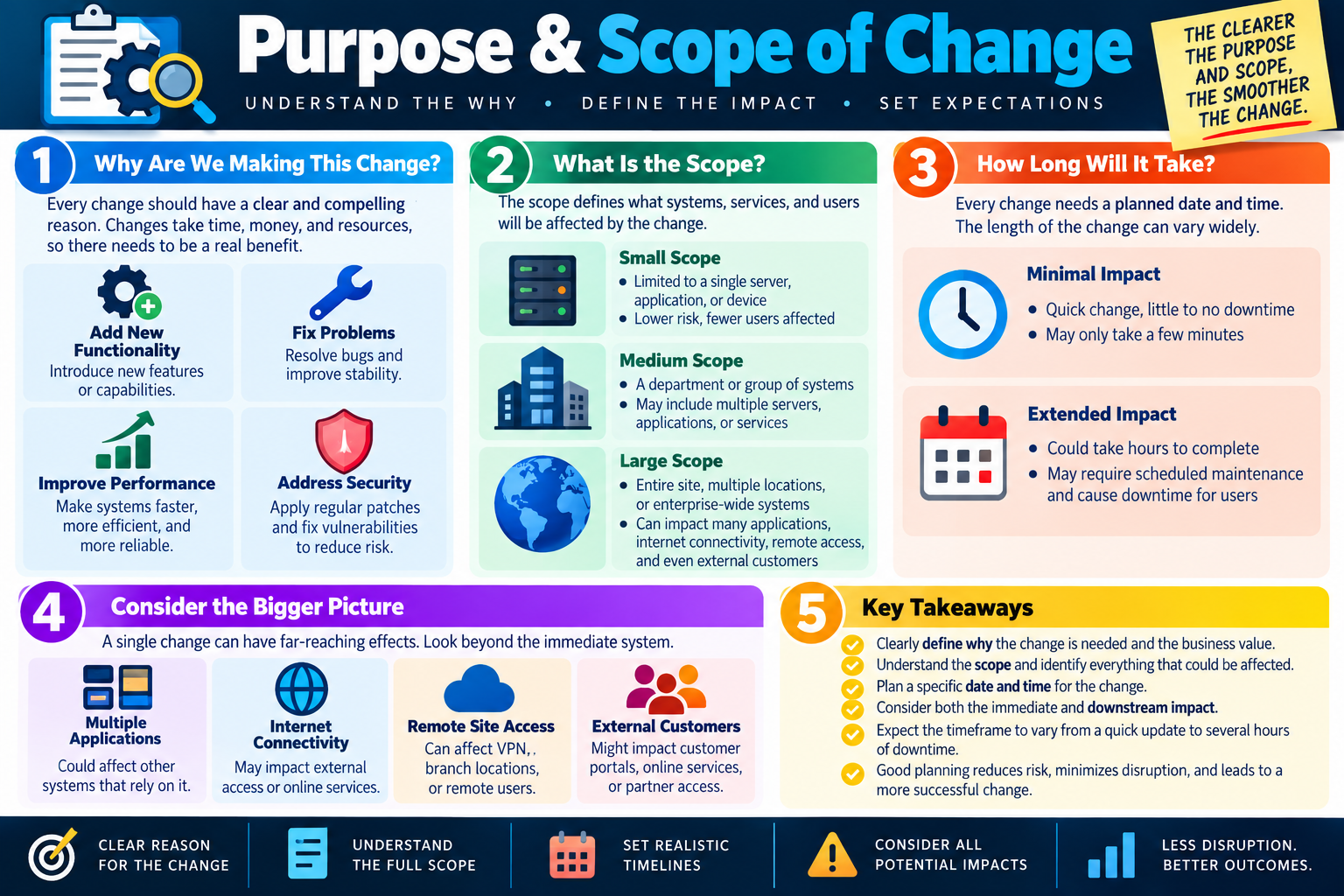
Module 07

Module 7 - Purpose & Scope of Change

Every change should have a clear purpose, a defined scope, a realistic timeline, and an understanding of both immediate and downstream impact.

Before a change is approved or implemented, the team needs to understand why the change is being made and what it will affect. Purpose explains the reason for the change. Scope defines the boundaries of the change. Timeline sets expectations for when the work will happen and how long it may take. Impact analysis looks beyond the obvious system to identify users, services, applications, remote access, and external customers that could be affected.

When purpose and scope are unclear, changes become risky. A technician may update the wrong system, overlook dependent services, underestimate downtime, miss an approval path, or create confusion for users. Clear purpose and scope make the change smoother because everyone understands the goal, the boundaries, the affected environment, and the expected outcome.

Why Are We Making This Change?

Every change should have a clear and compelling reason. IT changes consume time, money, staff attention, and sometimes downtime, so there should be a real benefit. A valid purpose may be to add functionality, fix a problem, improve performance, reduce security risk, meet compliance requirements, replace unsupported technology, or support a business need.

The purpose should be written in plain language. It should explain the problem or opportunity, the expected benefit, and why the change is worth the risk. A vague reason such as "update the system" is not enough. A stronger purpose explains what the update solves, what capability it adds, what vulnerability it addresses, or what business process it improves.

Add new functionality Introduce new features, capabilities, integrations, workflows, or user options that support business needs.
Fix problems Resolve bugs, errors, instability, compatibility issues, or recurring support incidents.
Improve performance Make systems faster, more efficient, more reliable, or better able to support current demand.
Address security Apply patches, close vulnerabilities, strengthen configurations, or reduce exposure to threats.

What Is the Scope?

Scope defines what systems, services, users, locations, applications, devices, configurations, and processes will be affected by the change. It also defines what is not included. This prevents scope creep, where a small approved change gradually turns into a larger, riskier change without proper review.

Scope should be specific enough for reviewers and implementers to understand the boundaries. For example, "upgrade the server" is too vague. A clearer scope might identify the exact server, application, database, users, maintenance window, dependent services, integrations, firewall rules, monitoring checks, and rollback steps. The scope helps determine risk, required approvals, communication needs, staffing, and validation steps.

  1. Small scope: Limited to a single server, application, device, account, policy, or setting; usually lower risk with fewer users affected.
  2. Medium scope: Affects a department, group of systems, multiple servers, several applications, or a business workflow.
  3. Large scope: Impacts an entire site, multiple locations, enterprise-wide services, many applications, internet connectivity, remote access, or external customers.
  4. Out of scope: Clearly list related systems or tasks that will not be changed so the team does not expand the work during implementation.

How Long Will It Take?

Every change needs a planned date and time. The length of the change can vary widely depending on the scope, complexity, testing requirements, approvals, backup steps, rollback plan, and affected users. Some changes may take only a few minutes and cause little or no downtime. Others may require a scheduled maintenance window, after-hours staffing, vendor coordination, and extended service interruption.

Timing should be realistic. A change plan should account for preparation, implementation, validation, communication, monitoring, and rollback time if needed. If the team only estimates the installation time, it may underestimate the total change window. Users and stakeholders need accurate expectations so they can plan around possible disruption.

Minimal impact A quick change with little to no downtime, limited scope, and a short validation process.
Moderate impact A change that may affect a department or service for a defined period and requires coordination.
Extended impact A change that could take hours, require planned downtime, or affect business operations.
Rollback time The schedule should include enough time to revert if validation fails or unexpected issues appear.

Consider the Bigger Picture

A single change can have far-reaching effects. A server update might affect applications that depend on it. A firewall rule change might affect internet access, VPN, branch offices, vendor connections, or external customer portals. A certificate update might affect websites, APIs, mobile apps, identity services, or monitoring tools. The team should look beyond the immediate system before deciding that a change is low risk.

Downstream impact is especially important in modern environments where systems are connected. Applications may rely on shared authentication, DNS, databases, storage, cloud services, APIs, network paths, certificates, and security tools. If the change affects one dependency, several services may experience symptoms even if those services were not directly changed.

  • Multiple applications: Other systems may rely on the component being changed.
  • Internet connectivity: External access, cloud services, updates, remote users, and vendor links may be affected.
  • Remote site access: VPN, branch locations, remote workers, and cloud connectivity may depend on the changed service.
  • External customers: Customer portals, partner access, online services, APIs, or public-facing applications may be impacted.

Set Expectations

Purpose and scope are not just technical planning details; they set expectations. Stakeholders need to know what business value the change should deliver, what systems are in scope, what users may be affected, when the work will occur, how long it may take, what downtime may happen, how success will be verified, and what happens if the change fails.

Good expectations prevent avoidable frustration. If users know a system will be unavailable during a maintenance window, they can plan around it. If support teams know which applications may be affected, they can respond faster. If approvers know the scope and risk, they can make a better decision. If implementers know the boundaries, they can avoid unapproved extra work.

Exam tip: When a change scenario asks what to define before approval or implementation, look for purpose, scope, affected systems, timing, impact, communication, and rollback expectations.

Planning Reduces Risk

Good planning connects purpose, scope, timing, and impact. The clearer the purpose, the easier it is to judge whether the change is worth doing. The clearer the scope, the easier it is to identify risk. The clearer the timing, the easier it is to communicate and schedule resources. The clearer the impact, the easier it is to protect users and services.

Planning also helps after the change. If the team defined success criteria ahead of time, it can verify whether the change delivered the expected result. If the change causes problems, documented scope helps troubleshoot by showing exactly what was changed and what dependencies were considered.

Clear reason Define why the change is needed and what business or technical value it should provide.
Full scope Identify every system, service, user group, location, and dependency that could be affected.
Realistic timeline Plan a specific date, time, expected duration, validation period, and rollback window.
Potential impacts Consider immediate, downstream, remote, external, security, and operational effects.

Key Takeaways

Purpose and scope give the change management process direction. Reviewers need them to decide whether the change should be approved. Implementers need them to know what work is authorized. Stakeholders need them to understand what will happen. Support teams need them to troubleshoot if something goes wrong.

Expect the timeframe to vary. A small update may take a few minutes. A large change may require hours of downtime, multiple teams, communication plans, and rollback readiness. The stronger the planning, the lower the chance of surprise disruption.

Bottom line: Clearly define why the change is needed, understand the full scope, plan a specific date and time, consider downstream impact, and set realistic expectations. Clear purpose and scope lead to less disruption and better outcomes.

Purpose and scope of change infographic explaining reasons for changes, scope sizes, change timing, downstream impact, and key takeaways for safer planning.
Defining purpose and scope helps teams understand the reason for a change, identify affected systems and users, set realistic timelines, and reduce disruption.
type
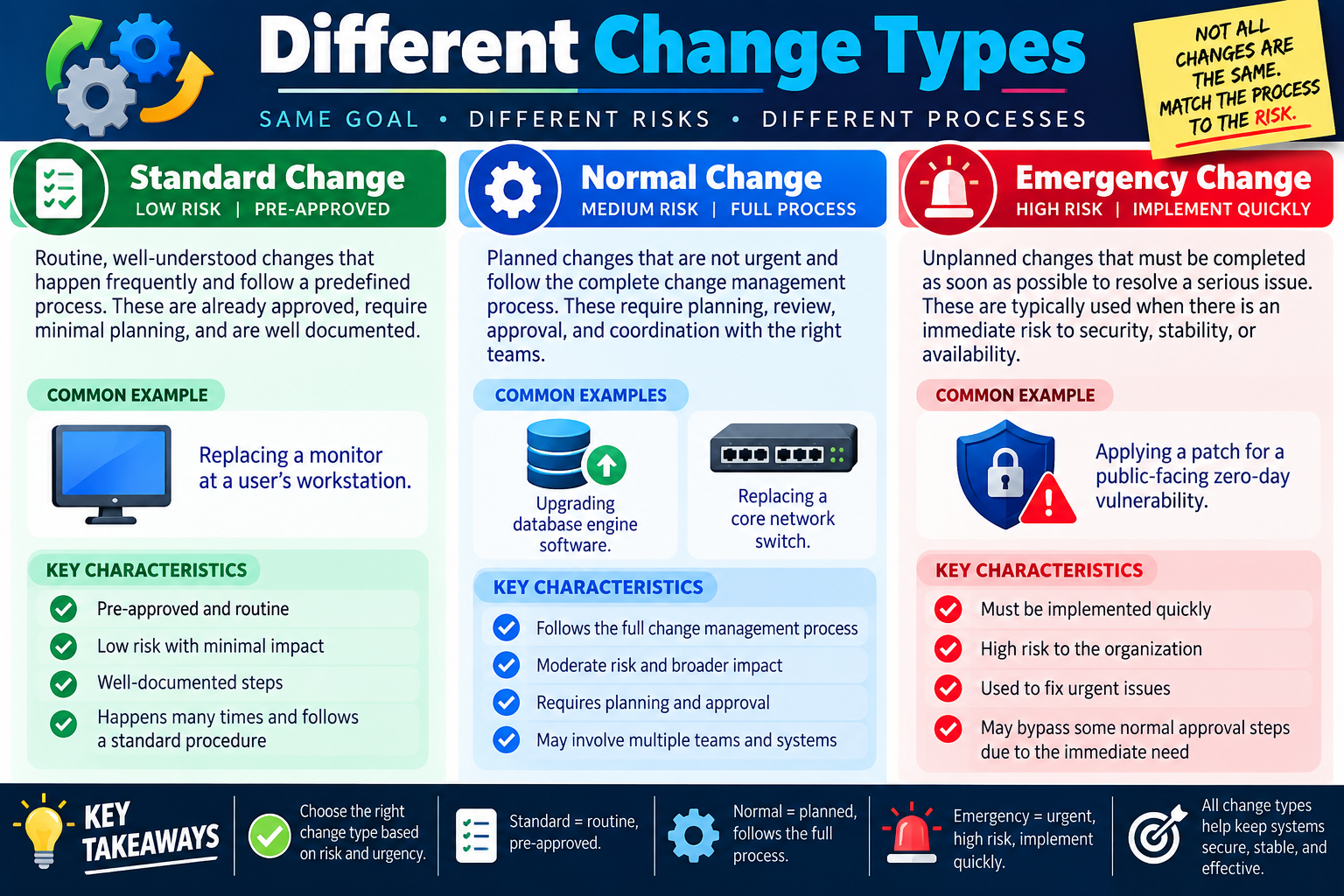
Module 08

Module 8 - Different Change Types

Not all changes carry the same risk, so the change management process should match the type of change being performed: standard, normal, or emergency.

Change management is not a one-size-fits-all process. Some changes are routine and low risk because they happen often and follow a documented procedure. Other changes require full planning, review, approval, scheduling, and coordination because they have broader impact. A few changes are urgent enough that they must be implemented quickly to protect security, stability, or availability.

Classifying the change type helps the organization apply the right level of control. If every small routine task requires a full review board, the process becomes slow and frustrating. If high-risk changes are treated casually, the organization may create outages or security gaps. The goal is to match the process to the risk.

Why Change Types Matter

Change types help reviewers and technicians decide how much planning, approval, communication, testing, and documentation are required. The classification should be based on risk, urgency, impact, repeatability, and whether the procedure is already understood. A monitor replacement at a single workstation does not need the same level of review as replacing a core switch. A zero-day patch on a public-facing system may need faster action than a normal monthly update.

Even when the process is different, all change types still support the same goal: keep systems secure, stable, available, and effective. Standard changes should still be documented. Normal changes should still be approved and verified. Emergency changes should still be recorded afterward, even if some approval steps are accelerated during the incident.

Risk How likely is the change to disrupt users, services, data, security, or business operations?
Urgency Can the change wait for the normal process, or must it happen quickly to reduce harm?
Impact How many systems, users, locations, applications, or customers could be affected?
Repeatability Is this a well-known task with documented steps, or does it require new planning?

Standard Change

A standard change is routine, well understood, low risk, and usually pre-approved. These changes happen frequently and follow a predefined process. Because the steps are already documented and the risk is minimal, the organization can allow the work to proceed without requiring the full approval path every time.

Standard changes still need discipline. The technician should follow the documented procedure, record the work, verify the result, and communicate as required by policy. Pre-approved does not mean careless. It means the organization has already reviewed the task, understands the risk, and trusts the documented process when followed correctly.

  • Common example: Replacing a monitor at a user's workstation.
  • Pre-approved and routine: The work has already been evaluated and accepted as low risk.
  • Low impact: The change usually affects one user, device, or small area.
  • Well-documented steps: The technician follows a known procedure rather than inventing a new plan.
  • Frequent and repeatable: The change occurs often enough that a standard process makes sense.

Normal Change

A normal change is planned work that is not urgent and requires the full change management process. These changes usually have moderate risk or broader impact, so they need review, approval, scheduling, coordination, communication, implementation planning, testing, and validation. A normal change may involve multiple teams, multiple systems, or business services that require careful timing.

Normal changes are the classic change management scenario. The team submits a request, defines purpose and scope, evaluates risk, confirms responsible staff, plans a maintenance window, gets approval, implements the change, verifies results, and documents closure. Because the change is not an emergency, there is time to do the process properly.

Database upgrade Upgrading database engine software may affect applications, reporting, backups, drivers, and user workflows.
Core network switch Replacing central network hardware may affect many users, VLANs, uplinks, phones, wireless access points, and services.
Full process Planning, review, approval, scheduling, testing, communication, and validation are expected.
Multiple teams Network, server, application, security, vendor, and business teams may need to coordinate.

Emergency Change

An emergency change is unplanned work that must be completed as soon as possible to resolve a serious issue. These changes are high risk, but delaying them may be even riskier. Emergency changes are often used when there is an immediate threat to security, stability, availability, or business operations.

Examples include applying a patch for a public-facing zero-day vulnerability, restoring a failed service, blocking active malicious traffic, replacing failed hardware that has no redundancy, or making a configuration change to recover a critical outage. Because time matters, some normal approval steps may be shortened or bypassed, but the change should still be authorized according to the organization's emergency process and documented afterward.

  1. Implement quickly. The change addresses an urgent issue that cannot wait for the normal approval timeline.
  2. High organizational risk. The issue may affect security, availability, stability, customers, revenue, or compliance.
  3. Fix urgent problems. The change is used to reduce immediate harm, not to skip planning for convenience.
  4. Document afterward. Capture what happened, who approved it, what was changed, validation results, and any follow-up work.

Choosing the Right Type

The change type should not be chosen based on convenience. A technician should not label work as standard just to avoid review, and a requester should not label work as emergency just to move faster. The classification should reflect the real risk, urgency, impact, and maturity of the procedure.

If a change is low risk, routine, pre-approved, and documented, it may be standard. If it is planned, not urgent, and needs full review, it is likely normal. If it is unplanned and must happen quickly to resolve a serious risk or outage, it may be emergency. When in doubt, follow organizational policy and involve the change manager, supervisor, or change advisory board.

Exam tip: Standard equals routine and pre-approved. Normal equals planned and follows the full process. Emergency equals urgent, high risk, and implemented quickly with documentation afterward.

Process Differences

Each change type uses a different process because each one carries a different balance of risk and urgency. Standard changes rely on pre-approved procedures. Normal changes rely on full planning and review. Emergency changes rely on rapid response and after-action documentation. All three still require accountability.

The organization should define criteria for each type so technicians do not guess. The policy should explain examples, approval paths, required documentation, validation expectations, rollback requirements, and when a standard or emergency change should be escalated into the normal process.

Standard Low risk, repeatable, pre-approved, documented, minimal planning required each time.
Normal Medium risk or broader impact, planned in advance, reviewed and approved through the full process.
Emergency High urgency, high risk, implemented quickly to resolve serious security, stability, or availability issues.
All types Require documentation, verification, accountability, and alignment with organizational policy.

Key Takeaways

Choosing the correct change type helps the organization move at the right speed without ignoring risk. Standard changes keep routine work efficient. Normal changes provide structure for planned work with broader impact. Emergency changes allow urgent action when waiting would create unacceptable risk.

All change types help keep systems secure, stable, and effective when the process is used correctly. The classification should guide the process, not become a shortcut around it.

Bottom line: Match the change process to the risk. Use standard changes for routine, pre-approved work; normal changes for planned work that needs full review; and emergency changes for urgent, high-risk situations that must be resolved quickly and documented afterward.

Different change types infographic comparing standard changes, normal changes, and emergency changes with risk levels, examples, and key characteristics.
Different change types help teams match the change process to risk, urgency, and impact while keeping systems secure, stable, and effective.
time
Module 09

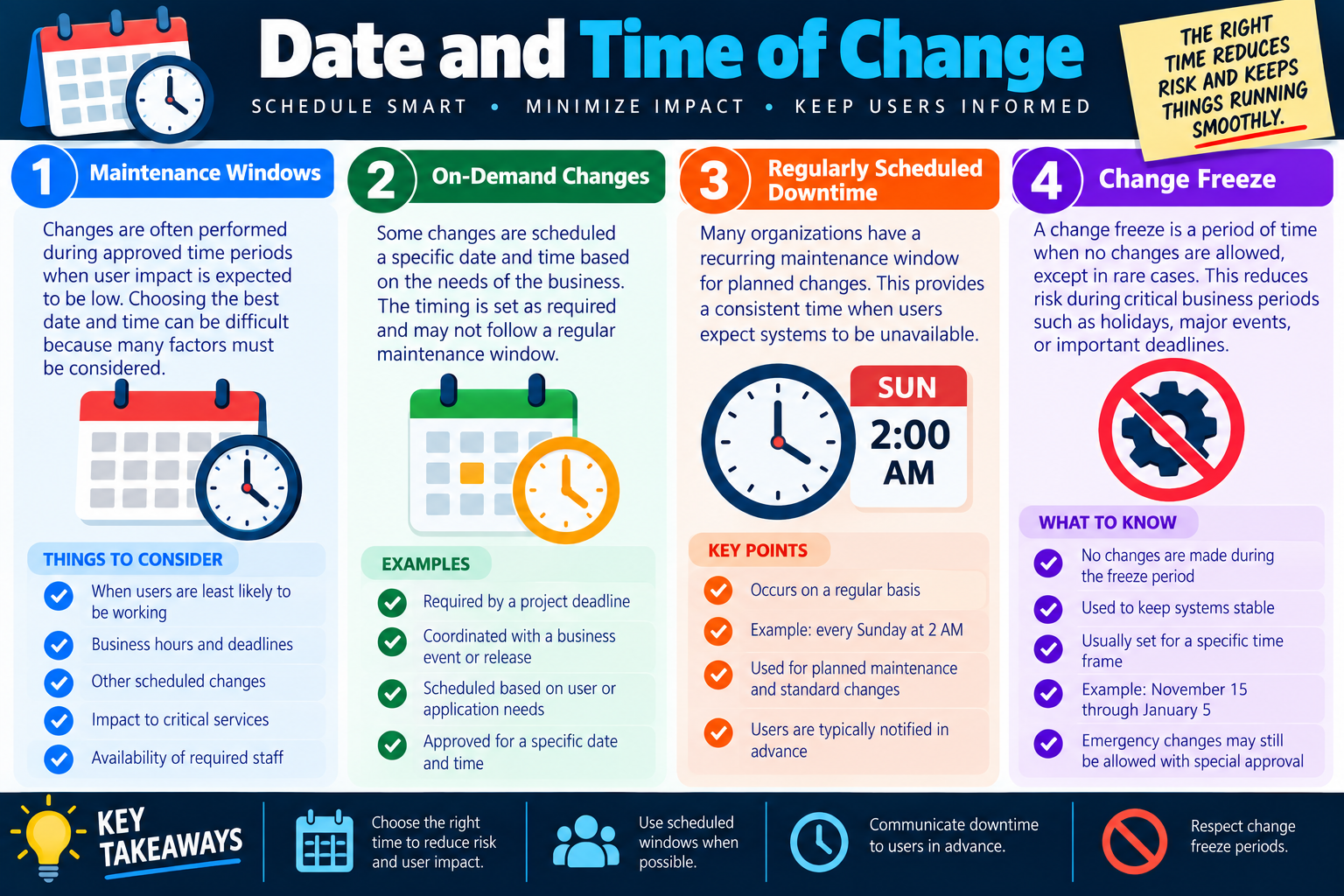
Module 9 - Date and Time of Change

The right date and time for a change reduces risk, limits user impact, supports staffing, and keeps business operations running as smoothly as possible.

Scheduling is one of the most practical parts of change management. A technically correct change can still become a problem if it happens at the wrong time. Users may be actively working, a business deadline may be in progress, critical services may be needed, required staff may be unavailable, or another scheduled change may already be affecting the same environment.

Choosing the date and time means balancing business needs, technical risk, user impact, staff availability, communication requirements, and organizational policy. Some changes fit into approved maintenance windows. Some are scheduled on demand for a specific business need. Some organizations use recurring downtime windows so users know when planned maintenance may occur. During major business periods, a change freeze may prevent most changes entirely.

Maintenance Windows

A maintenance window is an approved time period when changes are expected to have lower user impact. Organizations often schedule work during evenings, weekends, early mornings, or other low-usage periods. The goal is not just convenience for IT; the goal is to protect productivity, customer service, revenue, and critical business operations.

Selecting a maintenance window can be difficult because many factors must be considered. A time that works for one group may be disruptive for another. A global organization may have users in several time zones. A system may support automated jobs, backups, batch processing, monitoring, customer portals, or third-party integrations outside normal business hours. The maintenance window should reflect the real use of the system, not just the office schedule.

  1. User activity: Choose a time when users are least likely to be working or relying on the affected service.
  2. Business hours and deadlines: Avoid payroll, billing, exams, closings, launches, audits, and other critical business periods.
  3. Other scheduled changes: Avoid overlapping changes that could make troubleshooting harder if something fails.
  4. Critical services: Consider whether the system supports security, communication, sales, production, healthcare, education, or other essential operations.
  5. Staff availability: Confirm that implementers, approvers, testers, support staff, and rollback decision-makers are available.

On-Demand Changes

Some changes are scheduled for a specific date and time based on the needs of the business. These are not necessarily tied to a recurring maintenance window. A project deadline, software release, customer event, compliance requirement, vendor schedule, or department need may drive the timing. The change is still planned and approved, but the date is chosen for a specific reason.

On-demand scheduling should still follow the change management process. The request should explain why the selected date is needed, what users or services are affected, who approved the timing, what communication is required, and how the team will validate success. A special date does not remove the need for risk review, rollback planning, or documentation.

Project deadline The change is needed to support a milestone, release, migration, or business commitment.
Business event The timing supports a launch, audit, meeting, seasonal event, or operational requirement.
User or app need The schedule is based on when affected users or applications can tolerate the change.
Approved timing The specific date and time are reviewed and authorized before implementation.

Regularly Scheduled Downtime

Many organizations establish a recurring maintenance window for planned changes. For example, they may reserve every Sunday at 2:00 AM for system maintenance. This gives IT teams a predictable time for updates and gives users a consistent expectation that systems may be unavailable during that window.

Regularly scheduled downtime works best when it is communicated clearly. Users should know when it occurs, which systems may be affected, how they will be notified, and where to check for status updates. Recurring windows also help teams plan staffing, testing, backups, monitoring, and rollback support.

  • Occurs on a regular basis: The organization reserves a predictable time for maintenance.
  • Example: Every Sunday at 2:00 AM for planned system changes.
  • Used for planned work: Standard and normal changes often fit this type of window.
  • Communicated in advance: Users should be notified before planned downtime affects their work.

Change Freeze

A change freeze is a period of time when no changes are allowed except in rare cases. Organizations use change freezes to reduce risk during critical business periods such as holidays, major events, financial close, product launches, exams, audits, peak sales seasons, or important deadlines. The idea is simple: when stability matters most, avoid introducing avoidable change.

A freeze does not mean the organization ignores emergencies. Emergency changes may still be allowed with special approval if security, availability, or critical operations are at risk. However, routine or optional changes should wait until the freeze period ends. Respecting change freezes prevents unnecessary disruption at the worst possible time.

No routine changes Standard, normal, or optional changes are paused during the freeze period.
Stability focus The freeze keeps systems steady during high-risk or high-value business periods.
Specific timeframe The freeze should have clear start and end dates, such as November 15 through January 5.
Emergency exception Urgent security or availability changes may still proceed with special approval.

Communicate Downtime

Scheduling is not complete until affected people know what to expect. Users, support staff, business owners, managers, vendors, and other stakeholders may need advance notice. The message should identify the affected system, planned date and time, expected duration, expected impact, reason for the change, support contact, and any user action required before or after the work.

Communication should be timed appropriately. A major outage may need multiple reminders. A small low-risk change may need a shorter notice. If the schedule changes, update stakeholders quickly. If the change completes early, fails, or is rolled back, communicate the outcome so users and support teams are not left guessing.

Exam tip: When a change scenario asks when to perform work, look for maintenance windows, user impact, business deadlines, staff availability, other scheduled changes, change freezes, and user notification.

Scheduling Reduces Risk

The date and time of change should support the risk level. A high-impact change may need a longer maintenance window, more staff, business validation, vendor support, and rollback time. A low-impact change may be completed quickly during a standard window. A change during a freeze may require special approval or postponement.

Good scheduling also makes troubleshooting easier. If several changes happen at the same time, it can be difficult to know which one caused a problem. Coordinating the schedule prevents overlapping work and gives the team a clearer path if something goes wrong.

Right time Choose a date and time that reduces business impact and supports the approved plan.
Scheduled windows Use recurring maintenance windows when possible so users know when downtime may occur.
Advance notice Communicate downtime, impact, and expected duration before the change begins.
Freeze awareness Respect change freeze periods unless an approved emergency requires action.

Bottom line: Schedule smart. Choose the right time to reduce risk and user impact, use maintenance windows when possible, communicate downtime in advance, coordinate required staff, avoid overlapping changes, and respect change freeze periods.

Date and time of change infographic explaining maintenance windows, on-demand changes, regularly scheduled downtime, change freezes, and key scheduling takeaways.
Scheduling the date and time of a change helps minimize disruption, keep users informed, and protect critical business periods.
impact
Module 10

Module 10 - Affected Systems & Impacts

A small change can have a big impact when systems, applications, users, services, and dependencies are connected.

Before a change is approved, the team must identify what systems and services could be affected. A change may appear to involve one device, application, or server, but modern environments are interconnected. A firewall reboot can stop internet traffic, email flow, cloud services, and business applications. A database outage can stop multiple applications. A network change can affect remote locations, authentication, phones, printers, and external customer access.

Impact analysis means looking beyond the immediate change. The goal is to understand who and what could be disrupted before work begins. This helps reviewers decide whether the change should be approved, when it should happen, who needs to be notified, what support staff must be available, and what rollback plan is required.

A Change Can Affect Multiple Systems

Systems rarely operate alone. Servers, applications, networks, databases, identity services, cloud platforms, storage, monitoring tools, and security devices often depend on one another. When one component changes, the effect can ripple across many areas. That is why a change request should identify not only the system being changed, but also the systems that rely on it.

For example, rebooting a firewall may sound like a single-device action. In reality, the firewall may control internet access, email filtering, VPN access, cloud connectivity, site-to-site connections, remote users, monitoring alerts, and business application traffic. If that firewall is unavailable, many services may appear broken even though only one device was touched.

Internet access Firewall, DNS, proxy, routing, or ISP-related changes can disrupt web access and cloud services.
Email Mail flow may depend on network connectivity, filtering appliances, authentication, DNS, or cloud services.
Cloud services Hosted apps, storage, collaboration tools, identity providers, and SaaS platforms may rely on connectivity and security rules.
Business applications Line-of-business tools may depend on databases, servers, network paths, certificates, or authentication services.

The Impact Might Be Small

Not every change has a large impact. Some changes affect only a limited area, such as one test server, one application, one device, or a small group of users. A software update on a nonproduction test server may affect only a few people or no users at all. A monitor replacement might affect one workstation. A configuration change in a lab may have no production impact.

Small impact does not mean no documentation is needed. The change should still be recorded according to policy, especially if it modifies a managed system. However, a small-scope, low-risk change may require less communication, fewer approvals, and a shorter maintenance window than a change that affects an entire department or company.

  • Limited area: The change affects a single server, application, device, location, or test environment.
  • Few users: Only one user or a small group is likely to notice the change.
  • Lower operational risk: Business operations can continue if the change fails.
  • Simpler validation: Testing may focus on one service, workflow, or user group.

The Impact Could Be Company-Wide

Other changes can affect every user, department, location, or customer. These require careful planning because the business impact can be significant. Company-wide changes may involve core network services, authentication systems, internet connectivity, cloud platforms, endpoint management tools, email, collaboration software, remote access, or applications used across the organization.

Large-impact changes usually need broader communication, more formal approval, detailed rollback planning, extended validation, and support coverage during and after the work. They may also need leadership awareness because a failure could affect productivity, customer service, revenue, compliance, or safety.

  1. All users: Determine whether the change could affect every employee, student, customer, or device.
  2. Multiple applications: Identify whether several applications depend on the changed component.
  3. Network connectivity: Check whether internet, VPN, wireless, routing, DNS, firewall, or WAN services are involved.
  4. Remote locations: Consider branch offices, remote users, cloud sites, vendor connections, and partner access.
  5. External customers: Identify whether portals, websites, APIs, customer systems, or online services could be disrupted.

Consider Application Dependencies

Application dependencies are one of the easiest areas to overlook. A database server may store data for several applications. An identity provider may authenticate users for many systems. A file server may support reporting, exports, templates, and integrations. A certificate may be used by websites, mobile apps, APIs, and load balancers. If the dependency fails, every service that relies on it may fail too.

Dependency mapping helps prevent surprises. Before approving a change, the team should ask what relies on the affected system and what the affected system relies on. This may require reviewing documentation, CMDB records, asset records, architecture diagrams, monitoring tools, firewall logs, vendor documentation, tickets, or input from application owners.

Databases Applications such as ERP, CRM, reporting, and e-commerce systems may share the same database platform.
Authentication SSO, directory services, MFA, certificates, and identity providers may affect many unrelated applications.
Infrastructure Network, storage, DNS, DHCP, virtualization, and cloud services can support many business systems.
Integrations APIs, scheduled jobs, file transfers, and middleware may depend on timing and connectivity.

Identify and Count All Affected Services

Before approval, determine every system, service, and user group that could be impacted. This does not mean guessing casually. It means intentionally listing affected services, identifying dependent applications, determining which users, departments, or locations will be impacted, and assessing the potential business impact.

This information helps decide the risk level, change type, timing, communication plan, approval path, support staffing, test plan, and rollback requirements. A change that affects one test server may be handled very differently from a change that affects internet access for the entire company.

  • List all affected systems and services: Include primary systems, dependent services, integrations, and infrastructure components.
  • Identify dependent applications: Determine which applications rely on the changed system or service.
  • Determine affected users: Identify users, departments, locations, customers, vendors, or partners who may be impacted.
  • Assess business impact: Consider productivity, revenue, customer service, compliance, security, safety, and operations.

Know the Impact Before Approval

Approvers need impact information before they can make a responsible decision. If the affected systems are unknown, the approval decision is weak. The organization may approve a change without understanding risk, schedule work during a critical business period, notify the wrong people, or fail to prepare support staff.

Impact analysis also helps define success criteria. If a change could affect email, VPN, cloud apps, and an ERP system, validation must include those services. Testing only the changed device is not enough. The team should verify the business services that users actually depend on.

Exam tip: When a scenario mentions a change to a shared system, database, firewall, network device, cloud service, or authentication platform, identify affected systems, dependencies, users, and business impact before approval.

Key Takeaways

Look beyond the immediate change. One change can impact many systems, especially when shared infrastructure or common dependencies are involved. Determine whether the impact is small, department-wide, site-wide, company-wide, or customer-facing before deciding how to handle the change.

Understanding affected systems and impacts improves planning, communication, approval, scheduling, validation, and rollback readiness. It also protects users from surprise outages and helps the organization make better decisions about risk.

Bottom line: Identify every affected system, service, dependency, user group, and business function before approval. Know who will be impacted, understand connected services, and verify the full business impact before moving forward.

Affected systems and impacts infographic explaining connected services, small and company-wide impacts, application dependencies, affected services, and business impact analysis.
Impact analysis helps teams look beyond the immediate change, identify dependencies, and understand business impact before approval.
map
Module 11

Module 11 - Impact Assessment

Impact assessment turns a proposed change into a clear picture of what could be affected, who could be disrupted, and how serious the business consequences may be.

Change management depends on understanding impact before approval. A request may identify the device, server, application, or configuration being changed, but that is only the starting point. The real question is broader: what relies on this system, what does this system rely on, which users or departments may be affected, and what happens to the business if the change fails?

A strong impact assessment looks beyond the immediate technical task. It identifies connected services, dependent applications, affected user groups, remote locations, external customers, and business functions. This gives approvers the information they need to decide whether the change should proceed, when it should be scheduled, who should be notified, and what recovery options must be ready.

Look Beyond the Immediate Change

Many outages are caused by underestimating dependencies. A technician may believe they are changing one firewall, one database, one server, or one application. In practice, that component may support internet access, email, cloud services, authentication, reporting, e-commerce, remote access, or line-of-business applications. When the shared component fails, several unrelated-looking services can fail at the same time.

Impact assessment begins by asking what could be touched indirectly. If a firewall is rebooted, what traffic stops? If a database is updated, what applications lose data access? If an identity provider is changed, what login paths are affected? If a network device is replaced, what locations, VLANs, phones, printers, cameras, or wireless access points depend on it?

Primary system The device, application, service, server, or setting directly included in the change.
Connected services Network, cloud, email, authentication, storage, DNS, monitoring, and security services that may depend on it.
Business workflows Processes such as sales, support, reporting, shipping, payroll, education, or customer service that could be interrupted.
External access Customer portals, APIs, vendor links, partner integrations, VPNs, and remote locations that may be affected.

Small Impact vs. Broad Impact

Some changes have a small impact. Updating software on a test server may affect only a few technicians or no production users at all. Replacing one monitor may affect one workstation. Adjusting a lab configuration may be low risk because the environment is isolated. These changes still need to be documented, but they may not require broad communication or a large maintenance window.

Other changes can be company-wide. A shared firewall, core switch, database, identity provider, DNS service, cloud platform, or endpoint management tool can affect every user, multiple departments, remote locations, and even external customers. These changes require more careful planning because the blast radius is larger.

  1. Small impact: A limited change affecting one system, one app, one device, or a small group of users.
  2. Department impact: A change affecting a team, workflow, shared application, or departmental service.
  3. Company-wide impact: A change affecting all users, multiple applications, network connectivity, remote access, or core services.
  4. Customer-facing impact: A change that could affect external portals, websites, APIs, partner access, or hosted services.

Map Dependencies

Dependencies are relationships between systems. An application may depend on a database. A database may depend on storage. Storage may depend on networking. Users may depend on directory services and MFA to access everything. If one dependency is unavailable, the systems above it may also stop working.

Dependency mapping does not have to be perfect to be useful. Start with known documentation, asset records, CMDB entries, network diagrams, application owner input, firewall logs, monitoring data, support tickets, vendor documentation, and previous incidents. The goal is to identify the most important relationships before the change is approved.

Application dependencies ERP, CRM, reporting, e-commerce, and internal tools may rely on shared databases or services.
Infrastructure dependencies Network, DNS, DHCP, storage, virtualization, certificates, and cloud connectivity may support many services.
Identity dependencies Directory services, SSO, MFA, and account policies can affect access across the organization.
Operational dependencies Backups, monitoring, logging, patching, automation, and scheduled jobs may also be affected.

Identify Affected Users and Services

A complete assessment should identify every service and user group that could be impacted. This includes direct users of the system and indirect users who rely on a dependent service. A database change may affect the finance team, sales team, warehouse team, customer portal, reporting platform, and support desk even if only one database server is being changed.

Counting affected services helps determine the correct risk level, change type, approval path, maintenance window, communication plan, support coverage, validation checklist, and rollback trigger. A change that affects five internal testers is handled differently from a change that affects every user and customer-facing service.

  • List all affected systems and services: Include direct systems, shared infrastructure, integrations, and dependent applications.
  • Identify dependent applications: Determine which apps rely on the changed system, database, network path, or authentication service.
  • Determine affected people: Identify users, departments, locations, customers, vendors, and partners who may experience disruption.
  • Assess business impact: Consider productivity, revenue, compliance, safety, support workload, customer trust, and security exposure.

Use Impact to Guide Approval

Approvers should not approve a change until they understand the potential impact. If the impact is unknown, the change may need more research before it proceeds. The approval decision should consider not only whether the change is technically possible, but also whether the timing, risk, communication, staffing, and rollback plan are appropriate for the affected environment.

Impact also drives validation. If a change could affect email, internet access, cloud applications, and remote sites, the validation plan must test those services. Checking only that the changed device is online is not enough. The team must verify the business services that depend on the changed component.

Exam tip: Before approving a change, identify affected systems, dependent applications, user groups, locations, external customers, and business impact. The bigger the impact, the more planning and communication are required.

Document the Assessment

The impact assessment should be documented in the change request. This creates a record that future technicians, approvers, auditors, and support teams can review. It also prevents the team from relying on memory during the change window. If something fails, documented impact notes help responders quickly focus on likely affected services.

Good documentation should include the direct system being changed, known dependencies, user groups affected, expected downtime, business functions affected, communication plan, validation checklist, rollback criteria, and any remaining unknowns. Unknowns should be called out clearly rather than hidden.

Bottom line: Know the impact before approval. Look beyond the immediate change, map dependencies, count affected services, identify impacted users and locations, assess business consequences, and document what must be validated after implementation.

Affected systems and impacts infographic explaining connected services, small and company-wide impacts, application dependencies, affected services, and business impact analysis.
Impact assessment helps teams identify connected systems, dependencies, affected users, and business risk before approving a change.
cab
Module 12

Module 12 - Change Board Approvals

Change board approval is the decision point where the right people review the right changes before work begins.

A change board, often called a change advisory board or CAB, reviews proposed changes and decides whether to approve, deny, delay, or request more information. This review is not meant to be a rubber stamp. It is a structured discussion that helps the organization understand risk, impact, priority, timing, resource needs, and readiness before implementation starts.

Change board approval is especially important for changes that affect multiple teams, critical systems, security, users, customers, budget, or business operations. The board brings different perspectives to the table so the organization does not approve work based only on one technical viewpoint. Healthy discussion leads to better decisions and fewer surprises during implementation.

Go or No Go

The change board makes a go or no-go decision. It may approve the change as submitted, approve it with conditions, request changes to the plan, defer it to a later date, ask for more testing, require better rollback steps, or deny it if the risk is not acceptable. Questions and discussion are expected because the board is responsible for protecting the organization, not simply moving tickets forward.

A good change board asks practical questions. Is the purpose clear? Is the scope complete? Are affected systems and users identified? Is the timing appropriate? Is there a backup and rollback plan? Has the change been tested? Are the right staff available? Have users been notified? Is the business value worth the risk?

Approve The change is ready to move forward according to the approved plan and schedule.
Approve with conditions The change may proceed if specific requirements are met first, such as added testing or communication.
Request changes The plan needs more detail, better risk controls, different timing, or clearer ownership.
Deny or defer The change is too risky, incomplete, poorly timed, or not aligned with business needs.

Representation

A change board should include people from the areas needed to understand the full impact. Changes can affect more than IT, so the board may include representatives from IT operations, security, business units, finance, customer or end-user groups, compliance, project teams, vendors, or management. The exact membership depends on the organization and the type of change being reviewed.

Representation matters because each group sees different risks. IT may understand technical feasibility. Security may understand exposure and compliance. Business units may understand operational timing. Finance may understand cost and value. Customer-facing teams may understand user impact. Operations may understand staffing and support readiness.

  1. IT: Reviews technical feasibility, implementation steps, dependencies, testing, and rollback readiness.
  2. Business units: Confirm business need, user impact, timing, and acceptance criteria.
  3. Finance: Reviews budget, licensing, cost, contracts, and business value when applicable.
  4. Security: Assesses vulnerabilities, access, compliance, risk exposure, and control requirements.
  5. Operations: Evaluates staffing, support readiness, maintenance windows, monitoring, and service impact.
  6. Customers or end users: Provide perspective on usability, workflow disruption, and expected outcomes.

Priorities and Timing

Not all changes are equal. Some are urgent because they address security vulnerabilities, outages, compliance deadlines, or business-critical needs. Others are normal planned work. Some are lower priority routine changes. The change board helps determine the appropriate schedule based on business needs, risk, resources, and timing conflicts.

Prioritization prevents important work from getting lost and prevents lower-value changes from creating unnecessary risk during busy periods. A high-priority security patch may need expedited review, while a routine enhancement may wait for the next maintenance window. The board should also check for change freezes, overlapping maintenance, staffing conflicts, and business deadlines.

High priority Expedited changes may address security, outages, compliance, or critical business deadlines.
Normal priority Scheduled changes follow the planned review, approval, communication, and maintenance-window process.
Lower priority Routine or low-impact changes may wait for an appropriate window or standard process.
Timing conflicts The board checks for freezes, overlapping changes, key events, and resource availability.

Final Approval

Final approval marks the end of the review process and allows the change to move into implementation. At that point, the planning should be complete. The implementation plan, rollback plan, communication plan, validation steps, responsible staff, and schedule should be clear. The actual technical work happens after approval, not before.

Approval does not mean the change is guaranteed to succeed. It means the organization has reviewed the risk and believes the plan is ready. If conditions change before implementation, the change may need to return to review. For example, a new dependency may be discovered, a related outage may occur, a freeze may begin, or required staff may become unavailable.

Exam tip: Change board approval is the final review before implementation. Look for approval after planning and before technical work begins.

Implementation and Peer Review

After approval, implementation should follow the plan. A strong implementation plan outlines the steps, timing, resources, testing, communication, rollback plan, and responsibilities. For higher-risk changes, peer review adds another layer of quality control before work begins.

Peer review means another experienced person reviews the plan before implementation. A second set of eyes can catch missing steps, unrealistic timing, weak rollback instructions, unclear validation, dependency gaps, or risks the original implementer missed. This review builds confidence and can prevent problems before they reach production.

  • Build a solid plan: Document steps, timing, resources, communication, testing, and rollback procedures.
  • Get a second opinion: Have another qualified person review the plan before moving forward.
  • Check for gaps: Ask whether the plan is realistic and whether any risks or dependencies were missed.
  • Be better prepared: Use peer feedback to strengthen the plan and reduce implementation risk.

What the Board Should See

The board should receive enough information to make a responsible decision. A vague change request is not ready for approval. The change package should include purpose, scope, affected systems, affected users, risk level, proposed date and time, change type, implementation steps, test results, rollback plan, communication plan, responsible staff, and expected business value.

When the board has complete information, approval becomes more meaningful. The board can challenge weak assumptions, improve timing, confirm the right people are involved, and protect the organization from preventable disruption.

Risk and impact Affected systems, dependencies, users, locations, business functions, and possible downtime.
Readiness Testing, backup, rollback, implementation steps, staffing, communication, and validation plan.
Business fit Purpose, value, priority, timing, funding, deadlines, and alignment with organizational goals.
Decision record Approval status, conditions, questions, reviewers, dates, and follow-up actions.

Key Takeaways

Change board approval gets the right people involved before the work begins. It encourages discussion, verifies the plan, prioritizes timing, and ensures that risk is understood. The board is not just a formality; it is a control that helps prevent avoidable outages and poorly planned work.

Once approval is granted, implementation can proceed according to the documented plan. If the plan is not ready, the board should ask for more information or improvements before authorizing the change.

Bottom line: Involve the right people, expect questions, prioritize and schedule wisely, get peer review for the plan, and treat approval as the final step before implementation begins.

Change board approvals infographic explaining go or no-go decisions, board representation, priorities and timing, final approval, and peer review before implementation.
Change board approvals help ensure proposed changes are reviewed, prioritized, questioned, and approved by the right people before implementation.
peer
Module 13

Module 13 - Peer Reviewed Implementation

Peer reviewed implementation uses a second set of experienced eyes to strengthen the change plan, catch hidden risks, and improve the chance of a smooth deployment.

Before a change is implemented, the team should have a detailed plan and enough review to trust that plan. Peer review is a practical control: another qualified person examines the proposed implementation before work begins. The reviewer may notice missing steps, unrealistic timing, overlooked dependencies, weak rollback instructions, unclear validation, or communication gaps that the original implementer missed.

Peer review does not replace approval, testing, or documentation. It supports them. A change board may approve the change at a policy level, but peer review helps validate the actual technical plan. The goal is simple: reduce risk before the change reaches production.

Create a Solid Plan

A strong implementation plan explains what will happen before, during, and after the change. It should be detailed enough that another qualified technician can understand the sequence and evaluate whether it is realistic. A plan that only says "upgrade the server" or "apply the patch" is not complete enough for higher-risk work.

The plan should answer the basic operational questions: What are we doing? How will we do it? When will it happen? What resources do we need? What is the rollback plan? It should also identify validation steps, communication requirements, expected downtime, affected systems, and who is responsible for each part of the work.

What are we doing? Define the exact change, affected systems, expected result, and success criteria.
How will we do it? List the implementation steps, commands, tools, configuration changes, and sequence.
When will it happen? Identify the approved date, time, maintenance window, expected duration, and rollback deadline.
What do we need? Confirm staffing, access, backups, files, licenses, vendor support, communication, and test resources.

Is It a Good Plan?

After drafting the plan, the team should step back and evaluate it objectively. A plan can look complete to the person who wrote it because they already understand what they meant. A reviewer looks for ambiguity, missing assumptions, and weak points. This is where peer review becomes valuable.

A good plan should consider potential risks, dependencies, and what could go wrong. It should also be realistic. If the planned window is too short, if rollback steps are untested, if affected systems are missing, or if validation depends on unavailable users, the plan needs revision before implementation.

  1. Is the plan realistic? Confirm that timing, staffing, access, dependencies, and expected downtime make sense.
  2. Are there gaps? Look for missing preparation, unclear steps, absent owners, or incomplete communication.
  3. Were all outcomes considered? Think through success, partial success, failure, rollback, and post-change support.
  4. Are risks documented? Identify what could fail and how the team will respond if it does.

Get a Second Opinion

A second opinion improves the plan because different people bring different experience. A network technician may spot routing or firewall issues. A systems administrator may notice service dependencies. A security analyst may identify exposure or compliance concerns. A help desk lead may recognize user communication gaps. A vendor or application owner may know product-specific risks.

Reviewers should not simply say "looks good" without reading the plan. They should actively look for problems, raise additional risks, offer different perspectives, identify missing pieces, and suggest improvements. The best reviews are collaborative, not adversarial. The goal is to make the plan stronger before the change window begins.

  • Spot potential problems: Find errors, missing steps, bad assumptions, and unclear sequencing.
  • Raise additional risks: Identify dependencies, business impact, security concerns, or recovery issues.
  • Offer different perspectives: Use experience from other systems, teams, incidents, or previous changes.
  • Identify missing pieces: Check for absent approvals, credentials, backups, files, staff, or validation steps.
  • Suggest improvements: Make the implementation safer, clearer, faster, or easier to recover from.

Why It Matters

Peer review is an important part of change control because it leverages institutional knowledge. Experienced team members may remember prior incidents, undocumented dependencies, special timing issues, user behavior, vendor quirks, or operational constraints that are not obvious from the request form alone. That knowledge can prevent a repeat problem.

Peer review also saves time. Catching a weak plan before implementation is much cheaper than discovering the problem during an outage. A missing rollback file, wrong command, incomplete dependency list, or unrealistic maintenance window can cause delays when the team is under pressure. Finding those issues early helps avoid downtime and rework.

Leverages experience Uses knowledge from other technicians, teams, incidents, and previous changes.
Finds hidden issues Reveals risks, dependencies, assumptions, and missing details that one person may not see.
Saves time Catches problems before the change window, preventing delays and emergency troubleshooting.
Smooths implementation A well-reviewed plan reduces surprises, downtime, and confusion during the change.

What Reviewers Should Check

Reviewers should check both the technical details and the operational readiness of the change. Technical review confirms that the steps are correct and complete. Operational review confirms that timing, staffing, communication, rollback, and validation are ready. A technically correct plan can still fail if the organization is not prepared to support it.

The reviewer should ask whether the change has the right scope, whether affected systems are identified, whether dependencies are mapped, whether backups are current, whether rollback steps are tested, whether users are notified, and whether success can be verified. If the answer is unclear, the plan should be improved before work begins.

Exam tip: Peer review is a risk-reduction step before implementation. Look for a second qualified person reviewing the plan, finding gaps, and improving the procedure before work starts.

Implement With Confidence

After peer review, the implementer should update the plan with accepted feedback. This may mean adding steps, extending the window, improving rollback instructions, involving another team, changing communication, adding validation tests, or delaying the change until a dependency is ready. The final plan should reflect what the review discovered.

Peer reviewed implementation gives the team more confidence because the plan has been challenged before production work begins. It does not guarantee success, but it reduces preventable mistakes and gives the team a clearer path if something goes wrong.

Bottom line: Start with a detailed plan, ask whether it is realistic, get input from others, look for gaps and risks, use team experience to improve the plan, and implement with more confidence.

Peer reviewed implementation infographic explaining solid implementation plans, plan quality review, second opinions, hidden risks, and smoother change implementation.
Peer reviewed implementation strengthens change plans by using a second set of experienced eyes to catch issues before production work begins.
user
Module 14

Module 14 - End-User Acceptance

A change is not complete until the people who use the system confirm that it works for them and meets their needs.

End-user acceptance is the point in the change process where affected users review the result and confirm that the change is usable, valuable, and working as expected. Technical success is important, but it is not the whole story. A server may be online, an application may launch, and logs may look clean, but the change still fails if users cannot complete their real work.

User acceptance helps close the loop between IT work and business value. It confirms that the change solved the right problem, improved the right workflow, and did not create unacceptable side effects. This sign-off gives the organization confidence that the change can be closed, documented, and treated as successful.

User Approval Is Required

For many changes, the work should not be considered complete without agreement from the people who use the application, device, network, or service. Their approval confirms that the result meets operational needs. This may be a formal sign-off in the ticketing system, an email confirmation, a test result, a meeting note, or an approval workflow depending on organizational policy.

User approval is especially important when the change affects a business process. IT can verify technical status, but users verify whether the process works. For example, a finance application upgrade should be validated by finance users, not only by the technician who installed it. A VPN change should be confirmed by remote users. A printer deployment should be tested by the people who print from that location.

  1. Users review and confirm the change. The affected users or business owner verify that the change behaves as expected.
  2. Users verify it works as expected. Acceptance should test real workflows, not just whether the system is online.
  3. Official approval is needed before closing. The change record should show that the user or business owner accepted the result.

Help Users Be Successful

End-user acceptance is easier when users are prepared. Part of the technician's role is to support users and set them up for success. That may include explaining what changed, why it changed, how it affects their work, and what they should do differently. If users do not understand the change, they may reject it, avoid it, or flood the help desk with preventable questions.

Support can include training, quick guides, screenshots, short walkthroughs, knowledge base articles, office hours, department briefings, or direct availability for questions. The level of support should match the size and complexity of the change. A small interface change may need a short announcement. A major workflow change may need structured training and follow-up.

Communicate what changed Explain the change in practical language and connect it to the user’s work.
Provide training or guides Give users quick reference material, job aids, walkthroughs, or knowledge base articles.
Be available for questions Make support channels clear so users know where to go if they need help.
Address concerns early Listen to feedback, correct misunderstandings, and resolve issues before adoption suffers.

Users Decide the Value

End users ultimately determine whether the change is worth it. A change may be technically well planned, approved, and implemented, but if it does not solve a real problem or improve the user's work, adoption may be poor. Users evaluate value from their day-to-day perspective: does this help me do my job, save time, reduce errors, improve reliability, or make the process easier?

This is why user feedback should be included throughout the change process, not only at the end. Early user involvement helps shape the requirements. Testing helps reveal workflow problems. Acceptance confirms that the final result meets the need. When users see that their feedback matters, they are more likely to trust and adopt the change.

  • Does it solve a real problem? The change should address an actual user or business need.
  • Does it make the job easier? The result should improve workflow, reliability, access, performance, or usability.
  • Is the benefit worth the effort? Users compare the value of the change against disruption, retraining, and new steps.
  • Will it have a positive impact? Acceptance depends on whether the change helps the user’s work in practice.

This Is a Formal Step

End-user acceptance is an official part of the change process. It should not be treated as a casual afterthought. The change record should document who accepted the change, what was tested, what feedback was received, what issues remain, and whether the change is ready to close.

Formal acceptance also protects the team. If users later report that something is not working, the acceptance record shows what was validated and when. If unresolved issues remain, those should be documented as follow-up work rather than hidden. Acceptance does not mean every future issue is impossible; it means the agreed-upon change met the stated needs at closure.

Users stay involved Users participate through requirements, reviews, testing, feedback, and final acceptance.
Feedback shapes the change User input helps identify usability, workflow, training, and adoption concerns.
Acceptance closes the loop Sign-off confirms that the result meets the need and can be closed.
Documentation matters Record acceptance, remaining issues, follow-up tasks, and validation evidence.

Keep the Communication Going

Clear communication before and after the change builds confidence. Users should know what is changing, when it is happening, how it affects them, where to get help, and when the change is live. During implementation, updates reduce uncertainty. After implementation, follow-up confirms whether the change is working and gives users a chance to raise concerns.

Communication should not stop the moment the technical work finishes. Users may need time to try the new workflow, notice issues, or ask questions. A follow-up message or check-in can reveal whether acceptance is genuine or whether users are silently struggling.

  1. Share what is changing and when. Give users practical expectations before implementation.
  2. Provide updates during implementation. Keep affected users and support teams informed if timing or impact changes.
  3. Let users know when it is live. Confirm when they can begin using the changed system or workflow.
  4. Follow up after the change. Verify everything is working well and document any issues or feedback.

Acceptance Criteria

Acceptance should be based on clear criteria. Before implementation, the team should know what users need to test and what result counts as success. This may include logging in, completing transactions, printing, connecting remotely, running reports, accessing files, submitting forms, using a new feature, or confirming performance.

Good acceptance criteria prevent vague conclusions. Instead of asking, "Is everything okay?" the team can ask users to complete specific tasks and confirm the expected result. This makes acceptance more reliable and gives the change record stronger evidence.

Exam tip: End-user acceptance means the users or business owner verify that the change works for their real workflow before the change is closed.

Key Takeaways

End-user acceptance is about value, usability, and trust. Get user approval before closing the change. Support users so they can be successful. Make sure the change is valuable to them. Keep communication open before, during, and after the change.

Bottom line: Technical completion is not enough. The change is complete when users accept that it works, meets their needs, and supports their work.

End-user acceptance infographic explaining user approval, user support, change value, formal acceptance, and ongoing communication.
End-user acceptance confirms that a change works for the people who rely on it and that the change can be closed with confidence.
review
Module 15

Module 15 - Key Takeaways

Key Takeaways infographic for Objective 4.2 summarizing controlled change management, process steps, production planning, change classification, impact analysis, communication, stakeholder involvement, and common exam traps.
Key Takeaways for Objective 4.2 summarize how controlled change management keeps systems stable, users informed, and production changes accountable.

Objective 4.2 is about applying change management procedures so IT changes are planned, reviewed, approved, tested, implemented, verified, accepted, and documented with the least practical risk to users and business operations.

Change management is the discipline that keeps improvement from becoming disruption. In this section, every topic supports the same core idea: do not change production systems casually. Define the reason, understand the scope, identify affected systems, choose the correct change type, schedule the work wisely, get the right people involved, prepare rollback options, review the plan, communicate clearly, and confirm the outcome with users.

The best scenario answers usually protect stability, security, data, users, and accountability. They avoid rushed undocumented work unless the scenario is truly an emergency, and even emergency changes still require authorization, validation, and documentation after the immediate risk is controlled.

Use a Controlled Change Process

Change management begins with a structured process. A change should be requested, reviewed, approved, implemented, verified, and documented. The process is not meant to block progress; it helps make progress safer. It gives the team a repeatable way to understand what is changing, why it matters, who is affected, when the work will happen, and how the organization will recover if something goes wrong.

Request Use an official request form to capture purpose, scope, requester, timing, affected systems, risks, and expected benefits.
Review Assess impact, dependencies, change type, date and time, responsible staff, rollback readiness, and communication needs.
Approve Use the appropriate approval path, such as a supervisor, system owner, sponsor, security team, or change board.
Implement and verify Follow the approved plan, monitor progress, validate results, obtain user acceptance, and document closure.

Plan Before You Touch Production

Planning is the heart of change control. A good plan explains what will be done, how it will be done, when it will happen, who is responsible, what systems are affected, what the risks are, and how the team will back out if the change fails. Planning also includes testing, communication, staffing, validation, and acceptance criteria.

Rollback and backup planning should happen before implementation. Back up configurations, data, settings, or system states as appropriate. Verify that backups are usable. Document rollback steps clearly enough for another qualified technician to follow. If the change is risky, test it in a sandbox and get a peer review before production work begins.

  1. Define the purpose. The change should solve a real problem, add needed functionality, improve performance, or reduce risk.
  2. Define the scope. Identify what is included, what is excluded, and which systems, users, services, or dependencies may be affected.
  3. Plan the timing. Use maintenance windows, scheduled downtime, on-demand scheduling, and change-freeze rules appropriately.
  4. Prepare recovery. Keep rollback steps, verified backups, alternate methods, and escalation contacts ready.

Classify the Change Correctly

Different changes require different levels of control. Standard changes are routine, low risk, pre-approved, and well documented. Normal changes are planned, follow the full process, and require review and approval. Emergency changes are urgent, high risk, and implemented quickly to address serious security, stability, or availability issues.

The change type should match the risk and urgency, not convenience. Do not call a change standard just to avoid approval. Do not call a change emergency just to skip the normal process. Emergency work may move faster, but it still needs authorization, validation, documentation, and follow-up review.

Standard Routine, repeatable, low-risk, pre-approved work that follows a documented procedure.
Normal Planned work that requires the full process, including review, approval, scheduling, testing, and validation.
Emergency Urgent work needed to protect security, stability, availability, or business operations from immediate risk.
All changes Require appropriate documentation, ownership, verification, and alignment with organizational policy.

Understand Impact Before Approval

Impact analysis prevents surprises. A change may appear to affect one device or application but can ripple through shared systems, cloud services, databases, authentication, DNS, firewalls, remote access, external customers, or business workflows. Before approval, identify affected systems, affected services, dependent applications, user groups, departments, locations, external customers, and business functions.

The larger the impact, the more planning the change needs. A small test-server update may require limited communication. A firewall, database, identity, or network change may require broad notification, leadership awareness, vendor support, extended validation, and a clear rollback point.

  • Look beyond the immediate system being changed.
  • Map dependencies between applications, infrastructure, identity, cloud services, and business workflows.
  • Count affected users, departments, locations, services, and customers.
  • Use impact information to guide approval, timing, communication, staffing, validation, and rollback decisions.

Get the Right People Involved

Successful changes involve more than the technician performing the work. Responsible staff may include the IT team, business customer, organization sponsor, security, operations, finance, support teams, vendors, and end users. Each role sees a different part of the risk and value.

A change board or approval group helps review proposed changes before work begins. The board may approve, deny, defer, or request more information. Peer review adds another practical layer by having another qualified person evaluate the implementation plan before production changes happen. End-user acceptance confirms the change works for the people who rely on it.

Exam tip: If a scenario includes broad impact, unclear ownership, business risk, or production changes, look for involving the right stakeholders before implementation.

Communicate and Confirm

Communication should happen before, during, and after the change. Users and support teams need to know what is changing, when it will happen, what downtime is expected, who is affected, how to get help, and when the change is complete. Poor communication can make a technically successful change feel like a failure.

Verification and acceptance close the loop. Technical validation confirms that systems are functioning. End-user acceptance confirms that the change supports real work. Closure notes should document what changed, who approved it, what was tested, whether users accepted it, what issues occurred, and whether follow-up is needed.

Common Exam Traps

  • Making a production change before submitting a request, defining scope, assessing risk, or getting approval.
  • Skipping rollback planning because the change seems simple.
  • Testing only that the device is online instead of validating affected business services and user workflows.
  • Ignoring dependencies such as DNS, databases, authentication, firewalls, certificates, cloud services, or remote access.
  • Scheduling work during business-critical periods, change freezes, or overlapping maintenance windows.
  • Treating emergency changes as undocumented shortcuts instead of expedited controlled changes.
  • Closing the change before user acceptance or without documenting validation results.

Technician Mindset

Be deliberate Change working systems through a defined process, not through guesswork or informal shortcuts.
Be skeptical Ask what could go wrong, what depends on the system, who will be affected, and how recovery will happen.
Be collaborative Use business owners, sponsors, approvers, peers, users, vendors, and support teams to improve the plan.
Be accountable Document the request, approval, implementation, validation, acceptance, rollback, and final outcome.

Bottom line: 4.2 is about making change safely. Plan it, review it, approve it, test it, schedule it, communicate it, implement it, verify it, get user acceptance, and document what happened.
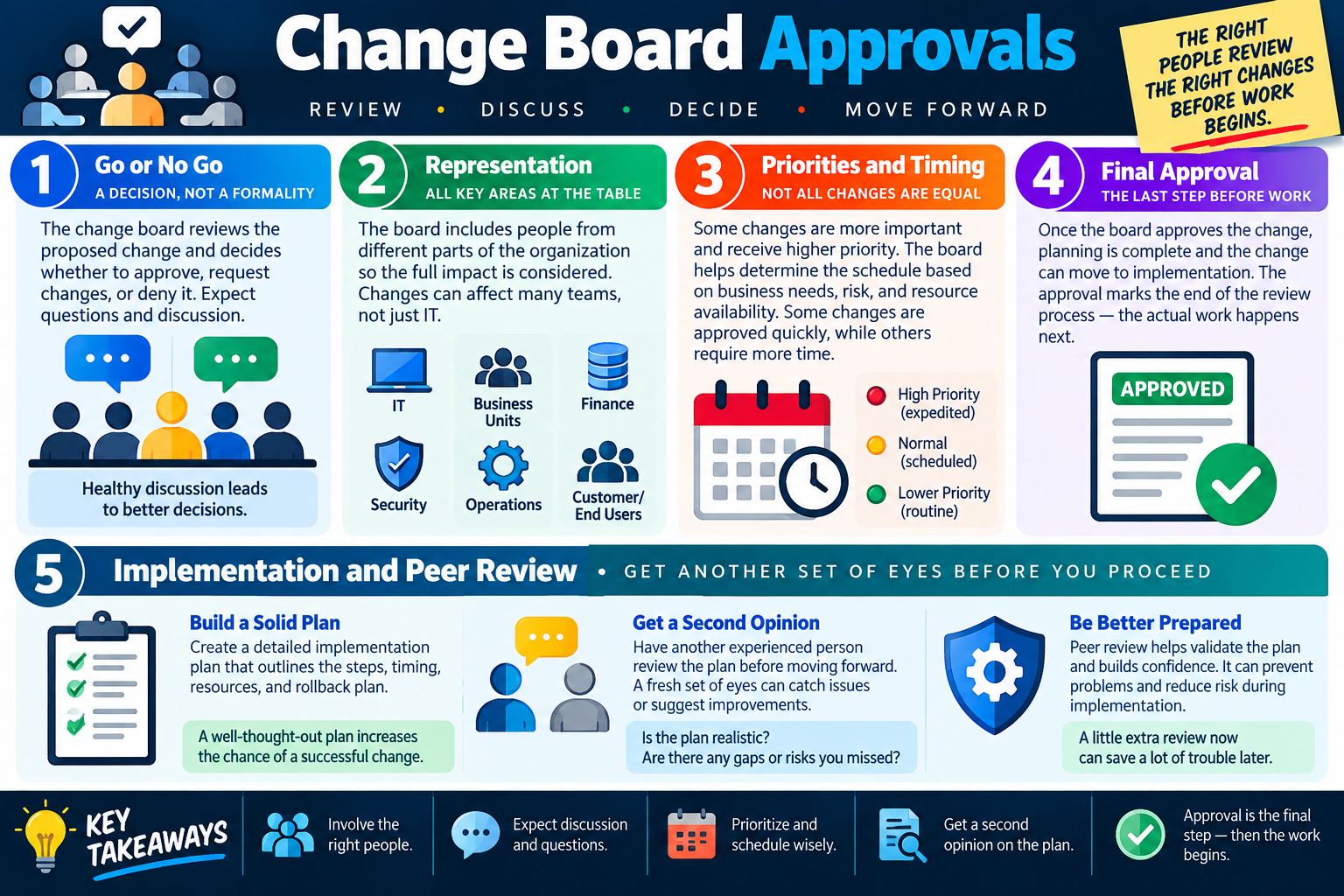
SN
Module 16

Module 16 - Section Notes

BROtocol Joe Core 2 220-1202Objective 4.2

4.2 Change Management Procedures

Core idea: Objective 4.2 is about applying a controlled process whenever IT systems are changed so improvements are planned, approved, communicated, tested, recoverable, verified, and documented.

What Change Management Does

  • Controls changes to systems, applications, devices, networks, services, and configurations.
  • Reduces unnecessary disruption by requiring planning, approval, implementation steps, verification, and documentation.
  • Creates a record of what changed, why it changed, who approved it, when it happened, and whether it worked.
  • Helps teams improve systems while protecting users, data, security, and business operations.

Change Request Process

  • Submit an official request with the requester, purpose, scope, timing, affected systems, risks, and benefits.
  • Define why the change is needed and what it should accomplish.
  • Identify what is included, what is excluded, and what dependencies may be affected.
  • Implement only after review, approval, scheduling, communication, and readiness checks are complete.

Purpose and Scope

  • Purpose explains the business or technical reason for the change.
  • Scope identifies affected systems, services, users, locations, applications, and boundaries.
  • Small scope may affect one server, application, or device; large scope may affect many sites or customers.
  • Clear scope prevents uncontrolled side changes and helps reviewers understand risk.

Change Types

  • Standard changes are routine, low risk, pre-approved, and follow a documented procedure.
  • Normal changes are planned, require the full process, and include review, approval, scheduling, testing, and validation.
  • Emergency changes are urgent and high risk but still require authorization, validation, documentation, and follow-up.
  • Classify the change by risk and urgency, not by convenience.
Memory hook: A change should answer why, what, who, when, impact, approval, recovery, validation, and closure.
Notes:
Planning, Risk, and RecoveryObjective 4.2

Plan Before Production Changes

Rollback and Backups

  • Have a rollback plan before making the change.
  • Back up configurations, settings, data, and relevant files before implementation.
  • Verify backups are usable and stored in a safe, accessible location.
  • Use multiple recovery options when possible, such as saved configs, offline copies, alternate upload methods, CLI access, or vendor support.

Sandbox Testing

  • Use an isolated test environment to validate changes before going live.
  • Test software upgrades, patches, configuration changes, functionality, and performance.
  • Confirm rollback steps and recovery methods in the sandbox when possible.
  • Remember that a sandbox cannot reproduce every production dependency, user behavior, or network condition.

Scheduling Changes

  • Use maintenance windows when user impact is expected to be low.
  • Schedule on-demand changes for specific business needs, deadlines, or releases.
  • Use recurring downtime periods for planned maintenance and standard changes.
  • Respect change freezes during holidays, major events, deadlines, or other high-risk business periods.

Affected Systems and Impact

  • Look beyond the device or application being changed.
  • Identify dependent systems such as DNS, databases, authentication, firewalls, remote access, certificates, cloud services, and business apps.
  • Determine which users, departments, locations, services, workflows, and external customers may be affected.
  • Use impact information to guide approval, timing, communication, staffing, validation, and rollback planning.
Memory hook: Good planning asks what could fail, who would notice, how to recover, and how to prove the change worked.
Notes:
People, Approval, and ClosureObjective 4.2

Coordinate the Right People

Responsible Staff Members

  • The IT team plans, configures, installs, tests, validates, and supports the technical work.
  • The business customer explains the need, defines requirements, validates results, and confirms business value.
  • The organization sponsor provides ownership, funding, support, and accountability.
  • Security, operations, support teams, vendors, and end users may also need to participate depending on risk and scope.

Change Board Approvals

  • A change board reviews proposed changes and decides whether to approve, deny, defer, or request more information.
  • Representation may include IT, business units, finance, security, operations, and customers or end users.
  • The board reviews priority, timing, business impact, risk, resources, and implementation readiness.
  • Approval is the final review step before work begins.

Peer Review and Acceptance

  • Peer review provides a second set of eyes before production work begins.
  • Reviewers may find missing steps, hidden dependencies, weak rollback plans, or unrealistic timing.
  • End-user acceptance confirms that the change works for the people who rely on it.
  • Do not close the change until validation, user acceptance, and final documentation are complete.

Communication and Closure

  • Communicate before, during, and after the change.
  • Tell affected users what is changing, when it will happen, expected downtime, who is affected, and how to get help.
  • Document approvals, implementation steps, test results, issues, rollback actions, user acceptance, and follow-up work.
  • Closure notes should explain what happened clearly enough for future troubleshooting, reporting, and audits.
Memory hook: Change management is not complete until the right people approved it, the work was verified, users accepted it, and the record explains what happened.
Notes:
TEST
Module 17

Module 17 - Final Test

Complete 20 difficult scenario-based multiple-choice questions for Objective 4.2. The test covers change management basics, request forms, purpose and scope, rollback and backup planning, sandbox testing, responsible staff, standard/normal/emergency changes, scheduling, impact assessment, change board approval, peer review, end-user acceptance, communication, validation, documentation, and technician decision-making. Each correct answer is worth 1 point.

Score pending0 / 20
WB
Workbook

Student Workbook

BrotocolJoeStudent Workbook

BrotocolJoe

CompTIA A+ Core 2 (220-1202)

Student Workbook

4.0 Operational Procedures

Objective 4.2 - Given a scenario, apply change management procedures.

How to use this workbook: Print this packet once, complete it by hand as you finish each online module, and keep it as evidence that you read, processed, and practiced the Objective 4.2 change management material.
Student Name:
What Is Change Management?Objective 4.2

Module 1 - What Is Change Management?

Key Information: Change management coordinates planning, authorization, implementation, communication, and review so that system changes meet business needs with understood risks.

Check Your Understanding

Why can a technically correct change still disrupt business?

How does an accountable change record help support staff?

Why should recovery be considered before implementation?

Change Rationale Record

  • Use a proposed business application upgrade. Write one or two sentences per field.
  • Need: Describe the business problem to solve.
  • Risk: Identify one possible unintended consequence.
  • Success: State an observable business outcome that would demonstrate value.
Explain why change management applies even when the implementation itself seems simple.
Technician Scenario: A technician wants to change a shared printer setting during business hours. Describe the information and coordination needed to decide how the change should proceed.
Change Management ProcessObjective 4.2

Module 2 - Change Management Process

Key Information: A change moves from a documented request through assessment, authorization, controlled implementation, validation, and closure. Follow the organization’s process and record exceptions.

Check Your Understanding

What information should be ready before an approval decision?

Why is validation required after implementation?

What should the final change record say about deviations from the plan?

Process Checkpoint Record

  • Use a scheduled application update. Write one or two sentences per field.
  • Before: Identify the planning and authorization evidence required.
  • During: Describe how actions, results, and unexpected conditions will be recorded.
  • After: Identify validation, communication, and closure evidence.
Explain why implementation completion and change closure are separate milestones.
Technician Scenario: An update installs successfully but users cannot complete their normal workflow. Explain the next steps and what should prevent premature closure.
Rollback and Backup PlansObjective 4.2

Module 3 - Rollback and Backup Plans

Key Information: A rollback plan defines how to return to an acceptable state, who decides, and when to act. Backups support recovery but must be usable and appropriate to the affected systems.

Check Your Understanding

How does a backup differ from a complete rollback plan?

Why must recovery duration fit the maintenance window?

How can data written after a change complicate rollback?

Comparison Record: Backup vs. Rollback

  • Write one or two sentences per prompt.
  • Backup: Identify the data or configuration to preserve and how recoverability will be verified.
  • Rollback: Describe the trigger, owner, and supported restoration approach.
  • Decision: Explain when recovery should begin to preserve time for validation.
Explain why a successful backup job alone does not prove that the service can be restored.
Technician Scenario: An application upgrade changes its database format. Plan recovery prerequisites, treatment of new transactions, rollback decision criteria, and validation without assuming the older application can use the new database.
Sandbox TestingObjective 4.2

Module 4 - Sandbox Testing

Key Information: An isolated test environment allows controlled checks before production work. Record differences from production, test representative workflows, and exercise recovery where feasible.

Check Your Understanding

What makes a test environment sufficiently representative?

Why should test data be protected or sanitized?

What production conditions might a sandbox fail to reproduce?

Sandbox Test Record

  • Use an operating-system update for business workstations. Write one or two sentences per field.
  • Coverage: Identify hardware, applications, and workflows to test.
  • Results: Specify the expected behavior and evidence to capture.
  • Limits: Describe an important production difference and how remaining risk will be handled.
Explain why passing sandbox tests reduces uncertainty without guaranteeing production success.
Technician Scenario: An update works on a test PC but the lab lacks a department’s specialized peripheral. Describe the coverage gap and the additional evidence needed before broad deployment.
Responsible Staff MembersObjective 4.2

Module 5 - Responsible Staff Members

Key Information: Assign implementation, approval, business validation, support, and communication responsibilities explicitly. Confirm availability and handoff expectations rather than assuming another team owns a task.

Check Your Understanding

Why should each critical action have an identified owner?

How do a business sponsor and an implementation technician contribute differently?

Why should vendor availability be confirmed before the maintenance window?

Responsibility Record

  • Use a shared application upgrade. Write one or two sentences per field.
  • Implementation: Identify the role performing work and coordinating recovery.
  • Authorization: Identify the role empowered to approve or stop the change.
  • Validation: Identify who tests technical health and who confirms business usability.
  • Communication: Identify who informs users and handles support escalation.
Explain how an absent decision-maker could affect a time-sensitive rollback.
Technician Scenario: A planned upgrade depends on a vendor and a department representative, but neither is confirmed for the window. Describe the readiness issue and the coordination needed before proceeding.
Request FormsObjective 4.2

Module 6 - Request Forms

Key Information: A complete change request gives reviewers enough information to evaluate need, scope, timing, impact, risk, implementation, recovery, and validation. Unknowns should be visible rather than hidden.

Check Your Understanding

Why should the requester and implementer be identified separately?

How do benefits and risks support an approval decision?

What should happen when a required field is still unknown?

Request Form Record

  • Draft concise entries for a fictional application upgrade.
  • Purpose and scope: State why the change is needed and which systems are included.
  • Timing and ownership: State the proposed window and responsible roles.
  • Risk and recovery: Describe one credible failure and the planned response.
  • Validation and approval: State the success check and authorization required.
Explain why vague entries such as no impact or fix if needed do not support meaningful review.
Technician Scenario: A request contains only update server Saturday. Identify missing information and draft the questions needed to make the proposal reviewable.
Purpose & Scope of ChangeObjective 4.2

Module 7 - Purpose & Scope of Change

Key Information: Purpose describes why a change is needed; scope defines its boundaries. Identify included and excluded systems, affected users, expected duration, and dependencies.

Check Your Understanding

How does a business objective differ from a list of technical actions?

Why should exclusions be documented?

What should happen if implementation reveals work outside the approved scope?

Comparison Record: Purpose vs. Scope

  • Write one or two sentences per prompt.
  • Purpose: State the business result expected from a printer-server migration.
  • Scope: Define the servers, queues, and user groups included, plus an explicit exclusion.
  • Boundary: Explain how an additional unplanned configuration change would be handled.
Explain how clear scope helps reviewers estimate risk and define acceptance tests.
Technician Scenario: During an approved departmental migration, a technician notices unrelated settings that could be improved. Describe how to handle the additional work while maintaining approval boundaries.
Different Change TypesObjective 4.2

Module 8 - Different Change Types

Key Information: Standard, normal, and emergency changes follow different organizational paths. Standard changes use defined preauthorized procedures; emergency changes still require the designated authorization and records.

Check Your Understanding

What makes a change eligible for the standard process?

Why is a request urgent to its requester not automatically an emergency?

What documentation remains important when emergency action is necessary?

Change Type Comparison Record

  • For each prompt, name the likely process and explain what policy evidence you would verify.
  • Routine: A repeatable low-risk task matches an approved standard procedure.
  • Planned: A new system upgrade needs risk assessment and scheduling.
  • Emergency: A critical service requires immediate corrective action.
Explain why emergency handling accelerates coordination rather than eliminating accountability.
Technician Scenario: A manager asks to classify a late feature request as an emergency to avoid normal review. Describe the criteria and authority needed to determine its proper path.
Date and Time of ChangeObjective 4.2

Module 9 - Date and Time of Change

Key Information: A suitable window accounts for business activity, dependencies, staff, implementation duration, rollback, and validation. Confirm time zones and communicate expected service effects.

Check Your Understanding

Why should a window include rollback and testing time?

How can a change freeze affect scheduling?

Why should remote stakeholders receive unambiguous time-zone information?

Maintenance Window Record

  • Use a change estimated to take one hour. Write one or two sentences per field.
  • Timing: Identify business constraints and additional recovery or validation time to allow.
  • Resources: State which people and dependencies must be available.
  • Communication: Describe the outage notice and completion update.
Explain why recurring maintenance windows do not automatically authorize every proposed change.
Technician Scenario: A planned change overlaps a financial reporting deadline in another region. Describe the scheduling review, stakeholder coordination, and authorization needed to resolve the conflict.
Affected Systems & ImpactsObjective 4.2

Module 10 - Affected Systems & Impacts

Key Information: Changes can affect services beyond the directly modified component. Map upstream and downstream dependencies, users, locations, and external consumers.

Check Your Understanding

How could changing one shared service affect several applications?

Why should external users be included in the impact review?

How can dependency information guide validation?

Dependency Record

  • Use a change to a shared authentication service. Write one or two sentences per field.
  • Direct system: Describe the component being changed.
  • Dependent services: Identify examples of applications or workflows that rely on it.
  • Users: Describe groups and locations that might experience interruption.
  • Checks: Name representative downstream workflows to validate.
Explain why counting changed devices does not measure the full business impact.
Technician Scenario: Only one server will be modified, but several departments rely on it for sign-in. Describe the affected services and communication needs that a server-only plan would miss.
Impact AssessmentObjective 4.2

Module 11 - Impact Assessment

Key Information: Impact assessment connects technical dependencies to business consequences, likelihood, uncertainty, and mitigation. Use findings to shape approval, scheduling, communication, and recovery.

Check Your Understanding

How does potential impact differ from the likelihood of failure?

Why should unknown dependencies be recorded?

How can an available workaround reduce disruption?

Impact Assessment Record

  • Use a shared file-service change. Write one or two sentences per field.
  • Consequence: Describe a plausible failure and the business work affected.
  • Exposure: Identify affected users, time sensitivity, and available alternatives.
  • Mitigation: State an action that reduces the risk or disruption.
  • Uncertainty: Identify information still needed before the approval decision.
Explain why a low probability does not automatically make a high-consequence change acceptable.
Technician Scenario: A change is unlikely to fail, but failure could halt order processing. Describe the evidence, mitigations, and decision-making needed before implementation.
Change Board ApprovalsObjective 4.2

Module 12 - Change Board Approvals

Key Information: The designated approval authority reviews the proposal, risk, timing, readiness, and stakeholder needs. Document conditions and confirm that the implemented plan matches what was authorized.

Check Your Understanding

What information supports a go/no-go decision?

Why should approval conditions be recorded?

What should happen if a material part of an approved plan changes?

Approval Readiness Record

  • Use a request awaiting review. Write one or two sentences per field.
  • Evidence: Identify test, impact, and recovery information to present.
  • Conditions: Describe a prerequisite that could make approval conditional.
  • Decision: Specify how approval, rejection, or deferral will be recorded and communicated.
Explain why technical readiness and authorization are both necessary.
Technician Scenario: A change was approved on condition that recovery testing succeed, but that test has not been completed. Describe the appropriate readiness decision and communication.
Peer Reviewed ImplementationObjective 4.2

Module 13 - Peer Reviewed Implementation

Key Information: Peer review checks whether an implementation plan is complete, realistic, and recoverable. Resolve findings and keep the reviewed version aligned with the authorized plan.

Check Your Understanding

How can a second reviewer identify assumptions the author missed?

Why should commands, prerequisites, and expected results be reviewable?

How should unresolved review findings affect readiness?

Peer Review Record

  • Use a deployment plan missing detailed verification. Write one or two sentences per field.
  • Finding: Describe the missing check and why it matters.
  • Revision: Propose a concrete improvement to the plan.
  • Follow-through: Explain how the revised plan and any approval implications will be checked.
Explain why peer review does not replace the designated change approval process.
Technician Scenario: A reviewer finds that rollback requires credentials unavailable to the implementation team. Describe the plan revision and readiness checks needed before the scheduled work.
End-User AcceptanceObjective 4.2

Module 14 - End-User Acceptance

Key Information: Technical checks establish system health; acceptance confirms that agreed business workflows and requirements are met. Record results, remaining issues, and authorized sign-off before closure.

Check Your Understanding

Why can a healthy service still fail a user’s business task?

Who should perform or authorize business acceptance?

How should unresolved issues be reflected in the final record?

Comparison Record: Technical Validation vs. Acceptance

  • Write one or two sentences per prompt.
  • Technical: Specify a system-health check after a business application upgrade.
  • Business: Specify a representative user workflow and expected result.
  • Closure: Describe the sign-off and unresolved-issue record required before closing the change.
Explain why silence from users is not equivalent to documented acceptance.
Technician Scenario: An upgrade passes service checks, but users cannot export a required report. Describe acceptance testing, issue handling, communication, and the decision needed before closure.
Objective 4.2 Final CheckCumulative Review

Objective 4.2 - Final Check

Purpose: Connect change planning, authorization, implementation, recovery, and business acceptance.

Scenario Sorting

For each case, identify the planning or acceptance gap and a justified next action.

  • A rollback test exceeds the proposed maintenance window.
  • A routine request is labeled an emergency to avoid review.
  • A peer reviewer discovers an unplanned service dependency.
  • A required approval condition remains unmet.
  • An upgraded application cannot complete a required business report.

Explain What You Know

  • How do purpose and scope differ?
  • How do impact and timing shape the plan?
  • Why must rollback be planned before implementation?
  • What evidence supports business acceptance and closure?
For each case above, identify the gap, responsible role, and next action, in order.
Draft a change plan for a shared business application upgrade. Include purpose, scope, change type, affected services, risk, roles, schedule, testing, approval, peer review, implementation checkpoints, rollback triggers, communication, and user acceptance.

4.2 Completion

Student signature:
Date completed:
Instructor signature:
Module 01 of 17