Home
Certification Prep // 220-1202

4.0 Operational Procedures

4.10 ~ Explain basic concepts related to artificial intelligence (AI).

core2-lab.exe
> load objective 4.10
> map scenario clues
> verify and document
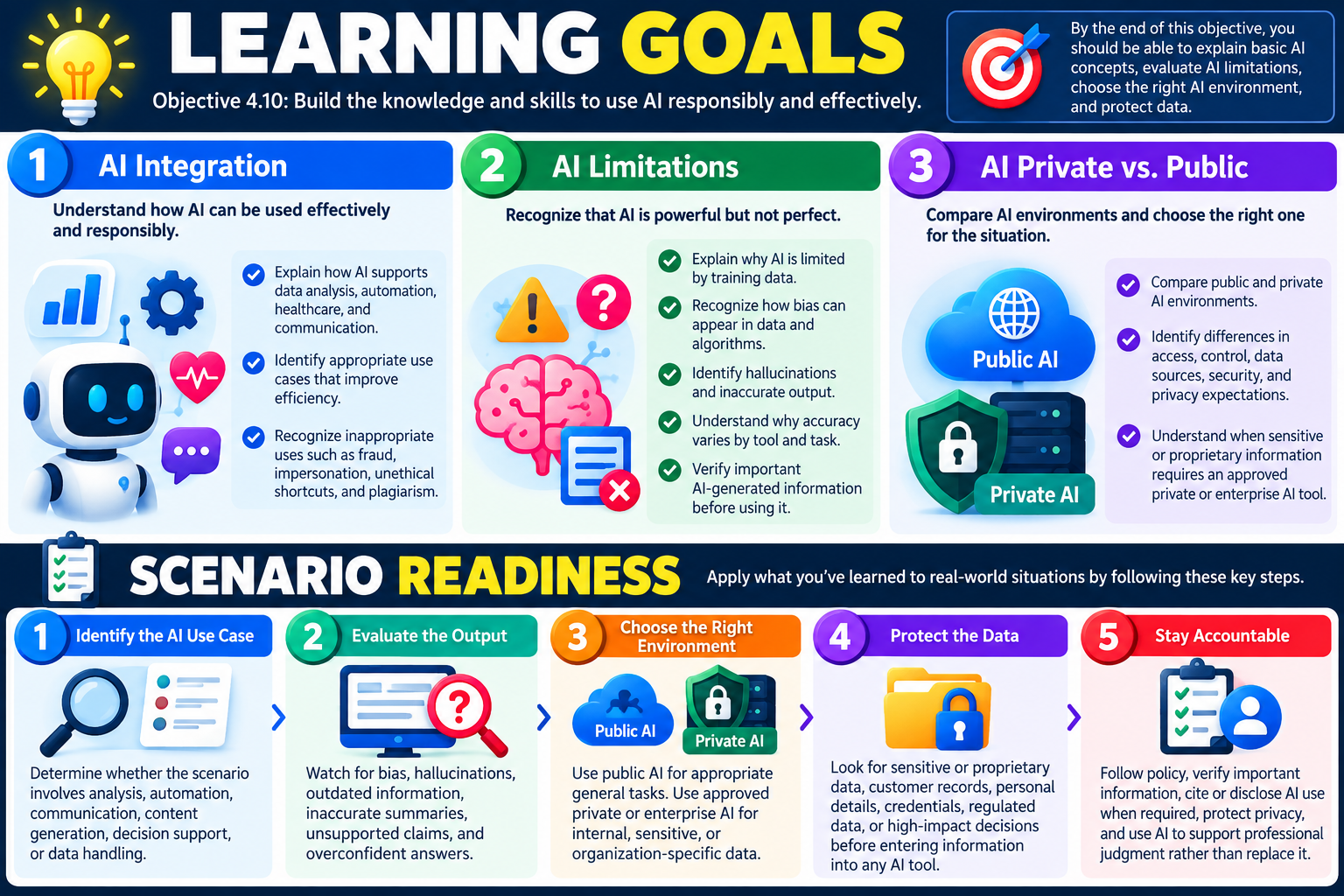
Learning Goals infographic for Objective 4.10 covering AI integration, AI limitations, public and private AI, and scenario readiness for responsible artificial intelligence use.
Objective 4.10 learning goals focus on using AI responsibly, understanding limitations, choosing the correct AI environment, and protecting data.

Learning Goals

By the end of Objective 4.10, you should be able to explain basic artificial intelligence concepts, recognize appropriate and inappropriate AI use, evaluate AI limitations, and protect data when choosing between public and private AI environments.

Module 1 - AI Integration Explain how AI can support data analysis, automation, healthcare support, and communication; identify appropriate AI use cases that improve efficiency; and recognize inappropriate uses such as fraud, impersonation, unethical shortcuts, and plagiarism.
Module 2 - AI Limitations Describe why AI is limited by training data, explain how bias can appear in data and algorithms, recognize hallucinations and inaccurate output, understand why accuracy varies by tool and task, and verify important AI-generated information before using it.
Module 3 - AI Private vs. Public Compare public AI and private AI environments, identify differences in access, control, data sources, data security, and privacy expectations, and decide when sensitive information requires an approved private or enterprise AI tool.

Scenario Readiness

  1. Identify the AI use case. Determine whether the scenario involves analysis, automation, communication, content generation, decision support, or data handling.
  2. Evaluate the output. Watch for bias, hallucinations, outdated information, inaccurate summaries, unsupported claims, and overconfident answers.
  3. Choose the right environment. Use public AI only for appropriate general tasks and approved private or enterprise AI for internal, sensitive, or organization-specific data.
  4. Protect the data. Look for sensitive data, proprietary information, customer records, personal details, credentials, regulated data, or high-impact decisions before entering information into any AI tool.
  5. Stay accountable. Follow policy, verify important information, cite or disclose AI use when required, protect privacy, and use AI to support professional judgment rather than replace it.
Lesson ModuleModule 1 / 6
AI
Module 01

Module 1 - AI Integration
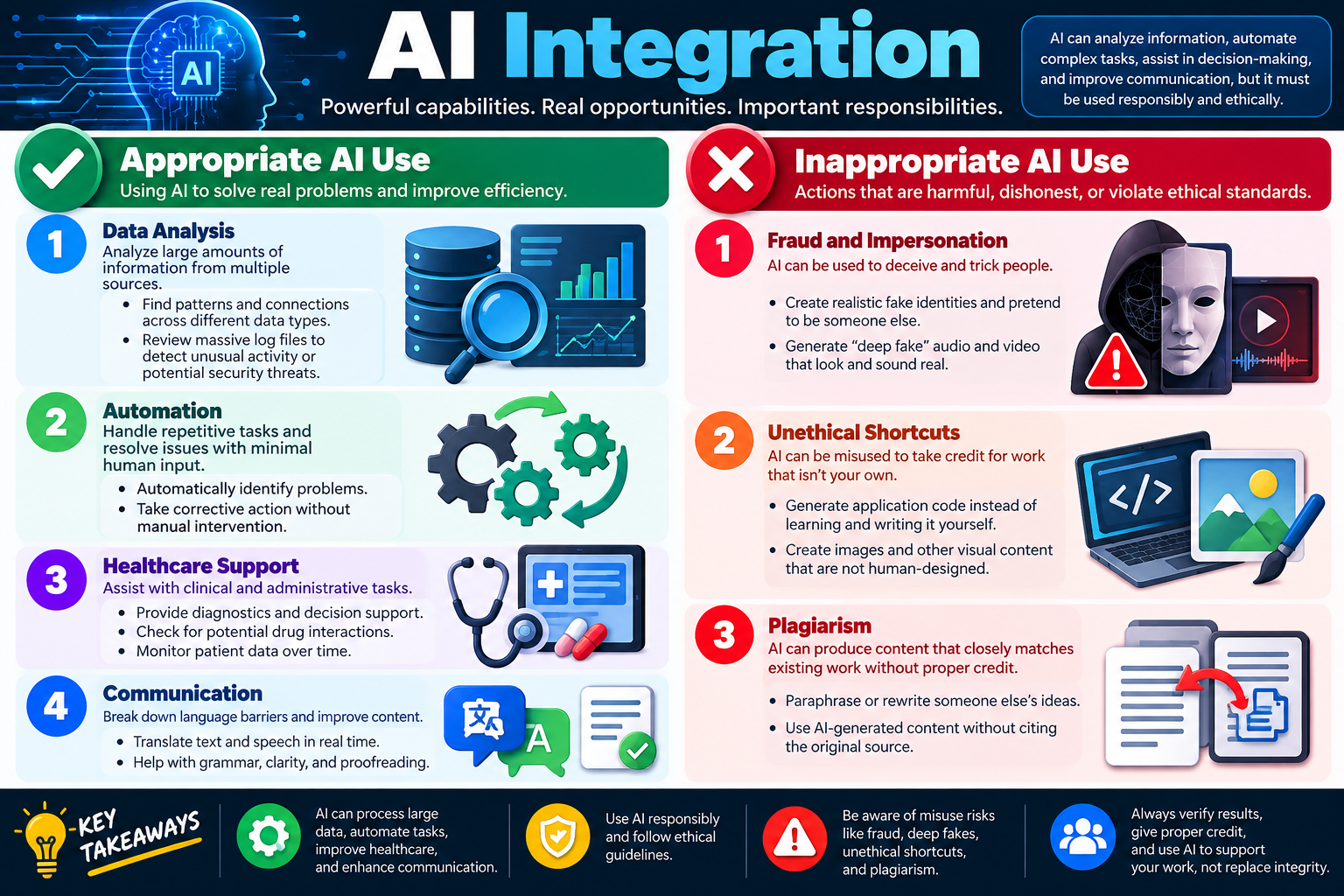
AI Integration infographic explaining appropriate AI use for data analysis, automation, healthcare support, and communication, plus inappropriate AI use such as fraud, impersonation, unethical shortcuts, and plagiarism.
AI integration can improve analysis, automation, healthcare support, and communication, but it must be used responsibly, ethically, and with verification.

AI integration means using artificial intelligence inside real workflows to analyze information, automate tasks, support decisions, and improve communication. The opportunity is powerful, but so is the responsibility: AI should support professional work, not replace judgment, honesty, privacy, or accountability.

For Objective 4.10, the goal is to understand basic AI concepts well enough to recognize appropriate and inappropriate use. AI tools can process large amounts of data, find patterns, summarize content, translate language, assist with troubleshooting, and help users complete routine work faster. In a support environment, this can make technicians more efficient and help organizations make better decisions.

At the same time, AI can be misused. A tool that can generate text, code, images, audio, or video can also be used to deceive people, impersonate someone, plagiarize work, or create content that violates policy. A professional technician should treat AI output as a starting point that must be reviewed, verified, cited when required, and used according to organizational rules.

Appropriate AI Use

Appropriate AI use means applying AI to solve real problems, improve efficiency, and support better outcomes without violating privacy, policy, ethics, or ownership rules. The infographic groups appropriate use into four major areas: data analysis, automation, healthcare support, and communication. These examples show how AI can assist people by handling scale, repetition, and pattern recognition while humans remain responsible for final decisions.

Data Analysis

AI can analyze large amounts of information from multiple sources much faster than a person could review manually. In IT and security work, this can include logs, alerts, tickets, system performance data, endpoint telemetry, inventory records, or other structured and unstructured information. AI can help identify patterns, connections, trends, and anomalies that may not be obvious at first glance.

For example, AI may review massive log files to detect unusual activity or possible security threats. It might notice repeated login failures, unusual access times, abnormal network behavior, or changes that match previous incidents. This does not mean the AI has proven an attack by itself. It means the tool can help surface clues so a technician or analyst can investigate more efficiently.

  1. Find patterns across data types. AI can compare information from logs, tickets, events, reports, and other sources.
  2. Support threat detection. AI can help flag unusual activity that may require review by a technician or security analyst.
  3. Improve decision support. AI can summarize large data sets so humans can focus on judgment and next steps.
  4. Require verification. AI findings should be checked against evidence before action is taken.

Automation

AI can help automate repetitive tasks and reduce manual effort. Automation may identify problems, recommend next steps, or take corrective action when the task is well understood and approved. This can help technicians spend less time on routine work and more time on troubleshooting, planning, user support, and higher-value tasks.

Examples include automatically categorizing support tickets, suggesting knowledge base articles, detecting repeated error patterns, identifying systems that need attention, or assisting with routine workflow steps. In some environments, AI may help trigger corrective actions, but those actions should be controlled by policy, permissions, testing, and change management. Automation should not become uncontrolled change.

Identify routine issues AI can help recognize repeated symptoms, common failures, or known patterns.
Reduce manual input AI can assist with repetitive tasks, summaries, categorization, and workflow steps.
Support corrective action AI may recommend or trigger approved fixes when the scope and risk are understood.
Keep human accountability Technicians remain responsible for validating results and following policy.

Healthcare Support

The infographic uses healthcare support as an example of AI assisting with clinical and administrative tasks. AI can help analyze patient data over time, check for possible drug interactions, assist with diagnostics, or support decision-making. These uses can be valuable because healthcare environments often involve large amounts of information and time-sensitive decisions.

However, healthcare also shows why AI must be used carefully. AI should support qualified professionals, not replace them. Medical data is sensitive, regulated, and high impact. Any AI-assisted recommendation must be reviewed within approved clinical, privacy, and compliance processes. In a broader IT exam context, this reinforces an important idea: the more sensitive the data and the higher the risk, the more carefully AI use must be controlled.

  • Diagnostic support: AI may help identify patterns that support a professional review.
  • Drug interaction checks: AI can help compare medication data against known risk patterns.
  • Patient monitoring: AI can assist with watching trends over time and flagging concerns.
  • Compliance matters: Sensitive data must be protected and handled only through approved systems.

Communication

AI can improve communication by translating text or speech, helping with grammar, improving clarity, summarizing long messages, and making content easier to understand. This can be useful for support technicians who need to communicate with users, write ticket notes, prepare instructions, or explain technical topics in everyday language.

Good communication support does not mean letting AI speak without review. A technician should check that the message is accurate, respectful, complete, and appropriate for the audience. AI can help draft or polish content, but the technician is still responsible for the final wording, technical accuracy, and tone.

Translate content AI can help break down language barriers in text and speech.
Improve clarity AI can help simplify explanations and make instructions easier to follow.
Proofread work AI can assist with grammar, spelling, structure, and readability.
Review before sending AI-generated communication should be checked before it reaches users or customers.

Inappropriate AI Use

Inappropriate AI use includes actions that are harmful, dishonest, deceptive, or unethical. The infographic highlights three major misuse categories: fraud and impersonation, unethical shortcuts, and plagiarism. These are important because AI can create convincing content quickly, and convincing content can be abused.

Fraud and Impersonation

AI can be used to create realistic fake identities, generate deepfake audio or video, imitate writing styles, or produce content that appears to come from someone else. This creates risk for social engineering, scams, business email compromise, fake support requests, misinformation, and reputational harm.

A technician should be cautious when a request, voice message, video, email, or identity claim seems unusual or high risk. Verification through approved channels matters. If AI-generated impersonation is suspected, preserve evidence, avoid taking risky action, and escalate according to policy.

  • Fake identities: AI can help create realistic profiles, photos, messages, or personas.
  • Deepfake media: AI-generated audio and video can look or sound real.
  • Social engineering risk: Attackers may use AI to make scams more convincing.
  • Verification required: Sensitive requests should be confirmed through trusted channels.

Unethical Shortcuts

AI can be misused to take credit for work that is not your own. This might include generating application code instead of learning and writing it yourself, creating images and pretending they were human-designed, or submitting AI-created work without following disclosure requirements. In a professional environment, this can violate policy, damage trust, and create quality or licensing problems.

Using AI as a learning aid or productivity assistant can be appropriate when policy allows it. The line is crossed when a person hides AI use, misrepresents authorship, bypasses required learning, ignores review, or submits work they do not understand. A technician should be able to explain, verify, support, and take responsibility for the work they deliver.

Plagiarism

AI can produce content that closely resembles existing work or rewrites someone else's ideas without proper credit. Even when AI creates new wording, the user is still responsible for checking whether the output uses protected material, needs citation, or violates policy. This applies to reports, documentation, training content, code, images, scripts, and other deliverables.

Plagiarism risk is not solved by asking AI to paraphrase. If the underlying idea, structure, or source belongs to someone else, proper credit may still be required. In school, business, and certification prep environments, users should follow disclosure and citation requirements.

Exam Mindset

If a scenario asks whether AI use is appropriate, look for the answer that improves efficiency while protecting privacy, accuracy, ownership, and ethics. If the scenario includes fake identities, deepfakes, uncited content, copied ideas, unverified results, or taking credit for AI-generated work, choose the answer that verifies, cites, discloses, follows policy, and escalates misuse when necessary.

Bottom line: AI can help technicians analyze data, automate repetitive work, support specialized decision-making, and communicate more clearly. Use it responsibly: follow policy, protect sensitive information, verify results, give proper credit, avoid deception, and use AI to support your work instead of replacing integrity.
AI
Module 02

Module 2 - AI Limitations

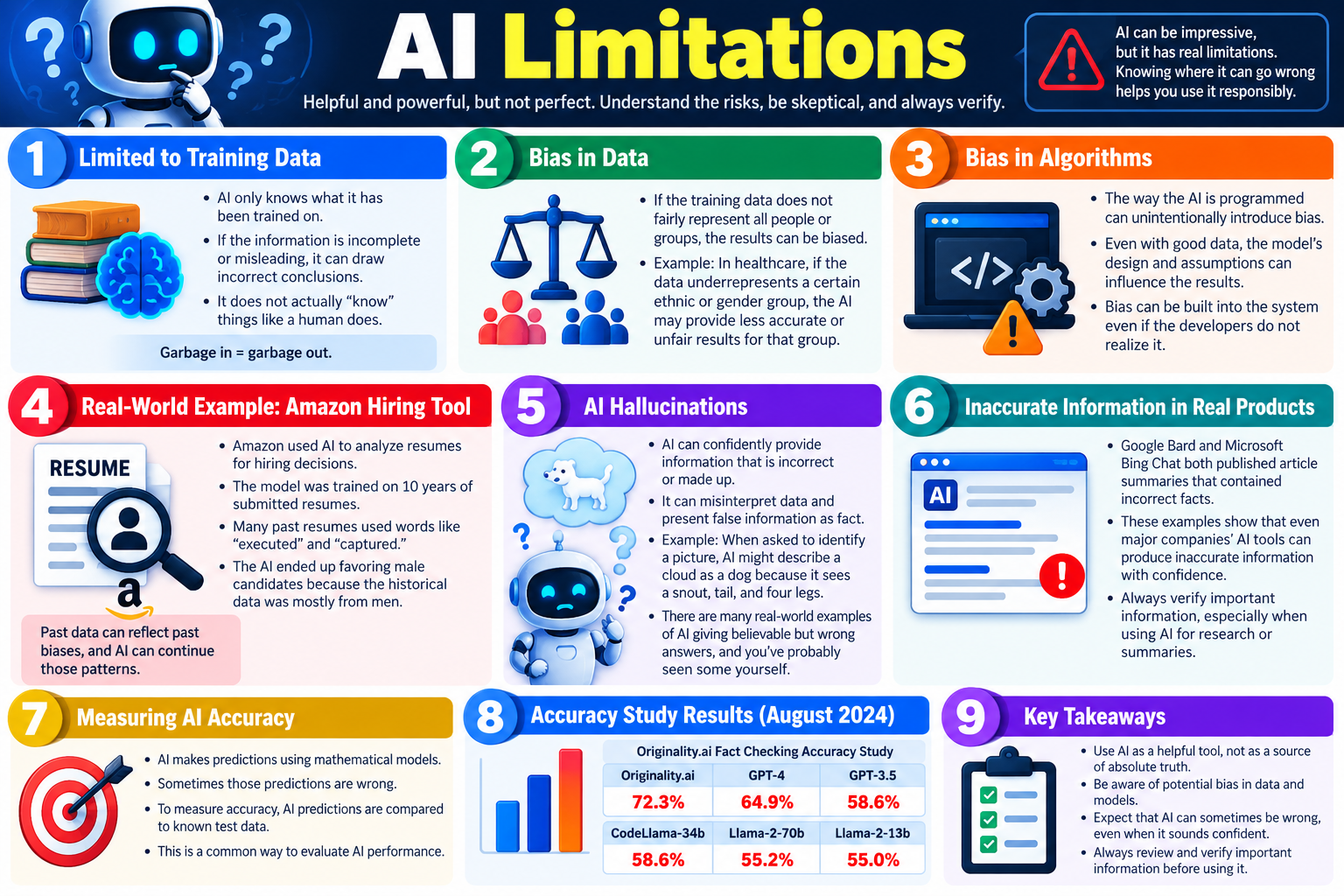
AI Limitations infographic explaining training data limits, bias in data, bias in algorithms, AI hallucinations, inaccurate information in products, measuring AI accuracy, and key verification takeaways.
AI tools can be useful and impressive, but they have real limits. Responsible use means being skeptical, checking important results, and understanding where AI can go wrong.

AI can be helpful and powerful, but it is not perfect. Its output depends on training data, model design, assumptions, and prompts, so technicians must understand bias, hallucinations, inaccurate information, and the need to verify results before using AI output for decisions.

For Objective 4.10, AI limitations are just as important as AI capabilities. A tool may sound confident, produce polished text, summarize large documents, or provide a detailed answer, but that does not guarantee it is correct. AI systems do not understand truth the same way a human expert does. They generate output based on patterns learned from data and the instructions they receive.

The technician mindset is simple: use AI as a helpful assistant, not as an absolute source of truth. When the information matters, verify it. When the output affects users, systems, safety, privacy, compliance, or business decisions, review it carefully and confirm it with trusted sources.

Limited to Training Data

AI systems learn from training data. That data may include books, websites, code, documentation, examples, images, or other information selected during the model-building process. The AI can only generate answers based on patterns it learned from that training process and any additional context provided by the user or connected tools.

If the training data is incomplete, outdated, misleading, low quality, or unrepresentative, the AI may produce incorrect conclusions. The infographic summarizes this with the phrase, garbage in equals garbage out. If the model learns from flawed information, the output may reflect those flaws. If the model lacks information about a new product, policy, vulnerability, or procedure, it may guess instead of saying it does not know.

  1. AI does not truly know like a person. It predicts likely output based on patterns, not personal understanding.
  2. Incomplete data creates weak answers. Missing or misleading training examples can lead to wrong conclusions.
  3. Outdated data can be risky. AI may not know recent changes unless it has access to current information.
  4. Verification is required. Important information should be checked against trusted sources, documentation, logs, or policy.

Bias in Data

Bias in data happens when the information used to train or guide an AI system does not fairly represent people, groups, events, devices, environments, or outcomes. If the data overrepresents one group and underrepresents another, the AI may perform better for one group than another. In high-impact areas, that can lead to unfair or inaccurate results.

The infographic gives a healthcare example: if medical data underrepresents a certain ethnic or gender group, an AI tool may provide less accurate support for that group. The same idea applies beyond healthcare. In IT, data bias could appear in support ticket patterns, hiring tools, security alerts, user behavior analytics, language translation, facial recognition, or automated decision systems.

Training data matters Results depend heavily on the examples used to build or guide the AI system.
Underrepresented groups If some groups are missing or poorly represented, results may be less accurate for them.
Historical patterns Past decisions, records, or behaviors can reflect old bias and continue it through AI output.
Human review matters Technicians and decision-makers should question outputs that may affect fairness, access, or opportunity.

Bias in Algorithms

Bias can also come from the way the AI is designed, programmed, tuned, tested, or deployed. Even when the data seems good, the model's assumptions and design choices can influence results. Developers may not intend to create bias, but bias can still enter through feature selection, weighting, labels, optimization goals, thresholds, or testing methods.

This matters because AI output can look objective. A score, recommendation, summary, or ranking may seem mathematical and neutral, but the system behind it may be shaped by hidden assumptions. Technicians should remember that AI results are not automatically fair just because they came from software.

  • Design choices influence output: Model architecture, labels, and priorities can affect results.
  • Bias may be unintentional: Developers may not realize how a system favors or disadvantages certain cases.
  • Testing must be broad: AI should be evaluated across different groups, data types, and real scenarios.
  • Policy still applies: AI-assisted decisions should follow organizational, ethical, legal, and compliance requirements.

Real-World Example: Amazon Hiring Tool

The infographic references Amazon's experimental hiring tool as an example of past data reflecting past bias. The tool used historical resumes to identify patterns, but the historical data came from an environment where many past resumes were from men. As a result, the system learned patterns that favored male candidates and penalized signals more associated with women.

This example is important because the AI was not necessarily trying to discriminate. It learned from historical patterns. If the past data reflects unfairness, the AI can repeat that unfairness at scale. A technician should understand the larger lesson: automated systems can continue old problems unless data, design, testing, and human oversight are handled carefully.

Scenario Lesson

If an AI tool is trained on biased historical records, it may produce biased future recommendations. The best response is not to trust the output because it is automated. The best response is to review the data, test for fairness, document the concern, and use human oversight before making high-impact decisions.

AI Hallucinations

An AI hallucination is when an AI confidently provides information that is incorrect, made up, unsupported, or misinterpreted. The answer may sound polished and convincing, but it can still be wrong. Hallucinations are especially risky because users may trust the tone of confidence instead of checking the facts.

The infographic gives a simple image example: if asked to identify a picture, AI might describe a cloud as a dog because it sees a snout, tail, and four legs. In text, hallucinations can show up as fake citations, wrong commands, incorrect troubleshooting steps, imaginary features, false summaries, inaccurate policy details, or confidently stated technical errors.

  1. Confidence is not proof. AI can sound certain even when it is wrong.
  2. False details can look real. Fake references, commands, steps, or product names may appear plausible.
  3. Context can be misread. AI may misunderstand an image, log, ticket, policy, or user request.
  4. Verification protects users. Important answers should be checked before being used in support or documentation.

Inaccurate Information in Real Products

Major AI products have produced inaccurate information in public examples, summaries, and answers. The infographic mentions Google Bard and Microsoft Bing Chat publishing article summaries that contained incorrect facts. The point is not that those tools are useless. The point is that even major companies' AI tools can be wrong while sounding confident.

This is a major exam concept: do not assume AI output is correct because the tool is popular, branded, or professionally designed. A technician should verify important information, especially when using AI for research, summaries, troubleshooting, legal or compliance content, security decisions, medical information, or anything that affects users and systems.

Summaries can be wrong AI may leave out important details or introduce errors while summarizing.
Brand trust is not enough Well-known tools can still produce inaccurate output.
Research needs checking AI-assisted research should be verified against reliable sources.
High-impact use needs caution The more important the decision, the more carefully the output should be reviewed.

Measuring AI Accuracy

AI accuracy is often measured by comparing AI predictions or answers against known test data. If the expected answer is already known, reviewers can check whether the AI output matches. This is one common way to evaluate model performance, but it is not the same as proving the AI will always be correct in real life.

Accuracy scores can vary by task, data set, prompt, language, product version, and evaluation method. A model may perform well on one type of question and poorly on another. A technician should understand that accuracy is not a permanent guarantee. It is a measurement under specific conditions.

  • AI makes predictions: It uses mathematical models to produce likely outputs.
  • Predictions can be wrong: Even strong models make mistakes.
  • Known test data helps measure performance: Comparing answers to known results helps evaluate accuracy.
  • Scores have context: Accuracy depends on what was tested and how the test was performed.

Accuracy Study Results

The infographic includes accuracy study results from August 2024 showing fact-checking accuracy percentages across several models. The lesson is that AI accuracy can vary widely. Even the highest score shown is not perfect, and several models are much lower. That means users should expect AI to sometimes be wrong, even when it appears useful.

For an exam or workplace scenario, the exact percentage is less important than the pattern: AI output needs review. If a model is 70 percent accurate on a certain test, that still means many answers may be wrong. If a model is around 55 or 60 percent accurate, the need for careful verification is even clearer.

Key Takeaways for AI Limitations

Use AI as a tool AI can assist with work, but it should not be treated as an unquestionable authority.
Watch for bias Bias can come from training data, historical patterns, algorithms, assumptions, or deployment choices.
Expect errors AI can hallucinate, summarize incorrectly, or present false information with confidence.
Verify important output Review and confirm important information before using it in decisions, support, documentation, or reports.

Exam Mindset

If a question describes AI giving a confident answer, summarizing content, making predictions, ranking people, analyzing data, or recommending action, ask what could go wrong. Look for bias, incomplete training data, hallucinations, outdated information, inaccurate summaries, and missing verification. The safest answer usually reviews the output, checks trusted sources, and keeps humans accountable for final decisions.

Bottom line: AI can be impressive, but it has real limitations. It is limited by training data, can reflect bias, can be shaped by algorithm design, can hallucinate, and can produce inaccurate information even in polished products. Use AI skeptically, verify important results, and treat it as a support tool rather than a source of absolute truth.

AI
Module 03

Module 3 - AI Private vs. Public

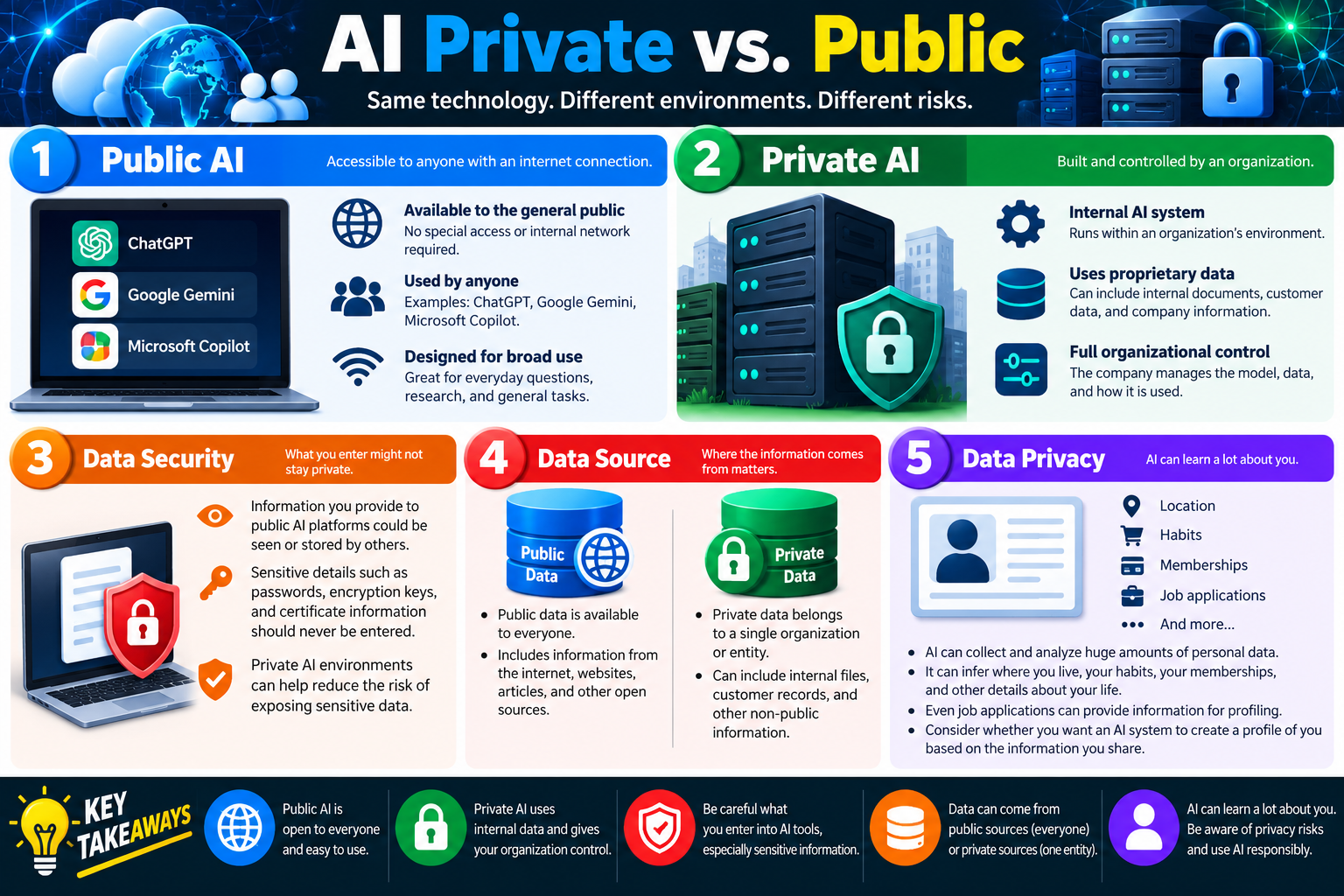
AI Private versus Public infographic comparing public AI, private AI, data security, data sources, and data privacy risks.
Public AI and private AI may use similar technology, but they operate in different environments with different data security, data source, and privacy risks.

Public AI and private AI can use similar underlying technology, but the environment changes the risk. Public AI is open to broad internet use, while private AI is built or controlled by an organization and can be designed to protect internal data, enforce policy, and limit how information is used.

For Objective 4.10, technicians need to understand that AI is not only about what the tool can do. It is also about where the tool runs, who controls it, what data it uses, what happens to user input, and whether sensitive information is protected. The same question asked in a public AI platform and a private organizational AI system can carry very different privacy and security implications.

The safest habit is to classify the data before entering it into an AI tool. Public AI may be useful for general research, drafting non-sensitive content, brainstorming, or learning broad concepts. Private AI may be more appropriate for internal documents, customer data, proprietary processes, support tickets, business records, or regulated information, but only if the organization has approved that use.

Public AI

Public AI refers to AI services that are available to the general public over the internet. Examples shown in the infographic include ChatGPT, Google Gemini, and Microsoft Copilot. These tools are designed for broad use and can help with everyday questions, research, summaries, writing support, coding help, translation, and general productivity.

Because public AI is easy to access, it can be tempting to paste anything into it. That is the risk. Information entered into public AI platforms may be processed, stored, reviewed, or used according to the provider's terms and settings. Even when a tool offers privacy controls, technicians should follow organizational policy instead of assuming the data is safe.

  1. Available to the general public. Public AI tools can usually be reached from any internet-connected device.
  2. No internal network required. Users do not typically need company VPN or internal access to use them.
  3. Designed for broad use. They are helpful for general tasks, not necessarily for sensitive company workflows.
  4. Policy still applies. Employees should not enter confidential or restricted data unless policy explicitly allows it.

Private AI

Private AI refers to an AI system built, hosted, configured, or controlled by an organization. It may run inside the organization's environment, through a private cloud deployment, or through an enterprise AI service with contractual and technical controls. The key idea is that the organization has more control over the model, data, access, logging, and acceptable use.

Private AI can use proprietary data such as internal documents, customer records, ticket histories, procedures, knowledge bases, product information, and company-specific workflows. This can make the AI more useful for internal work because it understands the organization's context. It also increases responsibility because the data may be sensitive or regulated.

Internal AI system Private AI can run within an organization's controlled environment or approved enterprise service.
Uses proprietary data It may include internal documents, customer information, tickets, procedures, and company data.
Organizational control The company can manage access, data sources, usage rules, retention, and monitoring.
Still requires governance Private does not automatically mean risk-free; permissions, logging, and policy still matter.

Data Security

Data security is one of the biggest differences between public and private AI. Information entered into public AI platforms may not stay private in the way a user expects. Sensitive details such as passwords, encryption keys, certificates, customer records, private business plans, source code, security findings, regulated data, and internal procedures should not be entered into public AI tools unless the organization has specifically approved that workflow.

Private AI environments can help reduce the risk of exposing sensitive data because they can be built with access controls, approved data storage, retention policies, logging, and governance. However, private AI still needs careful design. If permissions are too broad, a user may retrieve information they should not see. If logs are not protected, prompts and outputs may expose sensitive details. If data sources are outdated or poorly classified, the AI may provide incorrect or inappropriate information.

  • Do not enter secrets. Passwords, keys, certificates, tokens, and credentials should never be pasted into public AI tools.
  • Protect customer data. Personally identifiable, financial, health, legal, or confidential customer information requires approved handling.
  • Check the environment. Know whether the AI tool is public, private, enterprise-approved, or prohibited.
  • Use approved tools. Follow organizational policy for where data can be entered and how AI output can be used.

Data Source

Data source means where the AI's information comes from. Public AI commonly uses public or broadly available information, depending on the tool and configuration. That may include internet content, websites, articles, documentation, public examples, and other open sources. Public data is useful for general knowledge, but it may be incomplete, outdated, inaccurate, biased, or not specific to the organization.

Private AI can use private data that belongs to one organization or entity. This can include internal files, customer records, tickets, proprietary documentation, policies, procedures, and other non-public information. This makes private AI powerful for company-specific support, but also creates access-control and privacy concerns. Users should see only the information they are authorized to access.

Public data Available to many people and often useful for general information or broad research.
Private data Belongs to a specific organization, customer, department, or restricted workflow.
Source quality matters AI output depends on whether the data is accurate, current, complete, and relevant.
Permissions matter Private AI should enforce who is allowed to query or retrieve each type of information.

Data Privacy

AI tools can learn a lot about a user from the information they provide. The infographic lists examples such as location, habits, memberships, job applications, and more. Even if a user does not directly provide a full profile, repeated prompts can reveal patterns about where they live, what they do, what systems they use, who they interact with, what problems they have, and what they are trying to accomplish.

This is especially important when users enter personal data, work history, customer notes, ticket details, or application materials. AI systems may be able to infer sensitive information from small clues. A technician should consider whether entering information could create a profile of a person, customer, employee, applicant, or organization.

  1. AI can collect large amounts of personal data. Prompts and files may reveal more than the user intended.
  2. AI can infer details. Location, habits, memberships, job activity, and preferences may be inferred from context.
  3. Profiles create risk. Data entered for one task may reveal patterns useful for profiling or targeting.
  4. Minimize what you share. Use only the data needed, anonymize when appropriate, and follow approved procedures.

Choosing Public or Private AI

The decision is not simply public equals bad and private equals good. The correct choice depends on the data, task, policy, and risk. Public AI may be appropriate for general learning, drafting a non-sensitive email, explaining a generic concept, or brainstorming public-facing ideas. Private AI may be appropriate when the task involves internal records, company-specific procedures, customer support data, or proprietary information.

When in doubt, choose the more protective option and ask for guidance. Technicians should not experiment with sensitive data in public systems just because the tool is convenient. Convenience does not override data handling rules.

Use public AI for general tasks General explanations, public research, non-sensitive brainstorming, and generic writing support may fit public tools.
Use private AI for internal context Internal documents, support tickets, policies, and customer-specific work may require private or approved enterprise tools.
Never paste secrets Credentials, keys, private certificates, and restricted data should not be entered into public AI.
Follow policy first Organizational rules decide which AI tools and data types are approved.

Technician Responsibilities

Technicians often help users understand tools, risk, and policy. If a user asks whether they can paste customer data into a public chatbot, the safest response is to stop and check policy. If a user wants AI to analyze internal logs, tickets, resumes, or customer records, the technician should confirm whether an approved private or enterprise AI workflow exists.

Technicians should also think about output. Even if the input was safe, AI output can still include sensitive data, incorrect conclusions, or content that should not be shared broadly. Output should be reviewed before being copied into tickets, reports, emails, documentation, or customer-facing messages.

Exam Mindset

If the scenario mentions public AI, assume broad access and higher data exposure risk. If it mentions private AI, look for organizational control, internal data, and access management. If the scenario includes passwords, encryption keys, certificates, customer data, personal details, job applications, or proprietary information, choose the answer that protects data, follows policy, minimizes sharing, and uses approved private or enterprise tools when needed.

Bottom line: Public AI is easy to access and useful for general tasks, but sensitive information entered into public tools may not stay private. Private AI gives an organization more control over data sources, access, and use, but it still requires governance. Know where the AI runs, what data it uses, what information you are entering, and whether policy allows it.

KEY
Module 04

Module 4 - Key Takeaways

Objective 4.10 is about understanding basic artificial intelligence concepts and using AI responsibly. AI can be useful for analysis, automation, communication, and decision support, but technicians must understand its limits, protect data, verify output, and follow policy.

AI tools can feel impressive because they produce polished answers quickly. They can summarize long information, analyze patterns, draft messages, translate language, assist with code, and help automate repetitive tasks. The exam focus is not just knowing that AI is powerful. The key is knowing when AI use is appropriate, when it becomes risky, and what a responsible technician should do before trusting or sharing AI output.

A technician should treat AI as an assistant, not an authority. AI can help with work, but the human user remains accountable for accuracy, privacy, ethical use, and compliance. If an AI tool produces a recommendation, summary, report, image, code sample, or answer, the technician still needs to evaluate whether it is correct, allowed, secure, and properly credited.

Use AI for Appropriate Support

Appropriate AI use focuses on solving real problems and improving efficiency without violating policy or ethics. AI can help analyze large data sets, review logs, identify patterns, summarize documentation, draft user-friendly explanations, translate content, proofread communications, and assist with repetitive workflow tasks. These uses are helpful when the information is allowed to be used and the output is reviewed before action.

Data analysis AI can help find patterns in logs, tickets, reports, alerts, and large collections of information.
Automation AI can support repetitive tasks, categorization, summaries, recommendations, and approved workflow steps.
Communication AI can help translate, proofread, simplify, and clarify content for users or customers.
Decision support AI can assist with analysis, but humans must verify the result and make accountable decisions.

Avoid Inappropriate AI Use

Inappropriate AI use includes actions that are deceptive, dishonest, harmful, or against policy. AI should not be used to impersonate people, create deepfake audio or video for fraud, generate fake identities, plagiarize content, hide authorship, bypass required learning, or submit work the user does not understand. Even if AI can create something, that does not mean it is appropriate to use it.

  1. Do not impersonate. AI-generated voices, images, videos, or writing styles can deceive people and support fraud.
  2. Do not plagiarize. AI output may closely resemble existing work or rewrite someone else's ideas without proper credit.
  3. Do not take unethical shortcuts. AI should not be used to claim credit for work, code, designs, or analysis that was not properly reviewed or disclosed.
  4. Do not ignore policy. Organizational rules decide what AI tools, data, and disclosure practices are allowed.

Understand AI Limitations

AI is limited by the data it was trained on, the design of the model, the assumptions built into the system, and the information provided in the prompt. AI can produce wrong answers, outdated information, biased recommendations, inaccurate summaries, fake references, or confident statements that are not supported by evidence. This is why verification is a central Objective 4.10 skill.

AI hallucinations are especially important. A hallucination occurs when AI presents incorrect or made-up information as if it were true. The output may sound professional and detailed, but the confidence of the writing does not prove accuracy. Technicians should be skeptical when AI provides commands, procedures, citations, product details, policy summaries, security recommendations, or troubleshooting steps.

Training data limits AI output depends on the data and examples used to build or guide the model.
Bias risk Bias can come from historical data, underrepresented groups, labels, assumptions, or algorithm design.
Hallucinations AI can confidently produce false facts, fake details, unsupported summaries, or incorrect steps.
Accuracy varies AI performance depends on the task, model, prompt, data source, and evaluation method.

Protect Data and Privacy

Public AI and private AI may use similar technology, but they create different data risks. Public AI is available to broad internet users and is useful for general questions, drafting, learning, and non-sensitive research. Private AI is built or controlled by an organization and may use internal documents, customer records, ticket data, policies, or proprietary information. The environment matters because input data, output data, retention, access, and monitoring may be handled differently.

Sensitive information should not be pasted into public AI tools unless organizational policy explicitly allows it. This includes passwords, encryption keys, certificates, customer data, employee data, financial records, health information, private business plans, source code, support tickets, security findings, and anything regulated or confidential.

  1. Identify the data type. Decide whether the prompt contains public, internal, confidential, regulated, personal, or proprietary information.
  2. Choose the correct AI environment. Use public AI for appropriate general tasks and approved private or enterprise AI for sensitive or internal work.
  3. Minimize data sharing. Provide only what is needed, anonymize when appropriate, and avoid unnecessary personal details.
  4. Protect output too. AI-generated summaries, reports, and answers may contain sensitive or inaccurate information and should be reviewed before sharing.

Common Exam Traps

  • Trusting AI output because it sounds confident or polished.
  • Using AI-generated information in a ticket, report, or decision without verifying it.
  • Pasting customer records, credentials, certificates, source code, or internal logs into a public AI tool.
  • Assuming private AI is automatically risk-free without checking access controls, data sources, and logging.
  • Ignoring bias in training data, historical records, or algorithm design.
  • Using AI-generated content without citing, disclosing, or following plagiarism rules when required.
  • Letting AI make high-impact decisions without human review.
  • Believing public AI and private AI have the same privacy expectations.

Technician Mindset

Be skeptical AI can be useful and wrong at the same time. Review important output carefully.
Be protective Do not expose sensitive data, customer information, credentials, or proprietary details.
Be ethical Avoid deception, plagiarism, hidden AI use, impersonation, and unsupported claims.
Be accountable Verify results, document decisions, follow policy, and keep humans responsible for final actions.

Exam Mindset

If a scenario mentions AI, ask four questions: Is the use appropriate? Is the data safe to enter? Could the output be biased, inaccurate, or hallucinated? Does policy require verification, citation, disclosure, approval, or escalation? The best answer usually protects data, verifies important results, follows policy, and keeps human accountability in the process.

Bottom line: AI is a powerful support tool, not a replacement for professional judgment. Use AI to improve analysis, automation, and communication, but remember its limitations. Protect sensitive information, understand public versus private AI risks, watch for bias and hallucinations, give credit when required, verify important output, and follow organizational policy every time.

SN
Module 05

Module 5 - Section Notes

BROtocol Joe Core 2 220-1202Objective 4.10

4.10 Artificial Intelligence Concepts

Objective 4.10 is about explaining basic AI concepts, using AI responsibly, recognizing AI limitations, and choosing the correct AI environment for the data and task.

Appropriate AI Use

  • Use AI to support real work, not to avoid accountability.
  • Helpful uses include data analysis, automation, communication support, and decision support.
  • AI can summarize information, find patterns, translate content, proofread messages, and assist with routine workflows.
  • Humans remain responsible for reviewing, verifying, and approving the final result.

Inappropriate AI Use

  • Do not use AI for fraud, impersonation, deepfakes, fake identities, or deceptive communication.
  • Do not submit AI-created work as your own when policy requires disclosure or original work.
  • Do not plagiarize, hide sources, or use AI to rewrite someone else's ideas without proper credit.
  • Follow organizational rules for acceptable AI use, citation, disclosure, and review.

Professional Judgment

  • Treat AI as an assistant, not an authority.
  • Use AI output as a draft, clue, summary, or starting point.
  • Review the tone, technical accuracy, completeness, and audience fit before sharing.
  • Escalate when AI output affects security, privacy, compliance, health, finances, or other high-impact decisions.

Scenario Cues

  • Large logs or reports: AI may help analyze patterns.
  • Routine repetitive work: AI may support automation.
  • User-facing messages: AI may help clarify language.
  • Fraud, plagiarism, or impersonation: AI use is inappropriate.
Memory hook: AI can help you work faster, but it does not remove your responsibility to be accurate, ethical, and policy-aware.
Limitations, Bias, and VerificationObjective 4.10

Verify Before You Trust

Training Data Limits

  • AI output depends on the data, examples, and sources used to train or guide the model.
  • Incomplete, outdated, or misleading data can produce incorrect conclusions.
  • AI does not truly know information the way a human does.
  • Garbage in, garbage out: poor input and poor training data can lead to poor output.

Bias

  • Bias can appear in training data when people, groups, or examples are underrepresented.
  • Bias can also come from algorithm design, assumptions, labels, and system configuration.
  • Past data may reflect past unfairness and repeat those patterns.
  • Watch for results that treat groups differently or make unsupported assumptions.

Hallucinations

  • AI can confidently provide information that is wrong, made up, or unsupported.
  • Professional wording does not prove that the answer is true.
  • AI may invent citations, commands, product details, summaries, or troubleshooting steps.
  • Verify important output with reliable sources, logs, documentation, or approved procedures.

Accuracy Checks

  • Compare AI output to known correct information when possible.
  • Review sources, dates, commands, assumptions, and scope.
  • Use extra caution for security, compliance, customer-impacting, or high-risk decisions.
  • Document how important information was verified.
Memory hook: If the AI sounds confident, slow down. Confidence is not evidence.
Public AI, Private AI, and Data ProtectionObjective 4.10

Choose the Right AI Environment

Public AI

  • Available to broad internet users and useful for general, non-sensitive tasks.
  • Examples include public chatbot or assistant tools used for broad questions, drafting, or learning.
  • Information entered into public tools may not stay private depending on policy and configuration.
  • Do not enter sensitive, regulated, customer, credential, or proprietary information unless explicitly approved.

Private AI

  • Built, controlled, or approved by an organization.
  • May use internal documents, customer data, tickets, policies, or proprietary information.
  • Can reduce exposure risk when configured and governed correctly.
  • Still requires access control, logging, retention rules, data handling policies, and human review.

Protect the Data

  • Watch for passwords, encryption keys, certificates, customer records, employee data, health data, financial data, logs, tickets, source code, and security findings.
  • Minimize what you share and anonymize details when appropriate.
  • Protect AI output too; summaries can reveal sensitive information or include inaccuracies.
  • Follow policy for storage, sharing, disclosure, and retention.

Exam Traps

  • Trusting AI because the answer is polished.
  • Pasting private data into a public AI tool.
  • Assuming private AI is automatically risk-free.
  • Ignoring bias, hallucinations, plagiarism rules, or disclosure requirements.
  • Letting AI make high-impact decisions without human review.
Memory hook: Public AI is for approved general use. Private AI is for approved internal use. Sensitive data always needs protection.
TEST
Module 06

Module 6 - Final Test

Complete 20 difficult scenario-based multiple-choice questions for Objective 4.10. The test covers appropriate AI use, inappropriate AI use, data analysis, automation, communication, plagiarism, fraud and impersonation, AI limitations, training data, bias, hallucinations, accuracy verification, public AI, private AI, data security, data privacy, and technician decision-making. Each correct answer is worth 1 point.

Score pending0 / 20
WB
Workbook

Student Workbook

BrotocolJoeStudent Workbook

BrotocolJoe

CompTIA A+ Core 2 (220-1202)

Student Workbook

4.0 Operational Procedures

Objective 4.10 - Explain basic concepts related to artificial intelligence (AI).

How to use this workbook: Print this packet once, complete it by hand as you finish each online module, and keep it as evidence that you read, processed, and practiced the Objective 4.10 artificial intelligence material.
Student Name:
AI IntegrationObjective 4.10

Module 1 - AI Integration

Key Information: AI can assist with analysis, drafting, classification, and repeatable workflows. Choose a defined business task, establish permission to use the data, and assign human review before relying on the result.

Check Your Understanding

What makes a support task suitable for AI assistance?

Why should a draft be reviewed before it is sent to a customer?

How can impersonation, plagiarism, or fabricated evidence make an AI use inappropriate?

AI Use-Case Record

  • Use AI assistance to draft a knowledge article from approved, sanitized ticket notes. Write one or two sentences per field.
  • Purpose: State the intended benefit and how it would be measured.
  • Input: Identify the minimum information needed and what should be excluded.
  • Review: Describe the accuracy, clarity, and policy checks before publication.
  • Accountability: Identify who approves the article and how required attribution or AI-use disclosure is handled.
Explain why faster content generation does not remove responsibility for accuracy, permissions, and professional conduct.
Technician Scenario: A technician wants to use AI to draft a customer update and automatically close the ticket. Evaluate the two actions separately, identify needed review and authorization, and describe how the original business task should be verified before closure.
AI LimitationsObjective 4.10

Module 2 - AI Limitations

Key Information: AI output can be inaccurate, incomplete, biased, or unsupported even when it sounds confident. Evaluate claims against relevant evidence and distinguish a useful draft or suggestion from a verified conclusion.

Check Your Understanding

What is an AI hallucination, and why can confident wording make it difficult to notice?

How can incomplete or unrepresentative data affect results?

Why should generated citations, commands, and product claims be checked independently?

AI Output Review Record

  • Use an AI-generated troubleshooting recommendation. Write one or two sentences per field.
  • Claim: State a fictional recommendation that needs checking, without writing an executable command.
  • Evidence: Identify the authoritative documentation or controlled test needed to verify it.
  • Bias or omission: Describe a missing assumption, affected user group, or environment difference to investigate.
  • Decision: Explain when to revise, reject, or escalate the recommendation.
Explain why asking the same tool whether its answer is correct is not independent verification.
Technician Scenario: An AI draft cites a vendor article that cannot be found and recommends a configuration change for the wrong software version. Plan verification, safe handling of the untested suggestion, and correction of the support record before anyone acts on it.
AI Private vs. PublicObjective 4.10

Module 3 - AI Private vs. Public

Key Information: AI environments differ in access, administration, hosting, and data handling. Public, private, and enterprise labels alone do not establish permission to submit sensitive data; verify the approved service, configuration, terms, and organizational policy.

Check Your Understanding

Which access and data-handling controls should be checked before using an AI service?

Why does a private or enterprise label not automatically authorize every type of data?

How can data minimization reduce exposure even in an approved environment?

Comparison Record: Public Tool vs. Approved Internal Environment

  • Write one or two sentences per prompt.
  • General task: Describe a nonsensitive drafting task and the approval or usage checks still needed.
  • Internal task: Describe a company-data use case and the access, retention, sharing, and provider-use terms that must be verified.
  • Decision: Explain what to do if the service is approved but the specific data category or intended use is not clearly permitted.
Explain why removing names alone may not remove all identifying or confidential information from a support record.
Technician Scenario: An employee wants to paste customer ticket exports into an AI service to find common issues. Plan classification, permission checks, minimization, tool selection, access controls, and review of the output. State what to do while approval for that data use remains unclear.
Objective 4.10 Final CheckCumulative Review

Objective 4.10 - Final Check

Purpose: Evaluate AI use cases, recognize limitations, verify output, and choose an approved environment for the intended data and task.

Scenario Sorting

For each case, identify the benefit or concern, evidence or approval needed, and an appropriate next action.

  • AI drafts a customer update from sanitized, approved support notes.
  • A generated recommendation cites an article that cannot be found.
  • A summary omits problems reported by users of an assistive technology.
  • A customer-data export is proposed as input to an unapproved AI service.
  • An enterprise AI tool is available, but its approval scope for sensitive records is unclear.

Explain What You Know

  • What makes an AI use case appropriate for support work?
  • How do hallucinations and bias affect output review?
  • Which data and service controls must be checked before submitting information?
  • Who remains accountable for approved use and the final result?
For each case above, record the benefit or concern, required evidence or approval, and next action in order.
Plan AI assistance for analyzing recurring support issues and drafting a knowledge article. Include the business goal, approved input, data minimization, environment selection, access and retention checks, independent fact-checking, bias and omission review, human approval, and any required attribution or disclosure.

4.10 Completion

Student signature:
Date completed:
Instructor signature:
Module 01 of 06