Home
Certification Prep // 220-1202

2.0 Security

2.9 ~ Compare and contrast common data destruction and disposal methods.

core2-lab.exe
> load objective 2.9
> map scenario clues
> verify and document

Learning Goals

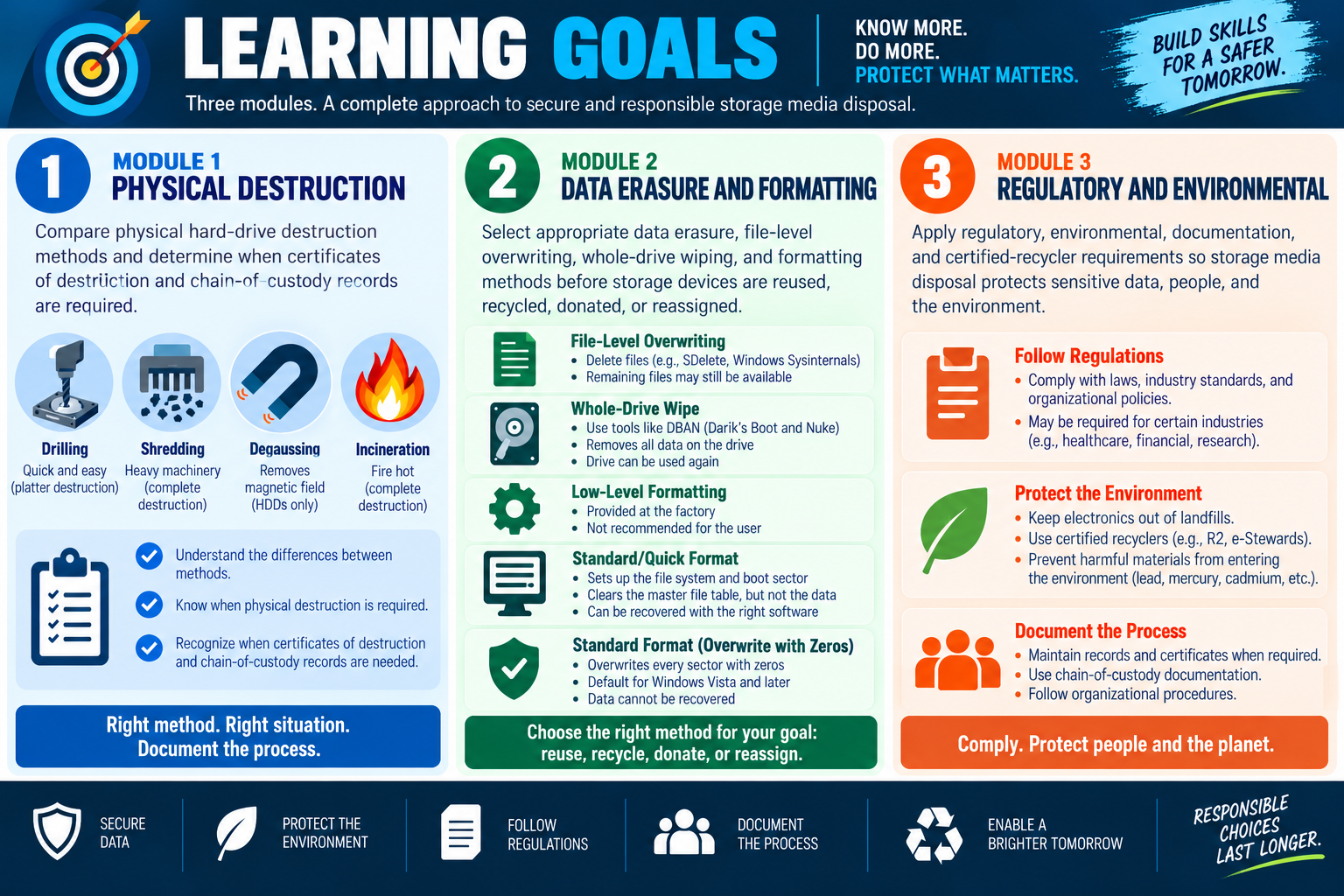
Learning goals infographic for Objective 2.9 data destruction and disposal, summarizing physical destruction, data erasure and formatting, and regulatory and environmental requirements.
  • Module 1: Compare physical hard-drive destruction methods such as drilling, shredding, degaussing, and incineration, and determine when certificates of destruction and chain-of-custody records are required.
  • Module 2: Select appropriate data erasure, file-level overwriting, whole-drive wiping, and formatting methods before storage devices are reused, recycled, donated, or reassigned.
  • Module 3: Apply regulatory, environmental, documentation, and certified-recycler requirements so storage media disposal protects sensitive data, people, and the environment.
Lesson ModuleModule 1 / 6
HDD
Module 01

Module 1 - Physical Destruction of Hard Drives

Physical destruction is used when the organization must make a hard drive unusable and make the data on that drive unrecoverable.

Data destruction is not only about deleting files. When a drive has stored sensitive, regulated, confidential, or high-value information, the organization may need proof that the data cannot be recovered by another user, a recycler, a thief, or a future owner of the hardware. Physical destruction focuses on permanently damaging the storage device so it cannot be reused and the data cannot be reconstructed through normal recovery methods.

This method is most appropriate when the drive does not need to be reused, when policy requires destruction, when the media contains highly sensitive information, or when the organization cannot accept the risk of data remaining on the device. It is a stronger step than simple deletion or formatting because the goal is final disposal, not reuse.

Drill or Hammer

Drilling or hammering is a simple physical destruction method that uses common tools to damage the hard drive platters. For a traditional hard disk drive, the platters are the internal disks where magnetic data is stored. If holes are drilled through the platters or the platters are shattered with force, the drive becomes unusable and normal recovery becomes extremely difficult.

This method is quick and easy for small quantities of drives, especially when a technician has only one or a few drives to destroy. The key is that the damage must reach the actual platters. Scratching the outside case or damaging only the connector is not enough. A drive that still has intact internal media may still expose data to a determined recovery effort.

Drill and hammer methods require care. Drives can contain sharp metal fragments, glass-like platter material, dust, and small parts that can fly outward when struck. Technicians should follow local safety procedures, wear appropriate protection, and perform destruction in a controlled area. The goal is secure disposal, not a messy accident.

Shredding

Industrial shredding is a stronger and more scalable destruction method. A drive shredder physically tears the device into small pieces, destroying the casing, platters, boards, and internal components. After shredding, the drive is no longer usable, and recovery is not realistically possible through normal means.

Shredding is often used when an organization has many drives to dispose of, when policy requires complete destruction, or when a third-party disposal provider handles retired media. It is more consistent than manual damage because the shredding equipment is designed specifically to destroy storage devices. For high-volume environments, shredding also creates a repeatable process that is easier to document.

Technicians should not confuse office paper shredders with media shredders. Hard drives require equipment designed for electronic storage. If a third party performs the shredding, the organization should understand how the provider handles custody, transportation, destruction, recycling, and certificates.

Degaussing

Degaussing uses a strong electromagnetic field to disrupt the magnetic patterns stored on magnetic media. For traditional hard disk drives, those magnetic patterns represent the stored data. A proper degaussing process can destroy hard drive data and usually renders the drive unusable afterward.

The important exam detail is that degaussing is effective for magnetic drives, not for SSDs or flash memory. Solid-state drives, USB flash drives, SD cards, and other flash-based storage do not store data magnetically in the same way. Running an SSD through a degausser is not a reliable data destruction method. For flash storage, use an approved wipe method, cryptographic erase where appropriate, or physical destruction methods suitable for that media type.

Degaussing also requires the right equipment and process. A weak magnet or casual exposure to a magnetic field is not the same as certified degaussing. Organizations should use approved equipment, follow procedure, and document the result when degaussing is required by policy or regulation.

Incineration

Incineration destroys drives through high heat. When performed correctly, it can completely destroy the drive and the data it contains. This method may be used for highly sensitive media, regulated environments, or disposal processes where the organization wants no usable media left behind.

Incineration is not a casual office task. Burning electronics can release hazardous materials and must follow environmental, safety, and legal requirements. If incineration is used, it should be performed by an approved facility or qualified provider that can handle the material safely and document the destruction.

In exam scenarios, incineration usually points to a very high-assurance disposal requirement. It is destructive, final, and appropriate only when the media will never be reused.

When Physical Destruction May Be Required

Physical destruction may be required when data sensitivity or regulations demand it. A single drive from a retired executive laptop may justify destruction if it contains confidential business data. Drives from healthcare, financial services, research, legal, or government environments may be subject to stricter disposal requirements. Any organization with privacy or confidentiality concerns should treat storage disposal as a security process, not a trash process.

Policy and law matter. Some organizations have a legal mandate to destroy certain storage devices, while others follow internal retention and disposal standards. Before destroying media, technicians should confirm the media type, sensitivity level, reuse plan, regulatory requirements, and organization policy.

Certificate of Destruction

A certificate of destruction provides documentation that media was destroyed. This is especially important when a third party performs disposal. The certificate should confirm what was destroyed, when it was destroyed, who handled it, and what method was used. It gives the organization a paper trail showing that data disposal was completed according to policy.

A certificate is not just paperwork for paperwork's sake. It supports audits, compliance reviews, incident investigations, and vendor accountability. If a provider says a drive was destroyed, the certificate helps prove that the service was performed and that custody was tracked.

For sensitive drives, chain of custody matters. The organization should know who collected the media, how it was transported, how it was stored before destruction, who destroyed it, and how the result was documented. A strong disposal process protects the data until the moment it is destroyed.

Scenario Cues

  • Drive contains regulated or confidential data and will not be reused: choose physical destruction or certified destruction based on policy.
  • One or two traditional hard drives need quick destruction: drilling or hammering may be acceptable if platters are actually destroyed.
  • Many drives need consistent destruction: use an industrial shredder or trusted disposal provider.
  • Magnetic HDD needs destruction: degaussing may be appropriate if approved equipment and documentation are available.
  • SSD, USB drive, SD card, or flash storage: do not rely on degaussing; use a method suitable for flash storage.
  • Third party destroys the drive: require chain of custody and a certificate of destruction.
  • High-security or regulated disposal: follow local law, industry rules, and organizational policy before selecting the method.

Key Takeaways

  • Physical destruction makes the drive unusable and the data unrecoverable.
  • Drilling or hammering can destroy individual hard drives when the platters are damaged.
  • Industrial shredding provides complete, repeatable destruction for media that will not be reused.
  • Degaussing works for magnetic HDDs, but not for SSDs or flash-based storage.
  • Incineration is a high-assurance destruction method that must follow safety and environmental requirements.
  • Certificates of destruction and chain-of-custody records help prove the disposal process was completed properly.
Exam focus: if the scenario says the drive must never be reused, contains sensitive data, or requires proof of destruction, think physical destruction, certified disposal, chain of custody, and the correct method for the media type.
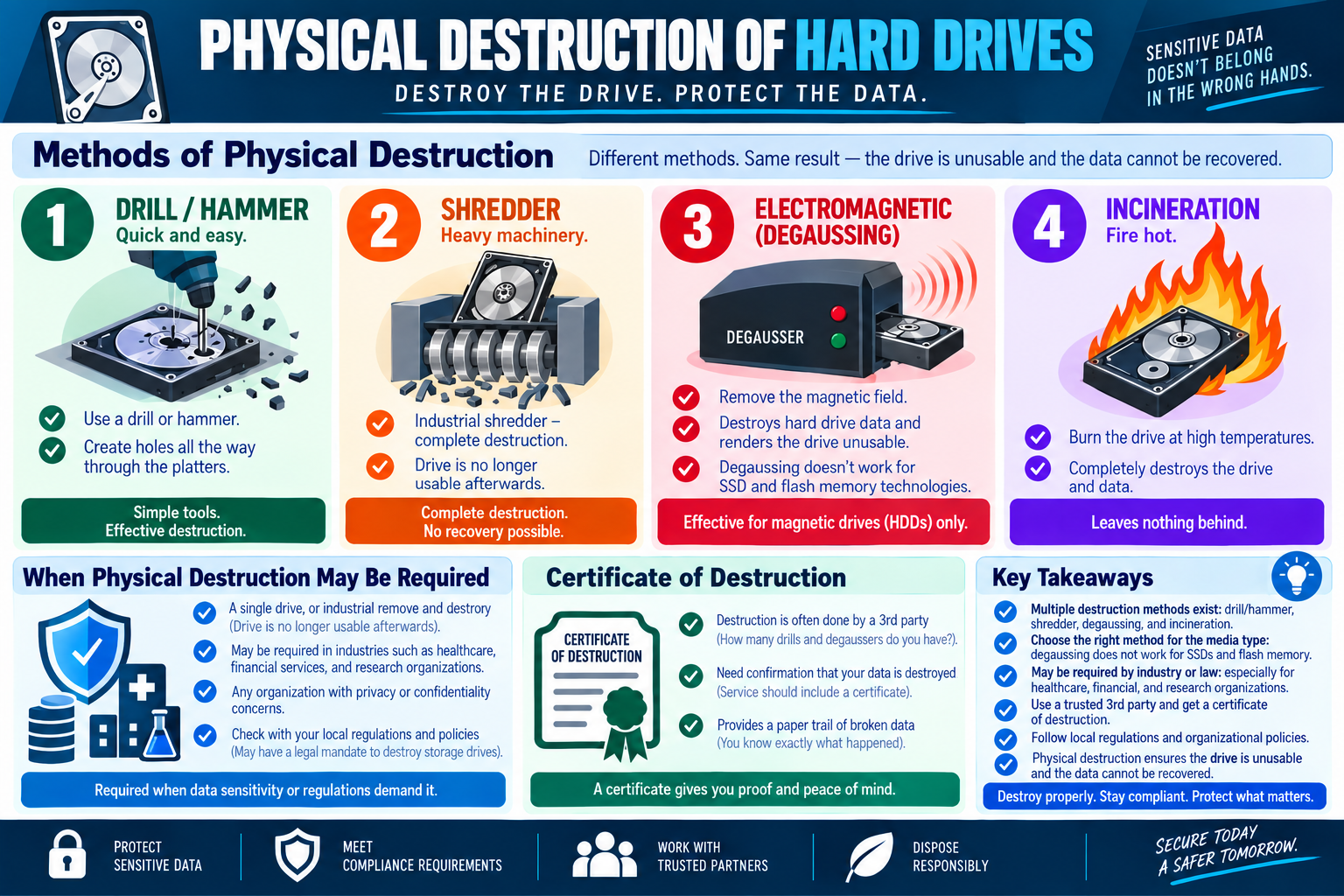
Infographic explaining physical destruction of hard drives, including drilling, shredding, degaussing, incineration, certificate of destruction, compliance reasons, and key takeaways.
Module 01 infographic: destroy the drive, protect the data, choose the right physical destruction method, and document the result.
RCY
Module 02

Module 2 - Recycling Best Practices

Recycling and repurposing storage devices can save money and reduce waste, but only after previously stored data has been removed using a method appropriate for the media, sensitivity, and reuse plan.

Data disposal does not always mean destroying the hardware. Sometimes a storage device can safely have a second life: a drive may be reused inside the organization, a laptop may be reassigned, or equipment may be sent to a recycler. The security requirement is that old data must not go along for the ride. Before a device is recycled, repurposed, donated, sold, or returned to inventory, the technician must remove previously stored information in a way that matches the risk.

The key idea is simple: erase before reuse. Deleting files casually is not the same thing as sanitizing media. Some methods only remove references to data, while others overwrite the data itself. The difference matters because recoverable leftover data can expose customer records, employee information, credentials, business files, financial data, legal documents, or regulated information.

Erasing Data Before Reuse

Erasing data prepares a storage device for reuse by removing the information that belonged to the previous user or system. This is required before recycling or repurposing a device. A clean device is safer because it reduces the chance that the next user, a recycler, or a third party can recover old information.

Technicians should start by identifying the device, the data sensitivity, and the intended outcome. If the drive will stay inside the organization and hold non-sensitive data, a secure wipe may be enough. If the drive contains regulated data or will leave organizational control, policy may require verified wiping, certified destruction, or a documented third-party process. The method should be chosen before the device is handed off.

Do not assume that moving files to the recycle bin, deleting a user profile, or reinstalling an operating system fully removes the old data. Those actions may make data less visible, but they may not make it unrecoverable.

File-Level Overwriting

File-level overwriting targets specific files rather than the entire drive. Tools such as SDelete from Windows Sysinternals can overwrite file data so the deleted file contents are much harder to recover. This can be useful when a technician needs to securely remove selected files while leaving the rest of the system in place.

The limitation is important: file-level overwriting is not a complete device sanitization method. It may remove the targeted file data, but remaining files, application caches, temporary folders, free-space artifacts, user profiles, system restore data, logs, and other data may still exist. If the entire drive is being reused or transferred, file-level overwriting alone is usually not enough.

Use file-level overwriting when the scenario specifically focuses on individual files and the device itself will remain in controlled use. If the device is being repurposed, recycled, or assigned to another user, a broader wipe is usually the better answer.

Whole Drive Wipe

A whole-drive wipe overwrites the entire storage device. Tools such as DBAN, Darik's Boot and Nuke, are designed to overwrite all data on a drive so the device can be reused without exposing previous contents. A full wipe is stronger than file deletion because it targets the whole drive instead of selected files.

Whole-drive wipes are useful when the organization wants to reuse a drive, donate equipment, repurpose a system, or prepare a device for a new user while keeping the hardware. The wipe should be verified when possible. A wipe that fails, is interrupted, or targets the wrong device can create risk or cause data loss.

Technicians should also know the limits. Some older wipe tools were designed primarily for magnetic drives and may not handle SSD wear leveling, hidden areas, or modern storage behavior perfectly. For SSDs, vendor secure erase, cryptographic erase, or platform-supported reset methods may be more appropriate depending on policy. The exam clue is still useful: a whole-drive wipe is intended to remove all data while allowing the drive to be used again.

Disk Formatting

Formatting prepares a drive for use by creating or resetting a file system, but not all formatting methods erase data securely. This is one of the most important distinctions in data disposal questions.

Low-level formatting is generally performed at the factory and is not recommended as a normal user or technician disposal method. In modern contexts, users do not usually perform true low-level formatting. If a scenario mentions low-level formatting as a user task, be cautious; it is usually not the practical best answer.

Standard formatting, or quick format, sets up the file system and clears the master file table or file references, but it does not necessarily overwrite the underlying data. The data may be recoverable with the right software. Quick format may make a drive appear empty, but appearance is not the same as secure removal.

Standard formatting, or regular/full format, can overwrite sectors with zeros on modern Windows versions and may prevent normal recovery. The infographic notes that regular format became the default behavior for Windows Vista and later. For exam purposes, regular format is more secure than quick format, but policy may still require a dedicated wipe tool or certified process for sensitive media.

Choosing the Right Method

The best method depends on the goal. If only a specific sensitive file needs to be removed while the system remains in service, file-level overwriting can be appropriate. If the whole drive is being reused, a full wipe or regular format may be required. If the drive will leave the organization and contains sensitive data, follow policy and consider verified wiping or certified destruction. If the drive will never be reused, physical destruction may be the better choice.

Technicians should also consider the media type. Hard disk drives, solid-state drives, USB flash drives, SD cards, and embedded storage do not behave identically. Wear leveling and hidden storage areas can affect SSD wiping. Magnetic-only methods such as degaussing do not apply to flash storage. Matching the method to the media matters.

Policy and Responsible Recycling

Recycling supports reuse of resources and reduces electronic waste, but it must be done responsibly. Security comes first: data must be removed before the device leaves the organization or is assigned to someone else. Environmental benefits do not outweigh privacy obligations.

Organizations should define approved disposal and recycling procedures. The policy should explain who can approve recycling, which wiping tools are allowed, when destruction is required, how results are verified, when certificates are needed, and how devices are tracked. For regulated data, documentation may be required to prove that disposal was handled correctly.

Scenario Cues

  • Device will be reused by another employee: wipe the device before reassignment.
  • Only one sensitive file must be removed: use file-level overwriting if the system remains in controlled use.
  • Entire drive must be reused safely: use a whole-drive wipe or approved regular format process.
  • Quick format was performed: data may still be recoverable because quick format clears file references, not necessarily file contents.
  • Drive contains sensitive or regulated data: follow organizational policy and use verified wiping or certified destruction.
  • SSD or flash storage is involved: use a method appropriate for flash media; do not assume old HDD tools are sufficient.
  • Equipment is being recycled externally: erase data first, document the process, and use approved recyclers.

Key Takeaways

  • Delete all data before recycling, donating, selling, or repurposing a storage device.
  • File deletion is not enough to protect data because deleted files or leftover data may be recoverable.
  • File-level overwriting is useful for selected files, but it is not a full-drive solution.
  • Whole-drive wiping removes data across the drive and supports safer reuse.
  • Quick format is not the same as secure erasure; regular/full format is stronger but may still need policy review.
  • Responsible recycling protects sensitive data while supporting reuse and reducing electronic waste.
Exam focus: if the scenario says reuse, recycle, repurpose, donate, or reassign, think erase before reuse. Choose the method that actually removes data, not just the method that makes the drive look empty.
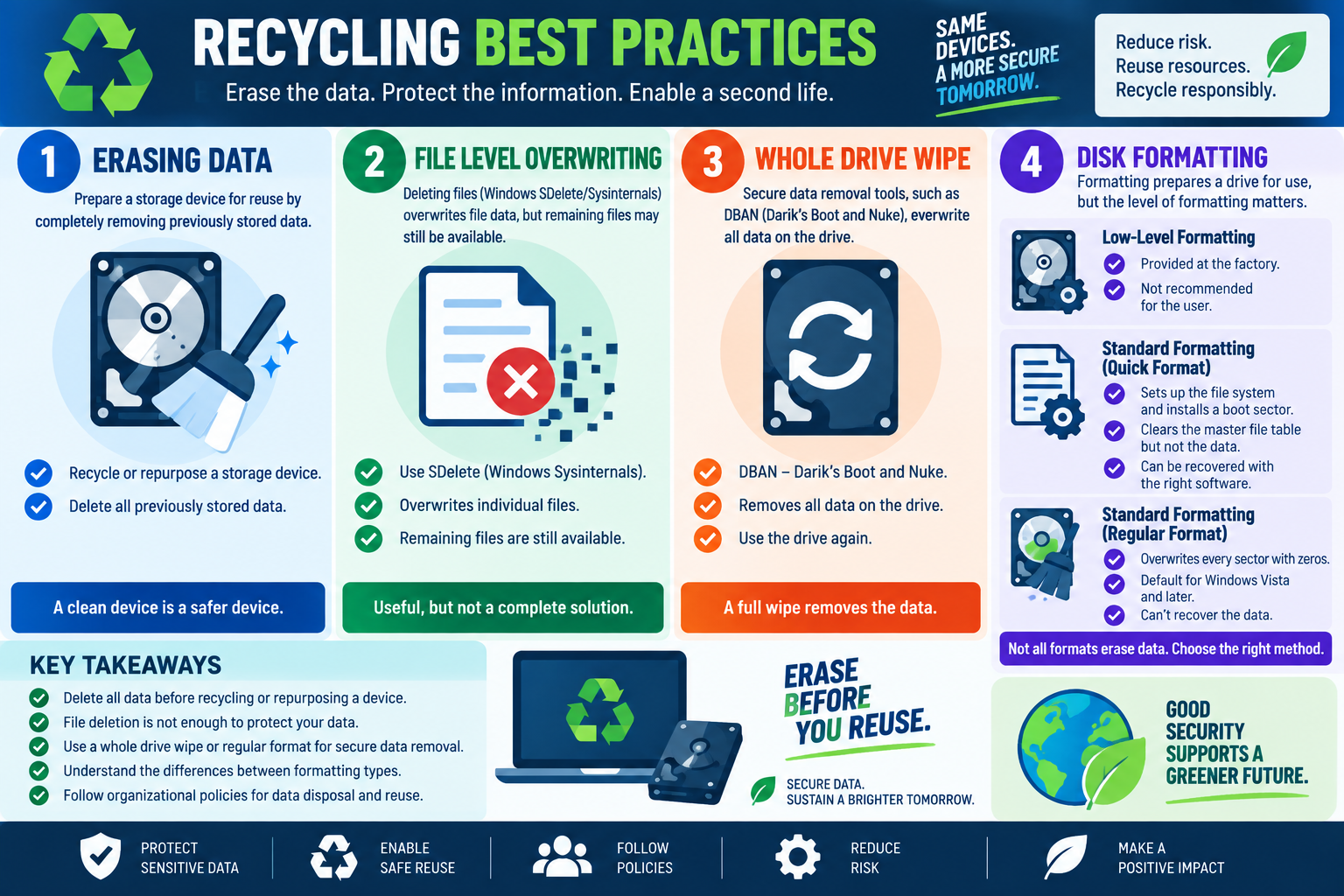
Infographic explaining recycling best practices for storage devices, including erasing data, file-level overwriting, whole-drive wiping, disk formatting types, and responsible reuse.
Module 02 infographic: erase data before reuse, choose the right wipe or format method, and recycle storage devices responsibly.
REG
Module 03

Module 3 - Regulatory and Environmental Requirements

Data disposal is both a security responsibility and an environmental responsibility: protect the information, follow the rules, document the result, and dispose of equipment responsibly.

When storage media is reused, donated, recycled, sold, returned, or destroyed, the technician is handling more than old hardware. The device may contain sensitive data, regulated records, customer information, credentials, proprietary documents, or employee data. It may also contain materials that should not be placed in ordinary trash. A good disposal process protects people, data, and the environment at the same time.

Regulatory and environmental requirements turn data disposal into a controlled process. The right answer is not always the fastest one. The right answer is the one that matches the sensitivity of the data, the media type, the legal or contractual requirements, and the organization's policy.

Data Security and Sanitization

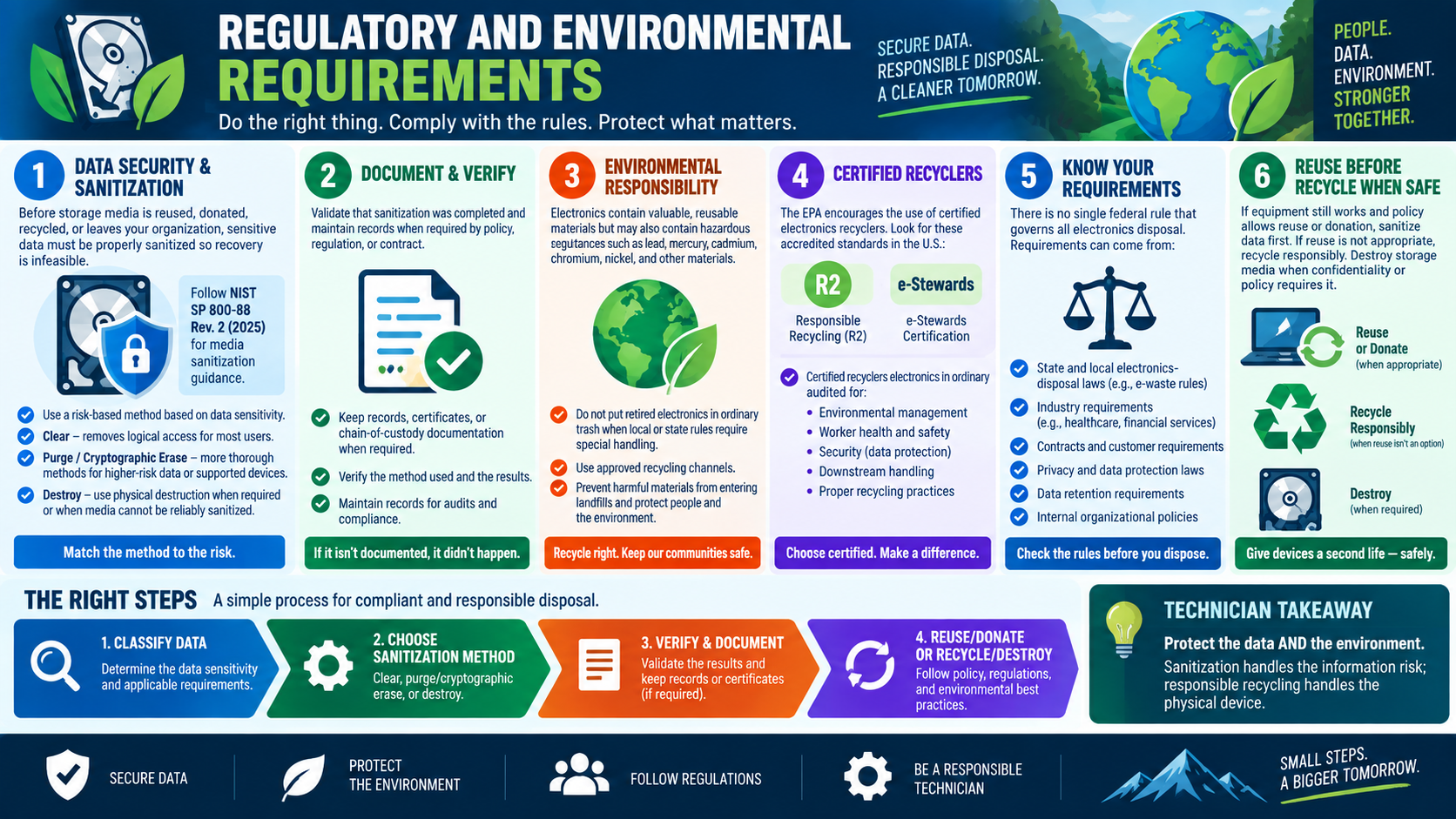
Before storage media is reused, donated, recycled, or allowed to leave the organization, sensitive data must be sanitized so recovery is infeasible. Sanitization means choosing a method that removes access to the data at a level appropriate for the risk. The method should be based on data sensitivity, device type, and disposal outcome.

Common sanitization categories include clear, purge, cryptographic erase, and destroy. Clear methods protect against normal user recovery and are often used for lower-risk reuse inside a controlled environment. Purge methods are stronger and are intended for higher-risk data or supported devices where more thorough sanitization is required. Cryptographic erase destroys or invalidates encryption keys so encrypted data can no longer be decrypted. Destroy methods physically damage or eliminate the media when reuse is not allowed or sanitization cannot be trusted.

The infographic references NIST SP 800-88 Rev. 2 (2025) as media sanitization guidance. For course purposes, the core idea is to match the method to the risk: do not use a casual delete or quick format when policy or sensitivity calls for a stronger sanitization method.

Document and Verify

If disposal is not documented, it is difficult to prove it happened. Organizations may need records for policy, regulation, contract terms, audits, insurance, customer commitments, or incident response. Documentation should show what media was handled, how it was sanitized or destroyed, when it happened, who performed or witnessed it, and what result was verified.

Verification is just as important as the action. A technician should validate that the selected method completed successfully and that the result matches the requirement. If a wipe tool fails, if the wrong drive was selected, if a certificate is missing, or if chain-of-custody records are incomplete, the organization may still carry risk.

Records may include sanitization logs, tool reports, certificates of destruction, asset tags, serial numbers, chain-of-custody forms, recycler receipts, and internal ticket notes. These records create a defensible paper trail for audits and compliance reviews.

Environmental Responsibility

Electronics contain useful materials, but they may also contain hazardous substances such as lead, mercury, cadmium, chromium, nickel, and other materials that should be handled carefully. Throwing retired electronics into ordinary trash may violate local rules and can harm the environment.

Responsible disposal keeps harmful materials out of landfills and supports reuse or recovery of valuable materials. That does not mean security is ignored. The data must be sanitized first, and then the physical device can be reused, donated, recycled, or destroyed according to policy.

Technicians should understand that environmental responsibility and data security work together. A drive can be securely sanitized and then recycled. A working device can be safely reused after data has been removed. A device that cannot be sanitized or is too sensitive can be destroyed, with remaining materials handled through approved channels.

Certified Recyclers

Certified electronics recyclers provide a more controlled disposal path than informal recycling or ordinary trash. The infographic highlights two common U.S. recycler accreditation programs: Responsible Recycling (R2) and e-Stewards. These certifications indicate that recyclers are audited for areas such as environmental management, worker health and safety, data protection, downstream handling, and proper recycling practices.

Using a certified recycler helps reduce risk because the recycler is expected to follow documented processes. This matters when equipment contains storage media, batteries, displays, circuit boards, or other components requiring special handling. It also matters when the organization needs documentation showing that disposal was performed responsibly.

A certified recycler does not remove the organization's responsibility. The organization should still confirm service scope, chain of custody, data handling expectations, certificates, and any contractual requirements before handing over equipment.

Know Your Requirements

There is no single federal rule that governs all electronics disposal in every situation. Requirements may come from several sources, including state and local electronics disposal laws, industry requirements, contracts, privacy and data protection laws, data retention rules, and internal organizational policy.

For example, healthcare, financial services, government, research, legal, and education environments may have stricter requirements for data handling and disposal documentation. Customer contracts may require certified destruction, approved recyclers, or specific retention and disposal timelines. Local rules may affect how batteries, monitors, toner, drives, and other electronic waste are handled.

Technicians do not need to memorize every law for every location, but they must know when to check policy and escalate. If the scenario mentions regulation, contract language, privacy concerns, customer records, medical records, financial data, or legal hold requirements, do not treat disposal as routine trash.

Reuse Before Recycle When Safe

If equipment still works and policy allows reuse or donation, sanitization should happen first. Reuse can extend the life of the device and reduce waste, but the device must be safe to release. If reuse is not appropriate, recycle responsibly. If confidentiality or policy requires it, destroy the storage media.

The reuse decision should consider condition, business value, data sensitivity, device ownership, support status, and compliance requirements. A working laptop may be reused internally after a verified wipe. A drive containing highly sensitive information may need destruction even if the hardware still works. A device that cannot receive updates or no longer meets security standards may not be safe to reuse for business purposes.

The Right Steps

A simple compliant disposal workflow starts by classifying the data. Determine sensitivity, regulatory requirements, contract requirements, and whether the media can be reused. Next, choose the sanitization method: clear, purge, cryptographic erase, or destroy. Then verify and document the result, keeping logs, certificates, or chain-of-custody evidence where required. Finally, reuse, donate, recycle, or destroy according to policy and environmental best practices.

That sequence helps technicians avoid two common mistakes: disposing of hardware before protecting the data, and focusing only on data security while ignoring environmental handling rules. Good disposal protects both.

Scenario Cues

  • Media is leaving the organization: sanitize data first and keep records when required.
  • Regulated or confidential data is involved: choose a risk-based method and document verification.
  • Third party handles disposal: require chain-of-custody records, service details, and certificates where appropriate.
  • Electronics are being recycled: use approved channels and consider certified recyclers such as R2 or e-Stewards.
  • Local or state disposal rules apply: follow jurisdiction requirements for electronics, batteries, toner, and hazardous materials.
  • Working equipment can be reused: sanitize first, then reuse or donate only if policy allows.
  • Sanitization cannot be verified: do not release the device until the risk is resolved or the media is destroyed.

Key Takeaways

  • Sanitize storage media before reuse, donation, recycling, or disposal.
  • Match the sanitization method to data sensitivity, media type, and policy requirements.
  • Document and verify disposal actions so compliance can be proven later.
  • Use approved recycling channels and certified recyclers when appropriate.
  • Check state, local, industry, contractual, privacy, retention, and internal policy requirements.
  • Reuse equipment when safe, recycle responsibly when reuse is not appropriate, and destroy media when required.
Exam focus: if the scenario mentions regulation, audits, certificates, chain of custody, environmental disposal, or third-party recycling, think documented sanitization, approved recyclers, policy compliance, and responsible disposal.
Infographic explaining regulatory and environmental requirements for data disposal, including sanitization, documentation, certified recyclers, disposal rules, and reuse before recycling.
Module 03 infographic: protect the data and the environment by sanitizing, verifying, documenting, and using responsible disposal channels.
KT
Module 04

Module 4 - Key Takeaways

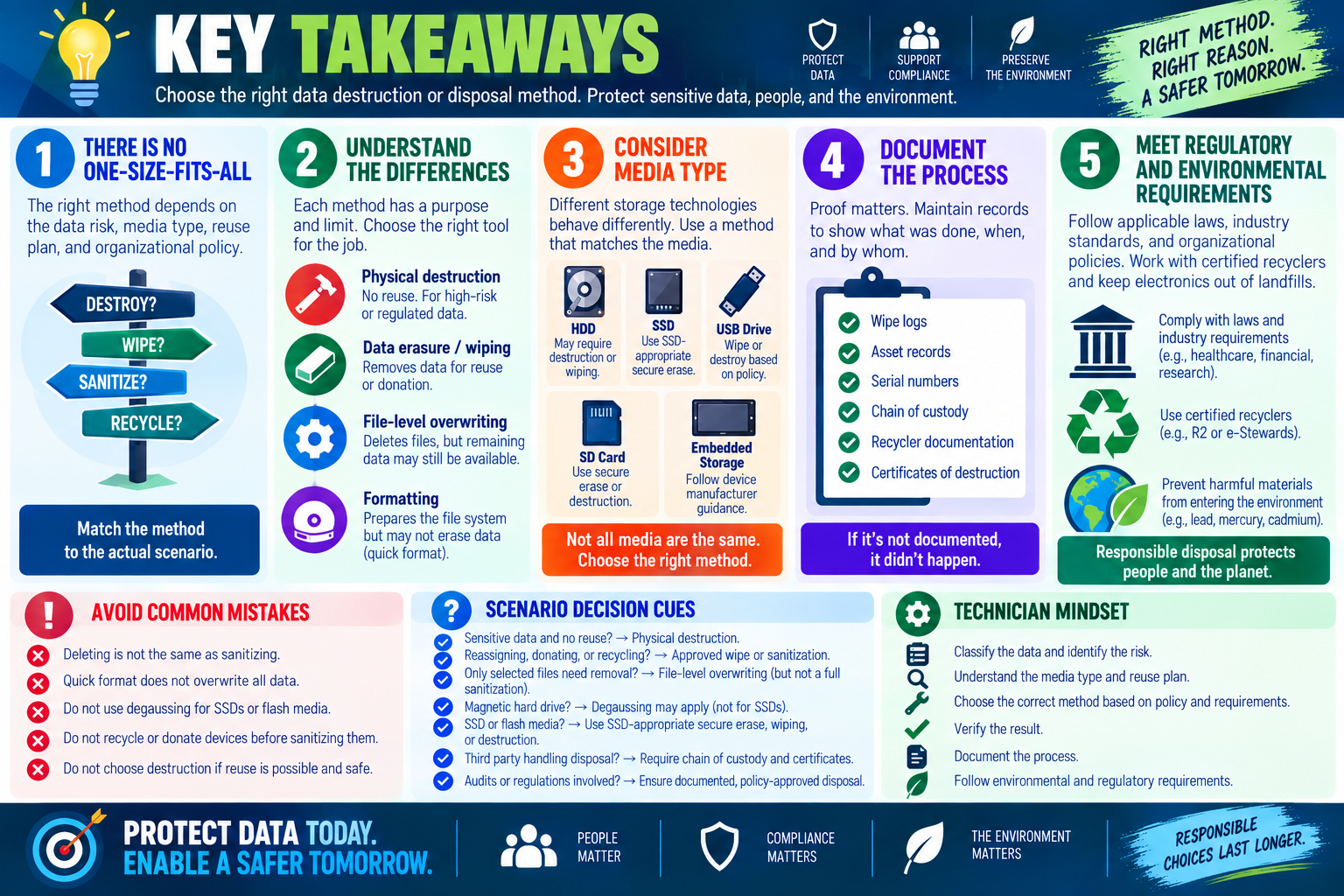
Key takeaways infographic for Objective 2.9 data destruction and disposal, emphasizing matching the method to risk, media type, documentation, compliance, and environmental requirements.

Objective 2.9 is about choosing the correct data destruction or disposal method based on the data risk, media type, reuse plan, documentation requirement, and environmental responsibility.

Data disposal is not one action. Sometimes the right answer is physical destruction because the media should never be reused. Sometimes the right answer is wiping because the hardware can safely have a second life. Sometimes the most important detail is not the tool at all, but the proof: records, chain of custody, certificates of destruction, and verified results.

Match the Method to the Outcome

Start by asking what should happen to the device after data is removed. If the drive will never be reused, physical destruction may be the right choice. If the device will be reassigned, donated, sold, or recycled, use an approved sanitization method before release. If only selected files need to be removed while the system remains in controlled use, file-level overwriting may be enough.

The wrong method can create either security risk or unnecessary waste. Destroying every device may be excessive when a verified wipe would allow safe reuse. Quick-formatting a device that contains sensitive data may leave recoverable information behind. The best technician answer fits the actual scenario.

Physical Destruction Means No Reuse

Physical destruction makes the storage device unusable. Drilling, hammering, shredding, degaussing, and incineration are used when data must not be recoverable and the media does not need a second life. These methods are especially important when policy, regulation, confidentiality, or high data sensitivity requires final disposal.

Each method has limits. Drilling or hammering must damage the actual platters. Shredding is strong and repeatable for larger batches. Degaussing applies to magnetic hard drives, not SSDs or flash media. Incineration is a high-assurance option but must be handled through safe and compliant channels.

Reuse Requires Real Sanitization

Recycling and reuse are good practices only when data has been properly removed first. File deletion is not enough. Quick formatting is not enough for sensitive data. File-level overwriting can protect selected files, but it does not sanitize the whole device. Whole-drive wiping, regular formatting where appropriate, secure erase, cryptographic erase, or another approved method may be required before reuse.

Media type matters. HDDs, SSDs, USB drives, SD cards, and embedded storage do not all behave the same way. SSD wear leveling and flash storage behavior can make older HDD-focused approaches less reliable. Always choose a method that matches the storage technology and organizational policy.

Compliance Is Part of the Work

For data disposal, documentation is not an optional afterthought. If a drive contained regulated, confidential, customer, employee, financial, healthcare, legal, or proprietary data, the organization may need to prove what happened to it. That proof may include wipe logs, asset records, serial numbers, chain-of-custody forms, recycler documentation, or certificates of destruction.

The phrase "if it is not documented, it did not happen" is especially useful here. Disposal work may be reviewed months later during an audit, investigation, insurance review, or customer compliance request. Good records protect the organization and the technician.

Environmental Responsibility Still Matters

Electronic waste can contain hazardous materials and reusable resources. Responsible disposal keeps electronics out of ordinary trash when local rules require special handling, and it supports reuse or recycling when safe. Certified recyclers, such as R2 or e-Stewards providers, can help organizations meet environmental, safety, worker-protection, downstream-handling, and data-protection expectations.

Security and sustainability should work together. Sanitize equipment before reuse. Recycle responsibly when reuse is not practical. Destroy storage media when confidentiality or policy requires it. The goal is to protect the data and the environment, not to choose one at the expense of the other.

Scenario Decision Cues

  • Drive contains sensitive data and will not be reused: choose physical destruction and documentation.
  • Drive will be reassigned or donated: use an approved wipe or sanitization method before release.
  • Only selected files need secure removal: consider file-level overwriting, but do not treat it as full-drive sanitization.
  • Quick format was used: assume data may still be recoverable unless policy says otherwise and the method is verified.
  • Magnetic hard drive requires destruction: degaussing may apply, but only for magnetic media.
  • SSD or flash media is involved: use SSD-appropriate secure erase, cryptographic erase, wiping, or destruction based on policy.
  • Third party handles disposal: require chain of custody, certificates, and approved recycler documentation.
  • Regulation or audit is mentioned: prioritize documented, verified, policy-approved disposal.

Common Exam Traps

Do not confuse deleting with sanitizing. Deleting removes visible access to files, but data may remain recoverable. Do not confuse quick format with secure erasure. Quick format prepares a file system but may not overwrite the data. Do not use degaussing for SSDs or flash storage. Do not recycle or donate devices before sanitizing them.

Another trap is choosing destruction when reuse is explicitly required. If the scenario says the organization wants to repurpose the drive, select a secure wiping method instead of shredding it. If the scenario says the drive must never be reused, then destruction becomes much more likely.

Technician Mindset

A strong technician classifies the data, identifies the media type, checks the reuse plan, chooses the proper sanitization or destruction method, verifies the result, documents the work, and follows environmental and regulatory requirements. That sequence prevents shortcuts and keeps disposal decisions defensible.

Key takeaway: Protect the data first, then dispose responsibly. Choose the method that matches the risk, verify the result, document the chain of custody, and recycle or destroy through approved channels.
SN
Module 05

Module 5 - Section Notes

BROtocol Joe Core 2 220-1202Objective 2.9

2.9 Data Destruction and Disposal

Core idea: Data disposal is a security decision. Match the destruction, erasure, formatting, recycling, or documentation method to the data sensitivity, media type, reuse plan, regulatory requirement, and organizational policy.

Physical Destruction

  • Use physical destruction when the storage media should not be reused and the data must not be recoverable.
  • Drilling or hammering can work for individual HDDs only when the platters are actually damaged.
  • Industrial shredding provides repeatable destruction for larger batches or formal disposal workflows.
  • Incineration is high assurance, but it must follow safety, environmental, and legal requirements.

Degaussing and Media Type

  • Degaussing removes magnetic patterns and applies to magnetic hard drives and some magnetic media.
  • Degaussing is not a reliable method for SSDs, USB flash drives, SD cards, or other flash-based storage.
  • SSDs may require vendor secure erase, cryptographic erase, approved wiping, or physical destruction.
  • Always identify the media type before choosing the disposal method.

Reuse and Erasure

  • Reuse, donation, recycling, or reassignment requires data removal before the device leaves the old owner.
  • Deleting files or emptying the recycle bin is not the same as sanitizing media.
  • File-level overwriting protects selected files, but remaining files and artifacts may still be recoverable.
  • Whole-drive wiping removes data more broadly when the storage device will be reused.

Formatting Choices

  • Low-level formatting is normally performed at the factory and is not the usual technician choice.
  • Quick formatting prepares the file system but may leave recoverable data behind.
  • Regular formatting can overwrite sectors with zeros on modern Windows versions and is stronger than quick format.
  • Choose the formatting method based on reuse, sensitivity, policy, and required assurance.
Memory hook: Classify the data. Identify the media. Choose the method. Verify the result. Document the chain. Dispose responsibly.
Notes:
Data Disposal Decision NotesObjective 2.9

Match the Scenario to the Disposal Method

Certificates and Chain of Custody

  • Use certificates of destruction when proof is required that media was destroyed.
  • Track chain of custody when sensitive media moves between people, locations, vendors, or disposal steps.
  • Record asset identifiers, serial numbers, dates, responsible parties, methods used, and verification results.
  • If a third party handles disposal, require documentation that matches organizational and compliance needs.

Regulatory Requirements

  • Healthcare, financial, legal, research, government, and customer-data environments may require stricter disposal controls.
  • Follow state, local, industry, contractual, privacy, retention, and internal policy requirements.
  • Use risk-based methods such as clear, purge, cryptographic erase, or destroy when policy defines the requirement.
  • Keep records long enough to support audits, investigations, vendor reviews, and compliance questions.

Environmental Responsibility

  • Do not place retired electronics in ordinary trash when local rules require special handling.
  • Use approved recycling channels to keep hazardous materials out of landfills and recover reusable materials.
  • Certified recyclers, such as R2 or e-Stewards providers, can support data protection and environmental handling.
  • Reuse or donate working equipment only after proper sanitization and policy approval.

Verification Habits

  • Confirm the correct device was sanitized or destroyed before releasing it.
  • Verify wipes, formatting, or destruction outcomes when tools or vendors provide proof.
  • Do not assume deletion, reinstalling the OS, or quick formatting fully removed sensitive data.
  • Document exceptions, failed wipes, damaged media, vendor handoffs, and final disposition.
Scenario ClueThinkBest Technician Move
A drive contains sensitive data and will never be reused.Final disposalUse physical destruction such as shredding, drilling, incineration, or approved destruction.
A magnetic HDD must be made unreadable.Magnetic mediaDegaussing may apply if approved equipment and documentation are available.
An SSD, USB drive, or SD card is being disposed of.Flash storageUse SSD-appropriate secure erase, cryptographic erase, wiping, or destruction; do not rely on degaussing.
A laptop will be reassigned to another employee.ReusePerform an approved wipe or sanitization before reassignment.
Only one confidential file needs removal on a controlled system.Selected dataUse file-level overwriting, but do not treat it as full-drive sanitization.
A quick format was performed before donation.Recoverable data riskUse a stronger wipe or verified sanitization method before donation.
A third-party recycler picks up retired systems.Vendor custodyRequire chain-of-custody records, recycler documentation, and certificates when required.
Regulated data or an audit is mentioned.Compliance evidenceUse documented, verified, policy-approved sanitization or destruction.
Working equipment can be donated safely.Second lifeSanitize first, document the result, then donate through approved channels.
Environmental disposal rules apply.Responsible recyclingUse approved or certified recyclers and keep electronics out of improper waste streams.
Notes:
Objective 2.9 Rapid ReviewResponsible Disposal

Exam Focus: Choose the Right Method for the Risk

Physical Destruction
  • Drilling, hammering, shredding, and incineration make media unusable.
  • Use when reuse is not needed and data must not be recoverable.
Degaussing
  • Works on magnetic media by removing magnetic patterns.
  • Does not work for SSDs, USB drives, SD cards, or flash memory.
Erasure and Wiping
  • File deletion is not sanitization.
  • File-level overwriting targets selected files; whole-drive wiping targets the entire device.
Formatting
  • Quick format prepares the file system but may leave recoverable data.
  • Regular format is stronger when it overwrites sectors, but policy still decides if it is enough.
Documentation
  • Certificates, wipe logs, asset records, and chain of custody prove what happened.
  • If it is not documented, it may not be defensible later.
Compliance and Environment
  • Use certified recyclers when required or appropriate.
  • Protect the data first, then recycle, donate, reuse, or destroy responsibly.
Bottom line: There is no one-size-fits-all disposal method. Match the method to the data, media, reuse plan, policy, compliance requirement, and environmental impact.
Notes:
TEST
Module 10

Module 10 - Final Test

Complete 20 difficult scenario-based multiple-choice questions for Objective 2.9. The test covers physical destruction, degaussing, secure erasure, file-level overwriting, whole-drive wiping, formatting, documentation, certificates of destruction, chain of custody, regulatory requirements, environmental responsibility, and disposal decision-making. Each correct answer is worth 1 point.

Score pending0 / 20
WB
Workbook

Student Workbook

BrotocolJoeStudent Workbook

BrotocolJoe

CompTIA A+ Core 2 (220-1202)

Student Workbook

2.0 Security

Objective 2.9 - Explain common data destruction and disposal methods.

How to use this workbook: Print this packet once, complete it by hand as you finish each online module, and keep it as evidence that you read, processed, and practiced the Objective 2.9 data destruction and disposal material.
Student Name:
Physical Destruction of Hard DrivesObjective 2.9

Module 1 - Physical Destruction of Hard Drives

Key Information: Destruction is an irreversible disposal choice when reuse is not intended or an adequate sanitization result cannot be established. The approved process must address the actual storage medium, not merely damage the enclosure.

Check Your Understanding

Why does a broken connector or damaged casing not prove data is unrecoverable?

Why must a destruction method distinguish magnetic disks from flash storage?

What information connects a certificate of destruction to the correct asset?

Comparison Record: Destruction vs. Degaussing

  • Write one or two sentences per prompt. Describe method selection; do not perform physical destruction as part of this workbook.
  • Physical destruction: Explain how an approved process must address the data-bearing components and why ordinary drilling alone may leave recoverable material.
  • Degaussing: Explain why it applies to suitable magnetic media and why it does not sanitize flash storage.
  • Decision: Describe how media type, sensitivity, approved process, and the need for verification determine the choice.
Explain why shredding or incineration must be handled through an approved facility and safety process rather than improvised onsite.
Technician Scenario: A failed drive contains sensitive records and cannot be reliably sanitized through its interface. Plan authorization, asset identification, secure custody, an approved media-appropriate destruction service, and reconciliation of the resulting documentation.
Recycling Best PracticesObjective 2.9

Module 2 - Recycling Best Practices

Key Information: Before reuse or recycling, select an approved sanitization method for the media and data sensitivity. Deleting files, quick formatting, and reinstalling an OS do not by themselves establish that previous data is unrecoverable.

Check Your Understanding

How does removing file references differ from sanitizing stored data?

Why can file-level overwriting miss copies in snapshots, backups, or other storage locations?

Why do SSD behavior and inaccessible storage areas affect confidence in ordinary overwrite methods?

Comparison Record: Formatting vs. Sanitization

  • Use a laptop planned for reassignment. Write one or two sentences per prompt.
  • Formatting: Explain its filesystem-preparation purpose and why a format alone should not be assumed to meet the disposal requirement.
  • Sanitization: Explain how the selected supported method must address the actual media and sensitivity.
  • Verification: Describe the completion evidence and validation needed before releasing the device to the next user.
Explain what must be verified before relying on cryptographic erase, including encryption coverage and control of all relevant keys.
Technician Scenario: A donation batch includes HDDs and SSDs. A technician proposes deleting user profiles and running the same file-overwrite tool on every device. Develop a better plan covering authorized data preservation, media inventory, approved sanitization, failure handling, and release checks.
Regulatory and Environmental RequirementsObjective 2.9

Module 3 - Regulatory and Environmental Requirements

Key Information: Disposal must satisfy applicable organizational, contractual, retention, and environmental requirements. Consult the responsible policy owners and use documented processes rather than assuming a universal rule fits every device.

Check Your Understanding

Why must retention obligations or a preservation hold be checked before destruction?

How does chain of custody help protect media awaiting disposal?

Why does a recycling receipt alone not prove that the stored data was sanitized?

Disposal Documentation Record

  • For each field, state what evidence or approval to obtain. Use fictional asset identifiers and no sensitive record contents.
  • Authorization: Identify who confirms retention, ownership, and release requirements.
  • Asset and custody: Record device identity, handoffs, dates, and receiving parties.
  • Method and result: Describe the selected sanitization or destruction method and its verified outcome.
  • Recycler: Identify the vendor qualifications and environmental handling requirements to check against policy.
Explain how to reconcile returned destruction or sanitization records against the original asset inventory and handle a missing item.
Technician Scenario: A recycler collects retired equipment, but the paperwork does not identify individual storage devices. Describe how to pause final closure, resolve the custody and evidence gaps, and obtain policy-compliant records before marking the assets disposed.
Objective 2.9 Final CheckCumulative Review

Objective 2.9 - Final Check

Purpose: Choose a media-appropriate, authorized disposal process and demonstrate that custody, verification, and documentation are complete.

Scenario Sorting

For each case, identify the unresolved risk and the next check or authorized action.

  • A broken drive contains sensitive records.
  • An SSD is proposed for degaussing.
  • A donated laptop has only had its user profile deleted.
  • A device may contain records under a preservation hold.
  • A destruction certificate does not match the asset inventory.

Explain What You Know

  • How do formatting, sanitization, and destruction differ?
  • Why do media type and intended reuse matter?
  • What prevents release of an unverified device?
  • How do data protection and environmental handling fit into one disposal process?
Write the unresolved risk and next check or action for each case above, in order.
Plan retirement of a mixed batch of working and failed storage devices. Include inventory, retention approval, data preservation, media-specific method selection, secure custody, verification, recycler requirements, exception handling, and final records.

2.9 Completion

Student signature:
Date completed:
Instructor signature:
Module 01 of 06