Home
Certification Prep // 220-1202

2.0 Security

2.3 ~ Compare wireless security protocols and authentication.

core2-lab.exe
> load objective 2.3
> map scenario clues
> verify and document

Learning Goals

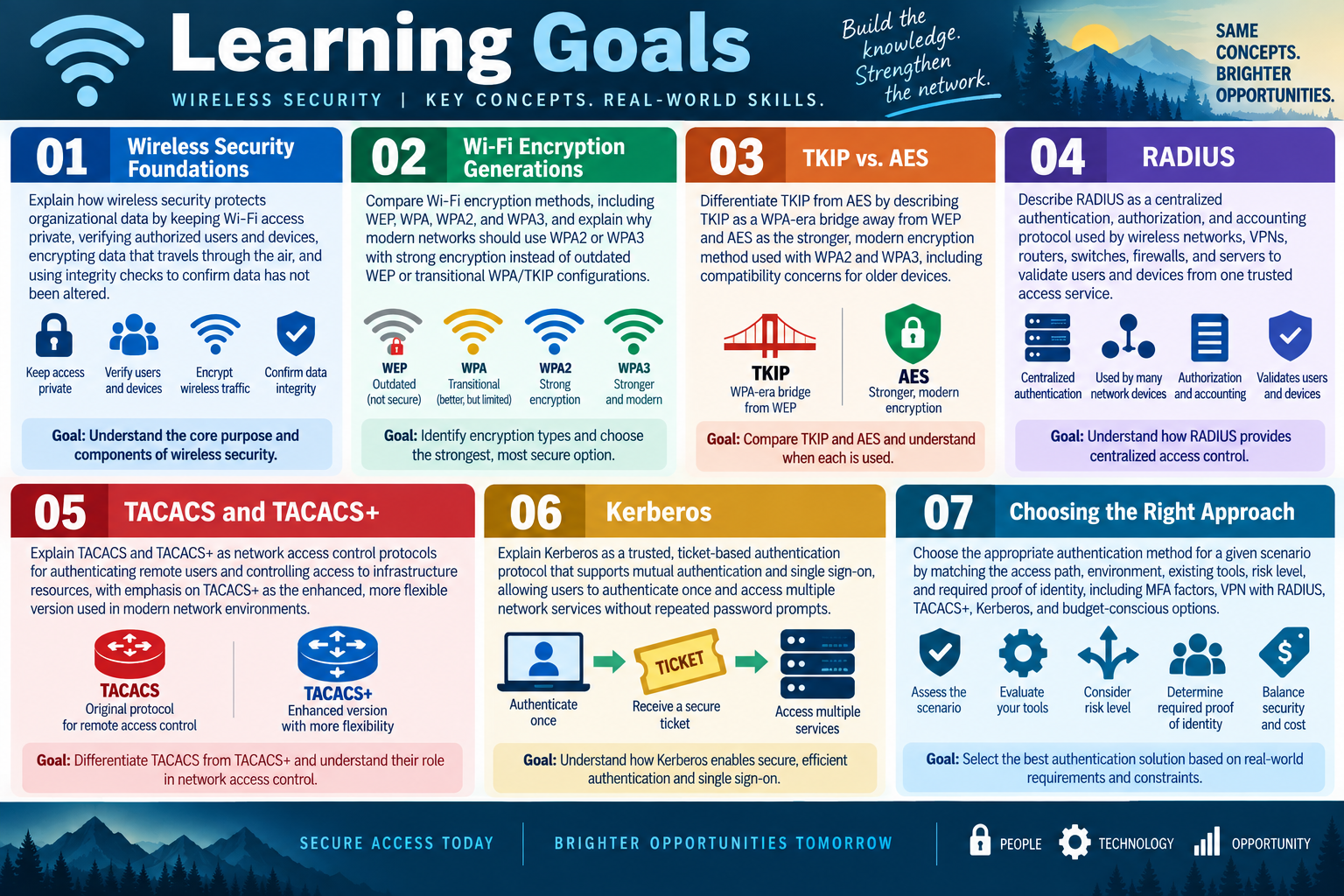
Learning goals for Objective 2.3 covering wireless security foundations, Wi-Fi encryption generations, TKIP and AES, RADIUS, TACACS and TACACS plus, Kerberos, and choosing the right authentication approach.
  • Module 01: Explain how wireless security protects organizational data by keeping Wi-Fi access private, verifying authorized users and devices, encrypting traffic that travels through the air, and using integrity checks to help confirm that transmitted data has not been altered.
  • Module 02: Compare Wi-Fi encryption generations, including WEP, WPA, WPA2, and WPA3, and explain why modern networks should use WPA2 or WPA3 with strong encryption instead of outdated WEP or transitional WPA/TKIP configurations.
  • Module 03: Differentiate TKIP from AES by describing TKIP as a WPA-era bridge away from WEP and AES as the stronger modern encryption method used with WPA2 and WPA3, including compatibility concerns for older devices.
  • Module 04: Describe RADIUS as a centralized authentication, authorization, and accounting protocol used by wireless networks, VPNs, routers, switches, firewalls, and servers to validate users and devices from one trusted access service.
  • Module 05: Explain TACACS and TACACS+ as network access control protocols for authenticating remote users and controlling access to infrastructure resources, with emphasis on TACACS+ as the enhanced, more flexible version used in modern network environments.
  • Module 06: Explain Kerberos as a trusted ticket-based authentication protocol that supports mutual authentication and single sign-on, allowing users to authenticate once and access multiple supported network services with fewer repeated password prompts.
  • Module 07: Choose the right authentication approach for a scenario by matching the access path, environment, existing tools, risk level, and required proof of identity, including MFA factors, VPN with RADIUS, TACACS+, Kerberos, and budget-conscious options.
Lesson ModuleModule 1 / 10
A+
Module 01

Module 1 - Wireless Security

Wireless security protects the data, users, and devices that communicate over the air by keeping the network private, verifying who is allowed to connect, encrypting wireless traffic, and checking that transmitted data has not been altered.

Wired networks have a physical boundary: a person usually needs access to a cable, jack, switch, or device. Wireless networks are different. The signal can travel through rooms, hallways, parking lots, neighboring offices, and public spaces. That convenience is exactly why wireless security matters. If the network carries business data, student records, healthcare information, payment activity, credentials, or internal applications, the organization must control who connects and protect the traffic while it moves through the air.

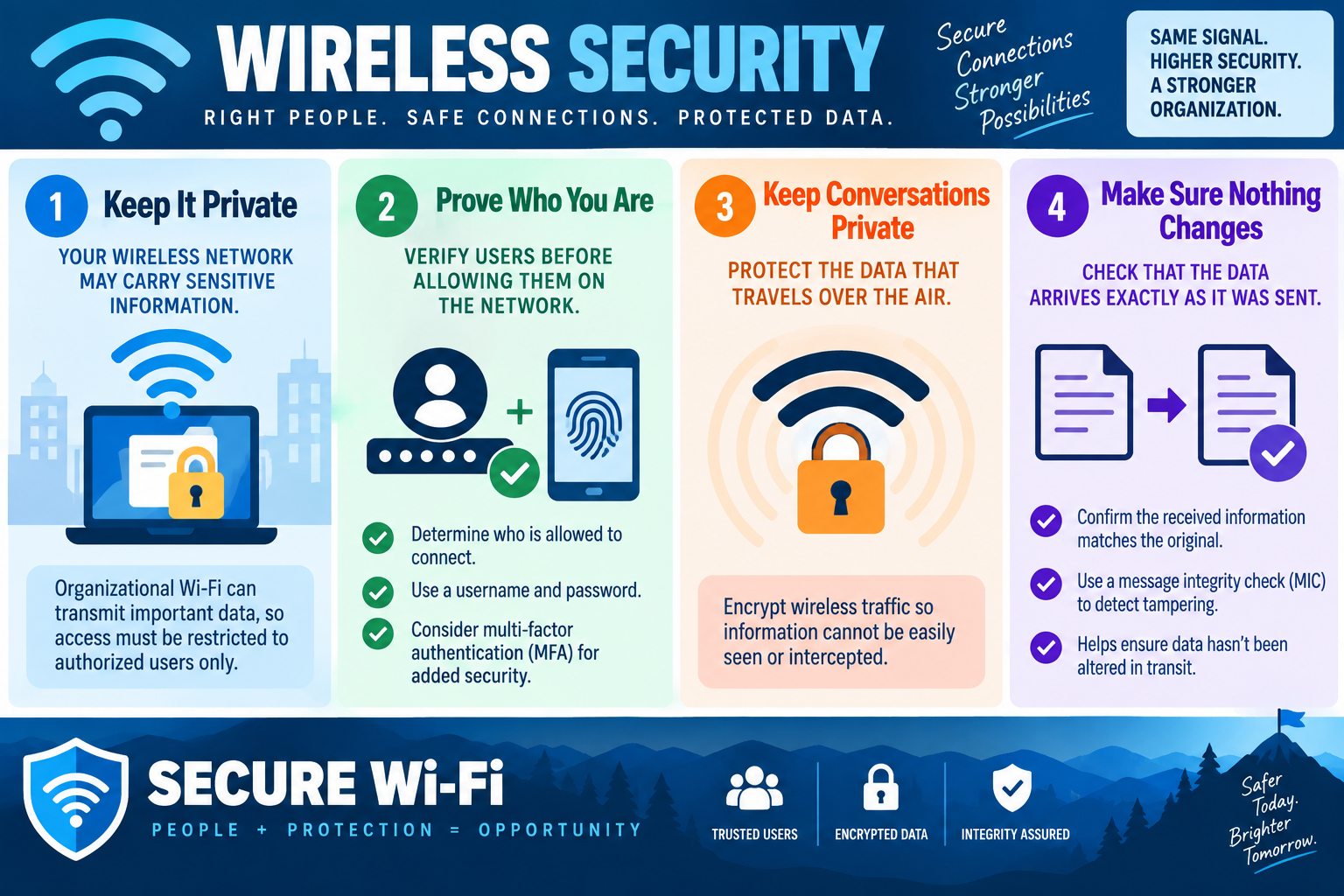
The infographic frames secure Wi-Fi around four practical ideas: keep it private, prove who you are, keep conversations private, and make sure nothing changes in transit. Those ideas map directly to the technician mindset for Objective 2.3. A secure wireless design is not just "set a password and hope." It combines access control, authentication, encryption, and integrity checking so the right people can connect safely and the wrong people are kept out.

Keep the Wireless Network Private

A wireless network may carry sensitive information, so access should be limited to authorized users, approved devices, and approved use cases. In a home network, that may mean a strong Wi-Fi password and a separate guest network. In an organization, it may mean enterprise authentication, unique user credentials, certificate-based access, device compliance checks, network segmentation, and monitoring.

Privacy starts with deciding who should be allowed on the network. Employees, students, guests, contractors, point-of-sale devices, printers, phones, tablets, cameras, and IoT devices may all need different access. A guest should not automatically receive the same network reach as an employee laptop. A printer should not have the same access as an administrator workstation. The secure answer is to match access to the role and risk.

When troubleshooting wireless access, first identify the network type and purpose. Is this a corporate WLAN, guest Wi-Fi, lab network, point-of-sale network, classroom network, warehouse scanner network, or personal hotspot? Then check whether the user or device belongs on that network. Many wireless problems are really authorization problems: the device can see the SSID, but the user, password, certificate, group, or policy does not allow access.

Prove Who You Are

Authentication is the process of proving identity before access is allowed. A simple wireless network may use one shared passphrase. That can work in small or low-risk environments, but it creates management problems because everyone knows the same secret. If one person leaves or the password is exposed, the shared key may need to be changed everywhere.

Organizations often need stronger authentication. Usernames and passwords allow access to be tied to a specific identity instead of a shared secret. Multi-factor authentication can add another proof, such as a push approval, code, certificate, hardware token, smart card, or biometric-backed sign-in. Enterprise wireless environments commonly use centralized authentication so access can be granted, revoked, logged, and reviewed through managed accounts.

For exam scenarios, pay attention to the difference between "the Wi-Fi password" and "the user's identity." If the question says each employee should sign in with their own credentials, shared WPA personal access is probably not enough. If the question says access should be removed when a user leaves the company, centralized user-based authentication is a better fit because disabling the account or removing group membership can remove wireless access without changing the password for everyone.

Keep Wireless Conversations Private

Encryption protects the data that travels between the wireless client and the access point. Without encryption, wireless traffic can be easier to observe because the signal is broadcast through the air. Encryption does not make a network magically perfect, but it helps prevent casual interception and protects information from being read by people who are not supposed to see it.

Modern wireless security should use strong encryption. For Objective 2.3, remember that WPA2 and WPA3 are the major wireless protection families students are expected to compare, and WPA3 is the stronger modern option when supported. AES-based encryption is preferred over older TKIP-based protection. Older protocols and weak ciphers may still appear in legacy environments, but they should not be selected for new secure deployments.

Compatibility is part of the real-world support story. A security upgrade may break older clients that do not support the selected protocol or cipher. That does not mean the organization should fall back to weak security everywhere. It means the technician should identify which devices are affected, confirm whether they support WPA2, WPA3, AES, enterprise authentication, or required certificates, and then plan a secure path forward.

Make Sure Nothing Changes in Transit

Integrity is about confidence that received data matches what was sent. The infographic calls out a message integrity check, or MIC, as a way to detect tampering. This matters because secure communication is not only about hiding data from view. It is also about detecting whether traffic has been modified while it travels between the sender and receiver.

In wireless security, integrity checks help defend against tampering and certain attack techniques that try to alter frames or trick devices into accepting changed information. Students do not need to become cryptographers for this objective, but they should understand the practical idea: encryption helps keep conversations private, while integrity checks help confirm the conversation was not altered.

If a scenario mentions data arriving exactly as it was sent, tampering detection, message integrity, or altered wireless traffic, think about integrity protections. If it mentions unauthorized viewing or interception, think encryption. If it mentions unknown users joining the WLAN, think authentication and access control.

Secure Wi-Fi in Practice

A well-designed wireless environment uses layers. The SSID should represent the right purpose. The authentication method should match the users and devices. Encryption should protect traffic. Network segmentation should limit what connected devices can reach. Monitoring should help detect failed authentication, unusual connection patterns, weak clients, rogue access points, and misconfiguration.

For example, a school may separate staff, student, guest, and device networks. A business may use enterprise authentication for employee laptops, a captive portal or isolated guest network for visitors, and separate rules for printers or inventory scanners. A small office may use WPA2 or WPA3 with a strong passphrase, but it should still avoid sharing the internal network broadly and should rotate credentials when needed.

Technician Workflow

  • Identify the network: confirm the SSID, purpose, location, and whether it is intended for employees, guests, devices, or a specific business workflow.
  • Confirm authorization: determine whether the user or device is allowed on that wireless network.
  • Check authentication: verify credentials, MFA, certificate status, account state, group membership, and centralized authentication services when used.
  • Check encryption: confirm whether the network uses an approved protocol and cipher, such as WPA2 or WPA3 with strong encryption.
  • Review compatibility: identify whether older devices fail because they do not support the required wireless security settings.
  • Validate integrity and stability: look for tampering clues, repeated disconnects, authentication failures, weak signal, or misconfigured access points.
  • Document the result: record the user, device, SSID, authentication method, security mode, change made, and verification outcome.
Support rhythm: identify who should connect, prove identity, protect traffic with strong encryption, verify integrity, test access, and document the wireless security decision.
Infographic explaining wireless security through private Wi-Fi access, user authentication, encrypted wireless traffic, message integrity checks, and secure Wi-Fi takeaways.
Secure Wi-Fi depends on authorized users, strong authentication, encrypted traffic, and integrity checks that help confirm data arrives unchanged.

Scenario Cues

  • Only approved users should connect: think authentication, authorization, user credentials, group membership, or enterprise wireless access.
  • Traffic travels over the air and should not be readable: think wireless encryption, strong protocols, and approved ciphers.
  • Data must arrive exactly as sent: think integrity checking and tamper detection.
  • Old devices fail after a security upgrade: check protocol, cipher, certificate, and authentication compatibility.
  • Guests need internet but not internal access: use a guest network or segmented access instead of the trusted internal WLAN.
  • One shared password is hard to control: consider user-based authentication so access can be managed per person.

Exam Mindset

Core 2 wireless security questions usually describe a balance between security and usability. The strongest answer is the one that meets the requirement without weakening the entire WLAN. Do not choose outdated security because it is convenient. Do not give every user the internal Wi-Fi password if the scenario asks for individual accountability. Do not focus only on signal strength when the clue is really about authentication, encryption, or integrity.

Remember the four-part model from the infographic: keep the network private, prove who is connecting, encrypt the conversation, and verify that the information was not changed. That model gives students a clean way to organize WPA, WPA2, WPA3, AES, enterprise authentication, MFA, and integrity concepts as the rest of Objective 2.3 expands.
Bottom line: secure wireless networks allow the right users and devices, protect data in transit, detect tampering, and keep organizational access stronger without making connection support a guessing game.
A+
Module 02

Module 2 - Wi-Fi Encryption

Wi-Fi encryption protects wireless communication by scrambling traffic, allowing only devices with the correct key or credentials to participate, and helping keep data private while it travels through the air.

Wireless networking is convenient because devices can communicate without a cable, but that convenience changes the security problem. Wi-Fi uses radio signals. A laptop, phone, tablet, printer, access point, and wireless router all transmit and receive through the air. Anyone nearby may be able to detect that a wireless network exists, and without proper protection, traffic may be easier to observe than traffic traveling through a physically controlled cable.

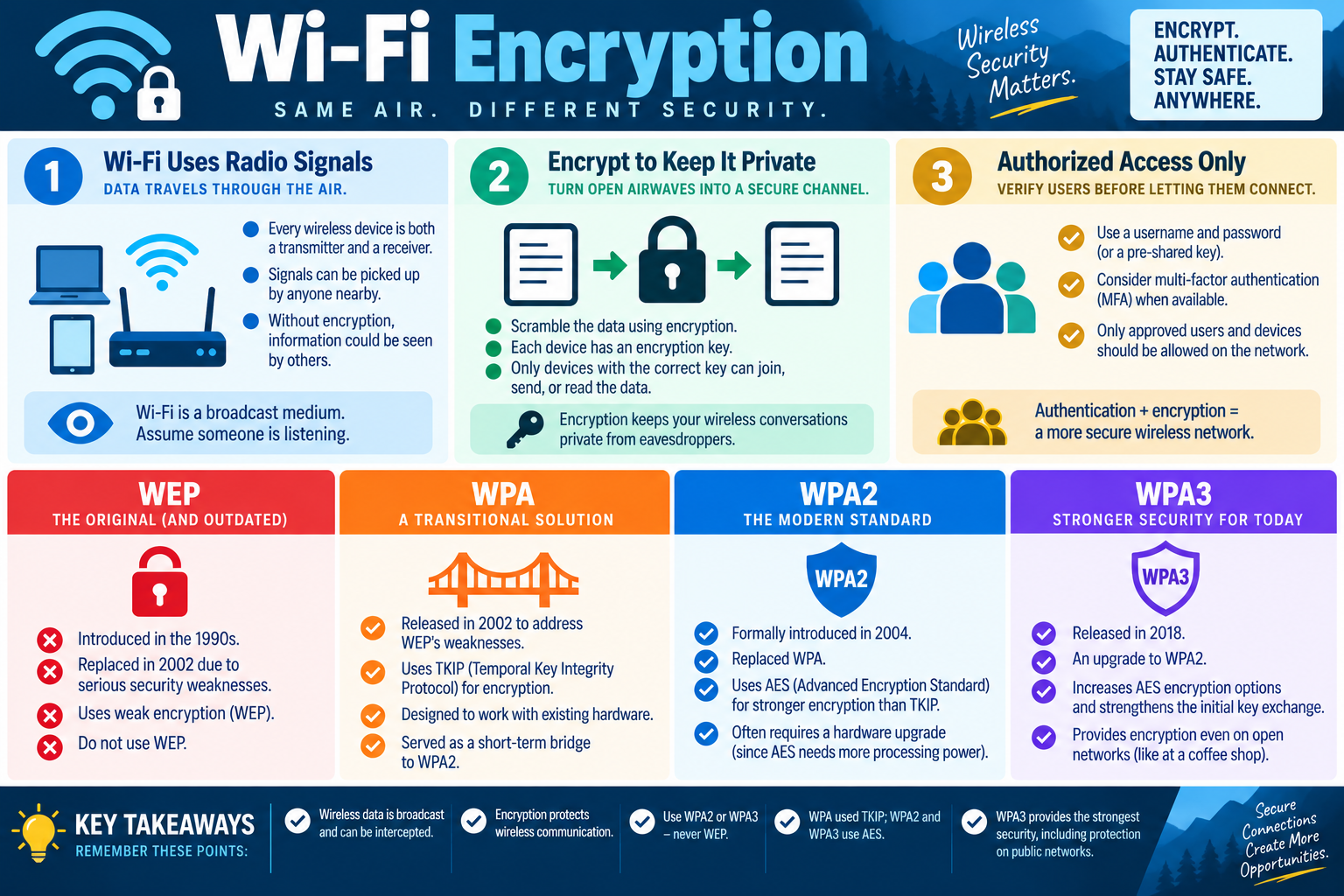
The image uses a simple phrase worth remembering: Wi-Fi is a broadcast medium, so assume someone is listening. That does not mean every nearby person can automatically read protected traffic. It means wireless networks must be intentionally secured. Encryption, authentication, and access control turn open airwaves into a controlled communication channel.

Wi-Fi Uses Radio Signals

Every wireless device is both a transmitter and a receiver. The access point sends and receives frames, and client devices do the same. Those signals may pass through walls, windows, ceilings, and shared spaces. A person does not need to plug into the network closet to notice wireless activity; they may only need to be within range of the signal.

This is why open Wi-Fi is risky. If traffic is not encrypted, information may be exposed to nearby listeners. In older or poorly configured environments, attackers may attempt to capture traffic, identify weak protocols, or trick users into connecting to unsafe networks. A technician should treat wireless security as data protection in motion, not just as a connection setting.

Signal range and security are related but not the same. A strong signal helps users connect reliably, but it does not prove the network is secure. A hidden SSID does not replace encryption. A strong password does not help if the network still uses an outdated protocol. The security setting must match the sensitivity of the environment.

Encrypt to Keep It Private

Encryption scrambles wireless data so that unauthorized people cannot easily read the communication. The client and access point use encryption keys to protect traffic. Only devices that successfully join using the correct method can send, receive, and read protected data. In practice, encryption helps keep wireless conversations private from casual eavesdropping and many common interception attempts.

For Objective 2.3, students should connect encryption to the protocol and cipher being used. WPA2 and WPA3 are modern wireless security options, and AES-based encryption is the preferred direction. TKIP was used as a transitional protection method, but it is not the modern target. WEP is outdated and should not be used.

Encryption also supports confidence in the network design. A business carrying internal applications, financial records, medical information, school records, customer data, or administrative credentials should not rely on open wireless traffic. Even guest networks should be separated and controlled so visitors receive internet access without trusted internal access.

Authorized Access Only

Encryption protects traffic, but the network still needs a way to decide who is allowed to connect. Authentication verifies users or devices before granting access. That may involve a pre-shared key, a username and password, certificates, enterprise authentication, or multi-factor authentication when available.

A pre-shared key is common in homes and small offices. Everyone who knows the password can attempt to join. This is simple, but it creates a shared-secret problem: if the key is exposed, every authorized device may need to be updated. User-based authentication is stronger for organizations because access can be tied to individual accounts, groups, and policy. If a user leaves, their account can be disabled without changing the wireless secret for everyone.

Authentication plus encryption creates a more secure wireless network. Authentication answers "Who is allowed in?" Encryption answers "Can outsiders read the conversation?" A secure deployment needs both. If the scenario asks for approved users and devices only, do not focus only on the encryption protocol; also consider how the user or device proves identity.

WEP

WEP, or Wired Equivalent Privacy, was the original wireless security protocol from the 1990s. It was designed to provide privacy for early Wi-Fi networks, but serious weaknesses made it unsafe. It was replaced by stronger options and should not be selected for modern deployments.

In exam language, WEP is a red flag. If a question says the network is still using WEP, the best answer is usually to migrate away from it. Do not keep WEP because an old device still connects. Do not choose WEP for compatibility unless the scenario is specifically asking you to identify an outdated or insecure configuration.

WPA

WPA was introduced as a transitional improvement after WEP. It helped address WEP's weaknesses and was designed to work with much existing hardware at the time. WPA commonly used TKIP, the Temporal Key Integrity Protocol, which gave older wireless environments a bridge toward stronger protection.

WPA was important historically, but it is not the modern standard students should choose for a secure new deployment. If a scenario describes WPA or TKIP, think legacy or transitional. The technician may need to support migration, identify old clients, or update equipment so the environment can move to stronger security.

WPA2

WPA2 became the modern baseline for secure Wi-Fi for many years. It replaced WPA and formally introduced stronger AES-based protection for wireless networks. Compared with WEP and WPA/TKIP, WPA2 with AES is a much stronger and more appropriate answer for most environments that cannot yet use WPA3.

Some older hardware may need upgrades because AES requires more processing capability than older protection methods. If old wireless clients cannot connect after moving to WPA2/AES, the issue may be hardware, driver, operating system, or adapter support. The safer answer is to update or replace unsupported devices rather than weakening the entire network.

WPA3

WPA3 is the stronger modern option for current Wi-Fi deployments when client devices and access points support it. Released after WPA2, it improves security for authentication and key exchange and expands strong encryption options. It also provides better protection in some public or open-network situations compared with older open Wi-Fi behavior.

WPA3 is the preferred choice for new secure environments when compatibility allows it. The practical challenge is support. A technician may need to check whether access points, wireless controllers, laptops, phones, tablets, IoT devices, drivers, and operating systems can use WPA3. In mixed environments, the organization may have to plan a migration path rather than flipping one setting and hoping every device survives the change.

Protocol Comparison

  • WEP: original and outdated; weak encryption; do not use for modern security.
  • WPA: transitional improvement over WEP; commonly associated with TKIP; useful historically but no longer the target standard.
  • WPA2: widely supported modern baseline; uses AES for stronger encryption than TKIP.
  • WPA3: stronger current option; improves security and should be used when the environment supports it.
  • AES: preferred modern encryption method for WPA2 and WPA3 environments.
  • TKIP: older transitional protection associated with WPA; avoid when stronger AES options are available.
Infographic explaining Wi-Fi encryption, radio signals, encrypted wireless communication, authorized access, and the differences between WEP, WPA, WPA2, and WPA3.
Wi-Fi security depends on encrypting traffic, authenticating approved users and devices, and choosing modern protocols such as WPA2 or WPA3 instead of legacy WEP or WPA/TKIP.

Scenario Cues

  • Network still uses WEP: identify it as outdated and migrate to WPA2 or WPA3.
  • Scenario mentions TKIP: think WPA-era transitional security and prefer AES when possible.
  • New secure wireless deployment: choose WPA3 when supported, or WPA2/AES where WPA3 is not available.
  • Older devices fail after a security upgrade: check whether their hardware, drivers, or operating systems support the selected WPA mode and cipher.
  • Users need individual accountability: combine encryption with user-based authentication instead of relying only on a shared passphrase.
  • Public wireless traffic needs better protection: look for modern protocol support and avoid assuming open Wi-Fi is private.

Exam Mindset

Core 2 wireless encryption questions usually ask you to compare generations of Wi-Fi protection. The order matters: WEP is obsolete, WPA was transitional, WPA2 became the broad modern standard, and WPA3 is stronger for current deployments. AES is preferred; TKIP is older. If the scenario asks for the best secure choice and compatibility is not a blocker, move toward WPA3. If WPA3 is not supported, WPA2 with AES is still far better than legacy options.

Do not confuse authentication with encryption. A password, pre-shared key, username, certificate, or MFA factor helps prove who may connect. Encryption protects the traffic after the connection is established. A strong wireless answer often needs both.

Bottom line: Wi-Fi uses open air as the transport, so protect it with modern encryption, authorized access, and WPA2 or WPA3 security instead of outdated WEP or transitional WPA/TKIP.
A+
Module 03

Module 3 - TKIP and AES

TKIP and AES are wireless encryption technologies from different generations: TKIP was a temporary bridge away from WEP, while AES is the stronger modern encryption method used with WPA2 and WPA3.

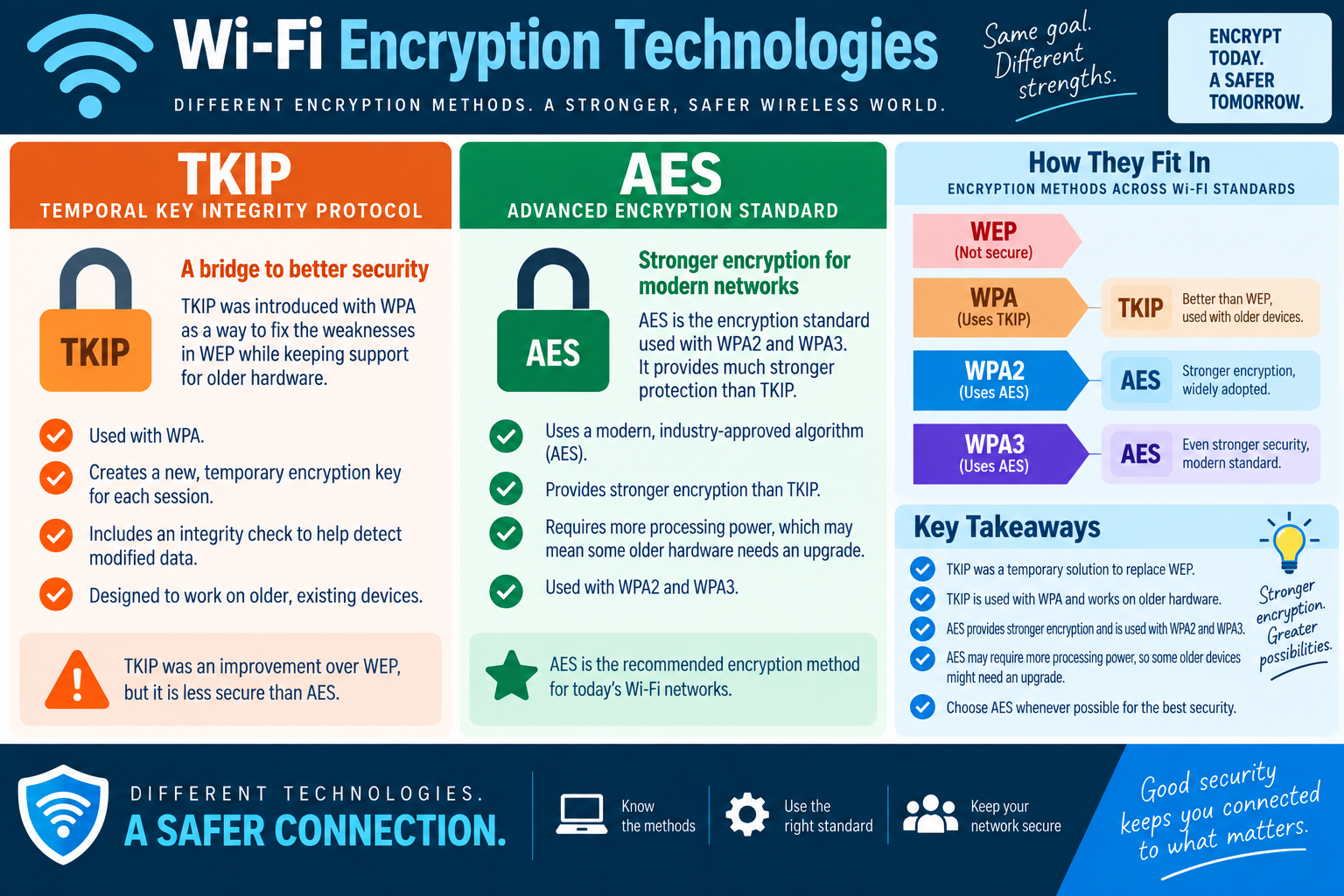
Wireless security has improved in stages. Early Wi-Fi needed a way to protect traffic, but the first common solution, WEP, proved weak. WPA introduced TKIP as a short-term improvement that could work with much existing hardware. Later, WPA2 and WPA3 moved the security baseline toward AES, which provides stronger protection for modern networks.

The infographic’s message is “same goal, different strengths.” TKIP and AES both exist to protect wireless communication, but they are not equal choices. TKIP helped older networks move away from WEP. AES is the recommended encryption method for today’s Wi-Fi networks whenever devices and access points support it.

Why Encryption Methods Matter

A wireless security protocol is the larger protection framework, while an encryption method is one of the technologies used inside that framework to protect the data. The names are easy to mix up because they often appear together in router settings, such as WPA/TKIP, WPA2/AES, or WPA3/AES. Students should learn the pairings because exam questions often hide the answer in those details.

If a scenario asks for stronger encryption, the answer usually points toward AES. If it describes older hardware that still uses WPA, TKIP may appear as a compatibility clue. If it describes WEP, weak encryption, or a network that should not be used, the answer is to replace or upgrade the configuration.

TKIP

TKIP stands for Temporal Key Integrity Protocol. It was introduced with WPA as a way to address weaknesses in WEP while still supporting older wireless hardware. That compatibility mattered because many organizations had already purchased wireless cards and access points that could not immediately support stronger hardware-demanding encryption.

TKIP creates new temporary encryption keys for each session instead of relying on the same weak behavior that made WEP so vulnerable. It also includes an integrity check to help detect modified data. These improvements made TKIP better than WEP and useful as a bridge technology during the transition to stronger wireless protection.

For modern security, though, TKIP is no longer the preferred answer. It is associated with legacy WPA environments and older devices. When a technician sees TKIP in a current business network, that should trigger a review. The organization may need to update access points, wireless adapters, drivers, operating systems, or device support plans so the WLAN can move to AES-based protection.

AES

AES stands for Advanced Encryption Standard. It is a modern, industry-approved encryption algorithm and is the standard students should associate with WPA2 and WPA3. Compared with TKIP, AES provides stronger protection and is widely adopted in current wireless environments.

AES may require more processing power than older encryption methods. That is why some older hardware may fail when a network is upgraded to WPA2/AES or WPA3. The correct support move is to identify incompatible devices and plan upgrades, not to weaken the whole network for convenience. Security that works only because it supports outdated clients can leave everyone at higher risk.

In normal exam logic, choose AES whenever possible. If the scenario asks for modern wireless encryption, stronger protection, or the recommended method for today’s Wi-Fi networks, AES is the clear direction. If the scenario asks why older devices stopped connecting after a security improvement, AES support and hardware capability may be part of the troubleshooting path.

How They Fit into Wi-Fi Standards

The relationship between wireless standards and encryption methods is a key Objective 2.3 concept. WEP is not secure. WPA commonly used TKIP and served as a transition away from WEP. WPA2 uses AES and became the widely adopted modern standard. WPA3 also uses AES-based protection and strengthens modern wireless security further.

  • WEP: outdated and not secure; do not select it for modern protection.
  • WPA with TKIP: better than WEP and useful for older devices, but transitional and weaker than AES-based options.
  • WPA2 with AES: stronger encryption, widely adopted, and still common in many secure networks.
  • WPA3 with AES: stronger modern security and the preferred direction when supported.

These pairings help students answer “best choice” questions quickly. If the answer choices include WEP, WPA/TKIP, WPA2/AES, and WPA3/AES, choose the strongest option supported by the environment. If compatibility is not mentioned, WPA3/AES is the most modern direction. If WPA3 is not supported, WPA2/AES is the practical secure baseline.

Infographic comparing TKIP and AES wireless encryption technologies across WEP, WPA, WPA2, and WPA3, with key takeaways about stronger modern Wi-Fi security.
TKIP was a bridge technology for WPA and older hardware; AES is the stronger recommended encryption method used with WPA2 and WPA3.

Technician Workflow

  • Identify the configured security mode: check whether the WLAN uses WEP, WPA, WPA2, WPA3, TKIP, AES, or a mixed mode.
  • Check the access point and controller: verify which protocols and ciphers the wireless infrastructure supports.
  • Check client compatibility: confirm whether laptops, phones, tablets, scanners, printers, and IoT devices support WPA2/AES or WPA3.
  • Prefer AES: choose AES-based security whenever possible instead of keeping TKIP for convenience.
  • Plan legacy migrations: identify older devices that force weaker settings and replace or isolate them when needed.
  • Document the change: record the SSID, security mode, cipher, affected devices, user impact, rollback plan, and final verification.

Scenario Cues

  • “Uses TKIP”: think WPA-era transitional security and older hardware support.
  • “Uses AES”: think stronger modern encryption with WPA2 or WPA3.
  • “Introduced to fix WEP weaknesses”: think WPA and TKIP.
  • “Recommended for today’s Wi-Fi”: think AES.
  • “Older devices may need upgrades”: check whether those devices can support AES-based security.
  • “Best security available”: choose WPA3/AES when supported, otherwise WPA2/AES over WPA/TKIP or WEP.

Exam Mindset

Core 2 questions may present TKIP and AES as if they are simply two equivalent encryption names. They are not. TKIP is a transitional improvement over WEP and was designed for older compatibility. AES is stronger, modern, industry-approved, and the recommended method for current Wi-Fi networks.

The safest exam habit is to rank the choices by generation and strength. WEP is the weakest and should not be used. WPA/TKIP is better than WEP but still transitional. WPA2/AES is strong and widely adopted. WPA3/AES is the stronger modern choice when supported. If the scenario mentions old hardware, compatibility may explain the problem, but it should not automatically justify keeping weaker encryption forever.

Bottom line: know the method, use the right standard, choose AES whenever possible, and treat TKIP as a legacy bridge rather than the target for secure Wi-Fi.
A+
Module 04

Module 4 - RADIUS

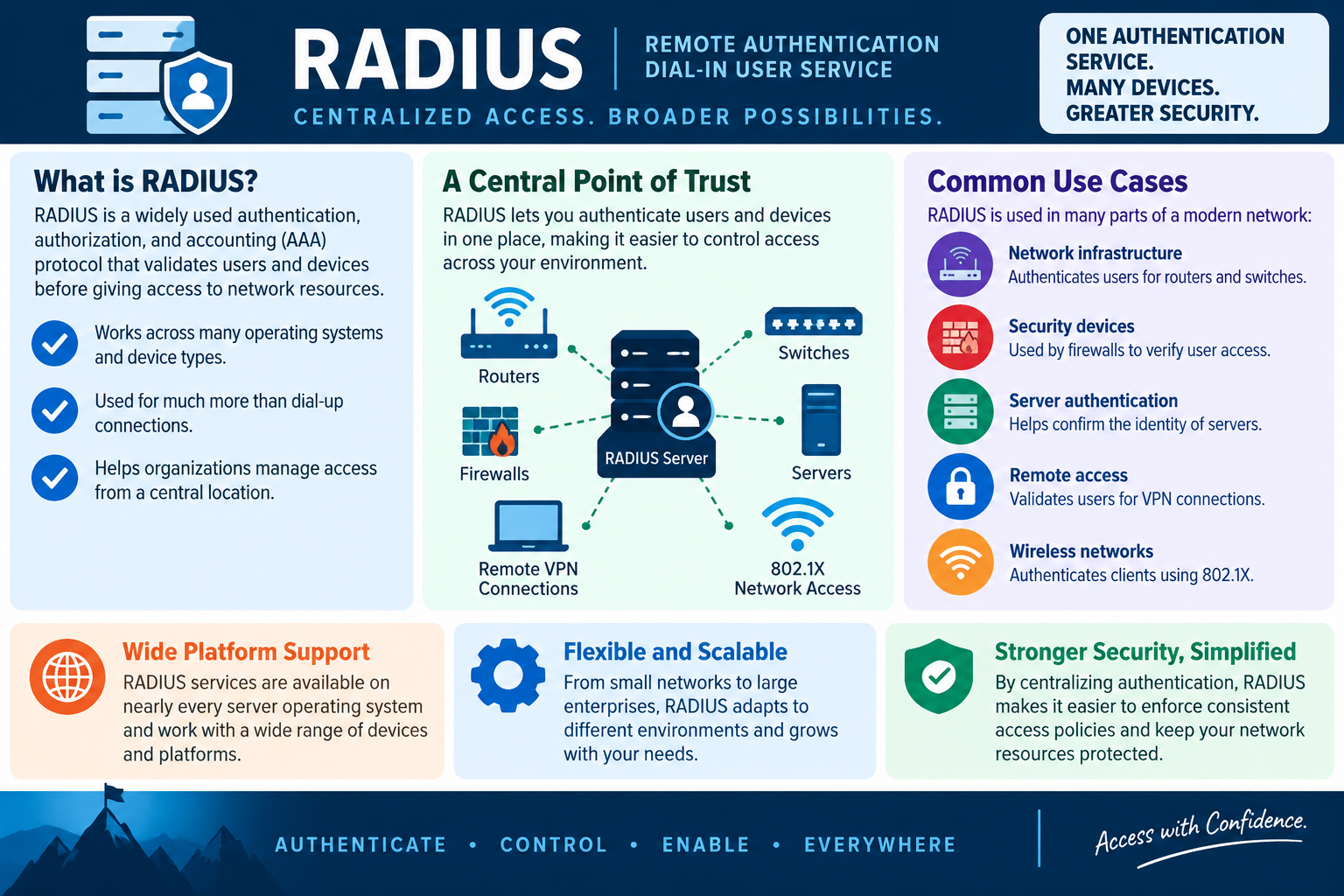
RADIUS is a centralized authentication, authorization, and accounting protocol that validates users and devices before granting access to network resources.

RADIUS stands for Remote Authentication Dial-In User Service. The name comes from older dial-up networking, but the protocol is still widely used in modern networks. Today, RADIUS commonly supports wireless authentication, VPN access, network infrastructure administration, switch access, firewall authentication, and other situations where many devices need to trust one central authentication service.

The central idea is simple: instead of every router, switch, firewall, VPN gateway, or wireless access point maintaining its own separate user list, those devices can ask a RADIUS server whether a user or device should be allowed in. That gives the organization one place to manage access rules, account status, group membership, policy, and logging.

AAA: Authentication, Authorization, and Accounting

RADIUS is often described as an AAA protocol. Authentication verifies identity. Authorization determines what the authenticated identity is allowed to do. Accounting records activity, such as when access started, when it ended, which device was used, and what service was requested.

These three pieces matter in support work. A user may fail authentication because the password is wrong, the account is disabled, MFA or certificate requirements are not met, or the authentication server cannot be reached. A user may authenticate successfully but still be denied because policy or group membership does not authorize that type of access. Accounting records help technicians and administrators review what happened after the fact.

A Central Point of Trust

The infographic frames RADIUS as a central point of trust. That is the heart of the technology. Network devices become RADIUS clients, and the RADIUS server becomes the trusted decision point. When a user tries to connect through a wireless access point, VPN concentrator, switch, router, or firewall, the device forwards the access request to RADIUS for validation.

This centralized model is easier to secure than scattered local accounts. If an employee leaves, the organization can disable the account or remove access in one identity system instead of hunting through every network device. If a policy changes, the organization can apply consistent rules. If there is an investigation, administrators have a better chance of finding useful authentication and accounting logs.

Wireless Networks and 802.1X

For Objective 2.3, one of the most important RADIUS clues is enterprise Wi-Fi. Business wireless networks often use 802.1X authentication so users or devices authenticate individually before joining the trusted WLAN. The access point or wireless controller acts as the network access device, and the RADIUS server validates the credentials or certificate.

This is different from a basic home Wi-Fi password. With a pre-shared key, everyone uses the same secret. With RADIUS-backed wireless authentication, access can be tied to individual users, devices, groups, certificates, or policies. That supports better accountability and easier removal when a user changes roles or leaves the organization.

Common Use Cases

RADIUS appears across many parts of a modern network. Network infrastructure devices can use it to authenticate administrators who sign in to routers and switches. Security devices can use it to verify user access through firewalls. Servers and remote access services can use it to validate identities. VPN systems can use it to check users before allowing remote network access. Wireless networks can use it for 802.1X client authentication.

That flexibility is why RADIUS matters for technicians. A failed sign-in to Wi-Fi, VPN, a managed switch, or a firewall may all point back to the same central authentication service. The symptom may appear at the edge device, but the root cause may be account state, group membership, shared secret mismatch, certificate problem, network reachability, time sync, DNS, policy, or the RADIUS service itself.

Wide Platform Support

RADIUS services are available across many server operating systems, network platforms, and device types. A Windows environment may use Network Policy Server, while other environments may use different RADIUS server implementations. The important Core 2 idea is not one vendor tool name; it is that RADIUS is broadly supported and commonly used to centralize network access decisions.

Because RADIUS works across varied devices, it helps organizations avoid isolated authentication islands. Routers, switches, VPN appliances, wireless controllers, access points, firewalls, and servers can all participate in a shared access model. That makes policy enforcement more consistent and makes large environments easier to manage.

Flexible and Scalable

RADIUS can scale from smaller managed networks to large enterprise environments. In a small office, it may support a single secure WLAN. In a large organization, it may support many locations, multiple SSIDs, VPN users, network device administration, and segmented access policies. The same basic idea grows with the environment: one authentication service, many devices.

Scalability also means planning for availability. If the RADIUS server is unreachable, users may be unable to connect to Wi-Fi or VPN even when their credentials are correct. A technician should consider server health, network paths, firewall rules, shared secrets, certificates, logs, redundancy, and failover behavior when troubleshooting.

Infographic explaining RADIUS as a centralized authentication, authorization, and accounting service for routers, switches, firewalls, servers, VPN connections, and 802.1X wireless networks.
RADIUS centralizes access decisions so many network devices can authenticate users and devices through one trusted service.

Technician Workflow

  • Identify the access device: determine whether the request is coming through Wi-Fi, VPN, a switch, router, firewall, or server.
  • Confirm the user or device identity: check username, password, certificate, device identity, MFA requirement, and account state.
  • Check authorization: verify group membership, network policy, VLAN assignment, access rule, or remote access permission.
  • Verify RADIUS communication: confirm the access device can reach the RADIUS server and that shared secrets, ports, and firewall rules are correct.
  • Review logs: compare client-side errors, network device logs, and RADIUS server events to see where the request failed.
  • Test safely: use a known-good account or test device when policy allows, and avoid weakening wireless or VPN security just to prove connectivity.
  • Document the result: record the user, device, access method, policy, server, change made, and verification outcome.

Scenario Cues

  • Business Wi-Fi requires individual user sign-in: think 802.1X with RADIUS-backed authentication.
  • VPN users authenticate through a central service: think RADIUS as the authentication source.
  • Routers, switches, and firewalls should use centralized admin login: RADIUS may be involved.
  • Many devices need one authentication service: RADIUS is a strong fit.
  • User password is correct but access is denied: check authorization policy, group membership, and RADIUS logs.
  • Multiple users cannot connect to Wi-Fi or VPN: check RADIUS reachability, service health, shared secrets, certificates, DNS, time, and firewall paths.

Exam Mindset

Core 2 questions often present RADIUS as the answer when the scenario needs centralized authentication for network access. The clue may mention wireless 802.1X, VPN users, routers, switches, firewalls, or many devices using one authentication service. When you see those words, think central access validation rather than a local password stored on each device.

Do not limit RADIUS to dial-up because of the historical name. Modern RADIUS is used far beyond dial-up. Also remember that RADIUS is not the same thing as Wi-Fi encryption. WPA2 or WPA3 protects wireless traffic; RADIUS helps decide who is allowed to join or administer network resources.

Bottom line: RADIUS gives organizations one trusted place to authenticate, authorize, and account for access across many devices, making network security easier to enforce and troubleshoot.
A+
Module 05

Module 5 - TACACS

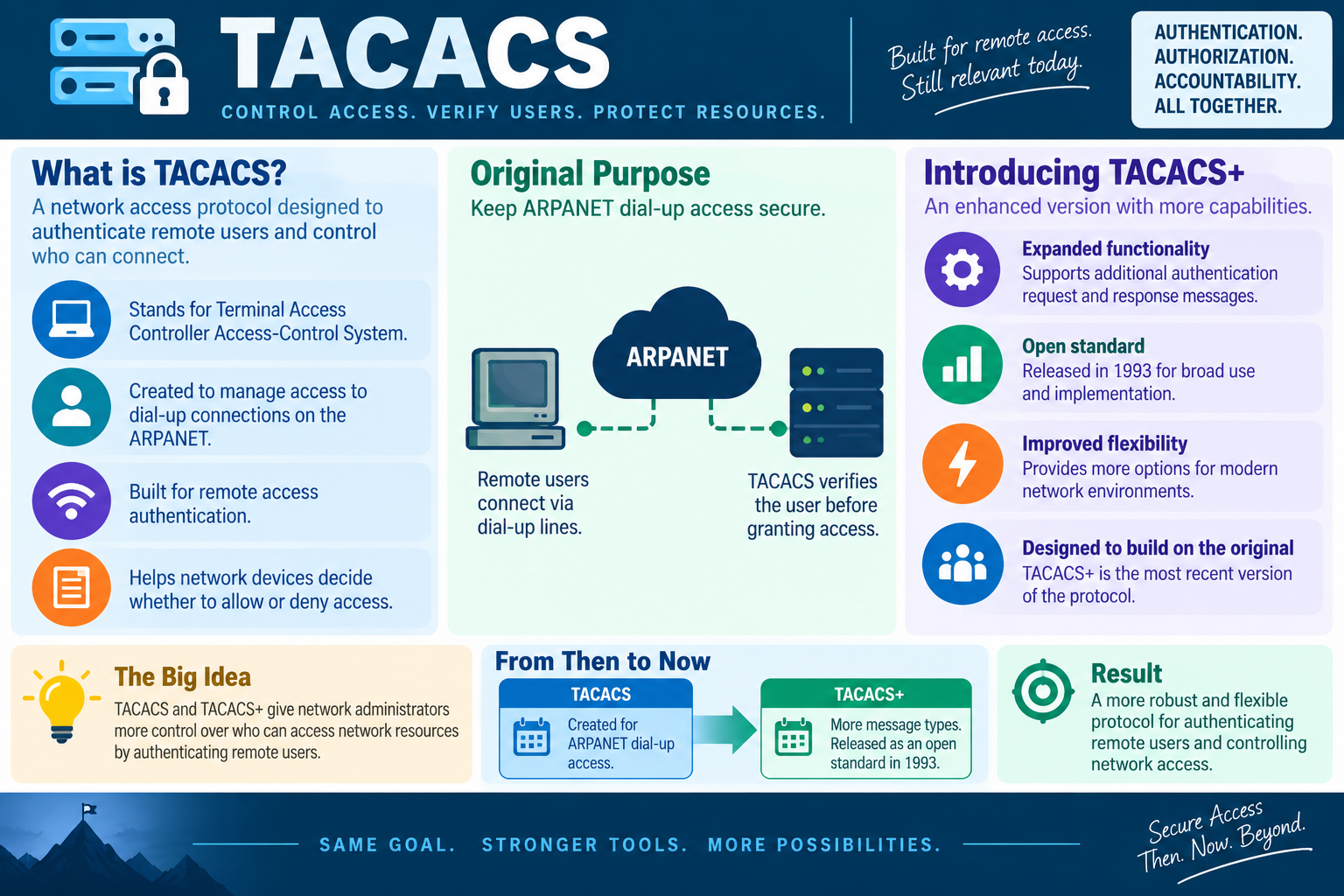
TACACS is a network access protocol designed to authenticate remote users and help network devices decide who is allowed to connect, administer resources, or perform privileged actions.

TACACS stands for Terminal Access Controller Access-Control System. Like RADIUS, it belongs in the network authentication conversation, but it has its own history and use cases. TACACS was originally created to help manage access to dial-up connections on ARPANET, where remote users needed to be verified before they could reach protected network resources.

The infographic frames TACACS around three ideas: authentication, authorization, and accountability. That is the right technician mindset. The protocol is about more than asking “Is this password correct?” It supports controlled access decisions and helps organizations understand who connected, what access was requested, and whether the request should be allowed.

Original Purpose

TACACS began in an era when remote access commonly meant dialing in over phone lines. Remote users connected from outside the local network, and the system needed a way to verify identity before granting access. TACACS provided a structured access-control process so users could be authenticated before they reached network resources.

Even though dial-up is not the normal access method today, the underlying problem still matters. Organizations still need to verify remote users, protect network devices, and control who can administer infrastructure. The connection method changed, but the access-control principle stayed relevant.

For exam scenarios, do not let the ARPANET or dial-up history make TACACS feel obsolete as a concept. The historical context explains where it came from. The modern lesson is that centralized authentication and authorization for network access remains important.

What TACACS Controls

TACACS helps network devices decide whether a user should be allowed or denied access. In practical terms, this can apply to administrators signing in to routers, switches, firewalls, and other infrastructure devices. The device receiving the login attempt can consult an authentication service rather than relying only on local accounts.

This matters because network infrastructure is powerful. A person who can administer a router, switch, firewall, VPN appliance, or wireless controller may be able to change traffic flow, security rules, management access, VLAN behavior, or authentication settings. Centralizing the decision helps reduce scattered passwords and supports better control over privileged access.

Introducing TACACS+

TACACS+ is the enhanced version with more capabilities. It expands the original approach with additional authentication request and response messages, more flexibility for modern network environments, and stronger control over access decisions. The infographic describes TACACS+ as the most recent version of the protocol family.

TACACS+ was released as an open standard in 1993 for broader use and implementation. In many technician conversations, TACACS+ is the version people mean when they talk about TACACS in modern network device administration. It is built on the original goal but offers stronger tools for current environments.

The plus matters because it signals evolution. TACACS was the starting point. TACACS+ added capability, flexibility, and broader usefulness. If a scenario asks for the enhanced or more capable version, TACACS+ is the clue.

From Then to Now

The infographic compares TACACS and TACACS+ as “from then to now.” TACACS was created for ARPANET dial-up access. TACACS+ expanded the model with more message types and open-standard availability. The same basic goal remains: secure access by verifying users and controlling network access.

Modern environments may use TACACS+ for network device administration because it can separate and control authentication, authorization, and accounting functions. This is especially useful when different administrators should have different command permissions or privilege levels. For example, one technician may be allowed to view configuration, while another may be authorized to make changes.

TACACS and RADIUS

Students often see TACACS and RADIUS near each other because both are AAA-related protocols. RADIUS is widely used for network access such as Wi-Fi, VPN, and device authentication. TACACS+ is often associated with administrative access to network infrastructure devices. The exact implementation depends on the environment, vendor, and policy, but the exam clue usually points to the best fit.

Think about the resource being protected. If the scenario says wireless clients need to authenticate to join the network, RADIUS and 802.1X are strong clues. If the scenario says network administrators need controlled access to routers and switches, TACACS+ may be the stronger clue. Both help centralize access; the difference is the common use case and level of control being emphasized.

Infographic explaining TACACS, TACACS plus, original ARPANET dial-up access purpose, enhanced functionality, open standard release, and network access control benefits.
TACACS began as remote access control for dial-up environments, while TACACS+ expanded the model into a more flexible protocol for authenticating users and controlling network access.

Technician Workflow

  • Identify the protected device: determine whether the access request involves routers, switches, firewalls, wireless controllers, VPN appliances, or another network resource.
  • Confirm the identity source: check whether the device uses local accounts, RADIUS, TACACS+, directory-backed authentication, or another AAA service.
  • Check authentication: verify username, password, token, certificate, account state, and reachability to the authentication server.
  • Check authorization: confirm which commands, privilege level, management role, or network access the user should receive.
  • Review accounting: use logs to confirm who attempted access, when they connected, whether access was granted, and what administrative activity occurred.
  • Protect fallback accounts: keep emergency local access controlled, documented, and limited so central authentication failure does not become an uncontrolled backdoor.
  • Document changes: record device name, user, access method, authorization level, AAA server, policy change, and verification result.

Scenario Cues

  • Remote users need network access control: TACACS may appear as a historical or conceptual answer.
  • Enhanced TACACS with more capability: think TACACS+.
  • Administrators need controlled access to routers and switches: TACACS+ is a strong fit.
  • Different admins need different permissions: look for authorization and command-control features.
  • Auditors need accountability for network device access: check accounting logs and AAA configuration.
  • The scenario says authentication, authorization, and accountability together: connect the clue to TACACS/TACACS+ and AAA-style access control.

Exam Mindset

Core 2 TACACS questions are usually about recognizing the protocol’s purpose and how TACACS+ improved the original design. Remember the historical anchor: TACACS was created to manage secure dial-up access to ARPANET. Then remember the modern anchor: TACACS+ is more flexible and commonly associated with controlled access to network devices.

Do not confuse TACACS with Wi-Fi encryption. TACACS does not replace WPA2, WPA3, AES, or TKIP. It helps verify users and control access. Encryption protects traffic; authentication and authorization decide who gets in and what they can do.

Bottom line: TACACS and TACACS+ help administrators verify users, control access, and maintain accountability for network resources, especially where remote or infrastructure access needs careful control.
A+
Module 06

Module 6 - Kerberos

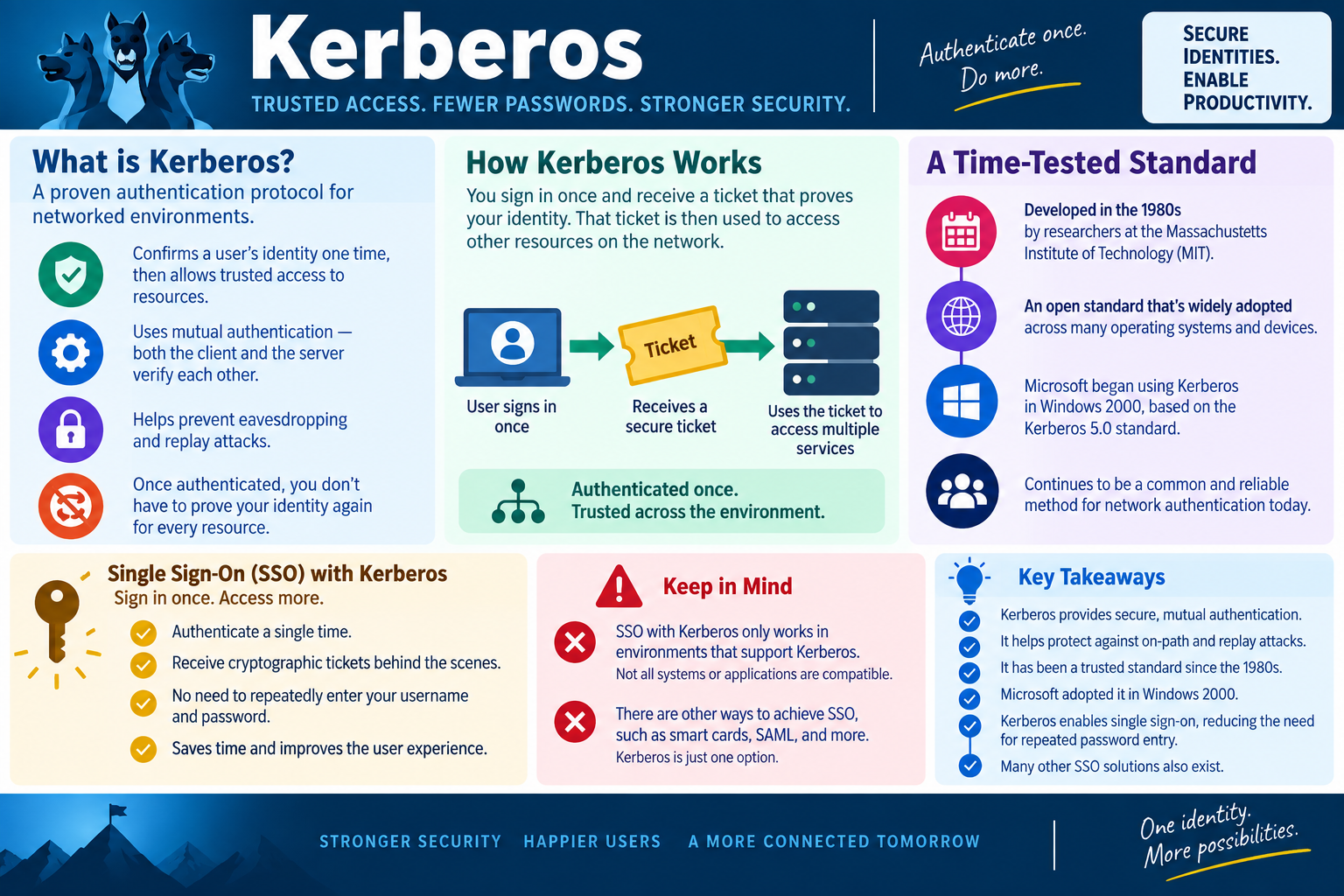
Kerberos is a trusted network authentication protocol that lets a user authenticate once, receive a secure ticket, and use that ticket to access multiple services without repeatedly sending a password.

Kerberos is built around trust, tickets, and mutual authentication. Instead of sending a username and password to every server or application, the user signs in and receives cryptographic proof of identity. That proof can then be presented to other services in the environment. The result is fewer repeated password prompts, stronger authentication, and a smoother user experience.

The infographic’s message is “authenticate once, do more.” That captures the practical value of Kerberos. In a networked environment, users often need access to file shares, printers, applications, databases, intranet services, and other resources. Kerberos helps make that access safer and more efficient by using tickets instead of asking the user to type credentials again and again.

What Kerberos Does

Kerberos confirms a user’s identity one time and then allows trusted access to resources through tickets. It uses mutual authentication, meaning both the client and the server can verify each other. This helps prevent users from unknowingly sending credentials to an impostor service and helps services trust that the client has been authenticated properly.

Kerberos also helps reduce exposure to eavesdropping and replay attacks. Because the user’s password is not repeatedly sent across the network to each service, there is less opportunity for credentials to be captured in transit. Tickets are time-sensitive and cryptographically protected, which helps limit the usefulness of captured authentication material.

For students, the simplest way to remember Kerberos is this: sign in once, receive a ticket, use the ticket to prove identity to network services. The password unlocks the first step; the ticket supports access after that.

How Kerberos Works

In a Kerberos environment, the user signs in and proves identity to a trusted authentication system. After successful authentication, the user receives a ticket. That ticket is then used to request access to services such as file servers, application servers, or other network resources. The user does not need to retype the username and password for every service.

Behind the scenes, Kerberos relies on shared trust and time-sensitive tickets. The ticket proves that authentication already happened, and the service can validate that proof. This is why accurate time synchronization is important in Kerberos environments. If clocks drift too far apart, tickets may be treated as invalid even when the user’s credentials are correct.

Although the infographic keeps the process high-level, technicians should know the core troubleshooting idea: if a user can sign in but cannot access Kerberos-protected services, check tickets, time sync, domain connectivity, account state, service principal configuration, DNS, and whether the service actually supports Kerberos.

Single Sign-On with Kerberos

Kerberos supports single sign-on by letting a user authenticate a single time and then access multiple trusted services. This improves productivity because users do not have to repeatedly enter a username and password throughout the day. It also improves security because fewer password prompts means fewer chances for users to type credentials into the wrong place.

Single sign-on does not mean every system automatically trusts every user. The user still must be authenticated, and authorization still controls what the user can access. Kerberos can prove who the user is, but permissions, group membership, application roles, and resource settings decide what that authenticated user can do.

In exam scenarios, look for words such as “sign in once,” “access multiple services,” “trusted environment,” “tickets,” or “fewer password prompts.” Those clues often point toward Kerberos or another SSO technology. If the scenario is specifically about Windows domain authentication, Kerberos becomes an even stronger clue.

A Time-Tested Standard

Kerberos was developed in the 1980s by researchers at the Massachusetts Institute of Technology. It became an open standard and has been widely adopted across operating systems and networked environments. Microsoft began using Kerberos in Windows 2000 based on the Kerberos 5.0 standard, which is why it appears so often in Windows domain authentication discussions.

Kerberos remains common because the underlying problem has not gone away. Networks still need secure identity, trusted access, fewer password prompts, and protection against authentication attacks. Even as cloud identity and newer SSO methods grow, Kerberos still matters in many enterprise and Windows environments.

Infographic explaining Kerberos as a trusted network authentication protocol using secure tickets, mutual authentication, single sign-on, and time-tested Windows domain authentication concepts.
Kerberos lets users authenticate once and use secure tickets to access trusted network services with fewer repeated password prompts.

Keep in Mind

Kerberos SSO only works in environments that support Kerberos. Not every system, web application, cloud service, device, or authentication flow uses it. Other single sign-on approaches exist, including smart cards, SAML, OAuth-related flows, and other identity-provider technologies. Kerberos is important, but it is one option among several.

Compatibility is a practical troubleshooting issue. If an application is not configured for Kerberos, if the device is not domain joined, if DNS is wrong, if time is out of sync, or if the service identity is misconfigured, SSO may fail. The user may still have a valid password, but the ticket-based process can break at another layer.

Technician Workflow

  • Identify the environment: confirm whether the user, device, and service are part of a Kerberos-capable domain or trusted network.
  • Check sign-in: verify account state, password status, lockout condition, and whether the initial authentication succeeded.
  • Check tickets: determine whether Kerberos tickets are being issued, expired, rejected, or missing.
  • Verify time synchronization: confirm that clients, domain controllers, and servers have accurate time.
  • Check DNS and service names: Kerberos relies on finding the correct service and validating the service identity.
  • Separate authentication from authorization: a valid Kerberos ticket proves identity, but permissions still determine access.
  • Document the result: record the user, device, service, domain context, ticket behavior, time state, and final access test.

Scenario Cues

  • Sign in once and access multiple services: think Kerberos SSO.
  • Tickets prove identity: Kerberos is the key clue.
  • Both client and server verify each other: think mutual authentication.
  • Protection against replay attacks: Kerberos tickets and timestamps are relevant.
  • Windows domain authentication after Windows 2000: Kerberos is commonly involved.
  • User signs in but SSO fails: check time synchronization, tickets, DNS, service identity, domain trust, and authorization.

Exam Mindset

Core 2 Kerberos questions usually describe trusted network authentication, tickets, mutual authentication, single sign-on, and reduced repeated password entry. When a scenario says users should authenticate once and then access multiple internal resources, Kerberos should be near the top of your mental list.

Do not confuse Kerberos with Wi-Fi encryption or AAA server protocols. WPA2, WPA3, TKIP, and AES protect wireless traffic. RADIUS and TACACS+ centralize network access decisions. Kerberos provides ticket-based authentication for trusted network services. The correct answer depends on the layer the question is testing.

Bottom line: Kerberos uses trusted tickets to support secure, mutual authentication and single sign-on, helping users access network services with fewer passwords and stronger identity protection.
A+
Module 07

Module 7 - Authentication Approach

The right authentication approach depends on the environment, the communication method, the tools already in place, the level of risk, and the kind of proof required before access is trusted.

Authentication is not one-size-fits-all. A home Wi-Fi network, a corporate VPN, a Cisco-heavy network infrastructure environment, and a Microsoft domain may all use different authentication methods. The goal stays the same: prove identity before granting access. The best method depends on how the user connects, what resource is protected, what systems already exist, and how much assurance the organization needs.

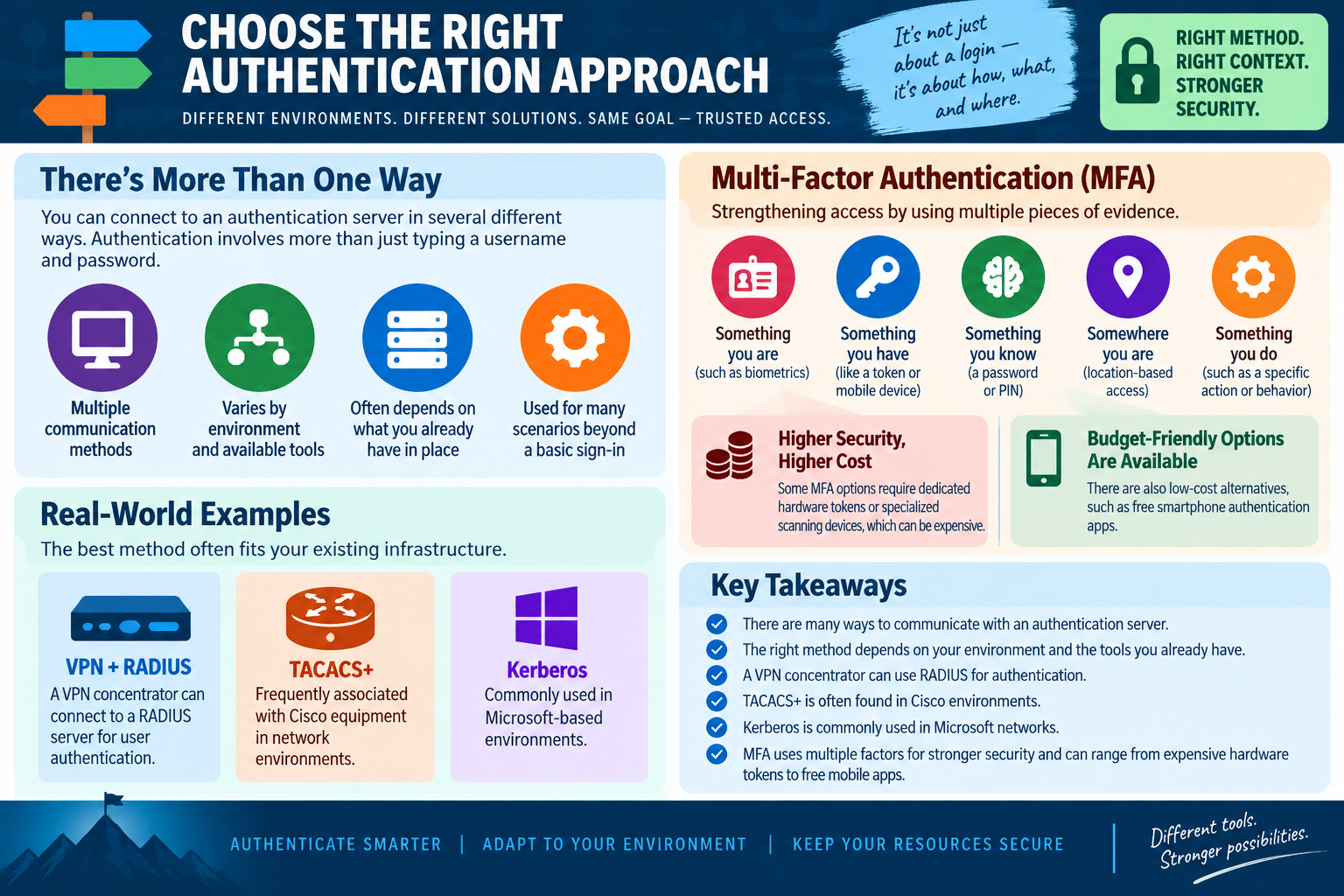
The infographic says it clearly: it is not just about a login; it is about how, what, and where. A username and password may be enough in one context and too weak in another. A hardware token may be excellent for privileged access but too expensive for every guest account. Kerberos may be perfect inside a Microsoft-based domain but irrelevant to an application that does not support it. A technician needs to match the method to the situation.

More Than One Way to Authenticate

There are many ways to communicate with an authentication server. The method may vary by environment, device type, network design, application support, and security requirement. Some systems authenticate users through a VPN concentrator, some through RADIUS, some through TACACS+, some through Kerberos, and some through a cloud identity provider or MFA platform.

Authentication also extends beyond basic sign-in. A user may authenticate to join a wireless network, connect to a VPN, access a file share, administer a router, open a protected application, approve a privileged action, or perform a sensitive transaction. In each case, the organization is asking for evidence that the request should be trusted.

Multi-Factor Authentication

Multi-factor authentication strengthens access by requiring multiple pieces of evidence. The classic categories are something you know, something you have, something you are, somewhere you are, and something you do. Using more than one category makes it harder for a stolen password alone to become a successful compromise.

  • Something you know: a password, PIN, passphrase, or other secret.
  • Something you have: a mobile device, hardware token, smart card, security key, or authenticator app.
  • Something you are: biometric proof such as fingerprint, facial recognition, or another physical trait.
  • Somewhere you are: location-based context, such as trusted network, region, building, or geolocation signal.
  • Something you do: behavior or action-based context, such as a specific approval action or behavioral pattern.

MFA does not have to mean expensive dedicated hardware for every user. Some environments use hardware tokens or specialized scanning devices for high-risk roles, but budget-friendly options exist too. Free or low-cost smartphone authenticator apps can improve security without requiring dedicated tokens for everyone.

Higher Security and Cost Tradeoffs

Stronger authentication often comes with operational tradeoffs. Hardware tokens, smart cards, biometric scanners, certificate systems, and specialized devices can improve security, but they also require purchasing, enrollment, replacement, support, training, and recovery planning. The strongest technical option is not automatically the best organizational option if it cannot be deployed or supported well.

Budget-friendly options can still be meaningful. A smartphone authenticator app, push approval, TOTP code, or passwordless mobile sign-in may be practical for many users. The technician should consider risk level, user population, support burden, device ownership, accessibility needs, recovery process, and policy requirements before recommending an approach.

Real-World Examples

A VPN concentrator can connect to a RADIUS server for user authentication. This lets remote access depend on centralized accounts and policies instead of a separate VPN-only user database. If a remote employee leaves, disabling the identity or removing group membership can remove VPN access without rebuilding the VPN device's local accounts.

TACACS+ is frequently associated with Cisco equipment and network infrastructure environments. It is often used when administrators need controlled access to routers, switches, firewalls, or similar devices. TACACS+ can support detailed authorization decisions, which matters when different administrators should have different management permissions.

Kerberos is commonly used in Microsoft-based environments. It supports trusted authentication and single sign-on through tickets, allowing users to authenticate once and access multiple supported services. If the clue mentions Microsoft domain resources, tickets, or sign in once and access more, Kerberos is likely part of the answer.

Infographic explaining how to choose the right authentication approach using MFA factors, VPN plus RADIUS, TACACS plus, Kerberos, cost tradeoffs, and environment-based decisions.
Choosing an authentication method means matching the access method, environment, existing tools, risk level, and user workflow to the right identity proof.

How to Choose the Right Method

Start with the environment. If users are connecting to Wi-Fi, look for WPA2 or WPA3, 802.1X, certificates, and RADIUS. If users are connecting remotely, look for VPN authentication, RADIUS, MFA, device compliance, and conditional access. If administrators are logging into network devices, look for TACACS+ or centralized AAA. If users are accessing Microsoft domain resources, look for Kerberos and directory-backed authentication.

Then consider the access risk. Everyday user access may need standard MFA and strong password policy. Privileged administrator access may need hardware-backed authentication, PAM workflow, just-in-time approval, or stricter logging. Guest access may need limited scope and isolation rather than the same authentication strength as an employee.

Technician Workflow

  • Identify the access path: determine whether the user is connecting through Wi-Fi, VPN, web app, domain login, network device management, or another service.
  • Identify the protected resource: clarify whether the request is for internet access, internal network access, infrastructure administration, application access, or domain resources.
  • Check existing tools: look for RADIUS, TACACS+, Kerberos, MFA platforms, certificates, smart cards, security keys, or identity-provider integrations already in place.
  • Match assurance to risk: use stronger factors for privileged, remote, sensitive, or high-impact access.
  • Plan recovery: make sure lost phones, expired tokens, certificate issues, and locked accounts can be handled securely.
  • Test the workflow: verify that authorized users can connect and unauthorized users are still blocked.
  • Document the design: record the method, server, policy, factor type, user group, recovery process, and verification result.

Scenario Cues

  • VPN authentication through a central server: think VPN plus RADIUS.
  • Cisco network devices or infrastructure administration: TACACS+ is a strong clue.
  • Microsoft domain, tickets, or sign in once: think Kerberos.
  • Need more proof than a password: use MFA.
  • Dedicated token or scanner is too expensive: consider budget-friendly authenticator apps where policy allows.
  • Authentication method depends on existing infrastructure: choose the method that fits the environment rather than forcing one universal answer.

Exam Mindset

Core 2 questions in this area often ask for the best authentication method for a specific environment. Slow down and identify the context. RADIUS is common for VPN and 802.1X network access. TACACS+ is common for controlled network device administration. Kerberos is common in Microsoft-based environments and supports ticket-based SSO. MFA strengthens access by requiring more than one type of proof.

Do not treat the most expensive option as automatically best. Do not treat the simplest option as automatically secure enough. The right answer is the one that fits the existing environment, meets the risk level, supports the users, and keeps resources protected.

Bottom line: choose authentication based on context: right method, right environment, right level of proof, and the smallest practical path to stronger trusted access.
A+
Module 08

Module 8 - Key Takeaways

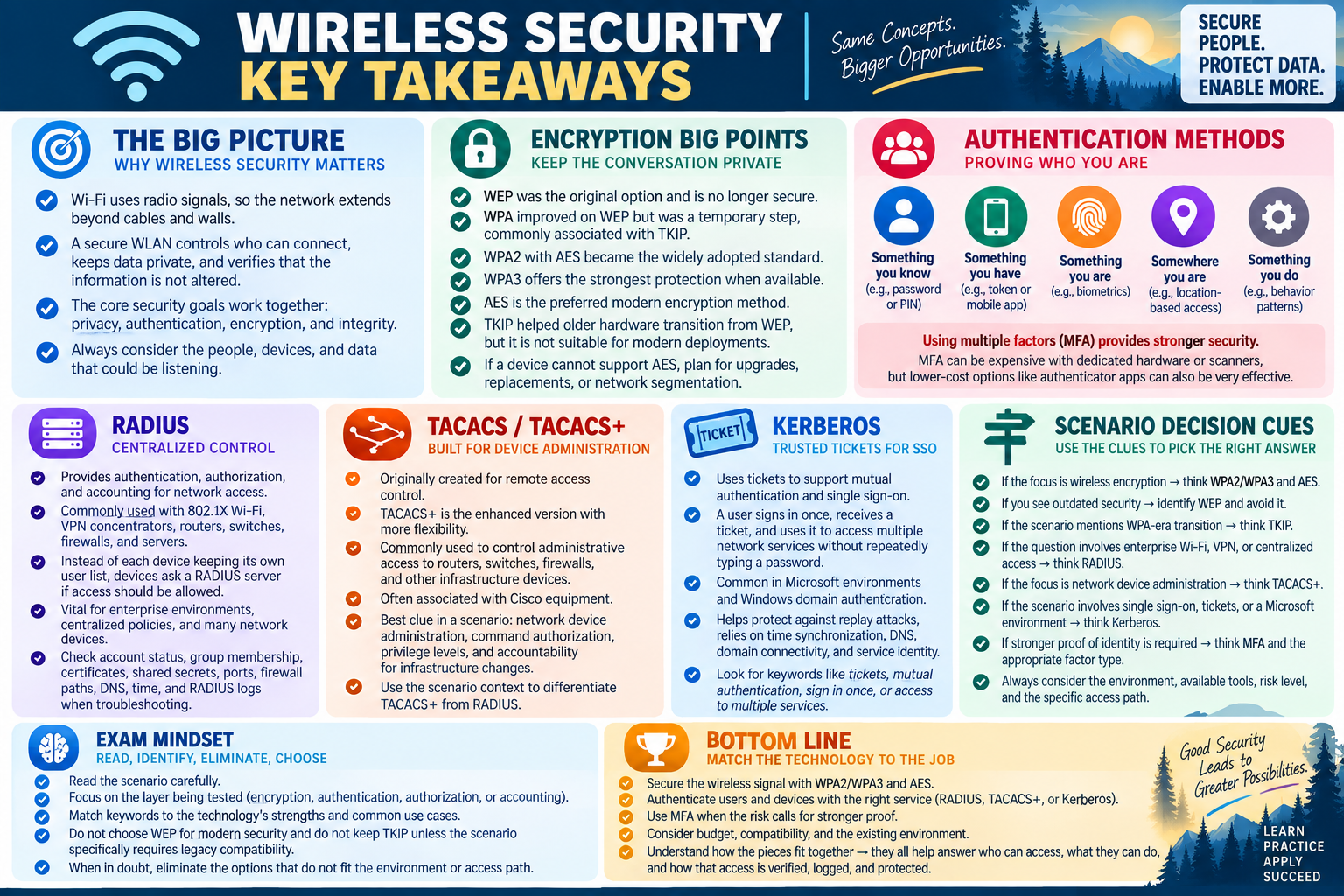
Wireless security key takeaways for Objective 2.3 covering encryption, authentication methods, RADIUS, TACACS plus, Kerberos, scenario decision cues, exam mindset, and the bottom line for matching the technology to the job.
Objective 2.3 ties together wireless privacy, encryption choices, centralized authentication, ticket-based SSO, MFA, and scenario clues for choosing the right access method.

Objective 2.3 is about choosing wireless protection and authentication methods that match the environment: secure the signal, use modern encryption, authenticate the right users and devices, and select the correct protocol for the job.

Wireless security starts with a simple reality: Wi-Fi uses radio signals, so the access path is not limited to a cable or wall jack. A secure WLAN has to control who can connect, protect the data moving through the air, and verify that the communication has not been altered in transit.

The major Objective 2.3 tools work together. WPA2 and WPA3 protect wireless networks. AES is the preferred modern encryption method. TKIP was a transitional method used with WPA, and WEP is outdated and unsafe. RADIUS, TACACS+, Kerberos, and MFA help answer the identity question: who is requesting access, what are they allowed to do, and what proof is strong enough for the risk?

Wireless Security Takeaways

Wireless networks should be designed around privacy, authentication, encryption, and integrity. Privacy limits the network to authorized users and devices. Authentication proves who is connecting. Encryption protects wireless traffic from being read by nearby observers. Integrity checks help detect tampering or modified data.

In scenario questions, do not stop at "the Wi-Fi connects." Ask whether the right person or device is connecting to the right SSID with the right security method. Guest users, employees, administrators, printers, phones, scanners, and IoT devices may need different network access.

Encryption Takeaways

Wi-Fi encryption keeps wireless conversations private. WEP was the original option and should not be used. WPA improved on WEP but was transitional and commonly associated with TKIP. WPA2 with AES became the broad modern baseline. WPA3 is the stronger current choice when supported.

AES is the encryption method to prefer whenever possible. TKIP helped older hardware move beyond WEP, but it is not the target for a secure modern deployment. If older devices cannot support AES, the safer move is to plan upgrades, replacements, or segmentation instead of weakening the whole WLAN.

RADIUS Takeaways

RADIUS centralizes authentication, authorization, and accounting for network access. It is commonly used with 802.1X enterprise Wi-Fi, VPN concentrators, routers, switches, firewalls, and servers. Instead of each device maintaining its own user list, devices can ask a RADIUS server whether access should be allowed.

RADIUS is a strong clue when the scenario mentions enterprise wireless authentication, VPN user validation, centralized access policies, or many network devices using one authentication service. When access fails, check account state, group membership, policy, certificates, shared secrets, ports, firewall paths, DNS, time, and RADIUS logs.

TACACS Takeaways

TACACS was originally built for remote access control, and TACACS+ is the enhanced version with more flexibility. In modern scenarios, TACACS+ is often associated with controlled administrative access to routers, switches, firewalls, and other infrastructure devices.

Use the scenario context to separate TACACS+ from RADIUS. RADIUS is often the stronger clue for Wi-Fi and VPN user access. TACACS+ is often the stronger clue for network device administration, command authorization, privilege levels, and accountability for infrastructure changes.

Kerberos Takeaways

Kerberos uses trusted tickets to support mutual authentication and single sign-on in networked environments. A user signs in once, receives a secure ticket, and uses that ticket to access supported services without repeatedly typing a password.

Kerberos is common in Microsoft-based environments and Windows domain authentication. If a question mentions tickets, mutual authentication, sign in once, access multiple services, Windows domain resources, or replay protection, Kerberos is likely involved. Troubleshooting may include time synchronization, DNS, domain connectivity, account state, service identity, tickets, and authorization.

Authentication Approach Takeaways

The best authentication method depends on the environment and the risk. MFA strengthens access by requiring more than one proof: something you know, have, are, somewhere you are, or something you do. Stronger methods may cost more or require extra support, but lower-cost options such as authenticator apps can still significantly improve security.

VPN plus RADIUS, TACACS+ for infrastructure administration, Kerberos for Microsoft domain SSO, and MFA for higher assurance are all valid in the right context. The exam usually rewards the answer that fits the existing environment and the specific access path.

Scenario Decision Cues

  • Open airwaves or nearby listeners: think wireless encryption and secure Wi-Fi design.
  • WEP is still configured: identify it as outdated and migrate away from it.
  • TKIP appears in the scenario: think WPA-era transitional security and older hardware.
  • Need the strongest modern Wi-Fi option: choose WPA3 when supported, or WPA2/AES as a strong practical baseline.
  • Enterprise Wi-Fi or VPN needs centralized authentication: think RADIUS.
  • Network administrators need controlled access to routers and switches: think TACACS+.
  • Users sign in once and use tickets to access services: think Kerberos.
  • More proof than a password is required: think MFA and the appropriate factor type.

Exam Mindset

Read the scenario for the layer being tested. Wireless encryption protects traffic. Authentication proves identity. Authorization determines allowed access. Accounting records activity. A single question may mention all of them, but the best answer usually matches the most specific requirement.

Do not choose WEP for modern security. Do not keep TKIP unless the scenario is specifically about legacy compatibility. Do not confuse RADIUS, TACACS+, and Kerberos. RADIUS commonly supports network access, TACACS+ commonly supports network device administration, and Kerberos supports ticket-based SSO in trusted environments.

Bottom line: secure the wireless signal, choose WPA2 or WPA3 with AES, authenticate users and devices through the right service, add MFA when risk calls for stronger proof, and match each protocol to its real-world job.
A+
Module 09

Module 9 - Section Notes

BROtocol Joe Core 2 220-1202Objective 2.3

2.3 Wireless Security and Authentication

Core idea: Secure wireless access by protecting the signal, choosing modern encryption, verifying users and devices, and matching the authentication protocol to the environment.

Wireless Security Foundations

  • Wi-Fi uses radio signals, so the network can extend beyond walls, rooms, and physical cable paths.
  • A secure WLAN controls who can connect, keeps wireless data private, and checks that data has not been changed.
  • Authentication verifies the user or device before access is allowed.
  • Encryption protects traffic as it travels between wireless clients and access points.
  • Integrity checks help detect tampering or modified wireless communication.

Wi-Fi Encryption Generations

  • WEP is the original wireless encryption option and is no longer considered secure.
  • WPA was created as a transitional improvement over WEP.
  • WPA2 became the widely adopted modern baseline for secure wireless networks.
  • WPA3 is the stronger current standard when devices and infrastructure support it.
  • Use WPA2 or WPA3 with strong encryption instead of legacy WEP or WPA/TKIP when possible.

TKIP

  • TKIP stands for Temporal Key Integrity Protocol.
  • It was introduced with WPA to address weaknesses in WEP while supporting older hardware.
  • TKIP creates temporary keys and includes integrity checking.
  • TKIP was useful as a bridge, but it is weaker than AES.
  • Do not choose TKIP for a modern secure wireless deployment unless the scenario is specifically about legacy compatibility.

AES

  • AES stands for Advanced Encryption Standard.
  • AES is the preferred modern encryption method for Wi-Fi security.
  • WPA2 and WPA3 use AES for stronger protection than TKIP.
  • AES can require more processing power, so very old devices may need upgrades.
  • When the question asks for strong modern wireless encryption, think WPA2/WPA3 with AES.
Memory hook: Wireless security starts with open air. Control who connects, encrypt what travels, verify nothing changed, and choose the strongest standard the environment supports.
Notes:
Authentication ServicesObjective 2.3

Centralized Access and Trusted Sign-In

RADIUS

  • RADIUS provides centralized authentication, authorization, and accounting for network access.
  • It is commonly used with enterprise Wi-Fi, 802.1X, VPN concentrators, routers, switches, firewalls, and servers.
  • Network devices can ask a RADIUS server whether a user or device should be allowed.
  • RADIUS helps enforce consistent access policies across many devices.
  • When troubleshooting RADIUS, check accounts, groups, certificates, shared secrets, ports, firewall paths, DNS, time, and logs.

TACACS and TACACS+

  • TACACS was created for remote access control and originally helped secure dial-up access.
  • TACACS+ is the enhanced, more flexible version used in modern network environments.
  • TACACS+ is often associated with Cisco equipment and infrastructure device administration.
  • It supports controlled administrative access to routers, switches, firewalls, and similar devices.
  • Scenario clues include command authorization, privilege levels, network device administration, and accountability for changes.

Kerberos

  • Kerberos is a trusted, ticket-based authentication protocol for networked environments.
  • Users authenticate once, receive secure tickets, and use those tickets to access supported services.
  • Kerberos supports mutual authentication so both the client and server can verify each other.
  • It helps reduce repeated password prompts and supports single sign-on.
  • Common troubleshooting areas include time synchronization, DNS, tickets, account state, domain connectivity, service identity, and authorization.

Multi-Factor Authentication

  • MFA strengthens access by requiring more than one type of proof.
  • Factor categories include something you know, have, are, somewhere you are, and something you do.
  • Examples include passwords, PINs, authenticator apps, tokens, smart cards, biometrics, and location-based rules.
  • Higher-security methods may cost more or require extra support.
  • Budget-friendly MFA options, such as authenticator apps, can still significantly improve access security.
Scenario ClueThinkBest Technician Move
Enterprise Wi-Fi or VPN users need centralized validation.RADIUSVerify the RADIUS server, policy, user group, certificates, shared secret, and network path.
Administrators need controlled access to routers and switches.TACACS+Use centralized AAA with command authorization, privilege control, and logging.
Users sign in once and access multiple domain services with tickets.KerberosCheck domain membership, DNS, time sync, ticket status, and service identity.
A password alone is not strong enough for remote or sensitive access.MFAAdd an appropriate second factor based on risk, cost, user workflow, and recovery needs.
A wireless network still uses WEP or TKIP.Legacy wireless securityMigrate to WPA2 or WPA3 with AES, and plan upgrades for devices that cannot support it.
Notes:
Objective 2.3 Rapid ReviewWireless Security

Technician Decision Rhythm

1. Identify the Access Path
  • Decide whether the user is connecting through Wi-Fi, VPN, domain sign-in, application access, or network device administration.
  • The access path usually points to the right tool or protocol.
2. Separate the Security Jobs
  • Encryption protects data from being read.
  • Authentication proves identity, authorization grants access, and accounting records activity.
3. Choose Modern Wireless Protection
  • Avoid WEP for modern security.
  • Prefer WPA3 when supported, or WPA2 with AES as a strong practical baseline.
4. Match Protocol to Environment
  • Use RADIUS for centralized network access such as enterprise Wi-Fi and VPN.
  • Use TACACS+ for infrastructure device administration, and Kerberos for ticket-based SSO in trusted domain environments.
5. Add Stronger Proof When Risk Increases
  • Use MFA for remote access, privileged actions, sensitive data, and high-impact systems.
  • Balance security, cost, support, accessibility, and recovery planning.
6. Troubleshoot with Clues
  • RADIUS issues often involve policies, certificates, shared secrets, ports, logs, DNS, or time.
  • Kerberos issues often involve tickets, DNS, time sync, domain trust, service identity, or authorization.
7. Verify and Document
  • Test that authorized users can connect and unauthorized users remain blocked.
  • Record the SSID, protocol, cipher, server, policy, user group, factor type, change made, and final result.

Exam Mindset

  • Choose the answer that matches the layer being tested: encryption, authentication, authorization, or accounting.
  • Do not choose WEP for secure modern Wi-Fi.
  • Do not choose TKIP unless the scenario specifically requires legacy WPA compatibility.
  • For strongest wireless encryption, look for WPA3 or WPA2/WPA3 with AES.
  • For enterprise Wi-Fi and VPN authentication, RADIUS is a strong clue.
  • For network device administration and command control, TACACS+ is a strong clue.
  • For tickets, mutual authentication, Windows domains, and SSO, Kerberos is a strong clue.
Bottom line: Objective 2.3 is about matching the method to the job. Secure the wireless signal, use WPA2 or WPA3 with AES, centralize access when needed, choose RADIUS, TACACS+, or Kerberos from the scenario clues, and add MFA when stronger proof is required.
Notes:
10

Module 10 - Final Test

Complete 20 multiple-choice questions for Objective 2.3. The test uses realistic wireless security, Wi-Fi encryption, RADIUS, TACACS+, Kerberos, MFA, and protocol-selection clues. Each correct answer is worth 1 point.

Score pending0 / 20
WB
Workbook

Student Workbook

BrotocolJoeStudent Workbook

BrotocolJoe

CompTIA A+ Core 2 (220-1202)

Student Workbook

2.0 Security

Objective 2.3 - Compare and contrast wireless security protocols and authentication methods.

How to use this workbook: Print this packet once, complete it by hand as you finish each online module, and keep it as evidence that you read, processed, and practiced the Objective 2.3 wireless security and authentication material.
Student Name:
Wireless SecurityObjective 2.3

Module 1 - Wireless Security

Key Information: Wireless security combines authorized access, confidentiality, and integrity. A visible network name or strong radio signal does not establish that a connection is trusted.

Check Your Understanding

How do authentication and encryption protect different aspects of wireless access?

Why do integrity checks matter for transmitted data?

Why is hiding an SSID not a substitute for secure authentication and encryption?

Security Requirements Record

  • For each prompt, state the protection needed and how you would verify it.
  • Access: Identify who and which devices should be allowed to connect.
  • Confidentiality: Explain what protects traffic traveling over the wireless link.
  • Integrity: Explain why detecting altered traffic matters.
  • Verification: Describe a test of approved access and a check that unauthorized access remains restricted.
Explain why successfully connecting to Wi-Fi does not automatically grant access to all organizational resources.
Technician Scenario: A visitor sees an office SSID and asks for the employee wireless password. Propose an approved guest-access workflow that separates guest needs from internal resources and describe how you would verify the intended separation.
Wi-Fi EncryptionObjective 2.3

Module 2 - Wi-Fi Encryption

Key Information: WEP and original WPA represent older wireless-security generations. Assess modern WPA2 or WPA3 configurations using the actual security mode, client support, and organization requirements.

Check Your Understanding

Why should WEP not be selected simply to support an old device?

How do Personal and Enterprise modes differ in how access is managed?

Why should you verify the configured mode rather than relying only on the router’s product label?

Comparison Record: WPA2 vs. WPA3

  • Write one or two sentences for each prompt; focus on supported secure configuration and deployment requirements.
  • WPA2: Describe the encryption configuration to verify and the client compatibility evidence needed.
  • WPA3: Describe why both access-point and client support must be checked before enforcing it.
  • Decision: A legacy client cannot join the intended modern mode. Explain how you would investigate replacement, upgrade, or approved isolation rather than weakening every client’s connection.
Explain why a strong passphrase is still important when using a modern Personal-mode wireless network.
Technician Scenario: An office wants stronger Wi-Fi protection, but a specialist device supports only obsolete security. Plan an inventory, compatibility check, approved exception or replacement decision, pilot, and verification.
TKIP and AESObjective 2.3

Module 3 - TKIP and AES

Key Information: TKIP was a transitional WPA-era mechanism. AES-based protection, such as CCMP in WPA2, is distinct from TKIP; verify the complete wireless configuration and client support.

Check Your Understanding

Why was TKIP a transition mechanism rather than a long-term modern choice?

How does an encryption algorithm differ from a complete wireless security protocol?

Why can mixed compatibility modes complicate a security assessment?

Comparison Record: TKIP vs. AES-Based Protection

  • Write one or two sentences for each prompt using an access point with several security options.
  • TKIP: Identify its legacy context and explain why compatibility alone is insufficient reason to select it.
  • AES-based protection: Explain what you would verify in the selected WPA2 or WPA3 mode and on clients.
  • Decision: Describe the evidence needed before retiring a legacy mode and how you would test the change.
Describe how you would record the access point’s security mode and cipher settings precisely enough for another technician to review.
Technician Scenario: An administrator says the network is secure because its configuration says WPA2, but legacy compatibility is also enabled. Explain what settings and negotiated client connections you would inspect before making a recommendation.
RADIUSObjective 2.3

Module 4 - RADIUS

Key Information: RADIUS supports centralized authentication, authorization, and accounting for network access. Client devices, access infrastructure, and the authentication service have distinct roles.

Check Your Understanding

What do authentication, authorization, and accounting each contribute?

How can individual identities make revocation easier than a shared wireless password?

Why must the access point or VPN gateway be able to reach its configured authentication service?

Access Flow Record

  • Use an employee joining an enterprise wireless network. Describe each role without writing credentials or shared secrets.
  • Endpoint: State what initiates the connection and supplies the configured identity proof.
  • Access infrastructure: Explain how it mediates the network-access request.
  • Authentication service: Explain how identity, policy, and an access decision are evaluated.
  • Accounting: Name the connection information useful for authorized auditing.
Explain why successful authentication should be followed by verification of the correct network access and resource permissions.
Technician Scenario: Employees see the enterprise SSID but several cannot authenticate. Plan checks for scope, configured identity method, authentication-service availability, client settings, and relevant logs before changing passwords or switching to a shared-key network.
TACACSObjective 2.3

Module 5 - TACACS

Key Information: TACACS+ is distinct from legacy TACACS and supports centralized AAA for infrastructure administration. Administrative access should be limited, attributable, and logged.

Check Your Understanding

Why should TACACS and TACACS+ not be treated as interchangeable protocol names?

How does permission to sign in differ from permission to run an administrative command?

Why are individual administrator identities preferable to a shared account for accountability?

Comparison Record: RADIUS vs. TACACS+

  • Use two needs: employee network access and controlled administration of network devices. Write one or two sentences per prompt.
  • RADIUS: Describe a common network-access use case and the role of centralized AAA.
  • TACACS+: Describe an infrastructure-administration use case and the value of command authorization.
  • Decision: Identify the device support, existing identity services, policies, and logs you would verify before choosing the approach.
Explain why a centralized authentication service also needs an approved availability and recovery plan.
Technician Scenario: A technician should inspect router status but must not change configuration. Describe how centralized authentication, limited command authorization, and accounting can support this role, and how you would test permitted and prohibited actions.
KerberosObjective 2.3

Module 6 - Kerberos

Key Information: Kerberos uses a trusted key distribution center and tickets to support authentication to services. Ticket availability, service identity, name resolution, and synchronized time matter.

Check Your Understanding

How does a ticket-based workflow reduce repeated password submission to services?

What is the role of the key distribution center?

Why can clock differences interfere with Kerberos authentication?

Comparison Record: Authentication vs. Resource Authorization

  • Use a user with a valid ticket who cannot open a restricted file share. Write one or two sentences per prompt.
  • Authentication: Explain what the valid ticket helps establish.
  • Authorization: Explain which resource-access decision still needs to be made.
  • Decision: Describe how you would distinguish a ticket or service problem from an insufficient-permission problem.
Explain what mutual authentication adds and why SSO is not a grant of unrestricted access.
Technician Scenario: A domain workstation develops repeated authentication problems after its clock is changed. Plan checks for time synchronization, network and name resolution, account state, and relevant errors before proposing a credential reset.
Authentication ApproachObjective 2.3

Module 7 - Authentication Approach

Key Information: Choose authentication for the access path, supported infrastructure, identity proof, risk, lifecycle, and operational requirements. MFA complements authentication services rather than replacing their roles.

Check Your Understanding

Why does the access path matter when choosing an authentication method?

Why do a password and a PIN generally represent the same factor category?

How should recovery, user support, and service availability affect the design?

Scenario Selection Record

  • For each case, name an appropriate approach, explain why it fits, and identify one implementation prerequisite.
  • Remote employees use a company VPN requiring centralized access decisions: __________________
  • Administrators need restricted commands on network equipment: __________________
  • Domain users need ticket-based access to supported services: __________________
  • A sensitive sign-in requires two different categories of identity proof: __________________
Explain how you would evaluate cost without overlooking secure revocation, logging, and recovery requirements.
Technician Scenario: A small business needs employee Wi-Fi, remote VPN access, and restricted router administration. Propose an approach for each path, identify where MFA fits, and describe support, compatibility, approval, and verification requirements.
Objective 2.3 Final CheckCumulative Review

Objective 2.3 - Final Check

Purpose: Match wireless protection and authentication methods to the access path, security requirement, and evidence.

Scenario Sorting

For each case, name the protocol, control, or investigation area and explain your choice.

  • A legacy device requires obsolete wireless encryption.
  • Employees need individually revocable enterprise Wi-Fi access.
  • A router administrator needs limited command permissions.
  • Ticket-based sign-in fails after a clock change.
  • A remote sign-in requires distinct authentication factors.

Explain What You Know

  • How do authentication, encryption, and integrity differ?
  • Why do compatibility settings matter?
  • How does authorization differ from successful authentication?
  • What should be verified before deploying a new access method?
Write the protocol, control, or investigation area and your reason for each case above, in order.
Plan secure access for an office with employee and guest Wi-Fi, remote workers, and network administrators. Include wireless modes, centralized authentication, factor choices, permissions, logging, compatibility, and tests of intended access.

2.3 Completion

Student signature:
Date completed:
Instructor signature:
Module 01 of 10