Home
Certification Prep // 220-1202

2.0 Security

2.1 ~ Summarize various security measures and their purposes.

core2-lab.exe
> load objective 2.1
> map scenario clues
> verify and document

Learning Goals

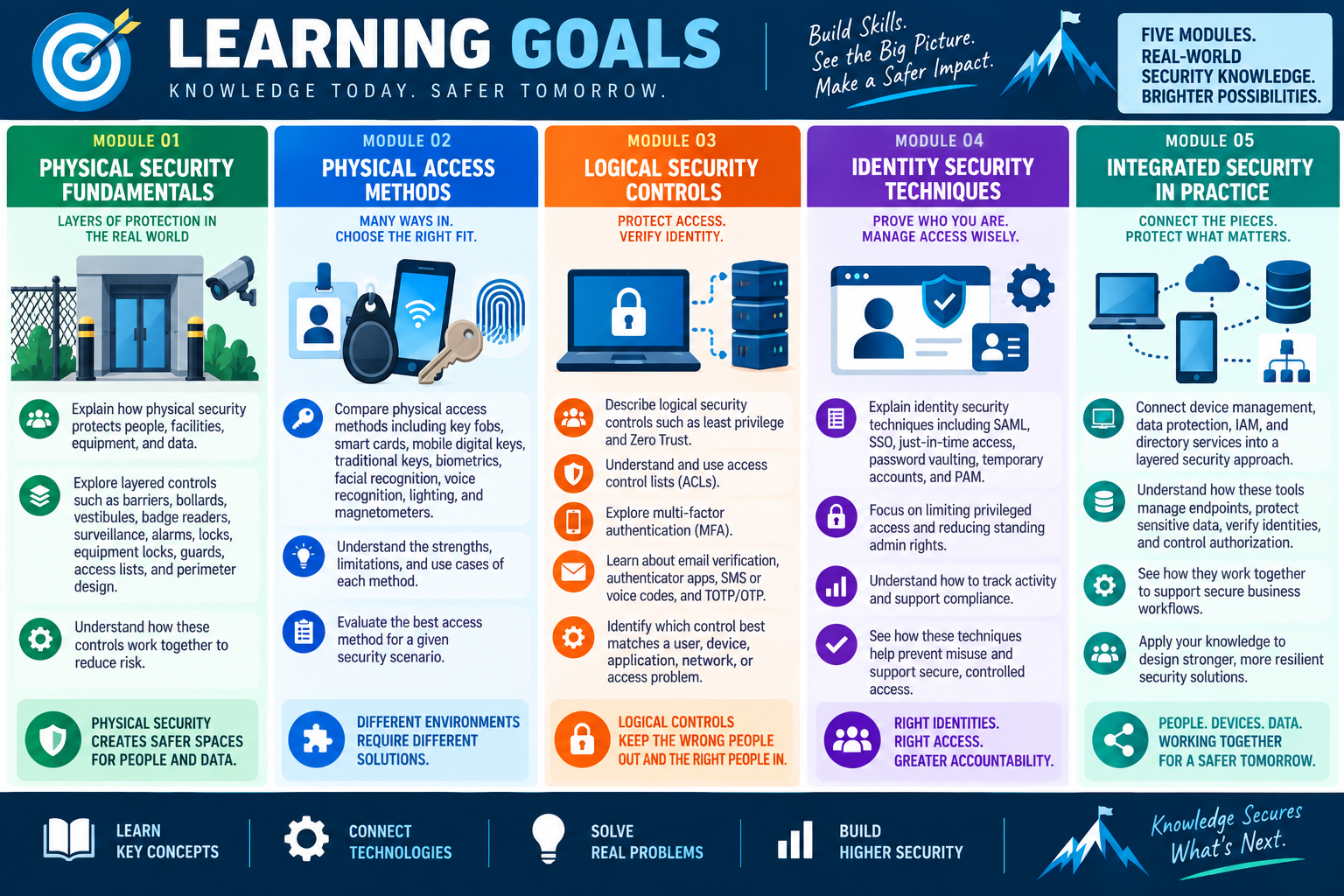
Learning goals for Objective 2.1 covering physical security fundamentals, physical access methods, logical security controls, identity security techniques, and integrated security practice.
  • Module 01: Explain how physical security protects people, facilities, equipment, and data by using layered controls such as barriers, bollards, vestibules, badge readers, surveillance, alarms, locks, equipment locks, guards, access lists, and secure perimeter design.
  • Module 02: Compare physical access methods including key fobs, smart cards, mobile digital keys, traditional keys, biometrics, facial recognition, voice recognition, lighting, and magnetometers, and choose the best access method for a given security scenario.
  • Module 03: Describe logical security controls such as least privilege, Zero Trust, ACLs, MFA, email verification, authenticator apps, SMS or voice codes, and TOTP/OTP, and identify which control best matches a user, device, application, network, or access problem.
  • Module 04: Explain identity security techniques including SAML, SSO, just-in-time access, password vaulting, temporary accounts, and PAM, with emphasis on limiting privileged access, reducing standing admin rights, tracking activity, and supporting compliance.
  • Module 05: Connect device management, data protection, IAM, and directory services into a layered security approach that manages endpoints, protects sensitive data, verifies identities, controls authorization, and supports secure business workflows.
Lesson ModuleModule 1 / 8
A+
Module 01

Module 1 - Physical Security

Physical security protects people, equipment, facilities, and data by controlling who can enter, what they can reach, and how unauthorized activity is detected.

Security does not begin at the login screen. It begins at the door, the parking lot, the reception desk, the equipment room, the wiring closet, and the workstation sitting in an open office. A device can have strong passwords, encryption, and software controls, but if an unauthorized person can physically access the hardware, remove a drive, plug into a network jack, steal a laptop, or enter a restricted area, the organization still has a serious security risk.

Physical security uses layered controls. No single lock, camera, guard, badge, or alarm solves every problem. The goal is to combine controls that delay unauthorized access, guide legitimate traffic, verify identity, detect suspicious activity, record evidence, and protect critical systems.

Control the Perimeter First

Perimeter controls define where public access ends and controlled access begins. Fences, gates, bollards, barriers, lighting, signage, and monitored entrances help direct people and vehicles to approved locations. These controls are especially important around data centers, warehouses, loading areas, parking lots, utility entrances, and buildings that house sensitive equipment.

Barriers and bollards can prevent vehicles from reaching doors, walls, walkways, generators, network rooms, or other protected areas. They also help route delivery drivers, visitors, employees, and emergency responders through the correct path. A good perimeter design reduces confusion and lowers the chance that someone reaches a sensitive area by accident or by pretending to belong there.

Manage Entry One Person at a Time

An access control vestibule, sometimes called a mantrap, is designed to control entry through two or more doors. Typically, one door must close before the next door opens. This slows movement into a secure area and helps prevent tailgating, where an unauthorized person follows an authorized user through a door.

Access vestibules are common in data centers, secure offices, research areas, payment processing environments, and other restricted facilities. They may combine badge readers, biometric checks, cameras, intercoms, visitor verification, and guard approval. The purpose is not just to lock a door; it is to make entry intentional, traceable, and limited to authorized people.

Verify Identity with Badges and Readers

Badge systems identify users and determine whether they are authorized to enter a location. Common technologies include magnetic stripe cards, RFID cards, NFC badges, key fobs, and mobile credentials. Badge readers can control doors, log entry events, track time, limit access by area, and integrate with other building systems.

A badge reader should be treated as both an access tool and an audit tool. If a user says they cannot enter a room, check whether the badge is active, whether the user is assigned to the correct access group, whether the door schedule allows entry at that time, and whether the reader is online. If a lost badge is reported, disable the credential quickly and issue a replacement through the approved process.

Use Locks That Match the Risk

Door locks range from simple mechanical keys to electronic, token-based, biometric, and multifactor systems. A conventional key is familiar and inexpensive, but it can be copied, lost, or difficult to track. Deadbolts add physical resistance. Electronic locks can use PINs, cards, fobs, or mobile credentials. Biometric systems can use fingerprints, face recognition, palm scans, retina scans, or other physical characteristics.

The correct lock depends on the environment. A general office may only need standard access control, while a server room may require badge plus PIN, badge plus biometric verification, or guard-controlled access. Higher security areas should support accountability: the organization should know who entered, when they entered, and whether access matched policy.

Monitor, Detect, and Deter with Surveillance

Video surveillance helps monitor facilities, detect suspicious activity, deter unauthorized behavior, and provide evidence after an incident. CCTV cameras may be placed near entrances, parking lots, reception areas, loading docks, hallways, server rooms, and equipment cages. Modern systems may record continuously, trigger on motion, support remote monitoring, or integrate with access logs.

Cameras do not replace every physical guard or access control, but they strengthen visibility. A technician should understand common support issues: camera power, network connectivity, storage retention, time synchronization, field of view, lighting, privacy requirements, and whether recordings are being saved long enough to support investigations.

Use Alarms and Sensors for Immediate Awareness

Alarm systems alert people when a door opens unexpectedly, a window breaks, motion is detected, a cabinet is opened, or a duress button is pressed. Sensors may be open-circuit, closed-circuit, infrared, radio-based, or motion-based depending on the environment. Alarm systems are especially valuable on perimeters, restricted rooms, after-hours entry points, and sensitive storage areas.

When troubleshooting alarms, verify the triggering condition before disabling anything. A false alarm may be caused by a bad sensor, weak battery, incorrect sensitivity, environmental movement, door misalignment, or poor placement. Disabling the alarm without understanding the cause can leave a real gap in protection.

Protect Equipment, Not Just Rooms

Important hardware may need dedicated locks even when it sits inside a secure building. Equipment locks include laptop cable locks, locking cabinets, rack locks, port blockers, drive locks, and secured server enclosures. In data centers and network rooms, racks may be locked and installed side by side to limit access to front, rear, top, and side panels.

Equipment security also includes environmental thinking. Locked cabinets still need proper airflow, cable management, power access, and authorized maintenance access. A technician should avoid creating a new reliability problem while solving a physical security problem.

Guards, Visitors, and Access Lists

Security guards provide visible deterrence, human judgment, and real-time access verification. Guards may check identification, compare names against access lists, issue visitor badges, escort guests, verify deliveries, respond to alarms, and prevent unauthorized entry. They are especially useful where policy, safety, and exceptions require human review.

Access lists define who is allowed into a specific area. These lists should be accurate, current, and tied to business need. When employees change roles, leave the company, or no longer require access, permissions should be updated. Visitor access should be logged, time-limited, and clearly separated from employee access.

Technician Decision Cues

  • Need to stop vehicles or guide traffic: use barriers, bollards, gates, signage, and controlled entrances.
  • Need to prevent tailgating: use an access control vestibule, guard verification, or entry controls that admit one person at a time.
  • Need to verify who entered: use badge readers, access logs, visitor records, and camera review.
  • Need to protect a server rack or shared hardware: use equipment locks, locked cabinets, restricted rooms, and documented ownership.
  • Need to detect after-hours movement: use alarms, motion sensors, cameras, and monitoring procedures.
  • Need to support investigations: confirm logs, timestamps, surveillance retention, access records, and incident documentation.
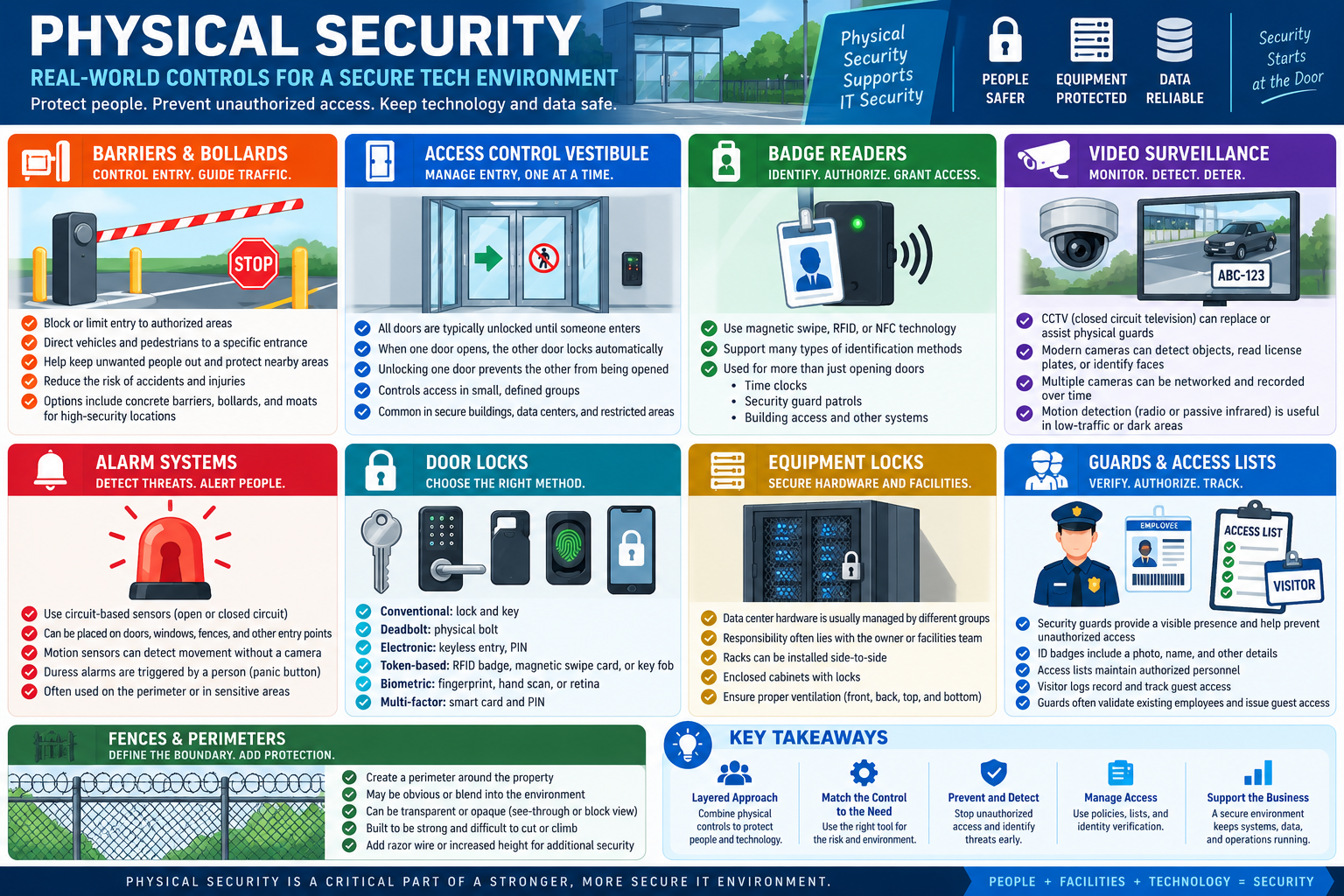
Support rhythm: identify the asset, define the risk, choose a layered physical control, verify that authorized users can still work, and document the access change.
Physical security controls including barriers, vestibules, badge readers, surveillance, alarms, locks, equipment locks, guards, and perimeter protection.

Why It Matters

Physical security supports IT security by reducing unauthorized access before a password, firewall, or encryption control ever comes into play. Strong physical controls protect people, keep equipment available, preserve evidence, reduce theft and tampering, and help the business maintain reliable operations. The best answer in a support scenario is usually the control that matches the specific risk with the least disruption to authorized work.
A+
Module 02

Module 2 - Physical Access Security

Physical access security uses credentials, identity checks, procedures, and environmental controls to make sure the right people can enter the right spaces at the right time.

Physical access is about more than opening a door. In a secure technology environment, every entry method should answer three questions: Who is this person, are they authorized to be here, and can the organization prove what happened later? The stronger the environment, the more deliberate the access process becomes.

A basic office may use traditional keys and visitor sign-in sheets. A data center, network operations center, medical environment, school testing lab, or finance department may require badges, PINs, smart cards, biometrics, cameras, lighting, guards, logs, and formal access lists. The correct control depends on the risk, the asset being protected, and the impact if access is misused.

Key Fobs

Key fobs are small electronic credentials that commonly use RFID or another proximity-based technology. A user presents the fob near a reader, and the access system checks whether that fob is allowed through the door. Fobs are convenient because they are contactless, durable, easy to carry, and faster than issuing or rekeying traditional metal keys.

For support scenarios, remember that a key fob is a credential. If it is lost, stolen, or assigned to the wrong person, it should be disabled in the access control system. If a fob stops working, check whether it is active, assigned to the correct user, part of the correct access group, allowed during the current schedule, and compatible with the reader.

Smart Cards

Smart cards contain embedded technology that can store digital credentials and support certificate-based authentication. They are commonly used for employee access, secure systems, network login, and environments that require stronger identity proof than a simple badge tap. Some laptops include smart card readers, and external USB readers can be used when built-in hardware is unavailable.

Smart cards are often part of multifactor security. The card may prove possession, while a PIN or password proves knowledge. In higher-security environments, a smart card can support both physical entry and logical authentication, which helps tie building access and computer access to a managed identity.

Mobile Digital Keys

Mobile digital keys let a phone act as the access credential. A user may unlock an office door, hotel room, vehicle, or smart lock using an approved mobile app or wallet credential. This can reduce physical key handling and make access easier to update because the credential can be issued, revoked, or changed digitally.

The advantage is convenience and central control. The risk is that the phone becomes part of the access chain. A technician should consider phone security, screen lock, biometric unlock, app enrollment, device compliance, lost-device procedures, battery state, Bluetooth or NFC settings, and whether the mobile credential requires an internet connection or local proximity to work.

Traditional Keys

Traditional metal keys are still used in many environments because they are simple, inexpensive, reliable, and do not require power or network connectivity. They may be used for doors, storage closets, lock boxes, cabinets, desk drawers, file rooms, or backup access when electronic systems are unavailable.

The weakness is accountability. A physical key can be copied, loaned, lost, or kept after a role change unless the organization has a strong key control process. When traditional keys are used, there should be a formal checkout process, secure storage location, documented ownership, periodic audits, and a plan for rekeying when a key is missing or no longer trusted.

Biometrics

Biometric authentication uses a physical characteristic to help verify identity. Common examples include fingerprint scans, facial recognition, palm print recognition, retina or iris scanning, and voice recognition. Biometric systems typically store a mathematical template rather than a full image of the user's fingerprint, face, eye, or voice.

Biometrics are powerful because they are tied to the person, but they also require careful handling. Unlike a password or fob, a biometric trait cannot be easily replaced if compromised. Biometric systems should be used with strong privacy practices, secure template storage, fallback procedures, and clear policies. In many environments, biometrics are best used as one factor in a broader access process rather than the only control.

Facial Recognition

Facial recognition systems analyze facial features and compare them to an enrolled template. They may be used for device sign-in, door access, attendance systems, secure check-in, or controlled facilities. Some systems use infrared cameras, laser dot projection, depth mapping, or 3D sensing to reduce spoofing and improve accuracy.

Lighting matters. Poor lighting, glare, camera placement, masks, hats, glasses, facial changes, or a dirty camera can affect performance. A technician troubleshooting facial recognition should check enrollment quality, camera hardware, lighting conditions, privacy policy, access logs, and whether an alternate approved authentication method is available.

Voice Recognition

Voice recognition uses a person's speech pattern as part of identity verification. A system may be trained with specific phrases and then compare future attempts to the stored voice pattern. It can be useful in hands-free or remote workflows, but it has limits. Background noise, illness, stress, microphone quality, accents, and environmental conditions can affect accuracy.

Because a user may not always be able to speak clearly, voice recognition should have a fallback method. It is strongest when combined with another factor, such as a PIN, device trust, badge, or managed account authentication.

Lighting Considerations

Good lighting improves physical security by making people, entrances, vehicles, cameras, badges, and suspicious activity easier to see. Attackers generally prefer dark or poorly monitored areas. Well-lit entrances, parking lots, loading zones, walkways, camera views, and reception areas make it easier to identify details and discourage unauthorized activity.

Lighting also improves surveillance quality. Many cameras, especially non-infrared models, perform better when there is enough light and when glare is controlled. When evaluating lighting, consider brightness, shadows, camera angles, reflective surfaces, emergency lighting, outdoor conditions, and whether the lighting supports facial recognition or license plate capture.

Magnetometers and Screening

Magnetometers detect metal objects and are commonly used in airports, schools, event venues, government buildings, and other checkpoint environments. They are useful when the security concern is metal objects entering a controlled area. They are limited because they do not detect non-metal objects such as plastic, ceramic, paper, or some electronic threats.

A magnetometer is a screening control, not a complete access control system. It should be paired with clear procedures, trained personnel, visitor flow, inspection rules, and a defined response process when an alert occurs.

Technician Decision Cues

  • User needs quick employee door access: key fob, RFID badge, or NFC credential may fit the need.
  • Environment requires stronger identity proof: smart card plus PIN, badge plus biometric, or another multifactor process may be appropriate.
  • Lost credential is reported: disable the old credential, verify user identity, issue a replacement, and document the change.
  • Traditional keys are used: confirm key checkout, storage, ownership, return procedures, and audit history.
  • Biometric access fails: check enrollment, sensor condition, lighting, user changes, and approved fallback options.
  • Camera or facial recognition is unreliable: review lighting, glare, camera placement, image quality, and environmental conditions.
  • Metal-object screening is required: use a magnetometer with trained staff and a documented response procedure.
Support rhythm: verify the user, verify the credential, verify the access rule, test the entry point, and document the outcome.
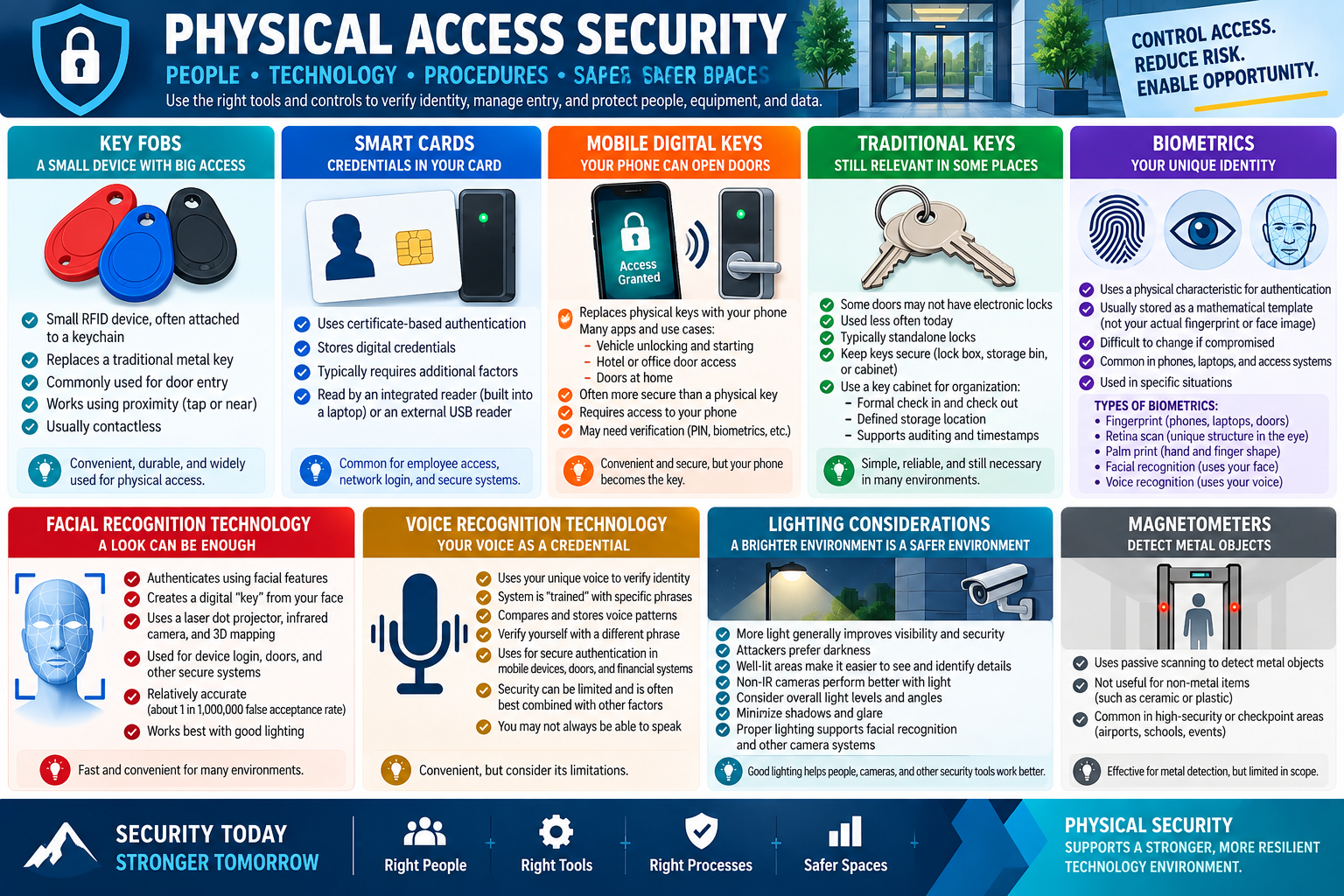
Physical access security controls including key fobs, smart cards, mobile digital keys, traditional keys, biometrics, lighting, and magnetometers.

Why It Matters

Physical access controls protect people and technology while keeping authorized work moving. Strong access systems use the right mix of people, tools, and procedures so an organization can grant access confidently, reduce risk, investigate incidents, and keep sensitive areas from becoming easy targets.

A+
Module 03

Module 3 - Logical Security

Logical security protects systems, data, applications, and networks by controlling authentication, authorization, permissions, and traffic rules.

Physical security protects the space around technology. Logical security protects the access paths inside the technology. A locked server room is valuable, but users still need accounts, permissions, authentication factors, and network rules that limit what they can do after they sign in.

Logical controls are usually invisible to the user until something is blocked. That is why support technicians need to understand what each control is trying to accomplish. A sign-in prompt, a denied permission, a blocked port, a second authentication factor, or a code sent to a phone may be the system working exactly as intended.

Privilege Management

Privilege management is the practice of giving users only the access required to perform their job. This is the principle of least privilege. A standard user should not have administrative rights just because it is convenient. Administrative access should be limited, approved, monitored, and used only when the task requires it.

Least privilege reduces damage when an account is compromised. If an attacker steals a normal user's password, the attacker should not automatically gain the ability to install software, change security settings, access every shared folder, create new accounts, or disable protections. When troubleshooting access, ask what the user needs to do, not what would make every permission error disappear.

Zero Trust

Zero Trust is a security model built around the idea of never trusting access automatically. A request should be verified based on the user, device, application, location, network, risk level, and requested resource. Being inside the building or connected to the company network should not be enough by itself.

In practice, Zero Trust may involve MFA, device compliance checks, conditional access policies, encryption, session monitoring, application controls, and detailed logging. The goal is to evaluate every connection as potentially risky and then allow only the access that has been verified. For a technician, this means access problems may come from identity, device state, policy, location, app trust, or network conditions.

Access Control Lists

An access control list, or ACL, defines what traffic or access is allowed, denied, or logged. ACLs can apply to files, folders, network devices, routers, firewalls, operating systems, applications, and cloud services. In networking scenarios, ACLs commonly evaluate details such as source IP, destination IP, protocol, port number, and direction of traffic.

ACLs matter because they control the flow. A user may have the right password and the correct application, but a rule can still block the traffic. If a service fails only from certain networks, certain subnets, certain ports, or certain devices, check the ACL, firewall rule, routing path, and policy scope before assuming the application is broken.

Multi-Factor Authentication

Multi-factor authentication requires two or more different ways to prove identity. The classic categories are something you know, something you have, something you are, somewhere you are, and sometimes something you do. A password plus a mobile approval, password plus fingerprint, smart card plus PIN, or password plus one-time code are all examples of layered verification.

MFA helps because a stolen password alone is not enough. If one factor is compromised, the attacker still has to satisfy another factor. However, MFA must be configured carefully. A locked-out user might have a new phone, a dead battery, a changed phone number, disabled notifications, a time-sync problem, or a conditional access policy blocking the request.

Email Authentication

Email authentication is often used during account registration, password reset, and identity verification workflows. The system sends a link or confirmation code to a registered email address to prove the user can access that inbox. This can be useful for recovery, but email should not be confused with a password or a strong possession factor.

Email verification depends on the security of the mailbox. If the email account is compromised, the attacker may be able to reset other accounts. For sensitive systems, email verification should be paired with stronger controls such as MFA, managed identity, device trust, or administrator approval.

Authentication Apps

Authentication apps generate or approve sign-in codes from a trusted device. Some apps produce time-based one-time passwords, while others send push approvals that the user accepts or denies. These apps are widely used because they do not require carrying a separate hardware token and can work even when SMS delivery is unreliable.

Support technicians should know common failure points: the user replaced their phone, the authenticator app was not restored, push notifications are disabled, the device clock is wrong, the account was never enrolled, or the wrong account is selected in the app. Recovery should follow the organization's identity verification process, not a shortcut that weakens security.

SMS and Voice Authentication

SMS and voice authentication deliver a one-time code through text message or automated phone call. These methods are convenient and familiar, but they have important trade-offs. Text messages can be delayed, intercepted, redirected, or affected by number changes. Voice calls may fail because of coverage, call blocking, voicemail, or phone-number ownership issues.

SMS and voice codes are often better than password-only access, but they are generally weaker than app-based MFA, hardware tokens, smart cards, or phishing-resistant methods. In an exam scenario, choose SMS or voice when the clue emphasizes quick phone-based codes, but recognize that higher-risk environments usually need stronger factors.

TOTP and OTP

An OTP is a one-time password. A TOTP is a time-based one-time password that changes after a short interval, commonly every 30 seconds. TOTP works by combining a shared secret key with the current time, which is why accurate device time is important. Many online services, VPNs, cloud accounts, and administrative portals support TOTP codes.

TOTP is useful because the code expires quickly and cannot be reused. If a user's TOTP codes fail, check whether the correct account is selected, whether the phone time is accurate, whether the enrollment was reset, and whether the service expects a different MFA method.

Technician Decision Cues

  • User can sign in but cannot change settings: check privilege level, role assignment, and least-privilege policy.
  • Access works on one device but not another: check Zero Trust conditions such as device compliance, location, app trust, and account risk.
  • Traffic is blocked even though credentials are correct: check ACLs, firewall rules, port numbers, protocols, and source or destination networks.
  • User has a new phone and cannot approve MFA: follow the approved identity recovery process and re-enroll the authenticator.
  • SMS codes do not arrive: verify the registered number, carrier delivery, blocked messages, and whether a stronger MFA method is available.
  • TOTP codes are rejected: check device time, account selection, enrollment state, and whether the token was reset.
Support rhythm: verify identity, check the access rule, confirm the factor or permission involved, make the smallest safe change, test access, and document the control that changed.
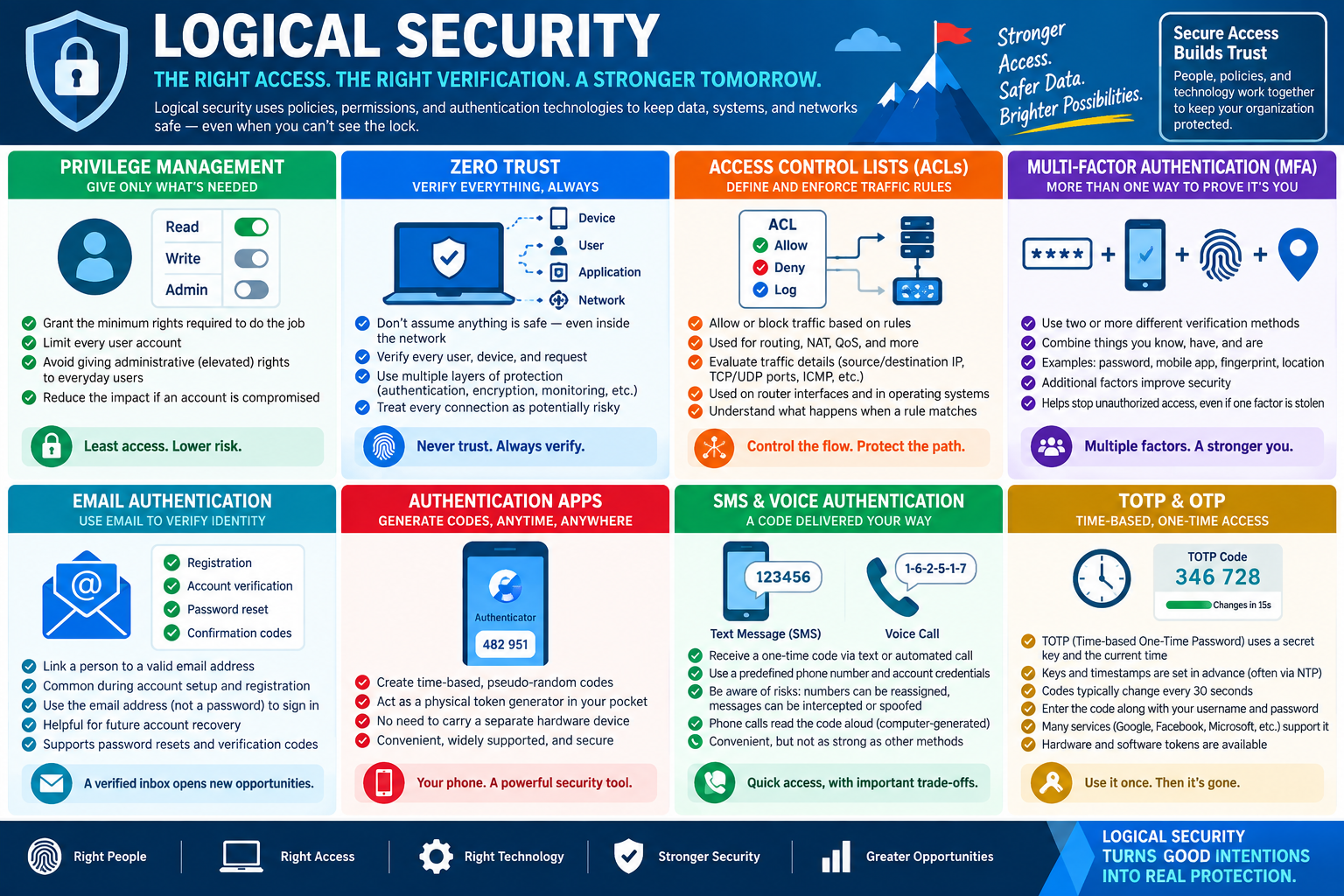
Logical security controls including privilege management, Zero Trust, access control lists, multifactor authentication, email authentication, authentication apps, SMS and voice authentication, and TOTP codes.

Why It Matters

Logical security turns security policy into actual protection. It keeps accounts limited, verifies risky access, controls traffic, reduces the value of stolen passwords, and helps technicians explain why an access attempt was allowed or denied. Strong logical security gives users the access they need while reducing the chance that one mistake becomes a larger compromise.

A+
Module 04

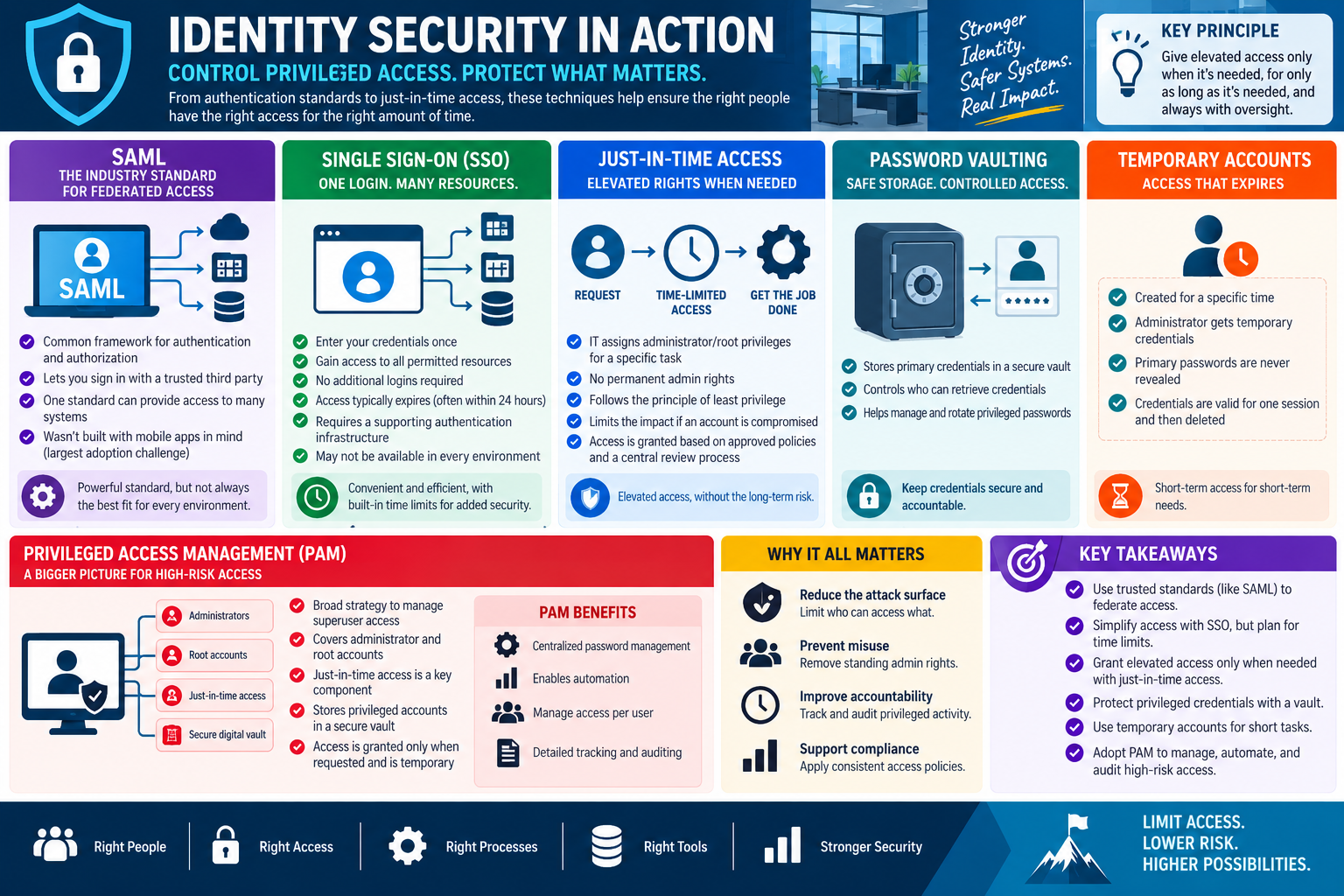
Module 4 - Identity Security in Action

Identity security makes sure privileged access is trusted, time-limited, auditable, and tied to the correct user instead of being treated like a permanent blank check.

Modern security depends on knowing who is requesting access, what they are trying to reach, and whether that access should be granted right now. Identity controls connect authentication, authorization, privilege management, and auditing so users can work without giving every account more power than it needs.

This is especially important for administrator and root-level access. A normal account mistake may affect one user's files or settings. A privileged account mistake can affect systems, servers, cloud tenants, directories, security tools, backups, applications, and sensitive data. For that reason, elevated access should be granted only when needed, for only as long as needed, and with oversight.

SAML

SAML, or Security Assertion Markup Language, is a common standard used for federated authentication and authorization. It allows a trusted identity provider to authenticate a user and pass an assertion to another service. In plain terms, one trusted system verifies the user, and another system accepts that verification instead of maintaining a completely separate password process.

SAML is common in enterprise single sign-on environments. It helps users access multiple applications through a central identity provider while giving administrators a consistent place to manage authentication policy. A technician should recognize SAML in scenarios involving federation, trusted third-party identity providers, web-based enterprise applications, and centralized sign-in.

SAML is powerful, but it is not always the best fit for every environment. Some newer mobile-first or API-first systems may use other standards. For the exam, focus on what SAML does: it supports federated access by letting a trusted identity provider pass authentication information to a service provider.

Single Sign-On

Single sign-on, or SSO, lets a user sign in once and then access multiple approved resources without logging in separately to each one. This improves user experience and reduces password fatigue. It also helps administrators apply consistent authentication policies, lockout rules, MFA requirements, and account disablement from a central place.

SSO does not mean unlimited access. The user still needs permission to each resource, and the session may expire based on policy. Time limits are important because they reduce risk if a device is left unlocked, stolen, or used from an untrusted location. When troubleshooting SSO, check identity provider status, user account state, app assignment, group membership, MFA requirements, session timeout, browser cookies, cached credentials, and service configuration.

Just-in-Time Access

Just-in-time access grants elevated privileges only when they are needed for a specific task. Instead of making a user a permanent administrator, the system can approve temporary admin or root-level rights, track the request, and remove the rights after the task is complete or after the time window expires.

JIT access supports least privilege because elevated rights are not always present. It also improves accountability because access is usually tied to a request, approval, policy, ticket, or review process. In a scenario where a technician needs administrator rights for one maintenance window, JIT is usually a better answer than making that technician a permanent admin.

Password Vaulting

Password vaulting stores privileged credentials in a secure vault instead of sharing them directly with users. The vault controls who can retrieve or use a credential, logs access, supports password rotation, and reduces the chance that a shared admin password is copied into notes, chat messages, scripts, or personal password managers.

Vaulting is especially important for administrator accounts, service accounts, break-glass accounts, root accounts, and credentials that unlock sensitive systems. A strong vault process may check out a password temporarily, rotate it after use, record who accessed it, require approval, or allow the user to launch a privileged session without ever seeing the actual password.

Temporary Accounts

Temporary accounts are created for a specific purpose and a limited time. They may be used for contractors, vendors, auditors, migration work, emergency support, testing, or short maintenance tasks. The important part is that the account expires or is removed when the need ends.

Temporary accounts reduce long-term risk when they are managed correctly. They should have a documented owner, a clear expiration date, the minimum required access, and a review process. They should not reveal or reuse primary administrator passwords. When the task ends, disable or delete the temporary account, revoke sessions if needed, and document the access cleanup.

Privileged Access Management

Privileged access management, or PAM, is a broader strategy for controlling high-risk access. PAM can include password vaulting, just-in-time access, session recording, approval workflows, privileged account discovery, credential rotation, audit logs, and policies that limit who can use administrator or root accounts.

PAM is not just a tool; it is a way to manage elevated access as a controlled workflow. Instead of handing out permanent admin credentials, PAM helps organizations centralize privileged password management, automate access requests, manage access per user, and produce detailed tracking for security reviews and compliance.

Why This All Matters

Identity security reduces the attack surface by limiting who can access sensitive resources. It prevents misuse by removing standing administrator rights. It improves accountability by tracking privileged activity. It supports compliance by enforcing consistent access policies and creating records that can be reviewed later.

For technicians, these controls change the support mindset. If an admin task fails, the answer is not always to give the user permanent administrator rights. The better answer may be to request JIT access, assign the correct role, use a password vault, confirm SSO app assignment, check the SAML configuration, or create a temporary account with a defined expiration.

Technician Decision Cues

  • User needs access to several company apps with one login: check SSO, app assignment, group membership, and identity provider health.
  • A web application trusts a central identity provider: think SAML or another federation standard.
  • Admin rights are needed for one approved maintenance task: use just-in-time access instead of permanent elevation.
  • A shared administrator password must be protected and audited: use password vaulting or PAM.
  • A vendor needs access for a short project: create a temporary account with least privilege, expiration, and monitoring.
  • Privileged activity must be reviewed later: confirm logging, approval records, session tracking, and audit reports.
  • A user signs in but cannot access the app: verify SSO assignment, SAML trust, license, group membership, conditional access, and session state.
Support rhythm: identify the identity provider, verify the user and role, grant only the access needed, time-limit elevated privileges, monitor the activity, and document what changed.
Identity security concepts including SAML, single sign-on, just-in-time access, password vaulting, temporary accounts, and privileged access management.

Why It Matters

Identity security connects the right people to the right resources without leaving powerful access exposed all the time. Strong identity controls make access easier for legitimate users, harder for attackers, and easier for technicians to audit, support, and explain.

A+
Module 05

Module 5 - Security Controls Working Together

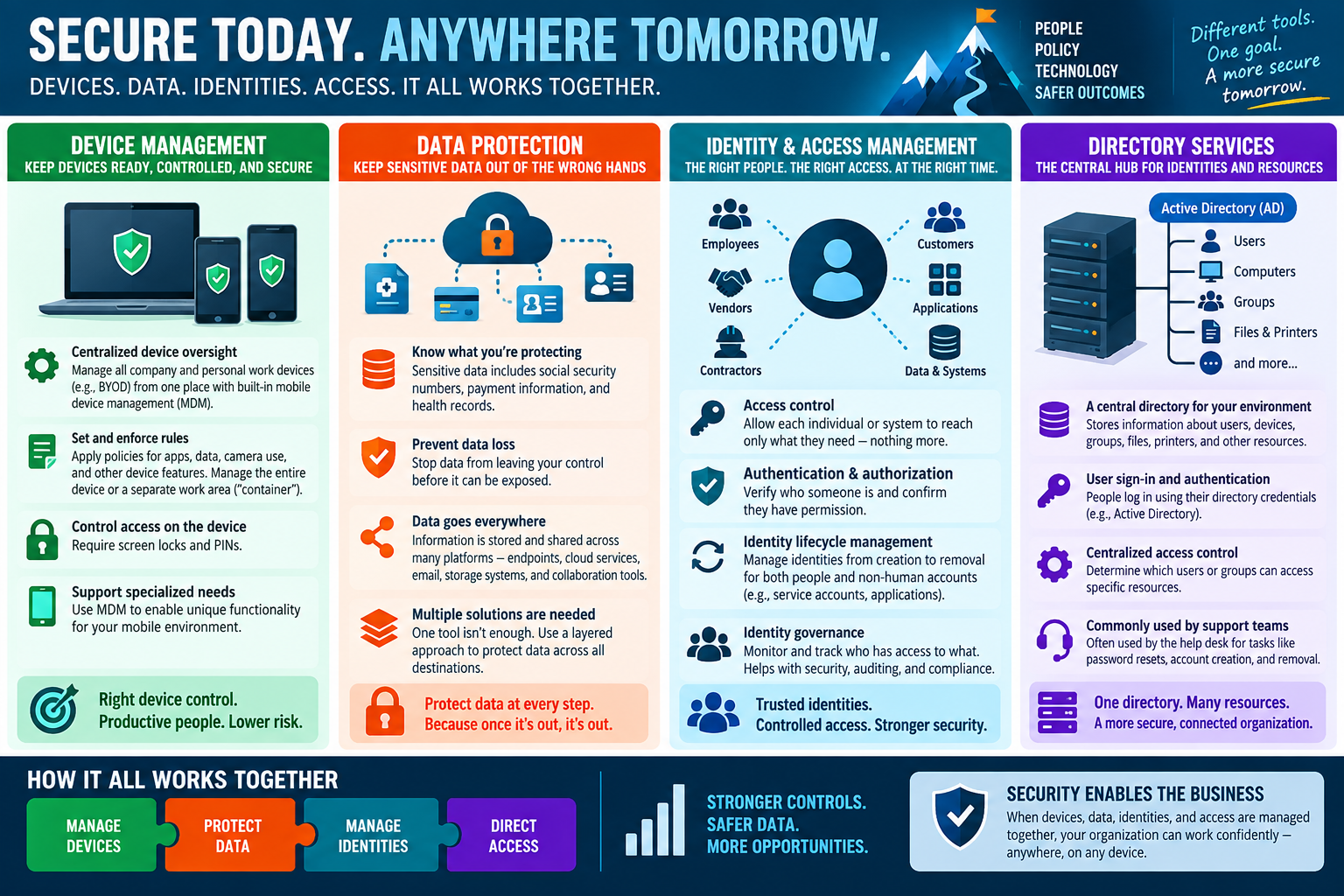
Strong security combines device management, data protection, identity and access management, and directory services so people can work safely from approved devices and locations.

Security is strongest when the major control areas support each other. A managed device helps enforce local settings. Data protection keeps sensitive information from leaving approved places. Identity and access management confirms who the user is and what they are allowed to reach. Directory services organize users, computers, groups, and resources so access can be assigned and maintained consistently.

When these pieces are handled separately, gaps appear. A user may have a valid password but an unmanaged device. A device may be encrypted but still allow data to sync to an unapproved app. A file share may have permissions, but the wrong group may be assigned in the directory. A technician should think in layers: device, data, identity, directory, access, and verification.

Device Management

Device management gives the organization oversight and control of computers, phones, tablets, and other endpoints. This can include company-owned systems and, when policy allows it, personal devices used for work. Mobile device management and endpoint management tools can enforce rules, deploy profiles, manage apps, apply security settings, configure Wi-Fi or VPN, require screen locks, and help protect data on lost or stolen devices.

Common device controls include PIN requirements, screen lock timers, encryption enforcement, camera restrictions, app allow lists, update policies, remote wipe, and separation of work data from personal data. On mobile devices, a managed work container can keep business apps and files separate from personal photos, messages, and apps. That separation matters because users need productivity without giving the organization unnecessary access to personal content.

When troubleshooting a managed device, verify enrollment state, compliance status, assigned profiles, device ownership, operating system version, network access, and whether the user is signed in with the correct work account. A security policy may block access because the device is out of date, jailbroken, rooted, missing encryption, or no longer enrolled.

Data Protection

Data protection focuses on keeping sensitive information away from the wrong people, locations, and applications. Sensitive data can include social security numbers, payment card details, health records, customer records, payroll files, internal reports, intellectual property, authentication secrets, and regulated business data.

Data loss prevention controls help stop protected data from being copied, uploaded, emailed, printed, synced, or shared in ways that violate policy. Data protection may also include encryption, file classification, retention rules, access reviews, secure sharing links, approved storage locations, and restrictions on unmanaged devices.

One tool is rarely enough. Data moves through endpoints, cloud services, email, removable drives, collaboration platforms, databases, and backups. A layered data protection plan follows the data across those places. Before changing access or moving files, a technician should know what type of data is involved, where it is allowed to live, who should access it, and what policy applies.

Identity and Access Management

Identity and access management, often shortened to IAM, controls which people, services, devices, and applications can access resources. IAM includes authentication, authorization, account lifecycle management, group membership, role assignment, access reviews, conditional access, and auditing.

Authentication proves who the user or system is. Authorization determines what that authenticated identity is allowed to do. Those are related, but they are not the same. A user may sign in successfully and still be denied access because they do not belong to the correct group, do not have the right role, are using an untrusted device, or are blocked by policy.

IAM also manages the identity lifecycle. New users need accounts, groups, licenses, roles, and application access. Users who change departments may need old access removed and new access added. Departing users should be disabled, sessions revoked, groups removed, shared data transferred, and licenses recovered. Non-human identities, such as service accounts and application identities, also need ownership, least privilege, rotation, and review.

Directory Services

Directory services act as a central hub for identities and resources. Active Directory is a common example in Windows environments. A directory can store users, computers, groups, printers, shared folders, policies, and other objects. It gives administrators a structured way to manage sign-in, resource access, group membership, and policy assignment.

Directory services matter because they reduce one-off access decisions. Instead of granting permissions to individual users everywhere, administrators can assign users to groups and grant the group access to resources. This makes access easier to audit and easier to update when roles change.

Support teams often use directory services for password resets, account unlocks, group membership changes, new account creation, account removal, computer object checks, and permission troubleshooting. A technician should avoid changing directory membership blindly. Confirm the request, the business need, the approval path, the resource, and whether the group grants more access than the user actually needs.

How the Pieces Work Together

A secure workflow usually depends on more than one control. For example, a user opening a sensitive cloud document may need a managed device, a compliant operating system, a valid identity, MFA approval, membership in the correct group, an assigned license, a data protection policy that allows the action, and a network path that is not blocked.

If the user is blocked, the best technician response is to identify which layer failed. Did the device fail compliance? Did the data policy block download? Did the user lack group membership? Did the directory not sync yet? Did the user authenticate successfully but fail authorization? Did a conditional access rule require a stronger factor?

Technician Decision Cues

  • Work app missing or access blocked on a phone: check device enrollment, compliance, assigned profiles, app deployment, and work account sign-in.
  • User can sign in but cannot open a resource: check authorization, group membership, role assignment, and resource permissions.
  • Sensitive data cannot be emailed or copied: check data loss prevention, classification, sharing policy, and approved storage location.
  • New employee cannot access expected tools: check directory account status, group membership, license assignment, app provisioning, and sync timing.
  • Former employee still has access: disable the account, revoke sessions, remove groups, recover licenses, transfer ownership, and document offboarding.
  • Access works for one group but not another: compare directory groups, nested memberships, permissions, policy scope, and conditional access rules.
  • Personal device is blocked: confirm BYOD policy, enrollment requirements, work container status, compliance state, and data protection rules.
Support rhythm: manage the device, protect the data, verify the identity, confirm directory membership, test access, and document the exact layer that changed.
Security controls working together across device management, data protection, identity and access management, and directory services.

Why It Matters

Security enables the business when users can work confidently from approved devices while sensitive data stays protected. Device management, data protection, IAM, and directory services give technicians a practical way to secure access without guessing. The best support outcome is not just that the user can get in; it is that the right user has the right access from the right device for the right reason.

A+
Module 06

Module 6 - Key Takeaways

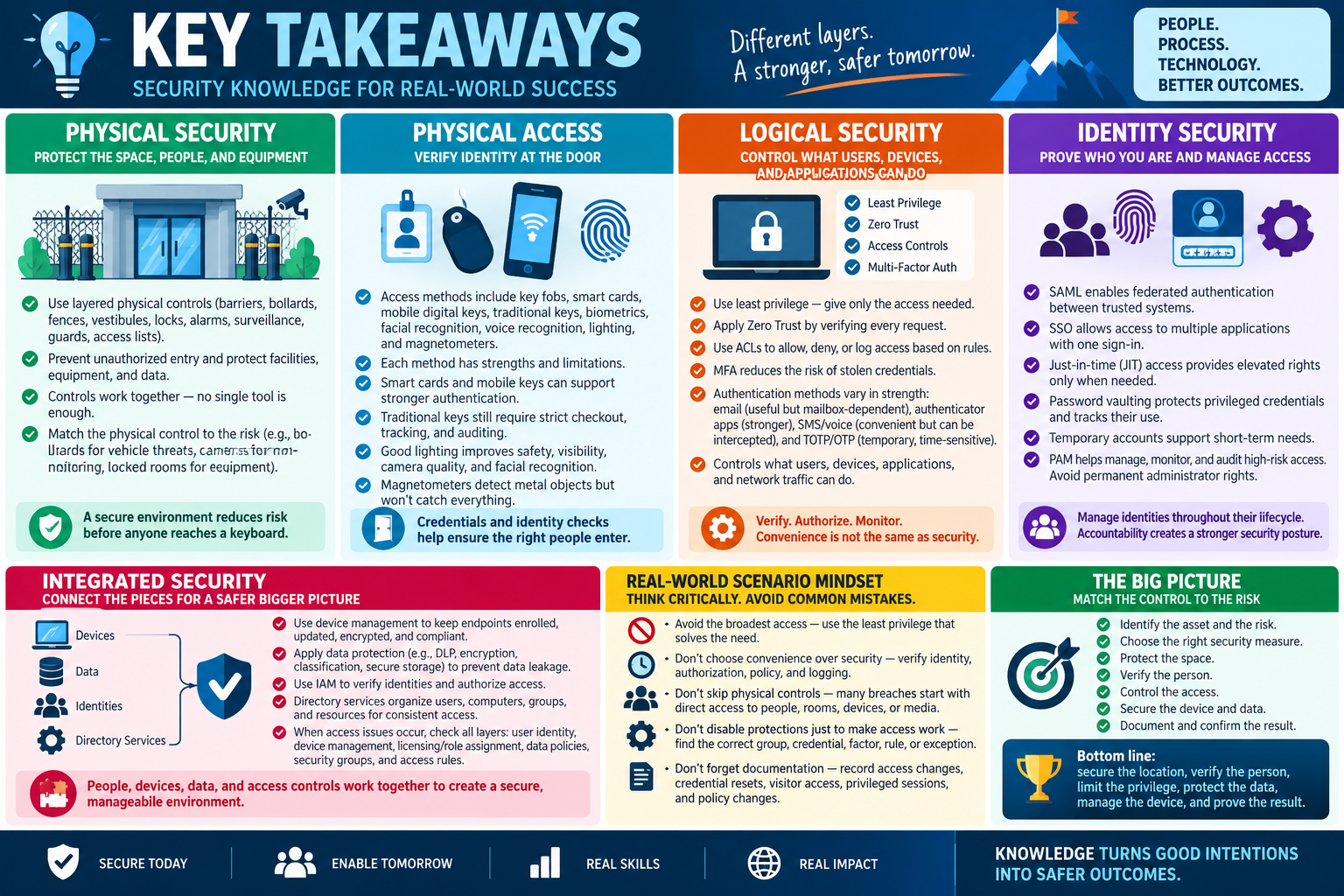
Key takeaways for Objective 2.1 covering physical security, physical access, logical security, identity security, integrated security, and real-world scenario mindset.

Objective 2.1 is about matching the right security measure to the risk: protect the space, verify the person, control the access, secure the device, and document the result.

The safest answer is rarely a single tool used by itself. Real security is layered. Physical controls protect the building and equipment. Physical access methods verify who can enter. Logical controls decide what authenticated users and systems can do. Identity security limits privileged access. Device, data, IAM, and directory controls connect those decisions into an environment that users can actually work in.

Start with the Asset and the Risk

Before choosing a control, identify what is being protected. A front entrance, parking area, server rack, user account, cloud application, workstation, mobile device, shared folder, and privileged password all need different controls. The best control is the one that addresses the specific risk without creating unnecessary disruption.

  • People: use guards, badges, visitor logs, access lists, lighting, and clear procedures.
  • Facilities: use fences, gates, bollards, vestibules, locks, alarms, and surveillance.
  • Equipment: use locked rooms, rack locks, cable locks, secured cabinets, and ownership tracking.
  • Accounts: use least privilege, MFA, SSO, JIT access, PAM, password vaulting, and temporary accounts.
  • Data: use DLP, encryption, classification, approved storage, access reviews, and secure sharing controls.

Physical Security Takeaways

Physical security reduces risk before a user ever reaches a keyboard. Barriers and bollards guide traffic and protect entry points. Fences define boundaries. Vestibules help prevent tailgating. Badge readers identify and log users. Cameras monitor and record activity. Alarms and sensors alert people when something unusual happens. Locks and equipment cabinets protect hardware from theft, tampering, and unauthorized handling.

In scenario questions, match the physical control to the clue. Vehicle threat means bollards or barriers. Unauthorized following means an access control vestibule. After-hours motion means alarms, motion sensors, and cameras. Server rack access means equipment locks and restricted room access. Visitor control means guards, badges, access lists, and logs.

Physical Access Takeaways

Access methods are credentials and identity checks. Key fobs and RFID badges are fast and common. Smart cards can support certificate-based authentication and stronger identity proof. Mobile digital keys make a phone part of the access process. Traditional keys are still useful but require strict checkout and auditing. Biometrics tie access to a physical characteristic, but they need secure storage, privacy controls, and fallback procedures.

Lighting and screening also matter. Good lighting improves safety, camera quality, facial recognition, and visibility. Magnetometers detect metal objects at checkpoints but do not detect every type of threat. A technician should understand both what each tool does well and where it is limited.

Logical Security Takeaways

Logical security controls what users, devices, applications, and traffic can do. Least privilege gives only the access required. Zero Trust verifies requests instead of assuming the network is safe. ACLs allow, deny, or log access based on rules. MFA reduces the value of a stolen password by requiring more than one proof of identity.

Authentication methods have different strengths. Email verification is useful for registration and recovery but depends on mailbox security. Authenticator apps are stronger and often more reliable than SMS. SMS and voice codes are convenient but can be intercepted, delayed, redirected, or affected by phone-number changes. TOTP and OTP codes are temporary, time-sensitive, and commonly used for cloud, VPN, and administrative access.

Identity Security Takeaways

Identity security is where access becomes accountable. SAML supports federated authentication between trusted systems. SSO lets users access multiple approved applications with one sign-in process. JIT access grants elevated rights only for the time needed. Password vaulting protects privileged credentials and records who used them. Temporary accounts support short-term needs without leaving permanent access behind. PAM ties these high-risk controls into a managed workflow.

For privileged access, avoid the easy but risky answer of permanent administrator rights. Look for options that limit duration, require approval, record activity, rotate credentials, and remove access when the task is complete.

Integrated Security Takeaways

Security controls should connect. Device management keeps endpoints enrolled, compliant, encrypted, updated, and controlled. Data protection prevents sensitive information from being exposed or moved to unapproved places. IAM verifies identities and authorizes access. Directory services organize users, computers, groups, and resources so access can be assigned consistently.

When a user is blocked, determine which layer is responsible. The user may be authenticated but not authorized. The device may be unmanaged. The license or role may be missing. The data policy may block sharing. The directory group may not have synced. The access rule may be correct even if the user expected a different result.

Exam Mindset

  • Do not choose the broadest access: choose the least privilege that solves the need.
  • Do not treat convenience as security: verify identity, authorization, policy, and logging.
  • Do not skip physical controls: many security failures begin with direct access to people, rooms, devices, or media.
  • Do not disable protections just to make access work: find the correct group, credential, factor, rule, or exception.
  • Do not forget documentation: access changes, credential resets, visitor access, privileged sessions, and policy changes should be recorded.
Bottom line: secure the location, verify the person, limit the privilege, protect the data, manage the device, and prove the result.
A+
Module 07

Module 7 - Section Notes

BROtocol Joe Core 2 220-1202Objective 2.1

2.1 Security Measures and Purposes

Core idea: Match the security control to the risk. Protect the physical space, verify identity, limit access, secure devices and data, and document what changed.

Physical Security Fundamentals

  • Physical security protects people, facilities, equipment, and data before an attacker reaches a keyboard.
  • Use layered controls: fences, barriers, bollards, vestibules, badge readers, surveillance, alarms, locks, guards, and access lists.
  • Choose controls based on the asset, environment, threat, and impact of unauthorized access.
  • No single control is enough. Strong security combines delay, detection, deterrence, verification, and documentation.

Physical Access Methods

  • Key fobs and RFID/NFC badges are fast, contactless credentials for common employee access.
  • Smart cards can store certificates and support stronger authentication, often with a PIN.
  • Mobile digital keys use a phone as the credential, so phone security and lost-device procedures matter.
  • Traditional keys are reliable but require checkout, storage, auditing, and rekeying plans.
  • Biometrics verify physical characteristics, but require secure template storage, privacy controls, and fallback options.

Logical Security Controls

  • Least privilege gives only the access needed to complete the job.
  • Zero Trust verifies every request based on user, device, application, location, network, and risk.
  • ACLs allow, deny, or log access based on rules such as source, destination, protocol, port, and direction.
  • MFA requires multiple proofs of identity, reducing the value of a stolen password.

Identity Security Techniques

  • SAML supports federated authentication between trusted identity systems and applications.
  • SSO lets users access approved resources through one sign-in experience.
  • JIT access grants elevated permissions only when needed and removes them afterward.
  • Password vaulting protects privileged credentials and records who used them.
  • PAM manages high-risk administrator and root-level access through approval, auditing, rotation, and monitoring.
Memory hook: Secure the location, verify the person, limit the privilege, protect the data, manage the device, and prove the result.
Notes:
Security Controls in PracticeObjective 2.1

Integrated Security Layers

Device Management

  • Device management keeps endpoints enrolled, configured, updated, encrypted, and compliant.
  • MDM and endpoint management can apply profiles, deploy apps, enforce PINs, manage Wi-Fi or VPN, and separate work data from personal data.
  • Blocked access may be caused by device compliance, enrollment state, OS version, ownership type, or missing profiles.

Data Protection

  • Data protection keeps sensitive information from leaving approved users, devices, apps, and storage locations.
  • DLP, encryption, classification, retention, secure links, and access reviews reduce exposure.
  • Protect data before changing permissions, deleting files, disabling accounts, or modifying sync and sharing settings.

IAM

  • IAM controls authentication, authorization, roles, groups, account lifecycle, and access reviews.
  • Authentication proves identity. Authorization determines what the identity can access.
  • A user may sign in successfully and still be blocked by role, group, device, policy, or resource permission.

Directory Services

  • Directory services organize users, computers, groups, printers, shared folders, policies, and other resources.
  • Active Directory is a common directory service used for sign-in, authentication, group membership, and centralized access control.
  • Support tasks often include password resets, account unlocks, group membership changes, new accounts, account removal, and permission checks.
Scenario ClueThinkBest Technician Move
Unauthorized vehicles could reach the building entrance.Perimeter and traffic controlUse bollards, barriers, gates, signage, and controlled entry paths.
Users are following each other into a restricted room.TailgatingUse an access control vestibule, guard verification, badge checks, and logging.
A badge is lost or stolen.Credential riskDisable the old credential, verify the user, issue a replacement, and document the event.
A user can sign in but cannot open a resource.AuthorizationCheck group membership, role assignment, permissions, policy scope, and directory sync.
An admin needs elevated access for one maintenance window.Privileged accessUse JIT access or PAM instead of permanent administrator rights.
Sensitive files cannot be copied to an unmanaged device.Data protectionReview DLP, classification, device compliance, approved storage, and sharing policy.
Notes:
Objective 2.1 Rapid ReviewSecurity Measures

Technician Decision Rhythm

1. Identify the Asset
  • Person, room, device, rack, account, app, data, network path, directory object, or privileged credential.
  • Clarify what must be protected and what business workflow must continue.
2. Read the Clue
  • Physical entry, credential problem, access denial, MFA issue, admin task, device compliance, data exposure, or directory membership.
  • Do not jump to the most advanced control if the clue points to a simpler layer.
3. Choose the Control
  • Physical controls for spaces and equipment.
  • Access methods for identity at doors or checkpoints.
  • Logical controls for permissions, traffic, and authentication.
  • Identity controls for SSO, federation, temporary access, and privileged activity.
4. Protect Before Changing
  • Preserve logs, access records, video, account state, group membership, and data.
  • Use least privilege and avoid permanent elevation unless policy requires it.
5. Verify the Workflow
  • Test entry, sign-in, application access, resource access, device compliance, and policy behavior from the user's perspective.
  • Confirm authorized users can work and unauthorized access remains blocked.
6. Document Clearly
  • Record the request, approval, user, device, credential, group, policy, change, test result, and next step.
  • Documentation supports audits, repeat troubleshooting, and incident review.

Exam Mindset

  • Choose the control that best matches the risk, not the control that sounds strongest.
  • Prefer least privilege, time-limited access, auditability, and clear approval paths.
  • Remember that authentication and authorization are different.
  • Physical controls still matter because many technical compromises start with physical access.
  • When access is blocked, check the layer: credential, identity, role, group, policy, device, data rule, or network rule.
Bottom line: Security measures work best when people, process, and technology are connected. The technician's job is to identify the layer, apply the right control, verify the result, and document the decision.
Notes:
08

Module 8 - Final Test

Complete 20 multiple-choice questions for Objective 2.1. The test uses realistic physical security, logical security, identity, access control, and integrated security clues. Each correct answer is worth 1 point.

Score pending0 / 20
WB
Workbook

Student Workbook

BrotocolJoeStudent Workbook

BrotocolJoe

CompTIA A+ Core 2 (220-1202)

Student Workbook

2.0 Security

Objective 2.1 - Summarize various security measures and their purposes.

How to use this workbook: Print this packet once, complete it by hand as you finish each online module, and keep it as evidence that you read, processed, and practiced the Objective 2.1 security measures material.
Student Name:
Physical SecurityObjective 2.1

Module 1 - Physical Security

Key Information: Physical controls protect people, facilities, equipment, and data. Barriers, controlled entry, locks, surveillance, alarms, and staff procedures address different risks.

Check Your Understanding

How do perimeter barriers and equipment locks protect different assets?

Why does surveillance need a monitoring and response process?

How can an access-control vestibule help address unauthorized entry, and what procedures must support it?

Comparison Record: Prevent vs. Detect

  • Use this scenario: a restricted equipment room is beside a public reception area. Write one or two sentences per prompt.
  • Prevention: Name an entry control and explain how it limits unauthorized access.
  • Detection: Name a monitoring control and explain what evidence or alert it provides.
  • Decision: Explain why both controls are useful and who should respond to an observed access violation.
Select a purpose for bollards, a cable lock, and a visitor access list. Explain the specific risk each addresses.
Technician Scenario: An unbadged visitor follows an employee toward a network closet. Describe the organization-approved verification, visitor handling, and reporting actions that protect the restricted area without assuming familiarity establishes authorization.
Physical Access SecurityObjective 2.1

Module 2 - Physical Access Security

Key Information: Keys, fobs, smart cards, mobile credentials, and biometrics support different access workflows. Authorization, credential lifecycle, accessibility, and audit requirements guide selection.

Check Your Understanding

How does losing a traditional key differ from losing a revocable electronic credential?

Why is successful identity recognition not the same as permission to enter every room?

How do lighting and magnetometers serve different purposes from an identity credential?

Comparison Record: Card vs. Biometric

  • Use a restricted office that must admit authorized staff and record entry. Write one or two sentences per prompt.
  • Card or fob: Explain how it is used and how a lost credential should be handled.
  • Biometric: Explain what it checks and one consideration for enrollment, failed recognition, or accessibility.
  • Decision: Describe the combination of credentials and procedures you would evaluate, including an approved fallback and access logs.
Explain why facial or voice recognition should be evaluated for reliability and policy fit rather than assumed to be infallible.
Technician Scenario: An employee reports a missing access fob and requests entry using a colleague’s credential. Plan identity verification, revocation, temporary access, replacement, and documentation through approved procedures.
Logical SecurityObjective 2.1

Module 3 - Logical Security

Key Information: Logical controls distinguish identity verification from authorization. Least privilege, ACLs, MFA, and ongoing access evaluation work together to constrain what a user or device can do.

Check Your Understanding

How does authentication differ from authorization?

Why do a password and a PIN usually represent one factor category rather than two?

How does Zero Trust change the assumption that being inside a network makes access trustworthy?

Comparison Record: MFA vs. Least Privilege

  • Use a user who signs in successfully but must not edit payroll data. Write one or two sentences per prompt.
  • MFA: Explain the sign-in risk it helps reduce and identify two different factor categories.
  • Least privilege: Explain how permissions should reflect the user’s actual duties.
  • Decision: State why successful MFA should not automatically grant payroll access and identify the authorization evidence to check.
Compare a time-based authenticator code with an SMS-delivered code: identify how each is obtained and one handling or security consideration. Do not record real codes.
Technician Scenario: A user can authenticate but receives Access denied on a departmental folder. Explain how you would inspect group membership and ACLs, confirm the business need, and request a limited authorized correction without disabling MFA or granting broad administrator rights.
Identity Security in ActionObjective 2.1

Module 4 - Identity Security in Action

Key Information: SSO and federation support sign-in across services. PAM, just-in-time access, vaulting, and expiring accounts constrain privileged work and support accountability.

Check Your Understanding

How does SSO differ from granting access to every application?

What role can SAML assertions play in federated sign-in?

Why should privileged actions be attributable to a specific authorized person?

Comparison Record: Standing vs. Just-in-Time Privilege

  • Use a technician who needs elevated access for one scheduled repair. Write one or two sentences per prompt.
  • Standing access: Explain the risk of retaining administrative privilege after the task ends.
  • Just-in-time access: Describe approval, scope, duration, and expiration for the repair.
  • Decision: Explain how PAM, vaulting, or session records can support the task without distributing shared passwords.
Describe the owner, purpose, expiration, and review details you would document for a temporary account.
Technician Scenario: A contractor requires privileged access for a two-hour maintenance window. Plan identity verification, approval, limited access, credential handling, activity records, expiration, and confirmation that access is removed afterward.
Security Controls Working TogetherObjective 2.1

Module 5 - Security Controls Working Together

Key Information: Device management, data protection, IAM, and directory services provide complementary controls. A valid account alone does not establish device compliance or permission to move sensitive data.

Check Your Understanding

How does device management support enforcement of endpoint settings?

How can directory groups simplify consistent access assignments?

Why do data-protection requirements still apply after a user authenticates?

Layered Control Record

  • Use a remote employee handling confidential project documents. For each prompt, name a control and explain what it protects.
  • Identity: Describe a sign-in and account-lifecycle control.
  • Device: Describe an endpoint compliance requirement to verify.
  • Data: Describe a permitted storage or sharing restriction.
  • Authorization: Describe how group or role assignments limit access to needed resources.
Explain how account access, device management, and data ownership should be reviewed when an employee changes roles.
Technician Scenario: A user with valid credentials tries to download sensitive files to an unmanaged laptop. Identify the identity, device, authorization, and data-policy checks that should guide the response. Propose an approved workflow that allows the business task while protecting the data.
Objective 2.1 Final CheckCumulative Review

Objective 2.1 - Final Check

Purpose: Match physical, logical, identity, device, and data controls to a specific risk and explain how they work together.

Scenario Sorting

For each case, name a suitable control and explain the risk it addresses.

  • An unbadged visitor approaches a restricted equipment room.
  • An employee loses an electronic access credential.
  • A valid user requests access beyond their job duties.
  • A contractor needs temporary administrator privileges.
  • An unmanaged device attempts to receive confidential files.

Explain What You Know

  • How do identity and authorization differ?
  • Why do physical and logical controls complement each other?
  • How does limiting privilege duration reduce risk?
  • What evidence verifies that a control works as intended?
Write the control and the risk it addresses for each case above, in order.
Design a security plan for a technician visiting a restricted office to perform a temporary repair. Include entry verification, equipment protection, account access, MFA, privilege scope and duration, device and data controls, logging, and access removal.

2.1 Completion

Student signature:
Date completed:
Instructor signature:
Module 01 of 08