Home
Certification Prep // 220-1201

2.0 Networking

2.6 ~ Given a scenario, configure basic wired/wireless small office/home office (SOHO) networks.

network-addressing.exe
> identify address version
> classify private or public range
> verify subnet mask and gateway
> troubleshoot DHCP and APIPA
Module 1 / 82.6 IPv4 and IPv6

Learning Goals

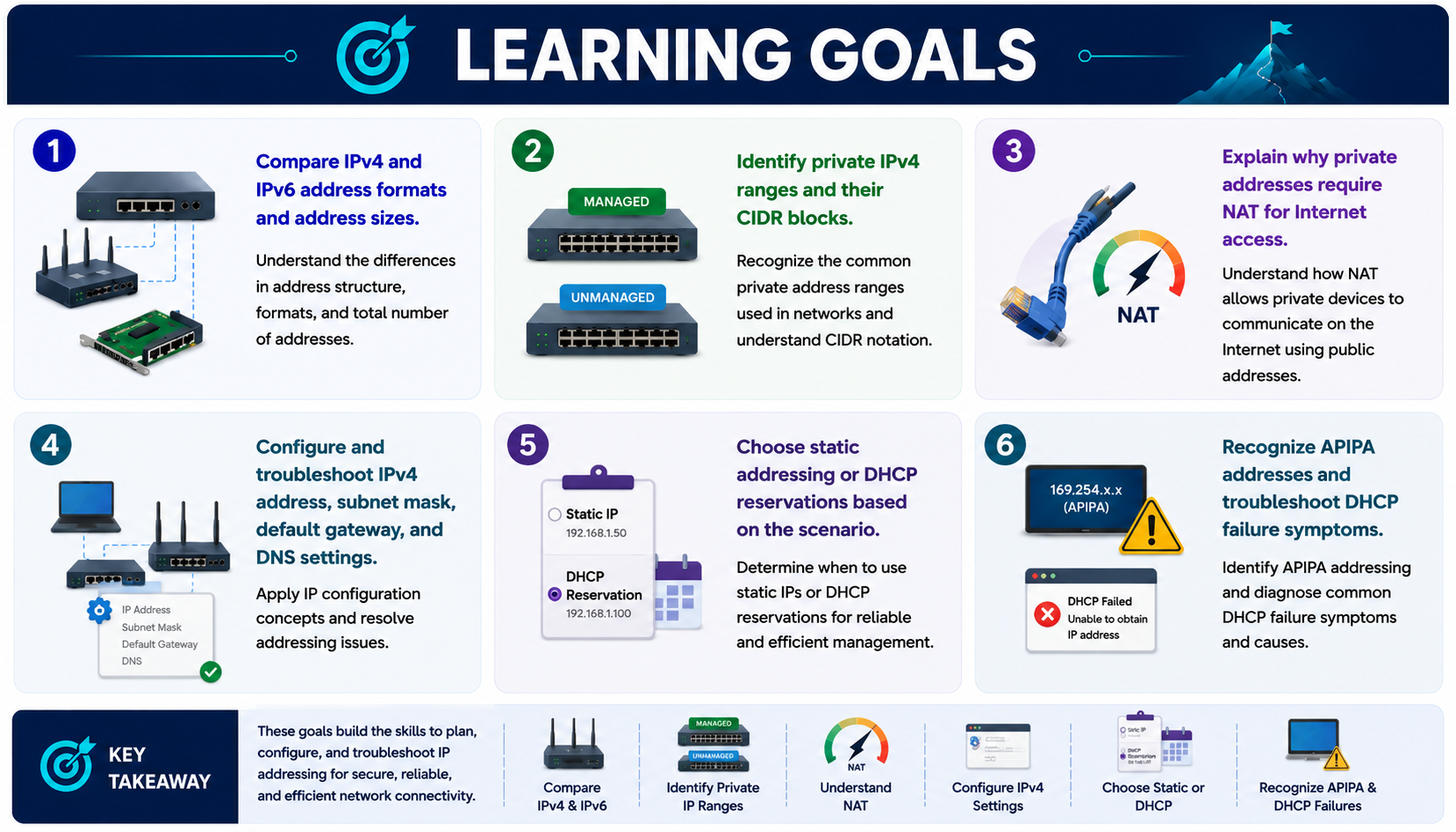
Learning goals infographic for 2.6 IPv4 and IPv6 addressing covering IPv4 and IPv6 formats, private IPv4 ranges, NAT, IPv4 settings, static addressing, DHCP reservations, APIPA, and DHCP troubleshooting.
These goals focus on planning, configuring, and troubleshooting IP addressing for secure, reliable, and efficient network connectivity.
  • Compare IPv4 and IPv6 address formats and address sizes.
  • Identify private IPv4 ranges and their CIDR blocks.
  • Explain why private addresses require NAT for Internet access.
  • Configure and troubleshoot IPv4 address, subnet mask, default gateway, and DNS settings.
  • Choose static addressing or DHCP reservations based on the scenario.
  • Recognize APIPA addresses and troubleshoot DHCP failure symptoms.
Module 1

Module 1 - IPv4 and IPv6 Big Picture

IPv4 is still the primary protocol for everyday networking, while IPv6 is built into modern operating systems and forms a major part of Internet infrastructure.

Both IPv4 and IPv6 are Internet Protocol addressing systems. They operate at OSI Layer 3, which means they identify network-layer source and destination addresses so traffic can move between devices and networks.

  • IPv4 basics: IPv4 is Internet Protocol version 4. It uses 32-bit Layer 3 addresses written as four decimal octets, such as 192.168.1.131.
  • IPv4 scale: Every public IPv4 address on the Internet must be unique, but the total IPv4 space is only about 4.29 billion addresses. That limitation created the need for private addressing, NAT, and eventually IPv6.
  • IPv6 basics: IPv6 is Internet Protocol version 6. It uses 128-bit addresses written in hexadecimal, such as fe80::5d18:652:cffd:8f52.
  • IPv6 scale: IPv6 provides a vastly larger address space, roughly 3.4 x 10^38 addresses, which solves the long-term scalability limitations of IPv4.
  • Modern support: IPv6 is built into modern operating systems, network stacks, and Internet infrastructure, even when a network still feels mostly IPv4 from the technician perspective.
  • DNS importance: IPv6 addresses are long and not human-friendly, so DNS becomes especially important for translating easy-to-remember names into IPv6 addresses.
IPv4Version 4, 32 bits, dotted decimal notation, four 8-bit octets, still widely used
IPv6Version 6, 128 bits, hexadecimal notation, massive address space, built for the future
LayerIPv4 and IPv6 addressing both live at OSI Layer 3 and support routed network communication
ScaleIPv6 provides a vastly larger address space and addresses IPv4 exhaustion
DNS and IPv6Because IPv6 addresses are long and difficult to memorize, DNS is a major part of IPv6 usability. A user should type a name like www.example.com, while DNS resolves that name to an IPv6 address such as 2001:db8::1.
Technician NoteIPv4 is what you will still configure constantly: address, subnet mask, gateway, and DNS. IPv6 is already present in modern systems, so do not ignore it when troubleshooting name resolution, routing, or connectivity.
Exam FramingIPv4 clue: four decimal octets, 32 bits, examples like 192.168.1.131. IPv6 clue: hexadecimal groups, 128 bits, examples like fe80::5d18:652:cffd:8f52. Both are Layer 3 addresses, but IPv6 has the much larger address space.
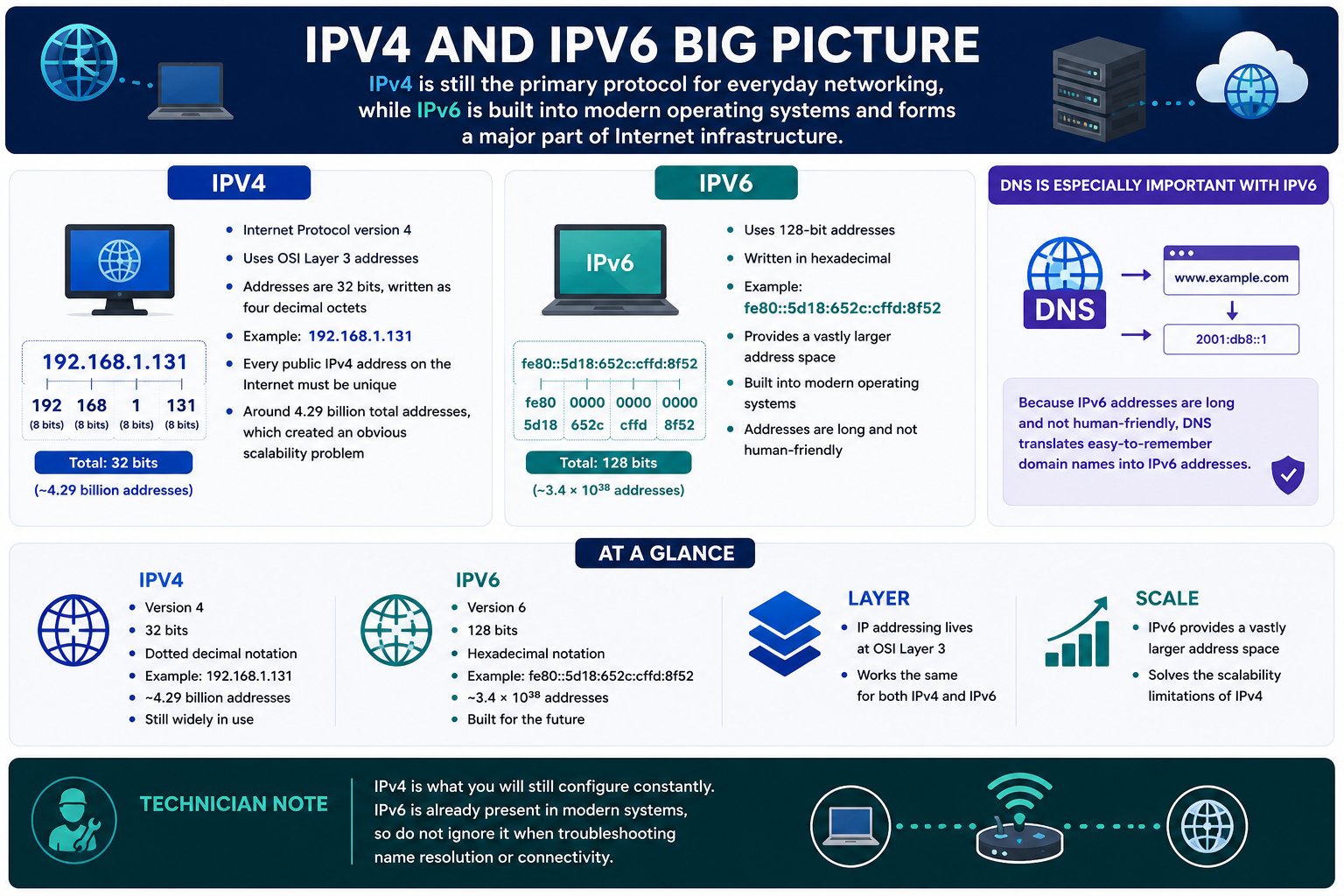
IPv4 and IPv6 big picture infographic comparing IPv4 dotted decimal 32-bit addresses, IPv6 hexadecimal 128-bit addresses, DNS importance for IPv6, OSI Layer 3 addressing, address scale, modern operating system support, and technician note.
IPv4 remains common in daily configuration, while IPv6 provides a vastly larger address space, is built into modern systems, and depends heavily on DNS for human-friendly connectivity.
Module 2

Module 2 - IPv4 Address Format and Private Ranges

Private IPv4 ranges are designed for internal networks and are not directly Internet-routable.

IPv4 private space lets homes, small offices, and enterprises reuse the same internal address blocks without consuming public Internet addresses. Those private addresses can be routed inside the organization, but they need NAT when users access the Internet.

  • Private addressing purpose: Private addresses are for internal use. They keep internal hosts addressable on the LAN while conserving public IPv4 space.
  • NAT requirement: Private IPv4 addresses are not directly Internet-routable, so a router or firewall normally translates private inside addresses to a public address for Internet access.
  • RFC 1918: The private IPv4 address ranges are defined in RFC 1918.
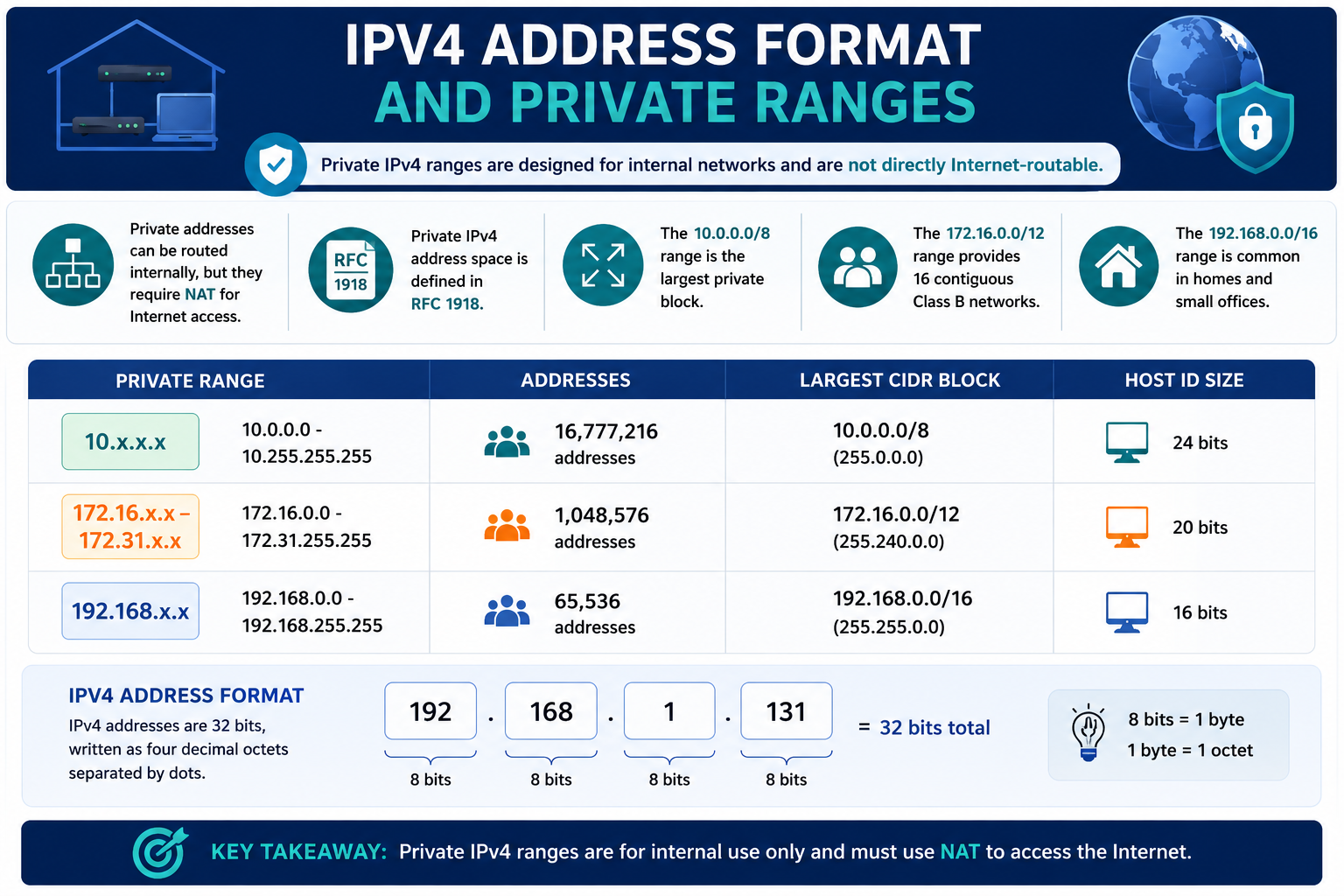
  • 10.0.0.0/8: The 10.x.x.x block is the largest private range, from 10.0.0.0 through 10.255.255.255, with 16,777,216 addresses and a 24-bit host ID size.
  • 172.16.0.0/12: The 172.16.x.x through 172.31.x.x block provides 1,048,576 addresses, representing 16 contiguous Class B networks with a 20-bit host ID size.
  • 192.168.0.0/16: The 192.168.x.x block is common in homes and small offices, from 192.168.0.0 through 192.168.255.255, with 65,536 addresses and a 16-bit host ID size.
  • IPv4 format: IPv4 addresses are 32 bits, written as four decimal octets separated by dots. Each octet is 8 bits, which equals 1 byte.
Private RangeAddressesLargest CIDR BlockHost ID Size
10.0.0.0 - 10.255.255.25516,777,21610.0.0.0/8 (255.0.0.0)24 bits
172.16.0.0 - 172.31.255.2551,048,576172.16.0.0/12 (255.240.0.0)20 bits
192.168.0.0 - 192.168.255.25565,536192.168.0.0/16 (255.255.0.0)16 bits
192.168.1.131192.168.1.131 = 32 bits total; 8 bits = 1 byte = 1 octet
Exam FramingPrivate IPv4 clues: 10.x.x.x, 172.16.x.x through 172.31.x.x, and 192.168.x.x. These addresses are valid internally, but they require NAT for Internet access.
Technician NoteIf a user has a private IPv4 address and can reach local resources but not the Internet, check the default gateway, NAT, firewall rules, and DNS. The private address itself is normal on an internal network.
IPv4 address format and private ranges infographic showing private IPv4 internal use, NAT requirement, RFC 1918, 10.0.0.0/8, 172.16.0.0/12, 192.168.0.0/16, address counts, CIDR blocks, host ID sizes, IPv4 octets, and key takeaway.
Private IPv4 ranges are for internal use, are defined in RFC 1918, and must use NAT to reach the Internet.
Module 3

Module 3 - IPv6 Addressing

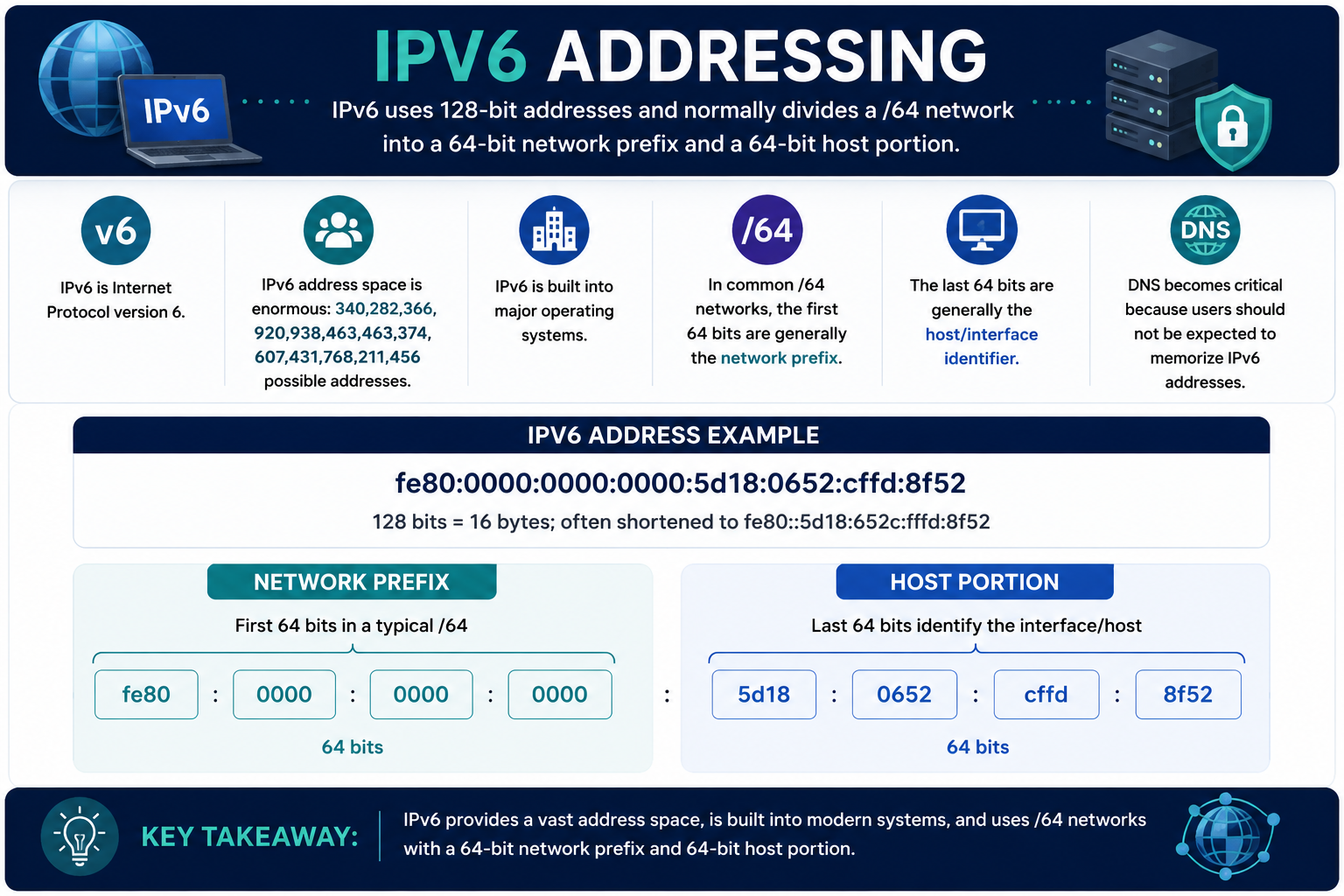
IPv6 uses 128-bit addresses and normally divides a /64 network into a 64-bit network prefix and a 64-bit host portion.

IPv6 was designed to solve IPv4 address exhaustion and to support modern Internet growth. Even when a site still uses IPv4 heavily, technicians should expect IPv6 to exist in operating systems, routers, DNS records, and troubleshooting output.

  • Protocol version: IPv6 is Internet Protocol version 6 and is the successor to IPv4 at OSI Layer 3.
  • Address space: IPv6 address space is enormous: 340,282,366,920,938,463,463,374,607,431,768,211,456 possible addresses.
  • Modern support: IPv6 is built into major operating systems, so it can appear on Windows, macOS, Linux, mobile devices, servers, and network equipment.
  • /64 structure: In common /64 networks, the first 64 bits are generally the network prefix.
  • Host portion: The last 64 bits generally identify the host or interface on that network.
  • DNS importance: IPv6 addresses are too long for normal users to memorize, so DNS becomes critical for translating names into usable IPv6 destinations.
fe80:0000:0000:0000:5d18:0652:cffd:8f52128 bits = 16 bytes; often shortened to fe80::5d18:652:cffd:8f52
Network PrefixFirst 64 bits in a typical /64, such as fe80:0000:0000:0000
Host PortionLast 64 bits identify the interface or host, such as 5d18:0652:cffd:8f52
Address ExampleFull: fe80:0000:0000:0000:5d18:0652:cffd:8f52. Shortened: fe80::5d18:652:cffd:8f52. The double colon compresses one continuous run of zero groups, and leading zeros inside a group can be omitted.
/64 Exam CueFor a typical IPv6 /64 network, think 64-bit network prefix plus 64-bit host/interface identifier. If the question shows /64, separate the address into the network side and host side.
Technician NoteDo not ignore IPv6 during troubleshooting. Name resolution, routing preference, dual-stack behavior, and local link IPv6 addresses can affect connectivity even on networks where most manual configuration still feels IPv4-focused.
IPv6 addressing infographic showing 128-bit IPv6 addresses, enormous address space, modern operating system support, /64 networks, 64-bit network prefix, 64-bit host interface identifier, DNS importance, IPv6 address example, and key takeaway.
IPv6 provides a vast address space, is built into modern systems, and commonly uses /64 networks with a 64-bit network prefix and 64-bit host/interface portion.
Module 4

Module 4 - IPv4 Settings, Static Addresses, and DHCP Reservations

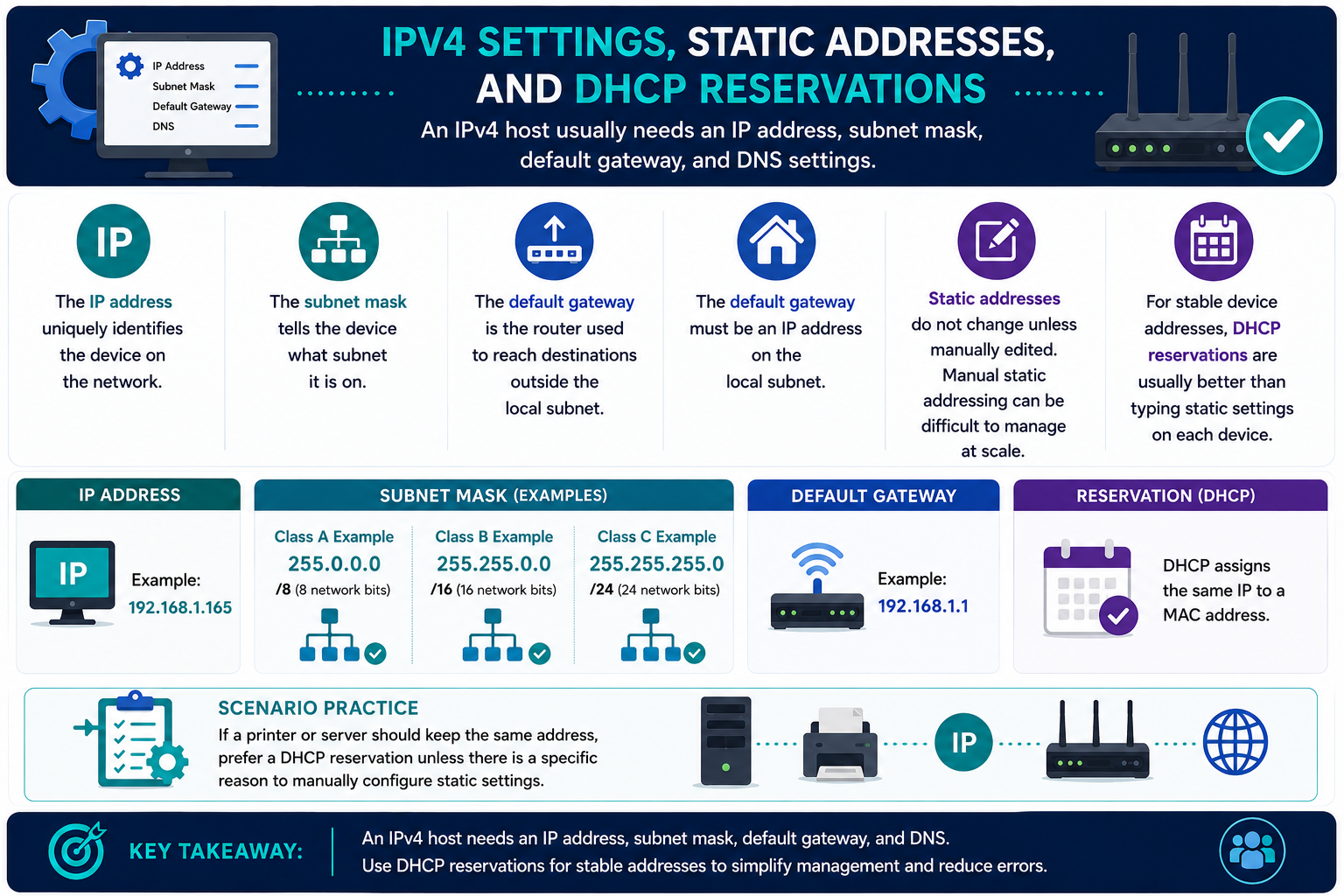
An IPv4 host usually needs an IP address, subnet mask, default gateway, and DNS settings.

When a device cannot communicate, a technician should verify the basic IPv4 settings before chasing higher-level application problems. The address identifies the host, the mask defines the local network, the gateway reaches other networks, and DNS resolves names.

  • IP address: The IP address uniquely identifies the device on the network. Example: 192.168.1.165.
  • Subnet mask: The subnet mask tells the device what subnet it is on. Common examples include 255.0.0.0 for /8, 255.255.0.0 for /16, and 255.255.255.0 for /24.
  • Default gateway: The default gateway is the router used to reach destinations outside the local subnet.
  • Gateway placement: The default gateway must be an IP address on the local subnet, such as 192.168.1.1 for a 192.168.1.0/24 network.
  • DNS settings: DNS servers translate names to IP addresses. If IP connections work but names fail, DNS settings are a likely cause.
  • Static addresses: Static addresses do not change unless manually edited, but manual static addressing can become difficult to manage at scale.
  • DHCP reservations: For stable device addresses, DHCP reservations are usually better than typing static settings on each device because the DHCP server assigns the same IP to a known MAC address.
IP AddressIdentifies the host. Example: 192.168.1.165.
Subnet MaskDefines the local subnet. Examples: /8, /16, /24.
Default GatewayRouter for off-subnet traffic. Example: 192.168.1.1.
ReservationDHCP assigns the same IP to a MAC address.
Scenario PracticeIf a printer or server should keep the same address, prefer a DHCP reservation unless there is a specific reason to manually configure static settings. This keeps the device predictable while preserving centralized management.
Troubleshooting CuesWrong subnet mask can make local devices appear remote or unreachable. Wrong default gateway can allow local traffic but block Internet access. Wrong DNS can allow access by IP address but break access by name.
Key TakeawayAn IPv4 host needs an IP address, subnet mask, default gateway, and DNS. Use DHCP reservations for stable addresses to simplify management and reduce errors.
IPv4 settings, static addresses, and DHCP reservations infographic showing IP address, subnet mask, default gateway, DNS settings, class A B C subnet mask examples, static addresses, DHCP reservations, scenario practice, and key takeaway.
An IPv4 host needs IP address, subnet mask, default gateway, and DNS settings; use DHCP reservations for stable addresses when possible.
Module 5

Module 5 - APIPA and Address Troubleshooting

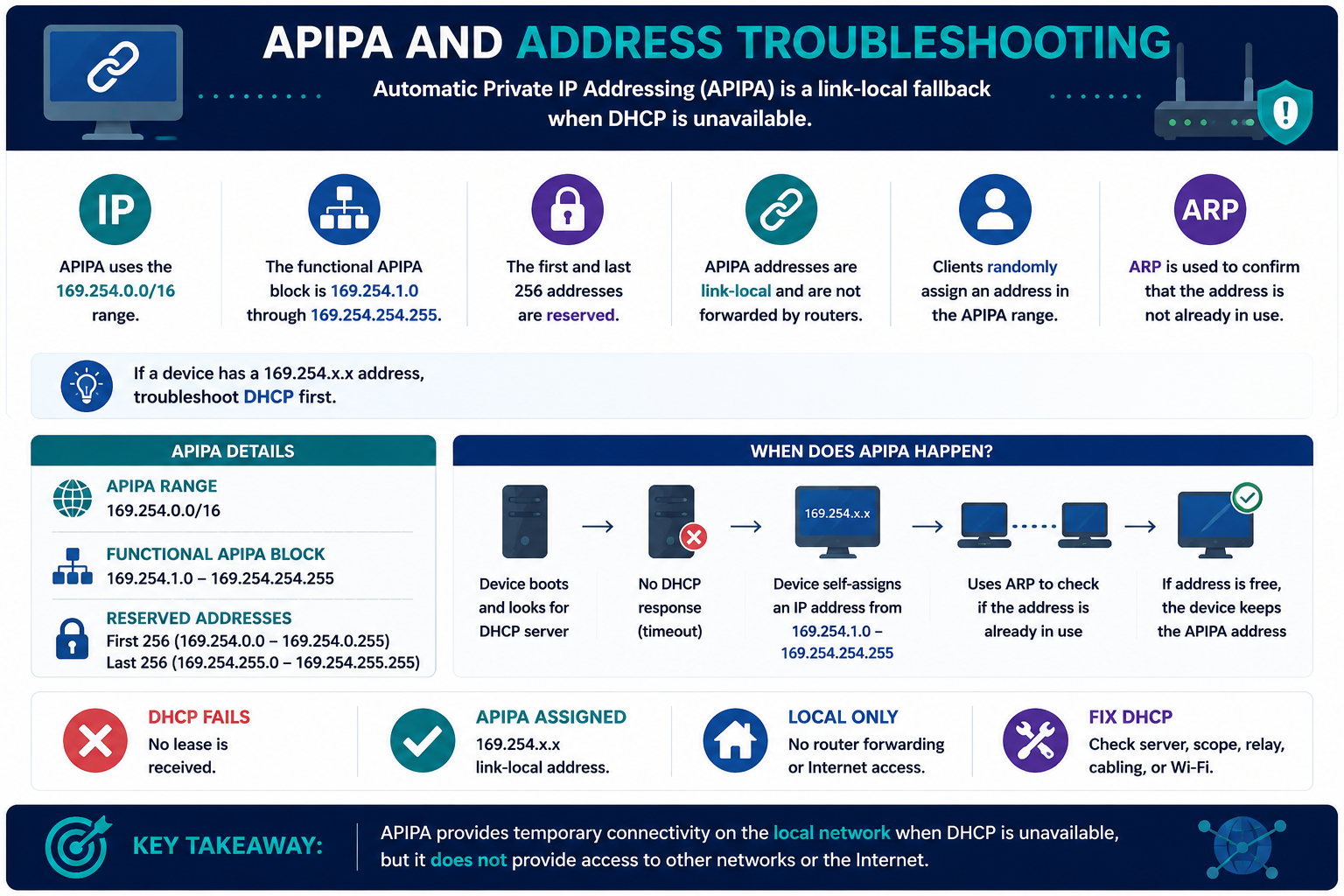
Automatic Private IP Addressing (APIPA) is a link-local fallback when DHCP is unavailable.

APIPA is not a normal production addressing plan. It is a clue that the device tried to use DHCP, did not receive a lease, and self-assigned a temporary local address so it may still communicate with nearby devices on the same link.

  • APIPA range: APIPA uses the 169.254.0.0/16 range.
  • Functional block: The functional APIPA assignment block is 169.254.1.0 through 169.254.254.255.
  • Reserved addresses: The first 256 addresses, 169.254.0.0 through 169.254.0.255, and the last 256 addresses, 169.254.255.0 through 169.254.255.255, are reserved.
  • Link-local only: APIPA addresses are local-link addresses and are not forwarded by routers.
  • Random assignment: Clients randomly select an address in the APIPA range after DHCP times out.
  • ARP check: ARP is used to confirm that the selected APIPA address is not already in use.
  • DHCP clue: If a device has a 169.254.x.x address, troubleshoot DHCP first.
DHCP FailsNo lease is received after the client tries to find a DHCP server.
APIPA AssignedThe device self-assigns a 169.254.x.x link-local address.
Local OnlyThe device may reach same-link APIPA hosts, but no router forwarding or Internet access is provided.
Fix DHCPCheck DHCP server, scope, relay, cabling, switch port, VLAN, or Wi-Fi.
When APIPA HappensDevice boots and looks for a DHCP server. No DHCP response arrives. The device self-assigns an address from 169.254.1.0 through 169.254.254.255. It uses ARP to check whether the address is already in use. If the address is free, the device keeps the APIPA address.
Troubleshooting PathCheck whether other clients are getting DHCP leases. Verify the DHCP server is online, the scope has available addresses, the DHCP relay is correct for routed networks, and the client is on the expected VLAN or Wi-Fi network.
Key TakeawayAPIPA provides temporary connectivity on the local network when DHCP is unavailable, but it does not provide access to other networks or the Internet.
APIPA and address troubleshooting infographic showing Automatic Private IP Addressing as DHCP fallback, 169.254.0.0/16 APIPA range, functional APIPA block, reserved addresses, link-local behavior, random assignment, ARP uniqueness check, DHCP failure flow, local-only connectivity, and DHCP troubleshooting steps.
APIPA provides temporary local connectivity when DHCP is unavailable, but it does not provide router forwarding or Internet access.
Module 6

Module 6 - Key Takeaways

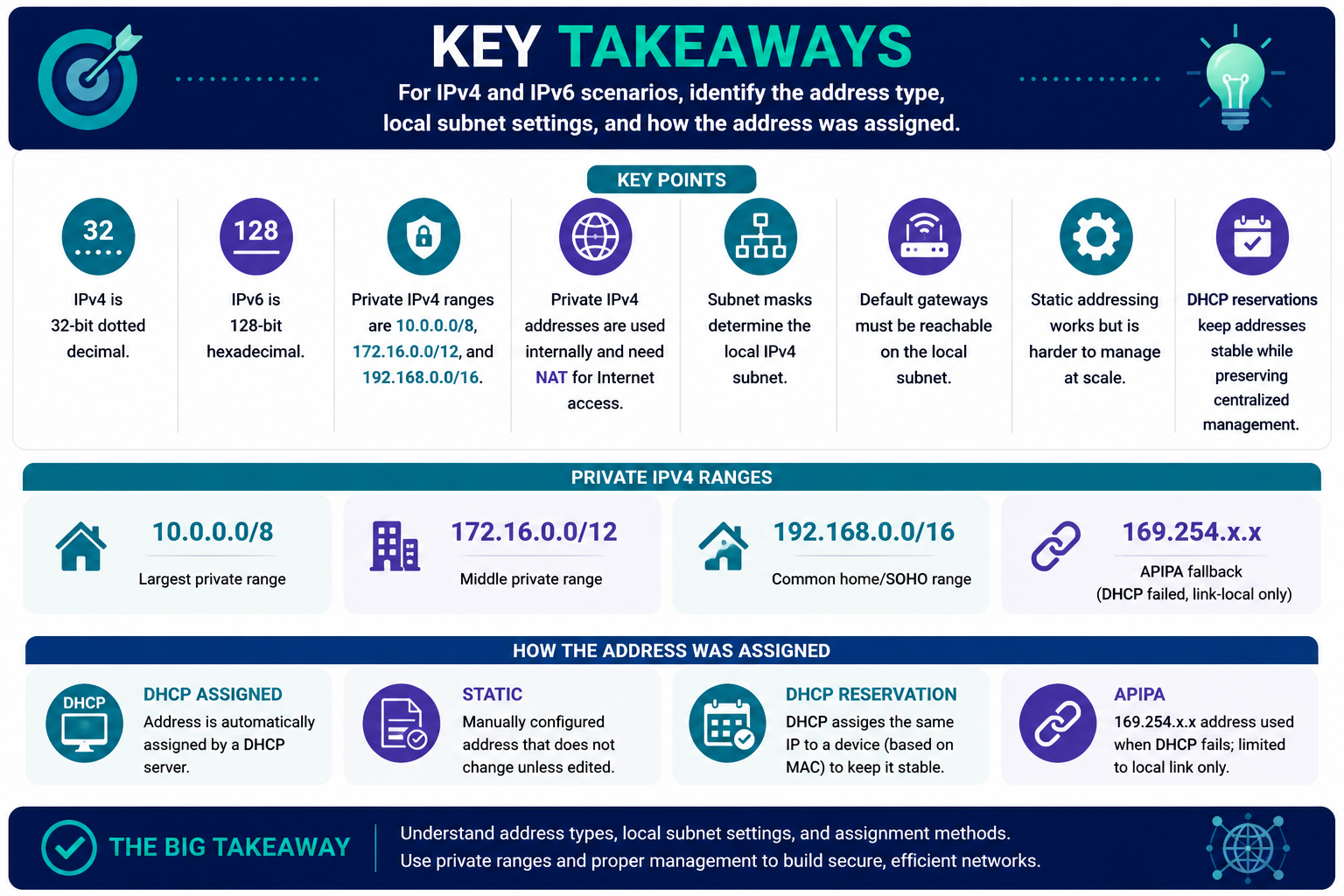
IPv4 and IPv6 key takeaways infographic covering IPv4 dotted decimal, IPv6 hexadecimal, private IPv4 ranges, NAT, subnet masks, default gateways, static addressing, DHCP reservations, APIPA fallback, and address assignment methods.
For IPv4 and IPv6 scenarios, identify the address type, local subnet settings, and how the address was assigned.

For IPv4 and IPv6 scenarios, identify the address type, local subnet settings, and how the address was assigned.

  • IPv4 is 32-bit dotted decimal; IPv6 is 128-bit hexadecimal.
  • Private IPv4 ranges are 10.0.0.0/8, 172.16.0.0/12, and 192.168.0.0/16.
  • Private IPv4 addresses are used internally and need NAT for Internet access.
  • Subnet masks determine the local IPv4 subnet.
  • Default gateways must be reachable on the local subnet.
  • Static addressing works but is harder to manage at scale.
  • DHCP reservations keep addresses stable while preserving centralized management.
  • APIPA 169.254.x.x means DHCP failed and communication is link-local only.
10/8Largest private range
172.16/12Middle private range
192.168/16Common home/SOHO range
169.254APIPA fallback
Module 7

Module 7 - Section Notes

CompTIA A+ Core 1 220-1201Objective 2.6 Section Notes

2.6 - IPv4 and IPv6 Addressing

Objective: Explain IPv4 and IPv6 addressing concepts.

Objective 2.6 focuses on recognizing IP address versions, private IPv4 ranges, IPv6 format and scale, IPv4 host settings, DHCP reservations, and APIPA troubleshooting. The exam usually gives an address, subnet, gateway, or assignment clue and expects you to identify what it means.

Core idea: Identify the address type first, then verify whether the host has the right local subnet settings and whether the address was assigned statically, dynamically, by reservation, or by APIPA fallback.
Address mindset
  • IPv4 is 32-bit dotted decimal.
  • IPv6 is 128-bit hexadecimal.
  • IPv4 uses four 8-bit octets.
  • IPv6 addresses are long, so DNS is especially important.
Troubleshooting mindset
  • Private IPv4 needs NAT for Internet access.
  • Subnet masks determine the local subnet.
  • Default gateway must be reachable on the local subnet.
  • 169.254.x.x means troubleshoot DHCP first.
Notes:
IPv4 and Private RangesObjective 2.6

IPv4 Address Format and RFC 1918 Space

RangeCIDR / MaskScenario Clue
10.0.0.0 - 10.255.255.25510.0.0.0/8, 255.0.0.0Largest private IPv4 block.
172.16.0.0 - 172.31.255.255172.16.0.0/12, 255.240.0.0Middle private range; 16 contiguous Class B networks.
192.168.0.0 - 192.168.255.255192.168.0.0/16, 255.255.0.0Common home and SOHO range.
169.254.x.x169.254.0.0/16APIPA fallback when DHCP fails.

IPv4 Format

  • IPv4 is Internet Protocol version 4.
  • IPv4 addresses are 32 bits, or 4 bytes.
  • Each 8-bit section is an octet.
  • IPv4 is written as four decimal octets, such as 192.168.1.131.
  • Every public IPv4 address on the Internet must be unique.

Private IPv4

  • Private addresses are designed for internal networks.
  • They can be routed internally.
  • They are not directly Internet-routable.
  • Private IPv4 addresses require NAT for Internet access.
  • Private IPv4 space is defined in RFC 1918.
Notes:
IPv6 AddressingObjective 2.6

IPv6 Big Picture

IPv6 Format

  • IPv6 is Internet Protocol version 6.
  • IPv6 addresses are 128 bits, or 16 bytes.
  • IPv6 is written in hexadecimal groups.
  • Example: fe80::5d18:652:cffd:8f52.
  • IPv6 provides a vastly larger address space than IPv4.

/64 Networks

  • IPv6 commonly uses /64 networks.
  • The first 64 bits are generally the network prefix.
  • The last 64 bits are generally the host or interface identifier.
  • IPv6 is built into major operating systems.
  • DNS is critical because IPv6 addresses are not human-friendly.
Scenario clue: A long hexadecimal address with colons is IPv6. Do not ignore IPv6 during name resolution or connectivity troubleshooting.
Notes:
IPv4 Settings and AssignmentObjective 2.6

Host Settings, Static Addresses, and DHCP Reservations

Required IPv4 Settings

  • The IP address uniquely identifies the device on the network.
  • The subnet mask tells the device what subnet it is on.
  • The default gateway is the router used to reach destinations outside the local subnet.
  • The default gateway must be an IP address on the local subnet.
  • DNS settings let names resolve to addresses.

Static vs. Reservation

  • Static addresses do not change unless manually edited.
  • Manual static addressing can be difficult to manage at scale.
  • DHCP dynamic addressing assigns available addresses from a pool.
  • DHCP reservations assign the same IP to a device based on MAC address.
  • For printers or servers, reservations are usually better than manually typing static settings.
Scenario clue: If a host has the right IP and mask but cannot leave the subnet, check the default gateway. If the gateway is outside the local subnet, it is wrong.
Notes:
APIPA and Rapid ReviewObjective 2.6

APIPA Troubleshooting Checklist

APIPA Facts
  • APIPA means Automatic Private IP Addressing.
  • APIPA uses 169.254.0.0/16.
  • The functional APIPA block is 169.254.1.0 through 169.254.254.255.
  • The first and last 256 addresses are reserved.
APIPA Behavior
  • APIPA is link-local only.
  • APIPA addresses are not forwarded by routers.
  • APIPA does not provide Internet access.
  • Clients randomly assign an address and use ARP to confirm it is not already in use.
Fix DHCP
  • Check DHCP server availability.
  • Check DHCP scope exhaustion.
  • Check DHCP relay if the server is on another subnet.
  • Check cabling, switch ports, Wi-Fi, and VLAN placement.
Final Exam Move
  • 32-bit dotted decimal = IPv4.
  • 128-bit hexadecimal = IPv6.
  • RFC 1918 = private IPv4.
  • NAT = private-to-public Internet access.
  • 169.254.x.x = DHCP failed.
Final check: For 2.6, decide whether the scenario is asking about address type, subnet membership, gateway reachability, assignment method, or DHCP failure.
Notes:
Module 8

Module 8 - Final Test

Answer this fixed 20-question Final Test: 15 scenario-based questions and 5 rote memory questions from the 2.6 modules. Each question has one best answer.

WB
Workbook

Student Workbook

BrotocolJoeStudent Workbook

BrotocolJoe

CompTIA A+ Core 1 (220-1101)

Student Workbook

2.0 Networking

Objective 2.6 - Given a scenario, configure basic wired/wireless small office/home office (SOHO) networks.

How to use this workbook: Treat each prompt as a SOHO configuration or troubleshooting ticket. Write the setting you would check, the evidence that supports your answer, and the risk of changing the wrong address, mask, gateway, reservation, or DHCP option.
Student Name:
Objective 2.6Module 1

Module 1 - IPv4 and IPv6 Big Picture

Key Information: IPv4 uses 32-bit dotted-decimal addresses, while IPv6 uses 128-bit hexadecimal addresses. Technicians must recognize the format before choosing the right troubleshooting path.

Check Your Understanding

A ticket lists 192.168.1.131 on one client and fe80::5d18:652:cffd:8f52 on another. Explain how you know which address family each belongs to and what that changes about troubleshooting.

A user says the address is "too long to type" and wants it replaced with a shorter IPv4 address. What service should make address length less important, and why?

Compare what a technician learns from address format before testing DNS, gateway reachability, or DHCP behavior.

Address Identification

  • Four decimal octets: ____________________
  • Hexadecimal groups with colons: ____________________
  • Name resolution helper: ____________________
  • Typical IPv6 local prefix clue: ____________________
Before You Move On: Explain why identifying the address version comes before changing router or client settings.
Objective 2.6Module 2

Module 2 - IPv4 Address Format and Private Ranges

Key Information: Private IPv4 ranges include 10.0.0.0/8, 172.16.0.0 through 172.31.255.255, and 192.168.0.0/16. Private addresses usually need NAT for internet access.

Check Your Understanding

A SOHO router hands out 192.168.1.x addresses. Explain why those addresses are appropriate internally but cannot be routed directly across the public internet.

A growing office wants the largest private IPv4 block for future subnetting. Which range should be chosen, and what planning risk remains even with a large block?

A client at 172.20.5.10 is reported as "public because it does not start with 192.168." Correct the misconception and cite the full private range.

Scenario Sorting

Classify each address as private IPv4, APIPA, IPv6, or public/unknown from the given clue: 10.44.8.9, 172.31.2.5, 169.254.30.15, fe80::21a.

Before You Move On: Explain how NAT lets many private clients share public internet access without making their private addresses internet-routable.
Objective 2.6Module 3

Module 3 - IPv6 Addressing

Key Information: IPv6 addresses are much larger than IPv4 addresses. A common /64 uses the first 64 bits as the network prefix and the remaining bits for the interface identifier.

Check Your Understanding

A router advertises an IPv6 /64 to wireless clients. What portion identifies the network, and why does that matter when comparing two client addresses?

A client has an IPv6 address but cannot reach internal resources by name. Why should DNS be checked before asking users to type IPv6 addresses manually?

Explain why IPv6 troubleshooting can still involve link-local addresses, DNS, gateway/router advertisements, and firewall rules even when DHCP is not the main issue.

Technician Scenario

Two devices show long IPv6 addresses. One reaches the router and one does not. List three clues that would help you decide whether the issue is local link, prefix, DNS, or routing.

Before You Move On: Explain why IPv6 does not remove the need for careful network-prefix troubleshooting.
Objective 2.6Module 4

Module 4 - IPv4 Settings, Static Addresses, and DHCP Reservations

Key Information: IPv4 clients need a usable IP address, subnet mask, default gateway, and DNS settings. Static addresses are typed on the device; DHCP reservations are centrally assigned to a device's MAC address.

Check Your Understanding

A workstation is 192.168.1.25/24 but the gateway is 192.168.2.1. Explain exactly why local access may work while external access fails.

A printer needs a predictable address, but the administrator wants centralized control. Defend using a DHCP reservation instead of manually entering a static IP on the printer.

During a subnet change, several old static devices are missed. What symptoms would users see, and what documentation should have prevented the problem?

Safe Procedure Checklist

  • Record current IP, mask, gateway, DNS, and MAC address.
  • Confirm the target subnet and gateway before changing settings.
  • Check DHCP scope exclusions and reservations.
  • Test local, gateway, DNS, and internet reachability after changes.
Before You Move On: Explain why a correct IP address alone is not enough for full network connectivity.
Objective 2.6Module 5

Module 5 - APIPA and Address Troubleshooting

Key Information: APIPA addresses in the 169.254.x.x range indicate a client self-assigned an address after failing to obtain DHCP. APIPA helps local link communication but does not solve normal network access.

Check Your Understanding

Several clients on one wireless network receive 169.254.x.x addresses. Build a troubleshooting path that includes DHCP service, scope availability, VLAN/SSID mapping, relay, and physical/wireless connectivity.

A single laptop has APIPA while nearby devices work normally. What evidence would help separate a client problem from a DHCP server outage?

Explain why renewing the lease may be a useful test but not a complete fix if the underlying DHCP path is broken.

Troubleshooting Checklist

  • Check link or Wi-Fi association.
  • Verify the client is on the intended VLAN or SSID.
  • Confirm DHCP scope has available leases.
  • Check DHCP relay/helper when the server is remote.
  • Compare one affected client with a known-good client.
Before You Move On: Explain why APIPA is a symptom that points toward DHCP reachability rather than a normal SOHO address plan.
Objective 2.6Final Check

Final Check - SOHO Addressing and Configuration

Keep this section together when printing. Use evidence from the address, mask, gateway, DHCP behavior, and name resolution to support each answer.

Scenario Sorting

Sort each clue into the best focus area: IPv4 format, IPv6 format, private IPv4 range, NAT, subnet/gateway mismatch, DHCP reservation, or APIPA.

1. 169.254.44.10 appears after boot. 2. 172.20.5.10 is called public. 3. A printer needs the same address under central control. 4. Gateway is outside the local /24.

Explain What You Know

Design a safe configuration plan for a SOHO office with a router, DHCP scope, two reserved printers, wireless clients, and one manually configured server.

Compare static addressing and DHCP reservations using one situation where each could make sense and one risk for each approach.

Explain how you would troubleshoot a client that can reach a local printer but cannot reach websites by name.

Short Reflection: Which addressing clue would you teach a new technician to check first, and why?
Student Signature:
Date Completed:
Instructor Signature:
Module 1 of 8